

To successfully connect the desktop client to the CA View database, several key elements need to be properly installed and configured.
The following illustration shows how the workflow is processed and where each solution fits into what is called cooperative processing.
This diagram provides a basic view of how cooperative processing works to provide end-user access to reports residing in a z/OS‑based report repository.
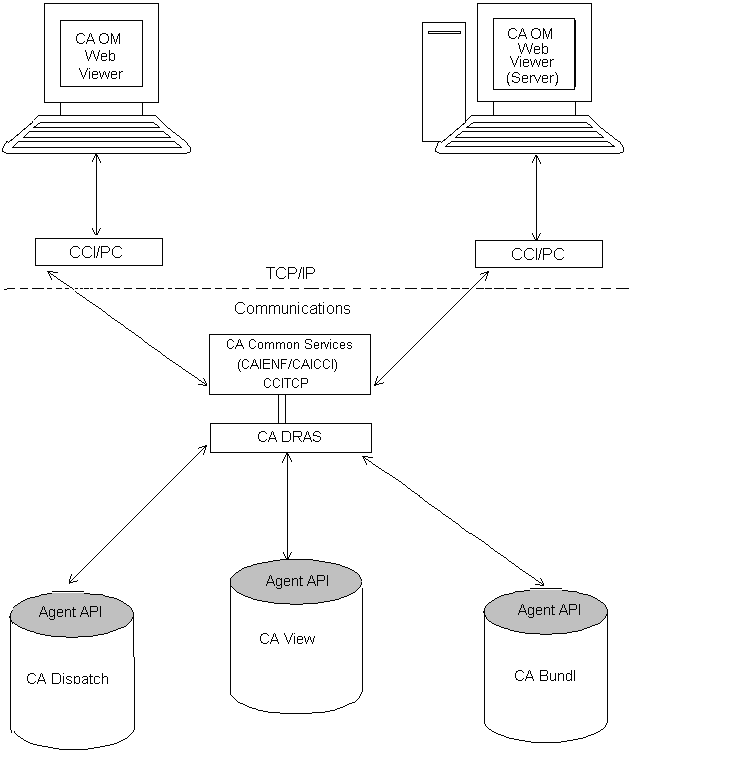
The Common Communications Interface uses the TCP/IP communication protocol to pass the request from the Windows environment, through CAICCI/PC, to the z/OS‑platform running the Common Communication Interface (CCITCP) task.
The Type 6 External Writer SMF record is optional and is created if the startup parameter SMF= is set to YES. The z/OS Type 6 record format definition can be found in the assembler language macro SYS1.MACLIB(IFASMFR).
In a Cross Memory Services (XMS) session, SMF records can also be created. The creation and record type number is controlled by the XMS startup parameter SMFSESS=. The record format definition can be found in the assembler language macro CAI.CVDEMAC(EBCSMFU1).
Note:
For more information about CA Deliver SMF records, see the CA Deliver Reference Guide.
|
Copyright © 2015 CA Technologies.
All rights reserved.
|
|