

Preparing for Installation › CA DRAS Is Included with CA View › Overview of the Cooperative Process
Overview of the Cooperative Process
To successfully connect the desktop client to a mainframe repository, there are several key elements that need to be properly installed and configured. The following illustration shows how the workflow is processed, and where each solution fits into what is called Cooperative Processing.
The illustration that follows shows:
- How the workflow is processed, and where each solution fits into what is called Cooperative Processing.
- A basic view of how cooperative processing works to provide end user access to reports residing in a z/OS‑based report repository.
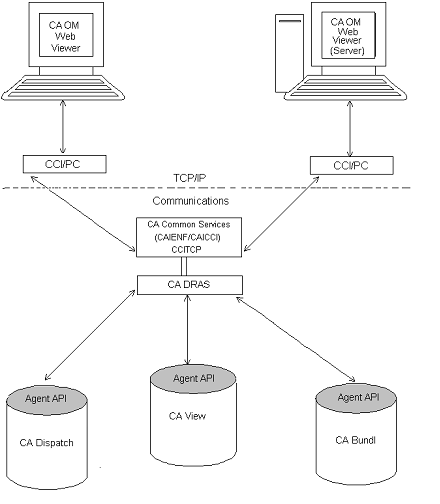
The process works this way:
- The client initiates a request using an initial login or a report data request from CA OM Web Viewer (CA‑DocView/Web).
- An SQL request is formatted by the Client API and passed through CA Common Services, Common Communications Interface (CCI).
The Common Communications Interface uses the TCP/IP communication protocol to pass the request from the Windows environment, through CCI/PC, to the z/OS platform running the Common Communication Interface (CCITCP) task.
- CA DRAS receives the request from the Common Communications Interface and passes it on to the requested repository Agent API for interpretation.
The Agent API formats the request based on the repository system and passes the properly formatted request to the repository system for processing.
- The request is validated and processed by the Report Repository system, CA View, in this case.
- Once the request is processed, it is returned to an SQL format and passed back to CA DRAS.
- CA DRAS processes and packages the response and passes it back through the Common Communications Interface to the Viewer system, where it is processed and displayed to the client.
Copyright © 2015 CA Technologies.
All rights reserved.
|
|