

Many sample Audit scripts are delivered with the system. However, the appropriate ones need to be selected, configured, and then actively used to meet the needs of your installation. Several of them are quite intensive regarding the amount of I/O, memory, CPU, and elapsed time that can be consumed. Observe the following:
If you run them at the same time, you not only cause contention for the I/O, memory, and CPU resources, but you also cause the I/O, memory, and CPU usage to spike at a much higher value. If I/O and CPU are already constrained, these spikes can hurt both CA Vantage SRM and system performance, but things will still run. However, if CA Vantage SRM memory is constrained or already in use for other functions, the memory spikes caused by running scripts concurrently can cause needed functions to fail due to the lack of sufficient memory.
To improve performance and keep all functions running smoothly, it is important to ensure that the appropriate scripts are being run at the appropriate times with the appropriate frequencies, such that they overlap as little as possible. That is, you need to ensure that these scripts are scheduled to execute at different times of the day and only as frequently as needed. For example, run them perhaps just once a week or once a month rather than every day or several times a day. Consider running audits at inactive times, such as on weekends or late at night.
Audit scripts generate reports showing the discrepancies between entries in files and catalogs. To avoid using too much CPU and memory running the audits, do the following:
Note: To find specific information related to each audit type, see the topic INCLEXCL – Local Parmlib Member in the Reference Guide.
For the HSM audits, review the following system parameters and ensure they are set to appropriate values:
The following is a list of all Audit scripts. The list provides the description, required license, resource consumption, and CA's recommendations for when and how often to run them. The list is followed by specific tasks that will help you adjust the schedules for each.
Creates LI objects with scratch tape mismatches between your tape management system and your silos. Include the appropriate objects in your warmstart list.
License Required: CA 1, CA TLMS, or CA Vantage SRM Tape Resource Option
Resource Usage: High I/O, moderate CPU and elapsed time
When to Run: Avoid high tape usage periods
How Often: Weekly or as needed
Creates LI objects with validation results comparing tape entries in catalogs, archives, silos and virtual tape systems with those in your tape management system. Include the appropriate VISxxxxx objects in your warmstart list.
License Required: CA 1, CA TLMS, or CA Vantage SRM Tape Resource Option
Resource Usage: High I/O, memory, CPU and elapsed time
When to Run: Avoid high tape usage periods
How Often: Monthly or as needed
Creates LI object OBJ02383 showing the number of data set entries for each alias in the catalog. Include the OBJ02383 object in your warmstart list.
License Required: any CA GMI qualified product
Resource Usage: High I/O, memory, CPU and elapsed time
When to Run: Not prime shift
How Often: Monthly or as needed
Creates LI object OBJ04012 showing archived data sets in the catalog but not found in the CA Disk archives. Include object OBJ04012 in your warmstart list.
License Required: CA Disk
Resource Usage: High I/O, memory, CPU and elapsed time
When to Run: Not prime shift
How Often: Monthly or as needed
Creates LI object AUDITARC showing data sets in the CA Disk archives but not indicated as archived in the z/OS catalog. Include object AUDITARC in your warmstart list.
License Required: CA Disk
Resource Usage: High I/O, memory, CPU and elapsed time
When to Run: Not prime shift
How Often: Monthly or as needed
Creates LI object DSNCTLGD to show cataloged data sets that cannot be found on disk. Include the object in your warmstart list.
License Required: CA Vantage SRM Base System
Resource Usage: High I/O, memory, CPU and elapsed time
When to Run: Not prime shift
How Often: As needed to do catalog cleanup
Creates LI object DSNUCTL to show disk data sets that are not cataloged. Include the object in your warmstart list.
License Required: CA Vantage SRM Base System
Resource Usage: High I/O, memory, CPU and elapsed time
When to Run: Not prime shift
How Often: As needed to do disk and catalog cleanup
Creates LI object OBJ04013 to show disk data sets not backed up by CA Disk. Include the object in your warmstart list.
License Required: CA Vantage SRM Base System and CA Disk
Resource Usage: High I/O and elapsed time
When to Run: After CA Disk backups end
How Often: As needed to identify and fix backup policy errors
Creates LI object HSMABCD to show the results of the BCDS audit. Include the object in your warmstart list.
License Required: CA Vantage SRM Interface for DFSMShsm
Resource Usage: High I/O, CPU and elapsed time
When to Run: Not prime shift, and avoid HSM backup periods
How Often: As needed to identify and fix BCDS problems
Creates LI object HSMAMCBG to show the results of the BCDS audit of MCB and MCC records. Include the object in your warmstart list.
License Required: CA Vantage SRM Interface for DFSMShsm
Resource Usage: High I/O, CPU and elapsed time
When to Run: Not prime shift, and avoid HSM backup periods
How Often: As needed to identify and fix BCDS problems
Creates LI object HSMAMCD to show the results of the MCDS audit. Include the object in your warmstart list.
License Required: CA Vantage SRM Interface for DFSMShsm
Resource Usage: High I/O, CPU and elapsed time.
When to Run: Not prime shift, and avoid HSM migration periods
How Often: As needed to identify and fix MCDS problems
Creates LI object HSMAOCD to show the results of the OCDS audit. Include the object in your warmstart list.
License Required: CA Vantage SRM Interface for DFSMShsm
Resource Usage: High I/O, CPU and elapsed time
When to Run: Not prime shift, and avoid high HSM tape activity periods
How Often: As needed to identify and fix OCDS problems
Creates LI object OBJ06110 to show disk data sets not backed up by HSM. Include the object in your warmstart list.
License Required: CA Vantage SRM Interface for DFSMShsm
Resource Usage: High I/O and elapsed time
When to Run: After HSM backups end
How Often: As needed to identify and fix backup policy errors
To ensure that you are running the appropriate Audit scripts at the appropriate times
The summary list above provides general and relative guidelines about the resources consumed by each script process and the suggested frequencies for running each of them. Measure and assess the values for your needs and your specific installation. Many of the scripts provide configuration options that range from process everything to process a small subset.
To do this, perform the following steps:
The Automation and Logging folder is expanded.
The Automation and Script Schedules object is displayed.
The Filter dialog is displayed.
"Event Type" INCL aud/
This filter statement will find all the Audit scripts you currently have scheduled.
The following is an example of the Filter dialog with the desired filter statement:
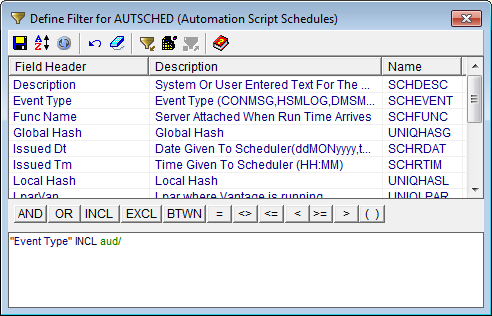
The Filter dialog closes and the Automation Script Schedules object is displayed with the filter applied.
To do this for Audit scripts, perform the following steps:
The Automation and Logging folder is expanded.
The Audit Script Activity Log object is displayed.
The Filter dialog is displayed.
Number = VKG0903 OR Number = VKG0904
The following is an example of the Filter dialog for the Audit Script Activity Log object with the desired filter statement:
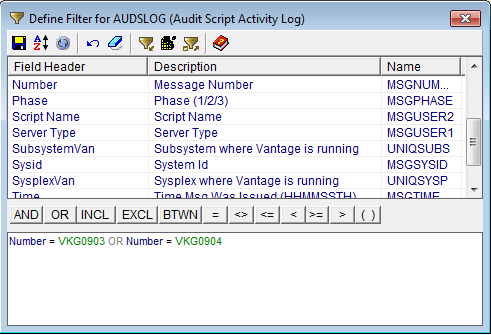
The Filter dialog closes and the Audit Script Activity Log object is updated with the filter applied.
The Sort dialog is displayed.
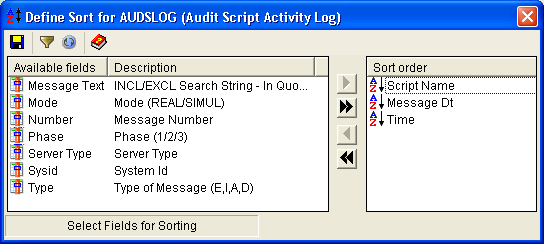
The Sort dialog has the following displayed in the Sort order pane with the Sort symbol arrow pointing down:
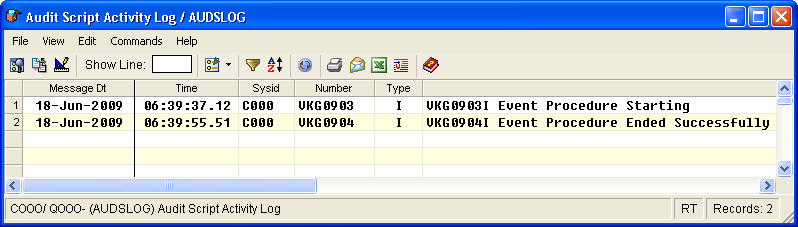
The Sort dialog closes and the Audit Script Activity Log object is displayed with the filter and sort applied.
Note: The Audit Script Activity Log object shows only those entries from the current memory buffer. If you do not see your scripts, select CA Vantage SRM Internal Management, System Activity, and then click the CA Vantage SRM Messages object. In the CA Vantage SRM Messages object select the menu option View, Mode and then Log, and apply the same filter and sort.
The following is an example of the Audit Script Activity Log object with the filter and sort applied. It allows you to easily find the elapsed time values for each of your scripts. Save this user view with a name, something like Audit Script Start and Stop Messages, so you can easily request it again for future monitoring and adjustments.
To do this perform the following steps:
The Automation and Logging folder is expanded.
The All Scripts Loaded object is displayed.
The Filter dialog is displayed.
"Event Type" INCL AUD/
The Filter dialog closes and the All Scripts Loaded object is updated and displayed with only Audit scripts.
To reduce the CPU usage of a high consumer, you must reduce its run frequency (as discussed in the next step), specify configuration options that will reduce the scope of its processing, or both.
Note: For more information about configuration options that will reduce the scope of processing, see the topic INCLEXCL - Local PARMLIB Member in the Reference Guide.
Use the results from all of the above and determine appropriate start times and frequencies for each script. Remember that you should run high resource consuming Audits only as frequently as you plan to examine the results and make any needed corrections. Running them frequently but routinely ignoring the results is a large waste of resources. It is far better to leave these scripts without any scheduled times, and then fire them off when you are ready to do any cleanup that may be needed. When you are ready to make changes, use the Audit Script wizard (from the z/OS drop-down menu select Object Scripting, and then Audit Scripts) to modify each script and assign it the appropriate execution schedule.
Note: For more information about the Audit Script wizard, see the section Customizing and Activating an Audit Script.
You are now running your scripts at the appropriate times and frequency to optimize memory and resource usage.
|
Copyright © 2014 CA.
All rights reserved.
|
|