

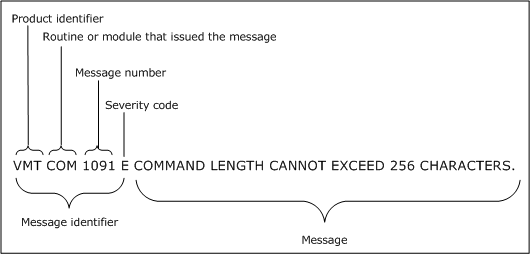
To get more information or help on a system message you receive, refer to the Message Reference Guide or use the CMS HELP facility for that message.
The Message Reference Guide lists all messages CA VM:Tape can generate, explains the possible causes of each message, and tells you how to respond to that message.
To use CMS HELP on a CA VM:Tape message, type help followed by a space, then vmt, the message number, and the severity code. For example, to get help on the message VMTCOM1091E, enter the following from CMS:
help vmt1091e
When you are finished reading the message help, press PF3 to exit the CMS HELP facility.
For more information about using the CMS HELP facility, refer to the CMS user’s guide for your system.
|
Copyright © 2011 CA.
All rights reserved.
|
|