

You may sometimes need to increase the size of a minidisk, but you do not have enough contiguous disk space available to hold the new minidisk. If you have enough space next to the existing minidisk, you can expand the minidisk by redefining it in place.
For example, you have a 100-cylinder minidisk, occupying cylinders 320 to 419, which you need to expand to 110 cylinders:

You do not have 110 contiguous cylinders available in which to redefine this minidisk; however, you do have 20 free cylinders adjacent to the existing minidisk, at 300 to 319:

You can redefine this minidisk in place, expanding it to occupy any 110-cylinder space within the cylinders numbered 300 to 419, for example, cylinders 300 to 409 or 310 to 419:
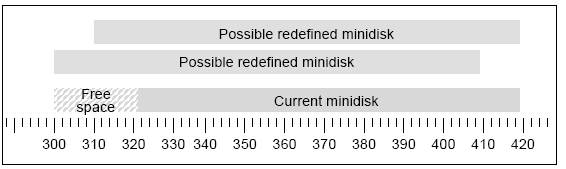
Redefining a minidisk in place also means you do not have to re‑enter directory links for it, as you would if you delete it and redefine it with more space. However, you do require write access to the minidisk you want to move in place.
Important! Redefining a minidisk in place reformats and destroys all files on the minidisk. You must therefore preserve the data on this minidisk if it will be needed in the future.
To redefine a minidisk in place
vmdirect manage accting 9 16D
The Redefine a Minidisk in Place screen appears.
 MAN000A0              Redefine a Minidisk in Place                 VM:Director
 ------------------------------------------------------------------------------

  Userid: USERID     Minidisk Address: 192               Device Type: 3390
  Volume: VST020    Minidisk Location: 1303            Minidisk Size: 1
   Label: DSK192          Utilization: 04            Number of Files: 0


       + - - - - - - - - - - - - - - - - - - - - - - - - - - - - - - - +
       |                      New Minidisk                             |
       |                                                               |
       |   Subpool: MAIN       Start: 1303          Size:              |
       |                                                               |
       |   Do you want to wait while formatting?    YES                |
       + - - - - - - - - - - - - - - - - - - - - - - - - - - - - - - - +

           Warning: New and old minidisks will be formatted
                    and all files will be destroyed.


--------------------------------------------------------------------------------
 PA1: Cancel      PF1: Help        PF3: Quit        PF10: Print       PF12: End
To redefine the minidisk according to the definition of another subpool you are authorized to use, type that subpool name.
To define the minidisk to a different location on the real disk, type that location in this field.
If the minidisk is a CKD device, this size is the number of cylinders the minidisk will contain; if the minidisk is an FBA device, the size is the number of 512–byte blocks it will contain. The smallest allowable size is 12 blocks.
|
Copyright © 2014 CA.
All rights reserved.
|
|