

There are two types of backups: full and incremental. A full backup job copies to tape all data from the DASD volumes and file pools specified in the backup job template file. An incremental backup job uses the catalogs from specified earlier backups to determine whether any domains have been updated. It then backs up only those portions that differ from these earlier backups. Portions refers to CMS files, SFS directories, BFS directories, files, SFS authorizations and aliases, BFS permissions and ownerships, CKD tracks, or groups of FBA blocks.
You can use incremental backups in two different ways. You can use them to back up data consecutively or cumulatively. In a consecutive incremental backup cycle, each incremental backup is based on the immediately previous backup, whether full or incremental. It includes only data that has changed since the immediately previous backup.
The following diagram illustrates this cycle.

In a cumulative incremental backup cycle, each incremental backup is based on a specified backup, usually the last full backup. It includes all data that has changed since the specified backup; therefore, each incremental backup replaces all previous incremental backups created after the specified backup. The following diagram illustrates this cycle.
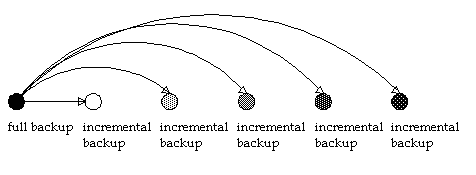
The job template file for incremental backups must identify, by job template file name, the backups on which to base the incremental backups. CA VM:Backup uses this information to locate the catalogs created by the specified job template files so it can detect differences between the current domain and the previously backed-up versions. The incremental backup job template must also indicate whether CA VM:Backup should back up the entire domain or only the changed portions if CA VM:Backup detects changes.
When an incremental backup is run whose job template file specifies domain-level detail for the backup detail level, CA VM:Backup backs up the entire domain if anything has changed since the previous backup. When an incremental backup whose job template file specifies file-level detail is run, CA VM:Backup backs up only those portions that have changed since the previous backup.
A file-level base catalog is required to perform an incremental backup that also specifies file-level detail for the backup detail level. If the base catalog was not created with file-level detail, CA VM:Backup backs up the entire minidisk or file space if any portion has changed. With only a domain-level base catalog, CA VM:Backup has no basis on which to compare file, track, or block changes.
Different types of backups are suited to different situations. For example, a backup cycle that uses daily full backups is ideal when much data changes daily. The amount of time it takes to restore data is minimal because you need to mount only the tapes from one backup. However, full backups require more time and more tapes than any other type of backup.
A backup cycle that uses a full monthly backup followed by daily consecutive incremental backups is better suited to sites at which there are relatively few daily changes to data and which have limited periods of time during which to run backups. Consecutive incremental backups use fewer tapes and run more quickly than other types of backups. However, you have to mount more tapes to restore data than when you use other types of backup cycles.
A backup cycle that uses a full monthly backup followed by cumulative daily incremental backups would also be suitable at sites where changes to data are minimal. Cumulative incremental backups use fewer tapes and are less time consuming than full backups, but use more tapes and are more time consuming than consecutive incremental backups. Again, when you restore data, you need to mount more tapes than for full backups but fewer than for consecutive incremental backups; only the tapes that contain the last full backup and the most recent incremental backup are required.
A fourth possibility is a cycle that uses all three types of backups. For example, you could run a full backup monthly, a cumulative incremental backup (based on the full backup) weekly, and consecutive incremental backups (based on the full and cumulative incremental backups) daily. This system combines the security and restore speed of cumulative incremental backups with the low tape and time consumption of consecutive incremental backups.
|
Copyright © 2014 CA Technologies.
All rights reserved.
|
|