

This section contains the following topics:
CA VM:Backup issues messages that perform the following functions:
CA VM:Backup Message Reference Guide lists all messages that CA VM:Backup can generate. This guide explains the possible causes of each message and tells you how to respond to that message.
Words in all lowercase letters in the message text, for example, vaddr, indicate that CA VM:Backup substitutes variable information when displaying the message.
The variable vmbackup in a message text indicates the user ID running CA VM:Backup, usually VMBACKUP.
Brackets around an item, as in FILE IS [ NOT ] AVAILABLE, indicate that the item may not appear when CA VM:Backup displays the message.
Braces surrounding several items that are separated by vertical bars, for example, ERROR { READING | WRITING } FILE, indicate that only one of the items will appear.
Messages that are displayed in line mode are in the format that is displayed in the following illustration:
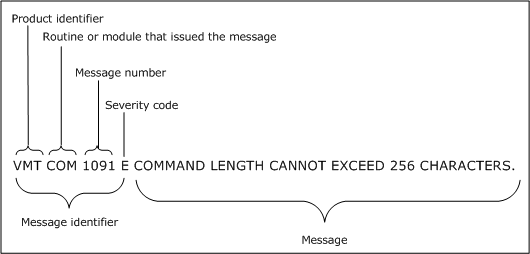
You can tell the type of message by its last letter, which is its severity code. The severity code can be one of the following:
Error message
The function or task can continue normally if you correct the error. The function or task may end.
Informational message
CA VM:Backup initialization has completed or a task that CA VM:Backup is executing has completed. When an informational message appears immediately after a severe error message (severity code S), it tells you how to correct the problem the severe error message identified.
Response message
CA VM:Backup requests information. The function or task continues after you supply the required information.
Severe error message
An error preventing the function or task from continuing has occurred. You are returned to CMS and must restart the procedure after correcting the error.
Terminal error message
A serious internal error has occurred, preventing the CA VM:Backup service virtual machine from continuing execution.
Warning message
An abnormal condition has occurred. The function or task continues, although the results may be affected by the abnormal condition.
Most CA VM:Backup message texts are kept in the VMBACKUP MESSAGES file on the VMBACKUP 192 minidisk. Only CA VM:Backup system administrators have access to this file.
Reason:
The message identifies the current CA VM:Backup Version and CA RS token when CA VM:Backup begins initialization.
Note: The CA RS token appears only if the product has a CA Recommended Service applied to it.
Action:
None.
Reason:
Initialization has completed successfully. The current date and time are ddmmmyy and hh:mm:ss respectively. This message follows message 0001I and other initialization messages and indicates that CA VM:Backup is ready to accept commands. Processing continues.
Action:
None.
Reason:
CA VM:Backup system execution has ended because the END command was entered, initialization failed, or a system abend occurred. Control is returned to CMS.
Action:
If a system abend occurred or if initialization failed, this message is accompanied by other messages describing the specific problem. See these messages for more information.
Reason:
CA VM:Backup initialization has failed. The current date and time are ddmmmyy and hh:mm:ss respectively. Control returns to CMS.
Action:
Other messages precede this message and explain why initialization did not complete. For the specific cause of the problem, the system administrator must see the descriptions of these messages, correct the problem, and start CA VM:Backup again.
Reason:
CA VM:Backup initialization has failed. The Common Nucleus application is not found. This is an internal logic error. This message appears on the CA VM:Backup console and is followed by message 0025I.
Action:
The internal logic error must be corrected with the assistance of Technical Support. Before calling CA, the system administrator must have the following information:
Reason:
CA VM:Backup displays this message during initialization. The message shows the virtual machine size and machine mode of the CA VM:Backup service virtual machine.
Action:
None.
Reason:
One of the following events has occurred:
If possible, processing of the command continues. If CA VM:Backup was transmitting data to one of the user's virtual devices when the interruption occurred, message 0106I can follow this message.
Action:
The system administrator must determine the cause of the problem. If a minidisk or directory has filled up, causing this problem, clear some space on the minidisk and issue the command again. If necessary, the system administrator can contact Technical Support.
Reason:
During initialization, CA VM:Backup determined that its service virtual machine does not have enough virtual storage for initialization to continue. Initialization fails.
Action:
Increase the service virtual machine size to at least 128 MB and try again.
Reason:
You issued a command to CA VM:Backup that failed. The command failed because the vmbuserid MODULE is not compatible with the VMBSYS MODULE. The vmbuserid MODULE must be of the same release or later than the VMBSYS MODULE. The name of the CA VM:Backup service virtual machine on your system is usually VMBACKUP. If your CA VM:Backup service virtual machine has a different name, use that name instead.
Action:
The CA VM:Backup system administrator must make sure that the vmbuserid MODULE is compatible with the VMBSYS MODULE. The system administrator must also ensure that the correct module was loaded to the VMANAGER 193 minidisk during initial installation. Ask the CA VM:Backup system administrator to copy the current module from the VMANAGER 193 minidisk to your system's public disk and remove any old version of this file.
Reason:
This message displays the command that was just entered on the command line of the CA VM:Backup console on a display terminal. The command begins. When you enter a null line on a line-mode terminal, this message acts as a prompt for you to enter a command. CA VM:Backup waits for you to respond.
Action:
None.
Reason:
CA VM:Backup displays this message on its console when a command, entered from either the CA VM:Backup console or another user ID, starts to run. Processing continues.
Action:
None.
Reason:
CA VM:Backup displays this message on its console when the indicated command, entered from either the CA VM:Backup console or another user ID, completes. If code is zero, the command completed successfully. If code is not zero, CA VM:Backup sends error messages describing the problem to the user ID that issued the command.
Action:
Respond to any error messages CA VM:Backup sends.
Reason:
The indicated option must be specified last on the command line.
Action:
Enter the command again, this time specifying the indicated option last.
Reason:
You cannot use the STACK option when executing a CA VM:Backup command on the console of the CA VM:Backup service virtual machine. STACK support is provided only through the CA VM:Backup communication module.
Action:
Either enter the command without the STACK option or enter the command from another virtual machine. If you enter the command from another virtual machine, remember to type the user ID of the CA VM:Backup service virtual machine as a prefix to the CA VM:Backup command.
Reason:
The indicated item has no meaning for the indicated command. The command ends.
Action:
Check the command format and enter the command again.
Reason:
You did not specify enough information with the indicated command. The command ends.
Action:
Check the command format, specify the missing information, and enter the command again.
Reason:
You entered a command that is not valid for CA VM:Backup.
Action:
Check the command and the format, then enter a valid CA VM:Backup command.
Reason:
You entered vmbuserid without specifying a CA VM:Backup command on the command line. If you are using a line-mode terminal, vmbuserid must be followed by a CA VM:Backup command. If you are using a display terminal, you must have USER authorization to issue anything but vmbuserid VERSION.
The vmbuserid command passes commands to the CA VM:Backup service virtual machine. vmbuserid is also the name of the CA VM:Backup service virtual machine at your site. At most sites, this command is VMBACKUP.
Action:
If you are using a line-mode terminal, specify a valid CA VM:Backup command on the command line and issue the command again. If you are using a display terminal, the CA VM:Backup system administrator must provide you with USER authorization.
Reason:
You entered a command containing more than eight characters. The maximum number of characters in any CA VM:Backup command is eight.
Action:
Check the command and the format, then enter the command again, specifying no more than eight characters for the command name.
Reason:
An error occurred while reading from, writing to, or closing this file. The return code code is from the CMS FSREAD, FSWRITE, or FSCLOSE macro. The command or activity that was executing does not complete. If this message is issued during initialization, initialization fails and control returns to CMS.
Action:
For an explanation of the return codes from the FSREAD, FSWRITE, and FSCLOSE macros, see the IBM documentation on CMS macros and functions. Correct the problem and try again.
Reason:
While validating the messages file, CA VM:Backup found a line in an invalid format. The correct format is a three- or four-digit message number followed by a one-character severity code, one blank space, and then the message text. The invalid format is probably the result of manual alteration of the file. CA VM:Backup ignores the invalid line and continues reading the remaining lines in the file. If the line is not corrected, you may receive unintelligible messages from CA VM:Backup.
Action:
The CA VM:Backup system administrator must determine and correct the format problem. If necessary, the system administrator can contact Technical Support.
Reason:
While validating the CA VM:Backup messages file, CA VM:Backup found a duplicate message number on the indicated line. CA VM:Backup ignores the duplicate message and continues reading the messages file.
Action:
The CA VM:Backup system administrator must determine whether the entire line or just the message number is duplicated. The administrator then must make the appropriate changes to the messages file.
Reason:
During initialization, CA VM:Backup could not find any lines with the correct message format in the VMBACKUP MESSAGES file. The correct format is a three- or four-digit message number immediately followed by a one-character severity code, then one blank space followed by the message text. This file is probably not a message file. CA VM:Backup initialization fails.
Action:
XEDIT the file to see if it is a valid VMBACKUP MESSAGES file. If you cannot find the correct messages file, the CA VM:Backup system administrator must reload it from the installation tape.
Reason:
During initialization, CA VM:Backup could not find the VMBACKUP MESSAGES file on an accessed minidisk. This file contains CA VM:Backup system messages and is required for CA VM:Backup to run. CA VM:Backup initialization fails.
Action:
The CA VM:Backup system administrator must put a copy of the VMBACKUP MESSAGES file on an accessed CA VM:Backup minidisk and must start CA VM:Backup again.
Reason:
CA VM:Backup initialization failed. Other messages precede this message and give the specific reasons why CA VM:Backup initialization did not complete. Control returns to CMS.
Action:
The CA VM:Backup system administrator must correct the problems that the accompanying messages describe and must start CA VM:Backup again.
Reason:
CA VM:Backup processing ended abnormally with abend code code, which occurred at storage location address. CA VM:Backup performs a VMDUMP and sends it to the virtual reader of the user ID specified on the DUMP record in the VMBACKUP CONFIG file. If no DUMP record is located in the VMBACKUP CONFIG file, CA VM:Backup sends the dump to the user ID that your VM system specifies to receive dumps.
Action:
The CA VM:Backup system administrator can correct some abends using information in the chapter "Abend Codes." Other abends are caused by internal logic errors or unexpected errors and must be corrected with the assistance of Technical Support. Before calling CA, the system administrator must have the following information:
Reason:
CA VM:Backup tried to display a screen of information on your terminal, but the file containing the screen information was not found on any minidisk accessed by CA VM:Backup. Either the CA VM:Backup minidisk containing the screen files is not accessed by CA VM:Backup, or the file was renamed or erased. Screen processing ends for the requesting user ID.
Action:
The CA VM:Backup system administrator must verify that CA VM:Backup has access to the minidisk on which the screen files reside. If the missing screen file cannot be found on a CA VM:Backup minidisk, the CA VM:Backup system administrator must load it from the installation tape. If necessary, the system administrator can contact Technical Support.
Reason:
CA VM:Backup tried to perform a function on a screen, but the screen was not previously opened by CA VM:Backup. This is probably due to a programming error. Screen processing ends for the requesting user.
Action:
The CA VM:Backup system administrator must contact Technical Support.
Reason:
One of the following events occurred:
If possible, processing of the command continues. If CA VM:Backup was transmitting data to one of the user's virtual devices when the interruption occurred, message 0106I may follow this message.
Action:
The CA VM:Backup system administrator must determine the cause of the problem. If a minidisk or directory has filled up, causing the problem, clear some space on the minidisk and issue the command again. If necessary, the system administrator can contact Technical Support.
Reason:
CA VM:Backup tried to initialize or retrieve information from a field on a screen, but the field name was not defined on the screen. This problem may occur when CA VM:Backup screen files (files with a filetype of SCREEN) are renamed or modified. If no screen files were renamed or modified, the problem may be due to a programming error. Processing may continue, but unpredictable results may occur.
Action:
If CA VM:Backup issued this message only once when you pressed the ENTER key, a programming error has probably occurred. The CA VM:Backup system administrator must contact Technical Support. If CA VM:Backup issued this message more than once for multiple field names, screen files may have been renamed or modified. The CA VM:Backup system administrator must check and correct the screen files.
Reason:
You entered the indicated command from a line-mode terminal, but it must be entered from a display terminal. The command ends.
Action:
Enter the command again on a display terminal.
Reason:
You entered a command that displays a full screen or prompts you for information. This command must be executed with the vmbuserid command; it cannot be entered from the CA VM:Backup console or issued with the CP SMSG command. This message may also be issued if you enter a full-screen or prompting command using the vmbuserid command but then interrupt it.
Action:
Enter the command again from a user ID other than the CA VM:Backup service virtual machine. Use the vmbuserid command and let it run to completion.
Note: You must have access to the file vmbuserid MODULE to enter the vmbuserid command.
Reason:
CA VM:Backup tried to display a screen on your terminal, but the screen name contains characters that are not valid in a CA VM:Backup screen name. This is probably due to a programming error. The screen is not displayed.
Action:
The CA VM:Backup system administrator must contact Technical Support.
Reason:
Some of the screens that are displayed on your terminal were not properly closed. This problem may be due to a programming error. CA VM:Backup closes the screens internally so that CA VM:Backup system processing can continue. Screen processing for the requesting user ends.
Action:
The CA VM:Backup system administrator must contact Technical Support to report this error message.
Reason:
An internal function that CA VM:Backup called has ended with the unexpected return code, code. The internal function that was running when the error occurred is text. CMS displays the name of the EXEC and the line number on which this error occurred. The command ends.
Action:
The CA VM:Backup system administrator must contact Technical Support and must provide the name of the EXEC, the line number on which the error occurred, the return code (code), and the name of the function that was running (text).
Reason:
You entered the CA VM:Backup CMS command to execute a CP or CMS command. You did so from either the CA VM:Backup console or a user ID with system administrator authorization while CA VM:Backup was running. The indicated command is not a valid CP or CMS command. The CA VM:Backup CMS command ends.
Action:
For a list of valid CP or CMS commands, see the CP or CMS HELPMENU or documentation.
Reason:
An internal CA VM:Backup programming lock was not released when expected. This problem may be due to a programming error. CA VM:Backup released the lock internally so that processing can continue. This message may follow other error messages indicating that a CA VM:Backup process ended unexpectedly or abnormally. CA VM:Backup system processing continues. Command processing for the requesting user ID ends.
Action:
The CA VM:Backup system administrator must contact Technical Support.
Reason:
See message 0050I.
Action:
See message 0050I.
Reason:
The DASD volume that is specified on the DIRECT record in the VMBACKUP CONFIG file is not a CA VM:Backup-supported device type. CA VM:Backup initialization fails.
Action:
The CA VM:Backup system administrator must make sure the volser that is specified on the DIRECT record is the same as the volser of the system residence volume containing the CP object directory. The system administrator must also ensure that the system residence volume is a device that CA VM:Backup supports. For a list of supported devices, see the System Programmer Reference Guide.
Reason:
Both the volser and the virtual address (vaddr) of the DASD volume are specified on the DIRECT record in the VMBACKUP CONFIG file. The volser on the DIRECT record does not match the volser of the DASD volume at the corresponding virtual address. CA VM:Backup initialization fails.
Action:
The CA VM:Backup system administrator must ensure that the volser and the virtual address (vaddr) specified on the DIRECT record are correct for the system residence volume that contains the CP object directory at your site. When these values are correct, start CA VM:Backup again.
Reason:
The volume that is specified on the DIRECT record in the VMBACKUP CONFIG file either does not contain the CP object directory or is not a CP volume. CA VM:Backup initialization fails.
Action:
The CA VM:Backup system administrator must update the DIRECT record in the VMBACKUP CONFIG file to identify correctly the volser and virtual address of the CP volume containing the CP object directory for your site. Then the system administrator must restart CA VM:Backup.
Reason:
CA VM:Backup detected invalid characters in the indicated file while copying it to or from a CA VM:Backup minidisk. This problem is probably due to a programming error. Additional error messages may accompany this message. The command ends.
Action:
The CA VM:Backup system administrator must contact Technical Support.
Reason:
CA VM:Backup cannot copy the indicated file to or from a CA VM:Backup minidisk because the file's record length exceeds CA VM:Backup standards. This problem is probably due to a programming error. Additional error messages may accompany this message. The command ends.
Action:
The CA VM:Backup system administrator must contact Technical Support.
Reason:
An I/O error occurred while CA VM:Backup was copying this file to or from a CA VM:Backup minidisk. Additional error messages may follow this message. The command ends.
Action:
The CA VM:Backup system administrator must contact Technical Support.
Reason:
When a user entered a command from a 3270 terminal, CA VM:Backup received an invalid sequence of screen fields from this terminal. This message appears on the CA VM:Backup console and is followed by message 0048E, which displays the fields in error. The command entered ends.
Action:
Have the CA VM:Backup system administrator contact Technical Support.
Reason:
This message follows message 0047E on the CA VM:Backup console. It lists the size of the data stream that is returned to CA VM:Backup from the user's 3270 terminal (length) and the size of the data that will actually be displayed (number). CA VM:Backup then displays, in hexadecimal, this first portion of the data that is returned from the user's terminal (data).
Action:
Have the CA VM:Backup system administrator contact Technical Support.
Reason:
You entered a CA VM:Backup CMS command with multiple CP commands, which were separated by the CP command delimiter x'15'. The CA VM:Backup CMS command can only execute one CMS or CP command at a time. None of the CP commands are executed; the CA VM:Backup CMS command ends.
Action:
Issue each CP command separately, using the CA VM:Backup CMS command.
Reason:
CA VM:Backup terminated abnormally. The diagnostic information that follows this message will help Technical Support determine the cause of the abend.
Action:
Retain the console log and dump. If necessary, the CA VM:Backup system administrator can contact Technical Support.
Reason:
See message 0050I.
Action:
See message 0050I.
Reason:
See message 0050I.
Action:
See message 0050I.
Reason:
This message refers to the 16 CA VM:Backup general purpose registers. See message 0050I.
Action:
See message 0050I.
Reason:
See message 0050I.
Action:
See message 0050I.
Reason:
See message 0050E.
Action:
See message 0050E.
Reason:
See message 0050I.
Action:
See message 0050I.
Reason:
See message 0050I.
Action:
See message 0050I.
Reason:
This message follows message 0057I. The indicated number is the trace entry number; the newest trace entry number will be 1. The trace entry is described by word. code1 through code4 indicate four hexadecimal trace entry codes. This message is displayed for every trace entry number, in descending order, from the oldest to the newest. For more information, see message 0050I.
Action:
See message 0050I.
Reason:
While CA VM:Backup was processing the indicated abend (code1), a second abend (code2) occurred. CA VM:Backup cannot continue abend recovery, and loads a disabled wait program status word (PSW). CA VM:Backup sends this message to both the CA VM:Backup console and user ID OPERATOR through the CP MESSAGE command.
Action:
To recover, restart CMS by entering IPL CMS.
Reason:
Errors occurred when CA VM:Backup tried to copy the indicated keyword data report to the requesting user's minidisk or directory. CA VM:Backup does not erase the keyword data report from the report minidisk.
Action:
See the preceding error message, which defines the error that occurred.
Reason:
A CA VM:Backup system administrator or client requested a keyword data report from the report minidisk with the GETRPT command. However, CA VM:Backup was not configured with a report minidisk. The command ends.
Action:
For information about configuring a report minidisk, see REPORTDISK Record in the System Programmer Reference Guide.
Reason:
A CA VM:Backup system administrator or the client that owns job jobname tried to retrieve a report from the CA VM:Backup report minidisk using the GETRPT command. However, no report for jobname exists. The command ends.
Action:
Make sure that the job name specified on the GETRPT command is correct, then resubmit the command.
Reason:
The checksum value on the CHECKSUM keyword data report record and the checksum value that is calculated by CA VM:Backup do not match. CA VM:Backup assumes that the keyword data report was manually modified, and does not transfer the report.
Action:
The CA VM:Backup system administrator must contact Technical Support.
Reason:
CA VM:Backup successfully copied the job's keyword data report to the requester's minidisk or directory, then erased the report from the report minidisk.
Action:
None.
Reason:
CA VM:Backup cannot access the report minidisk. The REPORTDISK configuration file record in the VMBACKUP CONFIG file may specify an incorrect virtual address for the report minidisk. Alternatively, the report minidisk may not be properly formatted. System initialization fails.
Action:
The CA VM:Backup system administrator must make sure the correct virtual address is specified on the REPORTDISK configuration file record. The system administrator must also ensure that the minidisk is a properly formatted CMS minidisk. The CA VM:Backup system administrator can then restart CA VM:Backup.
Reason:
CA VM:Backup issued the JOBEND command to the client. The return code that is displayed is the return code that is received from the client's JOBEND command. CA VM:Backup ignores this return code and processing continues.
Action:
See the client documentation for an explanation of return codes.
Reason:
You tried to import or submit a job template file that you do not own.
Any file that is imported by a user ID listed on the PRODUCT VMARCHIVE record in the VMBACKUP CONFIG file is owned by that user ID; only that user ID can submit it for execution. All other files that are imported by CA VM:Backup system administrators or created using CA VM:Backup screens are owned by VMBACKUP (this name is not tied to the CA VM:Backup service virtual machine user ID); any CA VM:Backup system administrator or operator can submit them for execution.
When importing a file: If the file being imported already exists on a CA VM:Backup minidisk, CA VM:Backup checks that the requesting user ID owns the file. In this case, the file that is indicated in the message is not owned by the indicated user ID.
When submitting a job: CA VM:Backup checks all files that are specified by the job to ensure that the user ID requesting the submission owns the job template, exception, and exclusion files. The file that is indicated in the message is included in the job submission but the file is not owned by the indicated user ID. Processing ends.
Action:
Ask the owner of the file to import or submit it.
Reason:
CA VM:Backup has not yet processed or is currently processing the indicated job, so the keyword data report may not be complete. Therefore, CA VM:Backup cannot release the report now.
Action:
Wait until CA VM:Backup job processing completes, then request the report again.
Reason:
There is not enough space on the report minidisk to write the keyword data report. CA VM:Backup places any job that receives the disk-full condition from the report minidisk on hold.
Action:
The CA VM:Backup system administrator must take one of the following corrective actions:
For information about increasing the size of the report minidisk, see the System Programmer Reference Guide.
Reason:
CA VM:Backup issues this message as a response to the QUERY STORAGE command and to the CA VM:Backup console during system termination to record the maximum amount of virtual storage used since it started. Of the available bytes of virtual storage, the indicated number of bytes were used.
Action:
None.
Reason:
During job termination, CA VM:Backup issues this message to the CA VM:Backup console and the job log to record the maximum amount of virtual storage used by the indicated job. Of the available bytes of virtual storage, the indicated number of bytes were used; number represents only the virtual storage used by the job.
Action:
None.
Reason:
You tried to import a job template or exception file that specifies a medium or density that is not supported by the release of VM under which CA VM:Backup is running. For example, medium ENH and densities XF, E, EXF, ENH, and ENHXF are not supported under releases of VM earlier than VM/XA r2.1. The IMPORT command fails.
Action:
Correct the job template or exception file so that it specifies allowed media and densities, or upgrade your operating system to a release that supports the devices you want to use and then import the file again.
Reason:
A job requested that tapes be allocated from a resource pool whose name is more than eight characters long or contains characters that are not valid in a CMS file name. You must interface CA VM:Backup with CA VM:Tape to use resource pools with names longer than eight characters or contain characters that are not valid in a CMS file name. CA VM:Backup places the job on hold.
Action:
Either cancel the job and resubmit it specifying a different resource pool name, or enable the interface between CA VM:Backup and CA VM:Tape and release the job.
Reason:
CA VM:Backup issues this message under the following circumstances:
CA VM:Backup sends this message to the service virtual machine console and processing continues.
Action:
To prevent CA VM:Backup from sending this message, place the CP SET 370ACCOM OFF command in the PROFILE EXEC of the CA VM:Backup service virtual machine.
Reason:
This message indicates an internal processing error.
Action:
Contact Technical Support.
Reason:
While importing a TPI file, CA VM:Backup detected missing or unbalanced quotes associated with a BFS file name on an INCLUDE BFSDIRECTORY, EXCEPT BFSDIRECTORY, RESTO BFSDIRECTORY, or INCLUDE BFSFILE statement. The file is not imported.
Action:
Correct the TPI file and try to import it again.
Reason:
While importing a TPI file, CA VM:Backup detected a null x'00' character in a BFS file name on an INCLUDE BFSDIRECTORY, EXCEPT BFSDIRECTORY, RESTO BFSDIRECTORY, or INCLUDE BFSFILE statement. Null characters are not allowed in a POSIX name. The file is not imported.
Action:
Correct the TPI file and try to import it again.
Reason:
While importing a TPI file, CA VM:Backup detected an unexpected error while parsing a BFS file name on an INCLUDE BFSDIRECTORY, EXCEPT BFSDIRECTORY, RESTO BFSDIRECTORY, or INCLUDE BFSFILE statement. The file is not imported.
Action:
Correct the TPI file and try to import it again.
Reason:
A system operator or an automated service machine has issued the CP SET TIMEZONE command to change the local time zone offset. CA VM:Backup continues to run; however, its internal clock will not have the same time as the system time. If CA VM:Backup is configured to automatically run the AUTOCAT process, the run time will be off by one hour from the scheduled run time.
Action:
End CA VM:Backup and then start CA VM:Backup again to pick up the new local time zone offset.
Reason:
CA VM:Backup must run on a virtual machine using the SHORTDATE date format.
Action:
None.
Reason:
During initialization, CA VM:Backup determined that its service virtual machine is running in 370 mode, but CA VM:Backup must run in ESA or XC mode. Initialization ends.
Action:
Update the directory entry for the CA VM:Backup service virtual machine so that it contains either a MACHINE ESA record or a MACHINE XC record and no other MACHINE records. Restart CA VM:Backup.
Reason:
During a restore of a BFS object, CA VM:Backup received the indicated unexpected return code from POSIX. The variable name is the name of the POSIX CSL function that received the error. The variable path is an abbreviation of the object pathname.
Action:
For this CSL routine, see the IBM POSIX documentation. Check the return codes and reason codes. If you cannot resolve the problem, have your system administrator call Technical Support.
Reason:
The indicated CSL routine returned reason code code while creating an alias file for the specified base file located in directory dirname. The last part of the directory name is dirname. For example, for directory SFS:FRANCIS.REPORT.AUGUST the message shows AUGUST.
Action:
Look up the reason code in the IBM documentation on CSL routines to determine the cause of the problem. If necessary, the CA VM:Backup system administrator can contact Technical Support.
Reason:
The name specified as a poolname is not a defined DASDtape resource pool or superpool. You must specify a valid poolname
Action:
Retry the command specifying a name of a defined DASDtape resource pool or superpool.
Reason:
CA VM:Backup encountered an error trying to connect to the Block I/O CP System Service for the checkpoint minidisk at virtual address vaddr. Initialization continues. Checkpointing and restart recovery are not in effect.
Action:
To make checkpointing and restart recovery available again, end CA VM:Backup, ensure the checkpoint minidisk is properly formatted, reserved, and linked and then restart CA VM:Backup.
Reason:
CA VM:Backup encountered an error while trying to write to the checkpoint minidisk. This problem is probably due to a hardware error. The job continues but checkpointing is no longer in effect.
Action:
It is important to allow the jobs that are currently running to complete because there is no checkpoint information available for them. When the current jobs have completed, end CA VM:Backup, correct the hardware problem, and then restart CA VM:Backup.
Reason:
CA VM:Backup encountered an error while trying to read from the checkpoint minidisk. This problem is probably due to a hardware error. The job continues but checkpointing is no longer in effect.
Action:
It is important to allow the jobs that are currently running to complete because there is no checkpoint information available for them. End CA VM:Backup, correct the hardware problem, and then restart CA VM:Backup.
Reason:
The checkpoint minidisk is not formatted at blocksize 4K. Initialization continues. Checkpointing and restart recovery are not in effect.
Action:
To make checkpointing and restart recovery available again, format and reserve the checkpoint minidisk with a blocksize of 4K, and then restart CA VM:Backup.
Reason:
CA VM:Backup issues this message when the utilization level, specified as the percent full threshold on the CHECKDISK configuration file record, for the checkpoint minidisk is reached or exceeded. CA VM:Backup issues this message every five minutes as long as the checkpoint minidisk's utilization level exceeds the specified threshold. Processing continues.
Action:
Increase the size of the checkpoint minidisk when no backup or restore jobs are running.
Reason:
The checkpoint minidisk is full. CA VM:Backup ignores any further checkpoint requests to add checkpoint data.
Action:
It is important to let the job complete. Once the job has completed, end CA VM:Backup and increase the size of the CHECKPOINT minidisk. Restart CA VM:Backup. If the job did not complete successfully, job processing will automatically begin again from the last checkpoint completed before the checkpoint minidisk filled up. If the job completed successfully, it does not start again.
Reason:
CA VM:Backup detected an internal error while trying to verify the existence of the checkpoint minidisk. CA VM:Backup initialization continues. Checkpointing and restart recovery are not in effect.
Action:
The CA VM:Backup system administrator must contact Technical Support.
Reason:
While trying to prepare the check point minidisk for use, CA VM:Backup determined that the minidisk indicated by the CHECKDISK configuration file record was not prepared by the CMS RESERVE command. Checkpointing and restart recovery are disabled and initialization continues.
Action:
To make checkpointing and restart recovery available, use the CMS RESERVE command to prepare the minidisk for checkpointing. For example, to reserve a minidisk at filemode T, enter RESERVE CHECK POINT T.
Reason:
While trying to prepare the check point minidisk for use, CA VM:Backup determined that the minidisk indicated by the CHECKDISK configuration file record was not attached. Checkpointing and restart recovery are disabled and initialization continues.
Action:
To make checkpointing and restart recovery available, use the CP LINK command to attach the minidisk.
Reason:
A permanent tape error (error text) occurred on the virtual device at virtual address vaddr. The message also indicates the real address of the tape drive in raddr and the volume that is mounted in volser. Messages 0102E, 0103E, and 0110I accompany message 0100E; 0102E gives the channel command word ccw and channel status word csw, 0103E the sense bytes, and 0110I the real address and device type. If sense information is not available, message 0104E is issued instead of message 0103E.
If message 0101E is issued, messages 0102E and 0103E (or 0104E) are issued again to provide error data for the recovery error. If processing cannot continue, the job may be placed on hold.
Action:
For an explanation of error text, see the appropriate device subsystem or component description manual.
Reason:
An I/O error occurred while trying to reposition a tape during error recovery.
Action:
See message 0100E.
Reason:
See message 0100E.
Action:
See message 0100E.
Reason:
See message 0100E.
Action:
See message 0100E.
Reason:
A tape I/O error occurred; CA VM:Backup also issues either message 0100E or 0101E to describe the error. Because it was a channel error, no sense information is available. See message 0100E.
Action:
See message 0100E.
Reason:
CA VM:Backup accumulates statistics for tapes and tape drives while performing backup, restore, MPC, or REINIT jobs. CA VM:Backup passes this information to CP when CA VM:Backup encounters a permanent tape error, when a tape is dismounted, and when a tape drive used by CA VM:Backup is prematurely detached.
If CP verifies the format of the information passed by CA VM:Backup, the information is recorded on the VM error recording cylinders for later use by the CPEREP program.
CA VM:Backup issues message 0105I when CP cannot record the tape statistics because of a formatting error in the information passed by CA VM:Backup or when CP cannot determine the real tape address. Job processing continues.
Action:
The CA VM:Backup system administrator must contact Technical Support.
Reason:
CA VM:Backup detected an internal error condition that should not occur during normal use. A user may have logged off or issued the CMS HX (halt execution) command while the CA VM:Backup command was running. Execution continues but the command may end with an error code.
Action:
None.
Reason:
The Inter-User Communication Vehicle (IUCV) allows a user to talk with the CA VM:Backup service virtual machine. CA VM:Backup cannot communicate with userid because an IUCV interrupt was received on a path that did not expect an interrupt of that type. The IUCV path is severed. Execution continues but the command may end with an error code.
Action:
The CA VM:Backup system administrator must contact Technical Support.
Reason:
The Inter-User Communication Vehicle (IUCV) allows a user to talk with the CA VM:Backup service virtual machine. An error occurred while trying to reply to an IUCV communication. The IUCV path is severed. Execution continues but the command may end with an error code.
Action:
The CA VM:Backup system administrator must contact Technical Support.
Reason:
The Inter-User Communication Vehicle (IUCV) allows a user to talk with the CA VM:Backup service virtual machine. An error occurred while trying to receive an IUCV communication from userid. The IUCV path is severed. Execution continues but the command may end with an error code.
Action:
The CA VM:Backup system administrator must contact Technical Support.
Reason:
CA VM:Backup issues this message to identify the real address, virtual address, and device type of a tape drive being used when:
The variable code is the CP device type; it identifies the tape drive's device type, model, and features. The code is obtained from the device's RDEVBLOK.
Action:
If you received message 0100E, see the description of that message.
Reason:
The Inter-User Communication Vehicle (IUCV) allows a user to talk with the CA VM:Backup service virtual machine. CA VM:Backup is unable to initialize an IUCV interface to communicate with other virtual machines. CA VM:Backup initialization fails.
Action:
For an explanation of the return codes from the HNDIUCV macro, see the IBM documentation. Correct the problem and start CA VM:Backup again. If you are unable to determine the cause of the problem, the CA VM:Backup system administrator must contact Technical Support.
Reason:
The Inter-User Communication Vehicle (IUCV) allows a user and CA product servers to talk with the CA VM:Backup service virtual machine. An error occurred while the indicated CA VM:Backup process tried to send an IUCV communication to userid on the indicated IUCV path. The IUCV path is severed. Execution continues but the command may end with an error code.
Action:
The CA VM:Backup system administrator must contact Technical Support.
Reason:
When trying to communicate with another CA VM:Manager Suite product service virtual machine, CA VM:Backup received a communication it did not understand. Your site may be running incompatible release levels of the two products. The command sent to the other service virtual machine userid fails.
Action:
Determine whether the release levels of the two products are compatible. The CA VM:Backup system administrator can contact Technical Support.
Reason:
CA VM:Backup service virtual machine cannot communicate with another CA Mainframe VM Product Manager product. This message indicates a programming error, possibly caused by the modification of a CA VM:Backup EXEC at your site.
Action:
The CA VM:Backup system administrator must contact Technical Support.
Reason:
If userid is the CA VM:Backup service machine at your site, CA VM:Backup is unavailable. If userid is the service virtual machine of another CA VM:Manager suite product at your site, CA VM:Backup cannot communicate with that product; your site may be running incompatible release levels of the two products. The command sent to userid fails.
Action:
The CA VM:Backup system administrator must determine whether CA VM:Backup is available or why CA VM:Backup cannot communicate with the other product service virtual machine. If necessary, the system administrator can contact Technical Support.
Reason:
You issued a command or command option that is supported only through the VMBACKUP MODULE either from the CA VM:Backup console or using the CP SMSG facility. The command may have partially completed or may not have run at all.
Action:
Enter the command again and preface it with vmbackup, or enter a different command or command option that can be issued on the CA VM:Backup console or using the CP SMSG facility.
Reason:
CA VM:Backup asked users linked to a minidisk required for a restore job to detach the minidisk. The request was canceled because one or more users linked to the minidisk refused to detach it, or because the USERWAIT time limit expired.
Action:
Ask users to detach the minidisk when asked to by CA VM:Backup. Or, ask the user to submit the job again so that files are restored to the virtual reader or to another minidisk that is not linked.
Reason:
A permanent, unrecoverable tape error occurred on one or more of the indicated tapes. CA VM:Backup treated it as an end-of-tape condition, stopped writing data, and ended the tapes with the tape error. If this error occurred during a backup or MPC job where output tape copies were used, the duplicate volsers are included in volser-list because they were also ended prematurely. Processing continues.
Action:
Although CA VM:Backup can use these tapes for restores, consider replacing the bad tapes so they are not used in future backup or MPC jobs.
Reason:
While reading the VMBACKUP EXPLEVEL file, CA VM:Backup encountered an expertise level other than NOVICE or EXPERT for the indicated user ID. The user IDs expertise level defaults to the level on the EXPLEVEL configuration file record. Processing continues.
Action:
If you want to specify a valid expertise level for the user ID listed in the error message, you must manually correct the level on the CA VM:Backup EXPLEVEL configuration file record. If you do not want to specify an expertise level for that user ID, ignore the warning, and the record will be deleted when CA VM:Backup next updates the file.
Reason:
You entered an invalid parameter with the indicated command.
Action:
Enter the command again, specifying a valid parameter.
Reason:
When you started CA VM:Backup, you specified an extra parameter after the right parenthesis ')'.
Action:
Delete the extra parameter and start CA VM:Backup again.
Reason:
You specified the indicated startup option with the VMBSYS server startup command. You did not specify enough information with the indicated startup option. CA VM:Backup initialization fails.
Action:
Check the VMBSYS server startup command format, specify the missing information, and try to start CA VM:Backup again.
Reason:
You received one or more messages earlier requesting either information or an action. You responded to the request by, for example, detaching a minidisk or providing information to CA VM:Backup. CA VM:Backup issues this message to indicate your response has been accepted. Processing continues.
Action:
None.
Reason:
The request number that you specified in your response to CA VM:Backup is not an outstanding request number. Either the request has already been satisfied or you specified the wrong request number.
Action:
None, if the request has already been satisfied. If the request has not already been satisfied, enter your response again with the correct request number.
Reason:
A response from a user, disk operator, or tape operator was not valid. The message displayed before this message provides information about valid responses. CA VM:Backup continues to send messages to the appropriate operator or user. The messages are sent every reminder interval to, for example, remind the user to detach a minidisk, the tape operator to mount a tape or enter a volser, or the disk operator to mount a disk.
Action:
Respond using a correct format or a valid response.
Reason:
The command you entered cannot gain access to a resource. For example, when userid is using the resource, such as a job template file, CA VM:Backup locks the template file to prevent other users from accessing it. CA VM:Backup waits for the internal lock to be released. When the lock is released, command execution resumes.
Action:
None.
Reason:
The command entered tried to unlock an internal CA VM:Backup lock that was not previously set. The command may end. This message indicates an internal logic error with CA VM:Backup.
Action:
The CA VM:Backup system administrator must contact Technical Support.
Reason:
During the termination of a command process, CA VM:Backup found an internal CA VM:Backup lock that had not been cleared. CA VM:Backup cleared the lock. This message may indicate a problem in CA VM:Backup. Processing continues.
Action:
The CA VM:Backup system administrator must contact Technical Support.
Reason:
CA VM:Backup is using either single (OFF) or multiple (ON) job processing. The type of processing is determined by the MULT record in the CA VM:Backup CONFIG file. MULT OFF specifies that CA VM:Backup can process only one backup, restore, MPC, or REINIT job at a time. MULT ON specifies that CA VM:Backup can process multiple backup, restore, MPC, and/or REINIT jobs simultaneously. The default setting is MULT ON.
Action:
None.
Reason:
You issued the MULT command to change the CA VM:Backup job processing setting but CA VM:Backup is already using that processing setting.
Action:
None.
Reason:
CA VM:Backup is preparing to restore files to a minidisk the user has linked as virtual address vaddr; however, CA VM:Backup cannot link to this minidisk until all users linked to the minidisk detach it. This message, along with message 0134R, is sent every USERWAIT reminder interval to all users linked to the minidisk until either all linked users detach it or at least one user linked to the minidisk informs CA VM:Backup that the restore request is to be canceled (see message 0134R). The WITHIN minutes MINUTES portion of the message is included only the first time the message is sent. If all users do not detach the minidisk within the indicated number of minutes, CA VM:Backup enters a line in the CA VM:Backup output listing indicating that the minidisk was not detached and the minidisk is not restored.
Action:
See message 0134R.
Reason:
This message follows message 0133R. Message 0134R explains how to respond to a request to detach a minidisk. The CA VM:Backup service virtual machine issuing this message is vmbuserid. Messages 0133R and 0134R are sent every USERWAIT reminder interval until either all users linked to the minidisk specified in message 0133R detach or at least one user linked to the minidisk rejects the request, which prevents CA VM:Backup from restoring this minidisk.
Action:
To detach minidisk vaddr:
vmbuserid REPLY reqnumber OK
This REPLY command tells CA VM:Backup that the minidisk has been detached. Although CA VM:Backup periodically checks for completion of the request, this command allows CA VM:Backup to try processing the minidisk immediately.
To reject the detach request, enter:
vmbuserid REPLY reqnumber CANCEL
CA VM:Backup will not restore the minidisk.
Reason:
CA VM:Backup finished restoring a minidisk to which you were previously linked and that CA VM:Backup previously asked you to detach.
Action:
You can link to the minidisk again if you need it.
Reason:
CA VM:Backup is preparing to restore files to the indicated minidisk; however, CA VM:Backup cannot link to this minidisk until all users linked to the minidisk detach it. This message, along with message 0134R, is sent every USERWAIT reminder interval to all users linked to the minidisk until either all linked users detach it or at least one user linked to the minidisk informs CA VM:Backup that the restore request is to be canceled (see message 0134R). The WITHIN minutes MINUTES portion of the message is included only the first time the message is sent. If all users do not detach the minidisk within the indicated number of minutes, CA VM:Backup enters a line in the CA VM:Backup output listing indicating that the minidisk was not detached and does not restore the minidisk.
Action:
See message 0134R.
Reason:
This message is shown in the backup job listing. It indicates that CA VM:Backup could not back up the minidisk because user ID had an exclusive link to it.
Action:
Ask the user to detach the exclusive link, then rerun the job if necessary. If this minidisk will always be linked exclusively, consider using the Quiesce user exit (VMBEXIT2) to free the disk so it can be backed up.
Reason:
While preparing to back up a file space, CA VM:Backup found an inconsistency in the SFS catalog records for the file space. This situation can occur if many changes are being made to the file space while CA VM:Backup is trying to read the catalog records, or if the file space has been corrupted. CA VM:Backup skips the file space.
Action:
Make sure nothing is creating, renaming, or discarding directories in the file space while the job is running. If the problem persists, contact Technical Support.
Reason:
You tried to restore data, but an AUTOCAT job is running. CA VM:Backup cannot execute a restore job that requires use of a catalog while an AUTOCAT job is running. CA VM:Backup does not submit the restore job.
Action:
Submit the restore job after the AUTOCAT job has completed.
Reason:
CA VM:Backup sends this request to ask that any activity involving the indicated minidisk or file space be completed. CA VM:Backup is ready to back up files on the minidisk or file space and needs to ensure that no changes are made to it during the backup. The backup continues when CA VM:Backup determines that the minidisk or file space is no longer active.
Action:
None.
Reason:
You entered the CA VM:Backup MULT command to change the number of backup and restore jobs that CA VM:Backup can run concurrently. Because of enhancements made to the Define Job Processing Options system administrator screen, the MULT command is no longer valid. This message is followed by message 0142I.
Action:
To change the number of backup and restore jobs that CA VM:Backup can run at the same time, use the Define Job Processing Options system administrator screen.
Reason:
You entered the CA VM:Backup MULT command to change the number of backup and restore jobs that CA VM:Backup can run concurrently. Because of enhancements made to the Define Job Processing Options system administrator screen, the MULT command is no longer valid. This message follows message 0141W.
Action:
To change the number of backup and restore jobs that CA VM:Backup can run at the same time, use the Define Job Processing Options system administrator screen.
Reason:
You entered the ORDER command to change the order of jobs in the waiting job queue. The command executed successfully.
Action:
None.
Reason:
CA VM:Backup encountered an error trying to update the system disk to reflect the new order of queued jobs.
Action:
Perform a DDR dump of your SYSDISK minidisk, which is defined on the SYSDISK configuration file record, then contact Technical Support.
Reason:
You specified a job ID more than once when entering a list of CA VM:Backup jobs to be reordered.
Action:
Enter the command again, this time specifying each job ID only once.
Reason:
While CA VM:Backup was scanning the CP directory to collect information to use in building a job, the directory may have changed. The conditions that cause this error are usually transient. The indicated backup job did not start.
Action:
Enter the SUBMIT command again. If the problem persists, make sure the minidisk specified on the DIRECT configuration file record is linked by CA VM:Backup, starts at real cylinder or block 0, and overlays all cylinders or blocks of the current CP directory area.
Reason:
You tried to run a CA VM:Backup job that uses an exception file specifying an encryption key. The encryption facility is not available in this version of CA VM:Backup. The job ends.
Action:
Either remove the reference to the exception file from the CA VM:Backup job template or remove the encryption keys from the exception file. Submit the job again.
Reason:
Upon initialization, CA VM:Backup encountered an invalid type of encryption in the VMBSYS MODULE. System initialization fails.
Action:
The CA VM:Backup system administrator must contact Technical Support.
Reason:
This message follows another message that describes why the job cannot be submitted.
Action:
See the previously issued message.
Reason:
CA VM:Backup sends this message to the disk operator to ask the operator to mount disk volser on the system. CA VM:Backup sends the message every DISKWAIT reminder interval until the disk is ready or until the wait time expires. The WITHIN minutes MINUTES portion of the message is included only the first time the message is sent. This message is followed by message 0151R. If the disk is not mounted within the indicated time, CA VM:Backup will not process the minidisks on that volser.
Action:
To mount a disk, the disk operator:
To reject the mount request or to tell CA VM:Backup that a disk drive is not currently available, see message 0151R.
Reason:
This message follows message 0150R. For more information, see that message. CA VM:Backup waits for you to respond.
Action:
The CA VM:Backup disk operator can communicate with CA VM:Backup by using one of the following CA VM:Backup commands:
VMBACKUP REPLY reqnumber OK
Although CA VM:Backup periodically checks for a completion of the request, this command allows CA VM:Backup to begin processing the disk immediately.
VMBACKUP REPLY reqnumber CANCEL
Although CA VM:Backup cancels the disk mount request, the job continues.
VMBACKUP REPLY reqnumber WAIT
This command, in effect, sets the DISKWAIT interval to infinity to provide an unlimited wait time. CA VM:Backup continues processing other requests and returns to this request when the specified disk has been readied. This command is used if a disk drive is not free when CA VM:Backup issues the request. The disk operator continues to receive reminder messages every DISKWAIT reminder interval until the disk is readied.
Reason:
An error occurred while CA VM:Backup was scanning the indicated SFS file pool to collect information to include in the job. A previously issued message identified the error. CA VM:Backup does not start the indicated job.
Action:
Correct the problem indicated by the previous error message and resubmit the job.
Reason:
The indicated job requested creation of a keyword data report, but CA VM:Backup is not configured with a report minidisk. The job is not started.
Action:
Ask the CA VM:Backup system administrator to either configure CA VM:Backup with a report minidisk or change the job template file for jobname so that it does not request the report.
Reason:
Your restore request has been submitted successfully to CA VM:Backup for processing. This message does not indicate that the job has started.
Action:
None.
Reason:
During initialization, CA VM:Backup found a device attached at virtual address vaddr. This address is within a range of addresses that CA VM:Backup uses to create printers and punches, link minidisks, and attach tape drives. CA VM:Backup leaves the device attached and does not use this address when creating devices, linking minidisks, or attaching tape drives.
Action:
None.
Reason:
You issued the SUBMIT command with the STREAMS option for one of the following types of job templates:
The STREAMS options is only valid for CA VM:Backup backup jobs. CA VM:Backup ignores this option.
Action:
Enter the SUBMIT command again without the STREAMS option.
Reason:
You cannot submit the job because CA VM:Backup is processing the job template file. The SUBMIT command ends.
Action:
Try submitting the job later.
Reason:
The resource pool specified in your job template file is a DASD resource pool, but DASD resource pools cannot be used to back up CA VM:Backup. The SUBMIT command ends and the job does not run.
Action:
The CA VM:Backup system administrator must change the job template file to specify a reel or cartridge resource pool. The system administrator can use the Manage Resource Pools system administrator screen to find a resource pool of the correct medium.
Reason:
The resource pool specified in the job template file is not defined on a TAPEPOOL record in the configuration file. The SUBMIT command ends and the job does not run. If this message is issued after the start command completes, the job terminates and the output listing is sent to the requesting user ID.
Action:
The CA VM:Backup system administrator must either use the Manage Resource Pools screen to define the resource pool, or correct the resource pool name in the job template file.
Reason:
No job template file with the indicated name was found on any minidisk accessed by CA VM:Backup. The job template file name may be misspelled. The command ends.
Action:
Check the spelling of name. If it is not misspelled, the CA VM:Backup system administrator must check the CA VM:Backup minidisks for a file named name TEMPLATE. If the file cannot be located, the system administrator must create a job template file named name.
Reason:
You cannot submit the job because the indicated job template contains incorrect information for the indicated type of record. This error may be the result of manual alteration of the file. The SUBMIT command ends and the job is not run.
Action:
If the job template file was created using the Manage Job Template system administrator screens and has been manually altered, the CA VM:Backup system administrator must replace the file. The system administrator can erase the file with the DISCARD command from the Manage Job Templates system administrator screen. A new job template file can then be created by using that screen.
If the job template was created using the screens and has not been manually altered, the CA VM:Backup system administrator can export the template and then import it again to determine whether CA VM:Backup corrects the problems. If problems persist, the CA VM:Backup system administrator can contact Technical Support and provide a copy of the file.
If the file was created using the template programming interface, the system administrator must contact Technical Support and provide a copy of the $TEMPLAT file.
Reason:
You cannot start the job because one or both of the following is true:
CA VM:Backup also issues this message if you try to start a restore when there are no backups that fall within the time period specified.
Action:
The CA VM:Backup system administrator must correct the selection criteria or time period specified in the job template file to back up or restore the desired minidisks or file spaces.
Reason:
The job template file for backup job name specifies that an incremental backup is to be taken, but no full backup was found on which to base the incremental backup. Either the full backup job template file name was specified incorrectly or a full backup was not previously run. A full backup will be taken instead. Processing continues.
Action:
If you do not want a full backup to run, cancel the job. The CA VM:Backup system administrator must either change the job template file to correctly specify the name of the full backup job template file on which to base the incremental job or, if necessary, run a full backup job to create the base catalog.
Reason:
CA VM:Backup successfully created a job based on the information in the indicated job template file. The job waits in the job queue until it can be processed. If the job was submitted with the HOLD option, the message will include the indicated on hold status.
Action:
None.
Reason:
The job is not submitted because the CA VM:Backup system minidisk is full.
Action:
The CA VM:Backup system administrator must either increase the size of the CA VM:Backup system minidisk or delete any unnecessary jobs from it. The system disk is defined by the SYSDISK in the CA VM:Backup configuration file. Or, the operator can free up some space on the system minidisk by releasing waiting jobs and letting them run to completion.
Reason:
CA VM:Backup has taken one of the following actions regarding the indicated job:
Processing continues.
Action:
None.
Reason:
The indicated job has completed.
Action:
None.
Reason:
You tried to start a backup job while CA VM:Backup was in restore-only mode. When CA VM:Backup is in restore-only mode, the catalog minidisk is linked read-only and cannot be updated. Therefore, backup jobs cannot run on a restore-only machine; only restore, MPC, or REINIT jobs can be run. The backup job is not submitted.
Action:
If you must run a backup from this CA VM:Backup service virtual machine, end CA VM:Backup, relink the catalog minidisk in read/write mode, and start CA VM:Backup again. Make sure no other CA VM:Backup service virtual machines have the catalog disk in write mode; disk corruption can occur if more than one service virtual machine is updating the same catalog minidisk at the same time.
Reason:
A job template file for a REINIT job was submitted but did not contain any REINIT records identifying tapes to be reinitialized. The job is not submitted.
Action:
If an authorized client submitted the job, the system administrator must contact Technical Support. Otherwise, the system administrator must update the job template file to include REINIT records identifying the tapes to reinitialize and submit the job again.
Reason:
If the BMX option is displayed, either the CP directory entry for the CA VM:Backup service virtual machine does not specify BMX on the OPTION record or the command CP DEFINE CHANNELS SEL was issued on the CA VM:Backup service virtual machine. If the ECMODE option is displayed, the directory entry does not specify ECMODE on the OPTION record. CA VM:Backup initialization fails.
Action:
Correct the directory entry and start CA VM:Backup again.
Reason:
CA VM:Backup cannot understand the response received from the CMS IDENTIFY command. This may be the result of manual modification of the CMS IDENTIFY command at your site. CA VM:Backup initialization fails.
Action:
Check the output from the CMS IDENTIFY command. If the command is not working properly, correct the problem and restart CA VM:Backup. If the command is working properly but has been modified by your site, the CA VM:Backup system administrator must contact Technical Support.
Reason:
The exclusion file specified in the job template file for this job contains invalid information. This error may be the result of manual alteration of the file. The SUBMIT command ends and the job is not run.
Action:
If the exclusion file was created using the Manage Exception/Exclusion Files system administrator screens and has been manually altered, the CA VM:Backup system administrator must replace the file. The system administrator can erase the existing file by using the DISCARD command on the Manage Exception/Exclusion Files system administrator screen. A new exclusion file can then be created by using the same screen.
If the exclusion file was created using the screens and has not been manually altered, the CA VM:Backup system administrator must contact Technical Support and provide a copy of the file.
If the exclusion file was created using the template programming interface, the system administrator must contact Technical Support and provide a copy of the $XCLUDE file.
Reason:
The exception file specified in the job template file for this job contains invalid information. This may be the result of manual alteration of the file. The SUBMIT command ends and the job is not run.
Action:
If the exception file was created using the Manage Exception/Exclusion Files system administrator screens and has been manually altered, the CA VM:Backup system administrator must replace the file. The system administrator can erase the existing file by using the DISCARD command on the Manage Exception/Exclusion Files system administrator screen. A new exception file can then be created by using the same screen.
If the exception file was created using the screens and has not been manually altered, the CA VM:Backup system administrator must contact Technical Support and provide a copy of the file.
If the exception file was created using the template programming interface, the system administrator must contact Technical Support and provide a copy of the $XCEPT file.
Reason:
You entered the SUSPEND command, but CA VM:Backup is already suspended. The SUSPEND command ends.
Action:
None.
Reason:
The indicated user ID has suspended CA VM:Backup job processing. Any backup or restore jobs that are currently running will complete. Any jobs submitted after the SUSPEND command is entered will be added to the pending job queue. No jobs will begin running until the RESUME command is entered.
Action:
None.
Reason:
You entered the RESUME command, but CA VM:Backup is not currently suspended. CA VM:Backup ignores the command and processing continues.
Action:
None.
Reason:
The indicated user ID entered the RESUME command. CA VM:Backup is no longer suspended. Jobs in the pending queue will be started if possible.
Action:
None.
Reason:
You issued the QUERY command with the REQUESTS option to view the queue of CA VM:Backup jobs. Currently no jobs are running or waiting to run.
Action:
None.
Reason:
You canceled the indicated job by using the CANCEL command. Job processing ends.
Action:
None.
Reason:
You entered the CANCEL or RELEASE command for request number but you do not have an outstanding request with that number.
Action:
Specify the correct request number and issue the command again.
Reason:
You entered the CANCEL command with the ALL option. All of your restore requests have been canceled. CA VM:Backup will not restore any data.
Action:
None.
Reason:
You entered the CANCEL command to cancel a restore request, but the restore has already started and cannot be canceled. Job processing continues; the CANCEL command ends.
Action:
None.
Reason:
You entered the RELEASE command for a request that is not on hold. CA VM:Backup ignores your request and continues processing.
Action:
None.
Reason:
You entered the RELEASE command for the indicated request number. As a result, the request is no longer on hold and CA VM:Backup will process it. The job will start when possible.
Action:
None.
Reason:
You tried to end CA VM:Backup or entered the AUTOCAT command while a backup, restore, MPC, or REINIT job was running. CA VM:Backup also issues this message if the automatic condense and discard process tried to run while a job is running. Either CA VM:Backup ends or the automatic condense and discard process begins when the jobs currently running have completed.
Action:
No action is necessary; however, to end CA VM:Backup immediately, enter the END command with the FORCE option. All jobs running when the END command is entered with the FORCE option will end abnormally.
Reason:
You tried to end CA VM:Backup while a command was still executing. CA VM:Backup waits for any active commands to complete. Active commands include any CA VM:Backup screens displayed on users' terminals and any line-mode CA VM:Backup commands currently executing. CA VM:Backup ends when all commands currently executing complete.
Action:
No action is necessary. However, to end CA VM:Backup immediately, use the END command with the FORCE option.
Reason:
You entered the QUERY command with the MSG or MESSAGE parameter but you have no outstanding messages from CA VM:Backup.
Action:
None.
Reason:
You tried to resume CA VM:Backup processing while a system administrator was updating resource pools. The RESUME command ends. CA VM:Backup processing is not resumed.
Action:
Try to resume CA VM:Backup processing when the CA VM:Backup system administrator has finished updating the resource pools.
Reason:
The CA VM:Backup service virtual machine does not have the CP privilege class needed to issue the indicated CP command or DIAGNOSE. CA VM:Backup initialization fails.
Action:
The CA VM:Backup system administrator must give CA VM:Backup the CP privilege class required to issue the indicated command at your site, then start CA VM:Backup again.
Reason:
The command you entered needs to write information to a file on your minidisk or directory accessed at filemode A; however, you either do not have a minidisk or directory accessed at A or, if you do, it is not accessed read/write. The command ends.
Action:
Make sure that you have a read/write minidisk or directory at filemode A before you enter the indicated command again.
Reason:
You specified volsers on the MDSKLIST command to identify which DASD volumes are to be restored; however, there are no minidisk entries in the CP directory for these DASD volumes. The command ends.
Action:
Specify correct volsers and enter the command again.
Reason:
You entered the SUBMIT command with the MDSKLIST option, but the indicated file was not found on your A-disk. The SUBMIT command ends and the job is not run.
Action:
Make sure that the indicated file exists on your A-disk and enter SUBMIT command again.
Reason:
You entered the SUBMIT command with the MDSKLIST option, but a record in the indicated file is missing information (for example, a record specifies a user ID without a virtual address). The SUBMIT command ends and the job is not run.
Action:
Correct the indicated record and enter the SUBMIT command again.
Reason:
The virtual address specified on the indicated record is either more than four characters long or is not a valid hexadecimal number. The SUBMIT command ends and the job is not run.
Action:
Correct the indicated record and enter the SUBMIT command again.
Reason:
You cannot start a job while CA VM:Backup is suspended. The job is placed in the job queue.
Action:
None.
Reason:
CA VM:Backup has successfully discarded the indicated job template file.
Action:
None.
Reason:
CA VM:Backup has successfully discarded the indicated exception file.
Action:
None.
Reason:
CA VM:Backup has successfully discarded the indicated exclusion file.
Action:
None.
Reason:
The user ID specified in the job template to receive output listings is not found in the CP directory. Job processing continues. CA VM:Backup sends the job output listings to the system printer instead.
Action:
The CA VM:Backup system administrator must correct the job template file to specify a valid user ID to receive the job output listings.
Reason:
CA VM:Backup did not find and therefore did not restore the minidisk, file space, or directory to be restored in the catalog specified in the restore job.
Action:
If the restore job was created using the end user RESTORE or RSPACE command, the CA VM:Backup system administrator must contact Technical Support. If the restore job was created using a job template file, the CA VM:Backup system administrator must ensure that the domain was specified correctly. If the domain was specified correctly, the CA VM:Backup system administrator must change the file to specify another search time period, then submit the restore job again.
Reason:
CA VM:Backup tried to restore an encrypted minidisk, but the security key specified in the job is not the same key used when the backup was performed. The minidisk is not restored.
Action:
If the restore job was created using the RESTORE, RGROUP, RPOOL, or RSPACE command, the CA VM:Backup system administrator must contact Technical Support. If the restore job was created using a job template, the system administrator must specify the correct security key in the exception file used by the job and then, submit the job again.
Reason:
CA VM:Backup could not find the minidisk, file space, directory, or abstract domain to restore on any of the input tapes. CA VM:Backup does not restore the domain.
Action:
If you entered the end-user RESTORE command or the system administrator RSPACE command, the CA VM:Backup system administrator must contact Technical Support. If the restore job was created using a job template, ensure that the domain was specified correctly and that the correct input tape and data set sequence number (DSSN) are specified in the job template file. The CA VM:Backup system administrator must correct the job template file so that the correct input tape or DSSN is specified and then submit the restore job again. If this message is issued during a restore job for CA VM:Archiver, contact the CA VM:Archiver system administrator.
Reason:
CA VM:Backup was processing the minidisk, file space, directory, or abstract domain when the restore job was cancelled and ended abnormally. Some data may have been restored to the domain.
Action:
Submit the restore request again.
Reason:
CA VM:Backup has successfully discarded the indicated resource pool.
Action:
None.
Reason:
This message appears in the Summary of All Minidisks report. It indicates that the minidisk was selected for restoring because it was specified in the MDSKLIST FILE filename which was specified on the SUBMIT command.
Action:
None.
Reason:
The files you are trying to restore were encrypted with type1 encryption. However, CA VM:Backup is using type2 encryption. The encryption type used when backing up data must be the same type used to decrypt the backed-up data for restores.
Action:
Contact the CA VM:Backup system administrator.
Reason:
CA VM:Backup has placed a job with the indicated request number on hold after you entered the HOLD command for reqnumber.
Action:
None.
Reason:
When CA VM:Backup is in restore-only mode, upon initialization, CA VM:Backup issues this message for every backup request that it tries to restart. Backup jobs cannot be started or restarted when CA VM:Backup is in restore-only mode. These backup jobs will have a status of waiting. The next time CA VM:Backup is initialized and is not in restore-only mode, these jobs will restart at the checkpoint preceding the interruption.
Action:
To cancel waiting backup jobs, enter the CANCEL command. Or, wait for the jobs to be restarted when CA VM:Backup is initialized in backup and restore mode.
Reason:
You tried to submit a job but the exclusion file specified in the job template file does not exist. The SUBMIT command ends and the job does not run.
Action:
The CA VM:Backup system administrator must make sure the correct exclusion file is specified in the job template file. The file filename XCLUDE should exist on a CA VM:Backup minidisk. If no exclusion file exists, the system administrator can create one using the Manage Exception/Exclusion Files screen or the template programming interface.
Reason:
You tried to submit a job but the exception file specified in the job template file does not exist. The SUBMIT command ends and the job does not run.
Action:
The CA VM:Backup system administrator must make sure the correct exception file was specified in the job template file. The file filename XCEPT should exist on a CA VM:Backup minidisk. If no exception file exists, the system administrator can create one using the Manage Exception/Exclusion Files system administrator screen or the template programming interface.
Reason:
You entered the SUBMIT command for a job to be created and submitted from the indicated job template file twice. CA VM:Backup has already submitted the job and does not submit a second one. If the job is waiting on a resource, CA VM:Backup immediately retests conditions to determine whether the resource requirement has been met and, if necessary, issues messages to request resources again.
Action:
None.
Reason:
The SUBMIT command for a job to be created and submitted from the indicated job template file has been issued for a second time. CA VM:Backup has already queued the job and does not submit a second one. If the job is waiting on a resource, CA VM:Backup immediately retests conditions to determine whether the resource requirement has been met and, if necessary, sends messages to request resources again.
Action:
None.
Reason:
You entered the SUBMIT command for a job to be created and submitted from the specified job template file. However, this job is already queued and on hold, and CA VM:Backup does not submit a second one.
Action:
None.
Reason:
The logical record length (LRECL) of all catalog files must be the same as the blocksize of the minidisk on which they reside. Catalog files must have a fixed record format.
Action:
The CA VM:Backup system administrator must contact Technical Support.
Reason:
This file is not on the catalog minidisk, but is referenced by other catalog files.
Action:
Retain the console listing and all files on the catalog minidisk. The CA VM:Backup system administrator must contact Technical Support.
Reason:
The header record of the file indicates an invalid identifier.
Action:
Retain the console listing and all files on the catalog minidisk. The CA VM:Backup system administrator must contact Technical Support.
Reason:
The internal file name of this file is not filename filetype.
Action:
Retain the console listing and all files on the catalog minidisk. The CA VM:Backup system administrator must contact Technical Support.
Reason:
The file has an internal pointer to a DUMPJOB, FILENNNN or DETAIL file whose filename contains non-numeric characters.
Action:
Retain the console listing and all files on the catalog minidisk. The CA VM:Backup system administrator must contact Technical Support.
Reason:
The indicated file contains an internal pointer to a DUMPJOB, FILENNNN, or DETAIL file that does not exist on the catalog minidisk.
Action:
Retain the console listing and all files on the catalog minidisk. The CA VM:Backup system administrator must contact Technical Support.
Reason:
The unused portion of a catalog file must contain binary zeros.
Action:
Retain the console listing and all files on the catalog minidisk. The CA VM:Backup system administrator must contact Technical Support.
Reason:
The indicated catalog file contains more than one record.
Action:
Retain the console listing and all files on the catalog minidisk. The CA VM:Backup system administrator must contact Technical Support.
Reason:
The indicated catalog file is referenced by more than one other file. This implies that the file is involved in more than one catalog chain.
Action:
Retain the console listing and all files on the catalog minidisk. The CA VM:Backup system administrator must contact Technical Support.
Reason:
The internal base dumpjob pointer of the indicated file is invalid.
Action:
Retain the console listing and all files on the catalog minidisk. The CA VM:Backup system administrator must contact Technical Support.
Reason:
The internal sibling dumpjob pointer of the indicated file is invalid.
Action:
Retain the console listing and all files on the catalog minidisk. The CA VM:Backup system administrator must contact Technical Support.
Reason:
The internal incremental dumpjob pointer of the specified file is invalid.
Action:
Retain the console listing and all files on the catalog minidisk. The CA VM:Backup system administrator must contact Technical Support.
Reason:
The internal FILENNNN or DUMPJOB pointer of the indicated file is invalid.
Action:
Retain the console listing and all files on the catalog minidisk. The CA VM:Backup system administrator must contact Technical Support.
Reason:
The indicated file is not referenced by any catalog chain. It is an "orphan" catalog file.
Action:
Retain the console listing and all files on the catalog minidisk. The CA VM:Backup system administrator must contact Technical Support.
Reason:
During initialization, CA VM:Backup determined that there might not be enough addresses available to define punches or printers, link to minidisks, or attach tape drives during jobs. CA VM:Backup looks for addresses for devices in specific ranges, as follows:
|
Device type |
Virtual address range |
|---|---|
|
Virtual punches |
0C00-0DFF |
|
Virtual printers |
0E00-0FFF |
|
DASD (for backup or restore links) |
2000-4FFF |
|
Tape drives |
0300-0BFF |
If not enough virtual addresses are available in the appropriate range during a job, CA VM:Backup will abend. Initialization continues.
Action:
Detach devices in the appropriate range.
Reason:
You specified the indicated option but did not specify a required value or specified an incorrect value. The command ends. If you issued the SUBMIT command the job does not run.
Action:
Enter the command again and specify the correct values.
If you entered the SUBMIT command for the REDUCE option, specify TAPEUSE or REMOUNT. For the JOBEND option, specify NOTIFY or QUIET. For the STREAMS option, specify an integer from 1 through 15.
Reason:
You specified more than one file of the specified type on the IMPORT command. You can specify only one file of each type (job template, exception, or exclusion) on a single IMPORT command. The command ends.
Action:
Enter the IMPORT command again and specify only one job template, one exception, and/or one exclusion file.
Reason:
CA VM:Backup tried to process a restore job, but the catalog files on which it is based have been discarded.
Action:
Ask the CA VM:Backup system administrator to follow the procedure for performing restores without catalogs.
Reason:
You specified the TEST option on the IMPORT command to have CA VM:Backup test-import the specified file and check for errors, and CA VM:Backup detected errors during the test import. The command ends.
Action:
See the preceding error message, which indicates the errors CA VM:Backup detected.
Reason:
A template or exception file being imported to CA VM:Backup contained a record1 record. A record1 record can only be present in a template or exception file when it follows a record2 record. CA VM:Backup continues to process the template or exception file to determine whether it contains any other syntax errors; the file is not imported.
Action:
Correct the error. For information about how to use the specified records, see the Template Programming Interface Guide. After you have corrected the file, enter the IMPORT command again to import the file.
Reason:
A catalog job was submitted while an AUTOCAT job or a catalog command was running. The catalog job cannot run until the AUTOCAT job or catalog command completes.
Action:
None.
Reason:
CA VM:Backup is not licensed to run on this CPU. CA VM:Backup operation continues; however, warning messages are generated until the product is properly licensed.
Action:
Call CA, Inc. to get a CA VM:Backup LMP key for this CPU.
Reason:
CA VM:Backup is not licensed to run on this CPU. CA VM:Backup operation continues; however, warning messages are generated until the product is properly licensed.
Action:
Call CA, Inc. to get a CA VM:Backup LMP key for this CPU.
Reason:
CA VM:Backup is not licensed to run on this CPU. CA VM:Backup operation continues; however, warning messages are generated until the product is properly licensed.
Action:
Call CA, Inc. to get a CA VM:Backup LMP key for this CPU.
Reason:
CA VM:Backup is not licensed to run on this CPU. CA VM:Backup operation continues; however, warning messages are generated until the product is properly licensed.
Action:
Call CA, Inc. to get a CA VM:Backup LMP key for this CPU.
Reason:
The AUTOCAT configuration file record is set to ON, but the job template file specified on the record does not exist. CA VM:Backup creates a job template file whose filename is the filename specified on the AUTOCAT record and whose filetype is TEMPLATE. The file is based on the sample AUTOCAT job template file provided on your distribution tape. If no filename is specified on the AUTOCAT record, CA VM:Backup uses the default filename AUTOCAT.
Action:
None.
Reason:
A job was submitted while a job that backs up CA VM:Backup was running. No other jobs can run while such a job is running. The other jobs wait in the job queue until the job that is backing up CA VM:Backup completes.
Action:
None.
Reason:
A job that backs up CA VM:Backup has started running. No other jobs can run while this type of job is running.
Action:
None.
Reason:
A job that backs up CA VM:Backup has been submitted. No other jobs can run while this type of job is running.
Action:
None.
Reason:
A job that backs up CA VM:Backup was submitted while other jobs were running. A job that backs up CA VM:Backup must be the only job running. The job waits in the job queue until all other jobs complete.
Action:
None.
Reason:
You cannot issue the SET D8ONECMD FAIL command for the CA VM:Backup service virtual machine, nor can you specify the D8ONECMD FAIL record in the CA VM:Backup service virtual machine's directory entry. Initialization fails.
Action:
Change the D8ONECMD FAIL setting for CA VM:Backup. For information about setting virtual machine options, see the appropriate IBM documentation.
Reason:
The indicated job requested creation of a keyword data report and CA VM:Backup has created the report.
Action:
None.
Reason:
The starting volser specified for the VOLSEARCH restore job is from a backup job that does not fall within the time period specified for the restore job. CA VM:Backup puts the job on hold.
Action:
Modify the job template to specify either a volser from a backup job that falls within the specified time period or a time period that includes the specified backup job. Cancel the original job; then submit the job template again.
Reason:
A backup job tried to back up an unresolved, revoked, or erased alias. CA VM:Backup cannot back up an alias of this type because there is no associated base file. CA VM:Backup does not back up the file. The job continues.
Action:
Determine why the alias file is not associated with a base file and then correct it. The alias file is located in a directory within the file space domain specified along with this message.
Reason:
This message is shown in a restore job listing. It indicates that CA VM:Backup could not link to the minidisk in the indicated mode to restore the minidisk because of the specified reason.
Action:
Ask the user to detach the minidisk, and then rerun the job if necessary.
Reason:
You tried to IMPORT a job template, exception, or exclusion file to the CA VM:Backup A-disk, but a file of the same name already exists there.
Action:
To replace the existing file with the new file, enter the IMPORT command again using the REPLACE option. If you do not want to replace the existing file, rename the file you tried to import.
Reason:
You tried to export a job template, exception, or exclusion file from the CA VM:Backup A-disk to your A-disk, but the file was not found on the CA VM:Backup A-disk.
Action:
Enter the correct filename and filetype and enter the command again.
Reason:
You tried to export a job template, exclusion, or exception file from the CA VM:Backup A-disk to your A-disk, but the indicated file already exists on your A-disk.
Action:
To replace the existing file with the new file, enter the EXPORT command again using the REPLACE option. If you do not want to replace the existing file, rename it before you reenter the EXPORT command.
Reason:
You tried to import a job template, exception, or exclusion file from your A-disk to the CA VM:Backup A-disk, but the file does not exist on your A-disk.
Action:
Specify the correct filename and filetype and enter the command again.
Reason:
CA VM:Backup has converted the indicated job template, exception, or exclusion file from TPI format to CA VM:Backup internal format and has copied it from the requesting user IDs A-disk to the CA VM:Backup A-disk.
Action:
None.
Reason:
CA VM:Backup did not import the indicated file due to previously identified conditions.
Action:
See the preceding error message, which indicates the errors CA VM:Backup detected.
Reason:
CA VM:Backup has converted the indicated job template, exception, or exclusion file from CA VM:Backup internal format to TPI format and has copied the file from the CA VM:Backup A-disk to the requesting user IDs A-disk.
Action:
None.
Reason:
CA VM:Backup did not export the indicated file due to previously identified conditions.
Action:
See the preceding error message, which indicates the errors CA VM:Backup detected.
Reason:
You specified the TEST option on either the EXPORT or IMPORT command to have CA VM:Backup test-export or test-import the file and check for errors during the test. CA VM:Backup did not find any errors in the specified file.
Action:
Remove the TEST option from the indicated command and enter the command again to actually export or import the file.
Reason:
CA VM:Backup found syntax errors in the indicated job template, exception, or exclusion file while trying to import it to the CA VM:Backup A-disk. CA VM:Backup does not import the file.
Action:
Correct the syntax error and enter the IMPORT command again.
Reason:
CA VM:Backup found errors in the indicated job template, exception, or exclusion file while trying to export it from the CA VM:Backup A-disk to the requesting user IDs A-disk.
Action:
The CA VM:Backup system administrator must contact Technical Support and provide a copy of the file.
Reason:
You entered an invalid filetype with the indicated command. The IMPORT command only supports filetypes $TEMPLAT, $XCEPT, and $XCLUDE; the EXPORT command only supports filetypes TEMPLATE, EXCEPT, and EXCLUDE.
Action:
Specify the correct filetype and enter the command again.
Reason:
You tried to import a job template, exclusion, or exception file from your A-disk to the CA VM:Backup A-disk, or you tried to export a job template, exclusion, or exception file from the CA VM:Backup A-disk to your A-disk, but the indicated invalid character was specified for the indicated filename. Valid characters for a file name are A-Z, 0-9, and special characters +-_:@# $.
Action:
Correct the invalid character in the filename and try the import or export command again.
Reason:
An unexpected error occurred while CA VM:Backup was converting a job template, exception, or exclusion file from either CA VM:Backup internal format to TPI format or from TPI format to CA VM:Backup internal format. This error should not occur and may indicate a logic error in the CA VM:Backup program.
Action:
The system administrator must contact Technical Support.
Reason:
The IMPORT and EXPORT commands require a read/write minidisk if you do not specify the TEST option. The IMPORT and EXPORT commands also require a read/write minidisk if you specified the DISK option to write error messages to a memo file. The command ends.
Action:
Access the minidisk read/write, then reenter the command.
Reason:
CA VM:Backup encountered an error while copying a file. This may indicate that either your A-disk or the CA VM:Backup A-disk is full or experiencing other problems.
Action:
The CA VM:Backup system administrator must contact Technical Support.
Reason:
The JOB record must be the first record in a job template file because it validates options and parameters specified on subsequent records.
Action:
Specify a JOB record as the first record in the file.
Reason:
The indicated record is not supported. It may be misspelled.
Action:
Make sure the record is spelled correctly. If the record is not supported, you cannot use it. The CA VM:Backup system administrator must remove the record.
Reason:
The indicated record is not supported. The parameter may be misspelled or incorrectly specified.
Action:
Correct the spelling of the parameter or enter a supported parameter.
Reason:
The indicated keyword on the indicated record is not supported. The keyword might be misspelled.
Action:
Correct the spelling of the keyword or enter a supported keyword.
Reason:
The value following the indicated keyword on the indicated record is not supported. It might be incorrectly specified.
Action:
Enter a correct keyword value.
Reason:
A valid keyword and value must be provided on the indicated record. The import fails.
Action:
Enter a valid keyword and value.
Reason:
No value followed the indicated keyword. The import fails.
Action:
Enter a valid value with the keyword.
Reason:
The indicated record occurs more than once in the input file. The import fails.
Action:
Remove the duplicate record.
Reason:
You cannot specify the indicated keyword on a record in the jobtype job. The import fails.
Action:
Remove the keyword.
Reason:
The indicated job specification value is invalid. The import fails.
Action:
Enter a correct value for jobspec.
Reason:
One or more required parameters are missing from the indicated record. The import fails.
Action:
Add the required parameters on the record.
Reason:
The indicated record contains extraneous parameters. The import fails.
Action:
Remove the extraneous parameters on the record.
Reason:
In an exception file, an EXCEPT record can be followed by either INCLUDE records or EXCLUDE records, but not both. The import fails.
Action:
Separate INCLUDE and EXCLUDE records so that any one EXCEPT record is followed only by INCLUDE records or only by EXCLUDE records.
Reason:
You cannot include the indicated record in a job of the indicated job type. The import fails.
Action:
Remove the unsupported record from the job.
Reason:
The indicated inconsistency conflicts with another option or provides contradictory information. For example, you may have specified reel tape media with 38K density on an INPUT record; this density is inconsistent with the media type because 38K density is only used with cartridges. The import fails.
Action:
Remove or correct the record.
Reason:
The indicated keyword is specified twice in the job. The first occurrence may be on the record that generated the error message or on a preceding record. The import fails.
Action:
Remove the duplicate keyword.
Reason:
During an import attempt, CA VM:Backup found that the indicated records were not preceded by the indicated records. In a job template file, a COPY record must precede a BASEVOL or INPUT record. In an exception file, an EXCEPT record must precede an OPTIONS, REPORT, BASEVOL, INPUT, USRRECORD, INCLUDE or EXCLUDE record. The import fails.
Action:
Make sure that a COPY or EXCEPT record precedes the indicated record, as appropriate. Try to import the file again.
Reason:
When you tried to import the job template, exception, or exclusion file, CA VM:Backup found that:
The import fails.
Action:
Add the indicated items to the file, then import the file again.
Reason:
The indicated job template file does not contain the required record. The import fails.
Action:
Add the record to the file.
Reason:
Too many of the indicated items were included in the input file. The import fails.
Action:
Remove the extra items.
Reason:
You tried to import a job template, exclusion, or exception file from your A-disk to the CA VM:Backup A-disk. The indicated item keyword was not provided for the indicated record. The import fails.
Action:
Specify an item for the record and try the import command again.
Reason:
In an exception file, an EXCEPT record can be followed by either INCLUDE records or EXCLUDE records, but not both.
Action:
Separate INCLUDE and EXCLUDE records so that any one EXCEPT record is followed only by INCLUDE records or only by EXCLUDE records.
Reason:
The indicated keyword value is not valid on the specified record within the jobtype job. This keyword value may be valid in other contexts. The import fails.
Action:
Enter a supported keyword value on the record.
Reason:
The indicated job template, exception, or exclusion file is invalid and cannot be processed. This message is only issued if a site has manually altered the indicated file.
Action:
The CA VM:Backup system administrator must contact Technical Support.
Reason:
The specified job ended prematurely because of errors. Additional messages explaining the problem follow this message.
Action:
Correct the problem and submit the job again.
Reason:
CA VM:Backup can no longer manipulate Shared File System (SFS) file pools because it cannot obtain work unit identifiers (IDs). Work unit IDs are paths through which CA VM:Backup communicates with your file pool server machine and are necessary for CA VM:Backup to manipulate file pools. CA VM:Backup continues to process non-SFS requests in this job and in subsequent jobs.
Action:
To start CA VM:Backup SFS processing again, end CA VM:Backup, enter the command IPL CMS, and start CA VM:Backup again.
Reason:
The indicated CSL routine returned reason code code for this file pool. CA VM:Backup skips the file pool.
Action:
Look up the reason code in the IBM documentation on CSL routines to determine the cause of the problem. Correct the problem and submit the request again. If necessary, the CA VM:Backup system administrator can contact Technical Support.
Reason:
The file pool specified in the backup job template file is a remote file pool, and CA VM:Backup cannot back up remote file pools. The job is not submitted.
Action:
The CA VM:Backup system administrator must either remove the file pool from the backup job template file or replace it with the filepoolid of a local file pool. Resubmit the job.
Reason:
The reason code code was returned by the indicated CSL routine while CA VM:Backup processed the specified file space. The file space is skipped.
Action:
Look up the reason code in the IBM documentation on CSL routines to determine the cause of the problem. Correct the problem and submit the request again. If necessary, the CA VM:Backup system administrator can contact Technical Support.
Reason:
CA VM:Backup encountered an unrecognized catalog record type while processing the SFS catalog for the indicated file space. CA VM:Backup skips the file space.
Action:
The CA VM:Backup system administrator must contact Technical Support.
Reason:
The indicated CSL routine returned reason code code. CA VM:Backup terminates abnormally with abend code CSL002.
Action:
Look up the reason code in the IBM documentation on CSL routines to determine the cause of the problem. If necessary, the CA VM:Backup system administrator can contact Technical Support.
Reason:
CA VM:Backup cannot process your Shared File System (SFS) backup or restore request for one of the following reasons:
Action:
Take one of the following actions:
If none of these procedures corrects the problem, the CA VM:Backup system administrator must contact Technical Support.
Reason:
The backup job has finished writing to the indicated tape stream. The job continues.
Action:
None.
Reason:
No users are enrolled in the file pool specified in the backup job template file; therefore, there is no data to back up. The file pool is not backed up.
Action:
To avoid receiving this message, remove the file pool specification from the file.
Reason:
The user storage group to which you are trying to restore does not exist in the specified file pool. CA VM:Backup cannot restore information to a user storage group that does not exist. The job is not started.
Action:
If you want to restore to the indicated user storage group, the SFS file pool administrator must add it to the indicated file pool. Or, you can specify restoring to a user storage group that already exists in the file pool.
Reason:
Not enough virtual addresses are available to CA VM:Backup for CA VM:Backup to link to the user storage group. CA VM:Backup can link up to 256 minidisks for each job. The user storage group is not backed up.
Action:
If the total number of minidisks in the user storage group plus other linked minidisks is more than 256, back up the user storage group in a separate job.
Reason:
CA VM:Backup did not find any data that fits the restore selection criteria, or no data was found to back up for the specified domain. The request failed.
Action:
If the restore is for CA VM:Backup data and CA VM:Backup did not find any data to restore, take the following actions:
If you continue to receive this message for restore jobs, the CA VM:Backup system administrator must make sure that the regular backup process includes the specified data by checking backup job output listings or by using the CHECK command with the DOMAINS option.
If the restore is for an authorized client, have the CA VM:Backup system administrator contact Technical Support.
If CA VM:Backup did not find any data to back up, make sure that the exception file did not exclude all data; then check the domain to determine whether the data really exists.
Reason:
You tried to restore a file pool or one or more user storage groups that are not in the backup. You used the ALL option, which specifies that CA VM:Backup is to delete file spaces not in the backup from the file pool or storage groups. Because there is no data to be restored, CA VM:Backup will delete the file spaces from the file pool or storage groups if you permit it to.
Action:
If you want CA VM:Backup to continue with the request and delete the file spaces, respond YES; if you do not, respond NO. If you want to restore the file spaces, try restoring from an earlier backup.
Reason:
You tried to back up or restore to an unavailable or nonexistent file pool.
Action:
If the file pool exists, the SFS file pool administrator must reinitialize the file pool. If it does not exist, check the file pool name. Either correct your entry or specify another file pool. Enter the request again.
Reason:
The CA VM:Backup service virtual machine is not a file pool administrator for the file pool you are trying to restore to or back up.
Action:
For a temporary solution, the SFS file pool administrator can enroll the CA VM:Backup service virtual machine as a file pool administrator for the file pool. For a permanent solution, the SFS file pool administrator must update the DMSPARMS file for the file pool to include the CA VM:Backup service virtual machine on an ADMIN record. Enter the request again.
Reason:
CA VM:Backup found the indicated file space in the file pool at job submission time, but later when it was time to back up the file space, it had been deleted. An SFS administrator deleted the file space sometime after the job started and before CA VM:Backup attempted to process the file space. CA VM:Backup automatically skips the file space.
Action:
None.
Reason:
This message follows other messages that explain why CA VM:Backup could not back up the indicated file pool.
Action:
Correct the problem and enter the request again.
Reason:
CA VM:Backup encountered errors while validating the physical block numbers for the indicated file in the indicated directory. The last part of the directory name is dirname. For example, for SFS:FRANCIS.REPORT.AUGUST the message shows AUGUST. This problem might be due to hardware problems experienced by the associated user storage group minidisks.
Action:
Correct any hardware errors. If the minidisks are not experiencing hardware errors, the CA VM:Backup system administrator must contact Technical Support.
Reason:
CA VM:Backup detected an I/O error while reading a file in the indicated file space. This problem may be due to hardware errors experienced by the associated user storage group minidisks.
Action:
Correct any hardware errors. If the minidisks are not experiencing hardware errors, the CA VM:Backup system administrator must contact Technical Support.
Reason:
The indicated user storage group does not contain the physical block numbers for the specified file space. This message indicates a problem with CA VM:Backup.
Action:
The CA VM:Backup system administrator must report this to Technical Support.
Reason:
The indicated CSL routine returned reason code code for user storage group number in the specified file pool.
Action:
Look up the reason code in the IBM documentation on CSL routines to determine the cause of the problem. Correct the problem. If necessary, the CA VM:Backup system administrator can contact Technical Support.
Reason:
The indicated file has been migrated by DFSMS/VM or a storage manager. When a file is migrated, an entry is found in the SFS file space catalog, but the file's data no longer resides in the file space. The indicated file is not backed up.
Action:
Prevent your storage manager from migrating files that you want to back up. Or, have it restore those files that have been migrated and rerun the backup job. For more information about DFSMS/VM, see the appropriate IBM documentation.
Reason:
You tried to restore a file space to the indicated user IDs file space, which is not enrolled in the indicated file pool. CA VM:Backup cannot restore to a file space that does not exist. The restore job is not started.
Action:
Either specify a different file space or ask the SFS file pool administrator to enroll userid in the indicated file pool.
Reason:
The backup job template file specifies a starting output volser for the backup job and specifies the output DSSN as 1. When output DSSN is 1, CA VM:Backup must select the starting output volser. The import ends.
Action:
If the job is a CA VM:Archiver job, the CA VM:Backup system administrator must contact Technical Support. Otherwise, remove the VOLSER keyword and associated volser from the OUTPUT record in the job template file and import the file again.
Reason:
A backup job tried to back up the indicated domain, but the domain does not exist. The backup job continues. CA VM:Backup does not back up the indicated domain.
Action:
Determine why the indicated domain does not exist. If the domain no longer exists, remove it from the template that was used to generate the job. If the domain name is specified incorrectly in the template, correct the template so that the domain will be backed up in subsequent jobs.
Reason:
The indicated CSL routine returned the specified reason code for a directory. The last part of the directory name is dirname. For example, for directory SFS:FRANCIS.REPORT.AUGUST the message shows AUGUST.
Action:
Look up the reason code in the IBM documentation on CSL routines to determine the cause of the problem. If necessary, the CA VM:Backup system administrator can contact Technical Support.
Reason:
The indicated CSL routine returned reason code code for the specified file in directory dirname. The last part of the directory name is dirname. For example, for directory SFS:FRANCIS.REPORT.AUGUST the message shows AUGUST.
Action:
Look up the reason code in the IBM documentation on CSL routines to determine the cause of the problem. If necessary, the CA VM:Backup system administrator can contact Technical Support.
Reason:
CA VM:Backup could not find the indicated user ID in any CA VM:Backup catalog. This message indicates a problem with CA VM:Backup.
Action:
The CA VM:Backup system administrator must report this to Technical Support.
Reason:
CA VM:Backup tried to restore a minidisk, directory, or both to a file space, but only file spaces can be restored to file spaces. This message indicates a problem with CA VM:Backup.
Action:
The CA VM:Backup system administrator must report this to Technical Support.
Reason:
A restore job tried to restore authorizations to a directory whose authorization attribute has changed since the directory was last backed up. The job either tried to restore FILECONTROL authorizations to a DIRCONTROL directory or DIRCONTROL authorizations to a FILECONTROL directory.
If the directory type is DIRCONTROL, authtype is READ, WRITE, NEWREAD , or NEWWRITE. If the directory type is FILECONTROL, authtype is either DIRREAD or DIRWRITE.
CA VM:Backup records this message in the restore job report. The data and other authorizations are restored.
Action:
None.
Reason:
A restore job tried to restore the indicated alias to a directory control directory. However, aliases cannot be restored to directory control directories. CA VM:Backup includes this message in the restore job report.
Action:
None.
Reason:
You tried to restore an SFS empty file or external object to a reader or minidisk, but these SFS entities can only be restored to an SFS file space.
Action:
Resubmit the restore, specifying a file space as the target location.
Reason:
For a VOLSER restore job, an INCLUDE record specified that CA VM:Backup restore the indicated domain, but the associated exception file does not include an INPUT record that specifies the volser of a tape on which the domain resides. CA VM:Backup processes the job and may restore data for other domains in the job, but it does not restore this domain.
For an MPC job, an INCLUDE record specified that CA VM:Backup copy the indicated domain, but there was no INPUT record that specifies the volser of a tape on which the domain resides. CA VM:Backup places the MPC job on hold.
Action:
For a VOLSER restore job, include an INPUT record that specifies the volser of the tape on which the domain starts in the exception file and submit a new VOLSER restore job.
For restore jobs submitted by an authorized client or for an MPC job, the CA VM:Backup system administrator must contact Technical Support.
Reason:
The indicated CSL routine returned reason code code for the specified user ID in file pool filepoolid.
Action:
Look up the reason code in the IBM documentation on CSL routines to determine the cause of the problem. The CA VM:Backup system administrator can contact Technical Support.
Reason:
CA VM:Backup cannot create aliases for the files being restored because it currently cannot perform Shared File System (SFS) processing for one of the following reasons:
Action:
If CA VM:Backup ran out of work unit IDs, end CA VM:Backup, enter the command IPL CMS, and start CA VM:Backup again. If no file pools are defined to CA VM:Backup, the CA VM:Backup system administrator must use the Identify SFS File Pools screen to identify the desired file pools to CA VM:Backup. If neither of these procedures corrects the problem, the system administrator must contact Technical Support.
Reason:
The indicated CSL routine returned the specified reason code.
Action:
Look up the reason code in the IBM documentation on CSL routines to determine the cause of the problem. Correct the problem. If necessary, the CA VM:Backup system administrator can contact Technical Support.
Reason:
This message always follows 0761E. CA VM:Backup tried to establish a connection to the DASD Block I/O System Service, but was unable to do so.
Action:
Make sure the server and minidisk identified in message 0761E are available. If both are available, check the MAXCONN directory statements for both the CA VM:Backup service virtual machine and the Shared File System server to ensure that the maximum number of Inter-User Communication Vehicle (IUCV) connections allowed for each is high enough. If neither of these procedures identifies the source of the problem, ask the CA VM:Backup system administrator to contact Technical Support.
Reason:
CA VM:Backup cannot enroll or delete users because it cannot currently perform Shared File System (SFS) processing for one of the following reasons:
Action:
If CA VM:Backup ran out of work unit IDs, end CA VM:Backup, enter the command IPL CMS, and start CA VM:Backup again. If no file pools are defined to CA VM:Backup, the CA VM:Backup system administrator must use the Identify SFS File Pools screen to identify the desired file pools to CA VM:Backup. If neither of these procedures corrects the problem, the system administrator must contact Technical Support.
Reason:
During job processing, CA VM:Backup encountered errors while attempting to use the CP SPOOL or CP TAG command to send the output file, filename, for job jobname to userid's virtual reader. CA VM:Backup completes the job and places the output file, filename, in the CA VM:Backup service virtual machine's, vmbuserid, virtual reader.
Action:
Ensure that userid is a valid user ID in the CP directory. If userid is a valid user ID, check the directory entry for userid. If it has a SPOOLFILE MAXSPOOL record to limit the number of spool files userid can own and create, either remove the SPOOLFILE MAXSPOOL record to remove the spool file limit or update the record to increase the number of spool files userid can own and create.
If the directory entry for vmbuserid has a SPOOLFILE MAXSPOOL record to limit the number of spool files vmbuserid can own and create, remove the SPOOLFILE MAXSPOOL record from the directory entry. If your site uses an external security manager, ensure that it does not prevent CA VM:Backup from executing the CP SPOOL or CP TAG command.
Reason:
During job processing, CA VM:Backup encountered errors when issuing the CP CLOSE command to close and send the output file from a job to userid's virtual reader. CA VM:Backup completes the job and places the output file in the CA VM:Backup service virtual machine's, vmbuserid, virtual reader.
Action:
If the directory entry for vmbuserid has a SPOOLFILE MAXSPOOL record to limit the number of spool files vmbuserid can own and create, remove the SPOOLFILE MAXSPOOL record from the directory entry. If your site uses an external security manager, ensure that it does not prevent CA VM:Backup from executing the CP CLOSE command.
Check the directory entry for userid. If it has a SPOOLFILE MAXSPOOL record to limit the number of spool files userid can own and create, either remove the SPOOLFILE MAXSPOOL record to remove the spool file limit or update the record to increase the number of spool files userid can own and create.
Reason:
An INCLUDE record in the VOLSER restore job template file specified that CA VM:Backup restore the indicated domain, but the associated exception file did not contain an EXCEPT record for this domain. The job continues, but CA VM:Backup does not restore this domain.
Action:
In the exception file, include an EXCEPT record that specifies the domain and an INPUT record that specifies the volser on which the domain resides, then submit a new VOLSER restore job.
Reason:
CA VM:Backup encountered an error while trying to write file filename filetype to the Shared File System (SFS). The file is not restored. The return code indicates the source of the problem:
Action:
Look up the reason code in the IBM documentation on CSL routines to determine the cause of the problem. Correct the problem and submit the request again. If you cannot correct it, the CA VM:Backup system administrator must contact Technical Support.
Reason:
While restoring to the Shared File System (SFS), CA VM:Backup encountered data that was backed up from the recomputed portion of a minidisk. This data cannot be restored to a directory. The data is not restored.
Data from the recomputed portion of a minidisk can only be restored to a minidisk that is the same device type and is at least as large as the minidisk from which the data was backed up. When restoring data from the recomputed portion of a minidisk, CA VM:Backup recomputes the target minidisk to look like the source minidisk from which the data was backed up.
Action:
Specify a minidisk as the target destination. Submit the restore again.
Reason:
You cannot restore a file space that was backed up in encrypted form. The encryption facility is not available in this version of CA VM:Backup. The job ends.
Action:
You must use a version of CA VM:Backup that supports the type encryption used to backup the data you want to restore.
Reason:
While trying to restore a file space, user storage group, or file pool, CA VM:Backup determined that the indicated file space is encrypted. CA VM:Backup issues messages 0896R and 0897R to ask you to enter the security key needed to decrypt the file space so it can be restored.
Action:
Respond to messages 0869R and 0897R by entering the first eight characters, then the second eight characters of the security key used when the file was backed up.
Reason:
You responded QUIT when CA VM:Backup issued messages 0896R and 0897R asking you to enter the security key for the indicated data to be restored. The file space is not restored.
Action:
Enter the restore request again; enter the correct security key when CA VM:Backup sends messages 0896R and 0897R again.
Reason:
CA VM:Backup is abnormally ending the backup or MPC job and will restart it. Additional messages that explain why the job ended abnormally will follow.
Action:
None.
Reason:
CA VM:Backup restarted the indicated job using checkpoint data. CA VM:Backup restarts:
Action:
None.
Reason:
To process SFS backup and restore requests, you must be running VM/SP r6 or later. CA VM:Backup verifies the release level during initialization. If you include a FILEPOOL record in the VMBACKUP CONFIG file and you are not at the correct release level, CA VM:Backup ignores the record. Initialization continues.
Action:
The CA VM:Backup system administrator must remove the FILEPOOL record from the VMBACKUP CONFIG file.
Reason:
For CA VM:Backup to restore an entire minidisk from a physical backup, the target minidisk must be at least the same size as the source minidisk. For this minidisk, the target minidisk is smaller than the source minidisk. As a result, CA VM:Backup could not restore the entire minidisk; CA VM:Backup restored data until it reached the end of the target minidisk at cylinder cylinder track track.
Action:
Either increase the size of the target minidisk or specify a different target minidisk that is at least the same size as the source minidisk. Then, submit the restore job again.
Reason:
CA VM:Backup tried to back up a base file whose file status table (FST) indicates either zero records in the file on a non-ESA system or the physical block numbers (PBNs) for the file are outside the storage group ranges. This occurs when a file is incorrectly written to SFS, causing the SFS catalog to reflect invalid FST data. The last part of the directory name is dirname. For example, for the directory SFS:FRANCIS.REPORT.AUGUST the message shows AUGUST. If the directory in which the file is located is the top directory, the message shows the user ID as the top directory instead of the directory name. CA VM:Backup skips the file and does not back it up.
Action:
The CA VM:Backup system administrator must determine the cause of the error. If the problem cannot be resolved, erase the file or exclude it from the backup.
Reason:
CA VM:Backup detected a change in the data on the minidisk while the minidisk was being backed up. CA VM:Backup must locate the tape on which the minidisk started to retry the backup of the minidisk.
Action:
None.
Reason:
Either the indicated user ID exists in the CP online directory twice; the user ID, file space, or directory was specified twice in the exception file used to build the job; or a CA VM:Backup programming error exists. Backup processing is not affected.
Action:
Remove the duplicate user ID from the CP online directory or from the job template file. If this does not correct the problem, the CA VM:Backup system administrator must contact Technical Support.
Reason:
CA VM:Backup selected an expired tape for a backup or MPC job. The existing catalogs must be erased before it can be reused. CA VM:Backup has begun deleting the catalogs; message 0355I will appear when the process is completed.
Action:
None.
Reason:
See message 0354I.
Action:
None.
Reason:
You entered the SUBMIT command to start a job. Jobs cannot be started while the automatic condense/discard process is running. The SUBMIT command ends; the job is not started.
Action:
Enter the SUBMIT command to start the job after the automatic condense/discard process has completed.
Reason:
You tried to restore a minidisk backed up in CMSALLOC or physical format to an SFS directory. Minidisks backed up in CMSALLOC or physical format can only be restored to a minidisk. The restore job completes but no data is restored; no change is made to the target SFS directory. This message appears in the Restore Summary of All Directories.
Action:
None.
Reason:
When a backup job contains both minidisks and file spaces, CA VM:Backup automatically excludes the user storage groups in the file pools involved from being backed up physically. This message appears in the Backup Summary of All Minidisks report.
Action:
None.
Reason:
Either VM or CA VM:Backup terminated abnormally while a backup job was running. The catalogs for the job were completely built. The resource pool information is lost.
Action:
None unless you want to retain the resource pool information. If you want to retain the resource pool information, save the reports for the job and have the CA VM:Backup system administrator contact Technical Support.
Reason:
CA VM:Backup scans the CP online directory for the minidisk specified as the target for restore processing. CA VM:Backup cannot process your restore request for one of the following reasons:
Action:
Specify the correct virtual address for the target minidisk and submit the restore request again.
Reason:
CA VM:Backup scans the online directory for the minidisk specified as the target for restore processing. The indicated user ID does not have a minidisk defined at virtual address vaddr.
Action:
Specify the correct virtual address for the target minidisk and submit the restore request again.
Reason:
CA VM:Backup scans the online directory for the user ID specified as the target for restore processing. The user ID is not found.
Action:
Specify the correct user ID and submit the restore request again.
Reason:
The restore link user exit, VMBEXIT4, returned the indicated invalid link mode, linkmode. VMBEXIT4 issues this message in the restore job output report for this minidisk. Valid link modes are M, W, MR, WR, MW, EW, SW, and SM.
Action:
Correct the coding of the user exit to specify a valid link mode and submit the restore job again.
Reason:
The restore link user exit, VMBEXIT4, changed the link mode for a particular minidisk. This message appears in the restore job output report for this minidisk.
Action:
None.
Reason:
This message is shown in the job listing. CA VM:Backup did not process the minidisk because it could not link to it. This can occur when the Restore Link user exit (VMBEXIT4) changes the link mode for restore jobs to EXCLUSIVE WRITE (EW), STABLE WRITE (SW), or STABLE MULT (SM), but the link fails because of existing links to the minidisk.
Action:
The CA VM:Backup system administrator must change the user exit to return a different link mode, such as W or R, that will guarantee that CA VM:Backup gets at least a read link.
Reason:
CA VM:Backup received message HCPLNK1152E in response to the CP LINK command for a minidisk. CP rejected the LINK request because it overlaps a CP system area, such as spool, page, or temporary disk space. CA VM:Backup cannot back up the minidisk.
Action:
Contact your systems support personnel to correct the minidisk definition or ask the CA VM:Backup system administrator to exclude the minidisk from the backup.
Reason:
CA VM:Backup expects CA VM:Archiver STAGE files to be written in a certain format. The format of file filename filetype is incorrect for VM:Archiver files. To determine the record number of the record which CA VM:Backup determined was incorrect, convert hexnumber from hexadecimal to decimal. CA VM:Backup does not back up the file.
Action:
The CA VM:Backup system administrator must contact Technical Support.
Reason:
During initialization or reconfiguration, CA VM:Backup found a WORKDISK or NODIAG84 configuration file record in the VMBACKUP CONFIG file. These records are no longer supported. CA VM:Backup ignores the record.
Action:
None. If you receive this message for a WORKDISK record, you can delete both the WORKDISK configuration file record and the work minidisk from your CA VM:Backup system to prevent CA VM:Backup from issuing this message again. If you receive this message for a NODIAG84 record, you can delete the record to prevent CA VM:Backup from issuing this message again.
Reason:
During a backup job, CA VM:Backup found that the CA VM:Archiver database record format was not as expected. The job continues, but CA VM:Backup does not back up the file.
Action:
The CA VM:Backup system administrator must contact Technical Support.
Reason:
When you requested that CA VM:Backup restore data backed up in CMSALLOC format, you specified a device other than a minidisk (for example, a reader or a directory) as the destination for the restored data. However, data backed up in CMSALLOC format must be restored to a minidisk.
Action:
Specify a minidisk as the target destination for the CMSALLOC-formatted data being restored and submit the restore again.
Reason:
CA VM:Archiver asked CA VM:Backup to restore the file filename1 filetype1, which was backed up under an earlier CA VM:Backup-CA VM:Archiver interface. As part of the restore, CA VM:Archiver asked CA VM:Backup to rename the file filename2 filetype2. CA VM:Backup encountered problems while attempting the restore. The specific problem is described in a previous message. CA VM:Backup does not restore the file.
Action:
The CA VM:Backup system administrator must contact Technical Support.
Reason:
CA VM:Archiver asked CA VM:Backup to restore the file filename filetype, which was backed up under an earlier CA VM:Backup-CA VM:Archiver interface. The size of the file data CA VM:Backup calculated it was to restore using the file information CA VM:Archiver specified in the exception file for the job the amount of file data on the backup tape do not match. CA VM:Backup does not restore the file.
Action:
The CA VM:Backup system administrator must contact Technical Support.
Reason:
A backup job contained a request to back up the minidisk userid vaddr. The job also included the following specifications to have CA VM:Backup:
The attempt to back up the minidisk in CMS format failed and CA VM:Backup switched to a physical backup. In a physical backup, individual files are not identified. No user file records are written for the domain.
Action:
None.
Reason:
CA VM:Backup was unable to locate the end of the indicated variable length file because a record descriptor word (RDW) was either 0 or caused the last record to be outside the last block of the file. CA VM:Backup backs up the file; however, the file might be corrupted and not restorable.
Action:
Determine the cause of the problem and correct or erase the file to ensure correct subsequent backups.
Reason:
You tried to restore BFS files or a BFS directory, but the target directory you specified does not exist. The data is not restored and the job continues.
Action:
Try the restore again, this time specifying a target directory that exists.
Reason:
A restore job tried to restore a BFS file or directory, but the requesting user ID does not have the BFS permissions required to write to the target directory. To restore to a directory, you must have write permission to it and search permission to each of its parent directories. The permissions can exist for the owner, group, or other. The data is not restored.
Action:
The requesting user can specify a different restore target or ask your site's BFS administrator for the required permission.
Reason:
The AUTOCAT job was put on hold or canceled. The job will finish its current operation (for example, condensing or discarding a catalog) to make sure the catalog disk is left in a usable state. It will then end.
Action:
None.
Reason:
When you requested that CA VM:Backup restore BFS data, you specified a file space that holds SFS data as the destination for the restored data. However, BFS data can only be restored to file spaces that hold BFS data.
Action:
Specify a BFS file space as the target for BFS data being restored and submit the restore again.
Reason:
You requested that CA VM:Backup restore SFS data to a file space that holds BFS data. BFS data can only be restored to file spaces that hold SFS data.
Action:
Specify an SFS file space as the target and submit the restore again.
Reason:
At reinitialization, CA VM:Backup rebuilds all jobs that were not completed when the system abnormally terminated.
Action:
None.
Reason:
A restore job submitted by an authorized client requested the data from a migrated file be returned to the migrated file, but CA VM:Backup encountered one of the following problems with the data that was backed up for the file:
Action:
The CA VM:Backup system administrator must contact Technical Support.
Reason:
A backup job encountered a POSIX Byte File System file space. CA VM:Backup cannot back up these file spaces. You must have CMS r12 or later to backup Byte File System file spaces. The job continues; the file space is not backed up.
Action:
To prevent CA VM:Backup from trying to back up the file space again, add an EXCLUDE record to your exclusion file for your backup templates. Make sure the file space is being backed up by the proper Byte File System utility.
Reason:
You requested that CA VM:Backup restore minidisk data; however, the restore target you specified is a Byte File System (BFS) file space. CA VM:Backup cannot restore minidisk data to BFS file spaces.
Action:
Submit the request again this time specifying a CMS minidisk or SFS file space as the restore target.
Reason:
CA VM:Backup was processing a REINIT job that contained an OPTION TAPEMOUNT YES record in the job template file. This record indicates that tapes are to be mounted to have a new VOL1 label written to the tape. CA VM:Backup encountered an error when attempting to reinitialize the tape, volser. This may indicate a problem with the tape. CA VM:Backup expires the tape in the CA VM:Backup resource pool or CA VM:Tape Tape Management Catalog (TMC), but a new VOL1 label is not written to the tape.
Action:
Because CA VM:Backup expires the tape in the CA VM:Backup resource pool or CA VM:Tape TMC, it is available for use by future backup or MPC jobs. Notify your tape librarian that the tape may have to be cleaned, repaired, or replaced before it can be used again.
Reason:
CA VM:Backup encountered an error while attempting to update the CA VM:Backup resource pool or CA VM:Tape Tape Management Catalog (TMC) to expire the tape, volser.
Action:
The CA VM:Backup system administrator must contact Technical Support.
Reason:
The CA VM:Backup service virtual machine A-disk became full while importing or exporting a job template file. The process ends.
Action:
End CA VM:Backup and increase the size of the CA VM:Backup A-disk. Then, reinitialize CA VM:Backup and issue the IMPORT or EXPORT command again.
Reason:
The specified job terminated abnormally while the first tape in the job was being written. CA VM:Backup deletes all checkpoint records associated with the job and resets the expiration date of the tape so that it can be used in subsequent jobs. When the job restarts, CA VM:Backup will request a new scratch tape.
Action:
None.
Reason:
The VMBACKUP MODULE for the user's virtual machine and the supervisor module, VMBSYS MODULE, running on the CA VM:Backup service virtual machine are not at compatible service levels. The command ends.
Action:
Contact your CA VM:Backup system administrator.
Reason:
During initialization, CA VM:Backup encountered a problem trying to use the Advanced Program-to-Program Communication (APPC) facility. Specifically, CA VM:Backup could not identify a resource ID to the CP *IDENT system service. CA VM:Backup sends this message to the CA VM:Backup operator and service virtual machine. CA VM:Backup waits one minute and then retries the request. Possible return codes are:
Action:
Look up the IPRCODE code in the IUCV CONNECT portion of the IBM programming services manual and correct the problem. If necessary, contact Technical Support.
Reason:
After initialization, CA VM:Backup encountered an error trying to use the Advanced Program-to-Program communication (APPC) facility. Specifically, the CP *IDENT system service severed the connection that defined the resource ID. CA VM:Backup waits one minute and then retries the request.
Action:
Look up the reason code in the IBM programming services manual and correct the problem. If necessary, contact Technical Support.
Reason:
During initialization, CA VM:Backup encountered a problem trying to use the Advanced Program-to-Program Communication (APPC) facility. Specifically, the CA VM:Backup service virtual machine is not authorized to connect to *IDENT system service for the indicated resource ID. CA VM:Backup sends this message to the CA VM:Backup operator and service virtual machine. CA VM:Backup waits one minute and then retries the request.
Action:
Make sure the IUCV *IDENT resid record in the directory entry for the CA VM:Backup service virtual machine specifies the correct resource ID. If necessary, contact Technical Support.
Reason:
During initialization, CA VM:Backup encountered a problem trying to use the Advanced Program-to-Program Communication (APPC) facility. Specifically, the directory entry for the CA VM:Backup service virtual machine does not contain an IUCV *IDENT resid record. This record is necessary for CA VM:Backup to identify the resource ID as a global or system resource. CA VM:Backup sends this message to the CA VM:Backup operator and service virtual machine. CA VM:Backup waits one minute and then retries the request.
Action:
Make sure the CA VM:Backup directory entry contains the following record:
IUCV *IDENT resid {LOCAL | GLOBAL}
If necessary, contact Technical Support.
Reason:
After initialization, CA VM:Backup encountered a problem trying to use the Advanced Program-to-Program Communication (APPC) facility. Specifically, another service virtual machine revoked the resource being used by CA VM:Backup. CA VM:Backup sends this message to the CA VM:Backup operator and service virtual machine. CA VM:Backup waits one minute and then retries the request.
Action:
Contact Technical Support.
Reason:
CA VM:Backup encountered an error trying to use the Advanced Program-to-Program Communication (APPC) facility. CA VM:Backup issues this message, then waits one minute before retrying the request. CA VM:Backup sends this message to the CA VM:Backup operator and service virtual machine.
Action:
See the messages preceding 0395I for information about the specific error that occurred.
Reason:
CA VM:Backup encountered an error trying to use the Advanced Program-to-Program Communication (APPC) facility. Specifically, a CMS IUCV exit program has already been established for the indicated resource ID. CA VM:Backup sends this message to the CA VM:Backup operator and service virtual machine. Initialization fails.
Action:
Contact Technical Support.
Reason:
CA VM:Backup has successfully established communications with the indicated resource through the Advanced Program-to-Program Communication (APPC) facility. CA VM:Backup sends this message to the CA VM:Backup operator and service virtual machine. Initialization continues.
Action:
None.
Reason:
During initialization, CA VM:Backup encountered a problem trying to use the Advanced Program-to-Program Communication (APPC) facility. Specifically, the indicated resource is already being used by another service virtual machine. CA VM:Backup sends this message to the CA VM:Backup operator and service virtual machine. CA VM:Backup waits one minute and then retries the request.
Action:
Contact Technical Support.
Reason:
CA VM:Backup is creating the resource definition for the CA VM:Backup service virtual machine. CA VM:Backup sends this message to the CA VM:Backup operator and service virtual machine.
Action:
None.
Reason:
An AUTOCAT job was submitted while other catalog jobs or commands were running. The AUTOCAT job will not run until the catalog jobs or commands complete.
Action:
None.
Reason:
There are two possible causes for this message. In both cases the indicated object was specified on one or more INCLUDE or EXCLUDE records in the job template file for the backup or restore job you were running when you received this message. The object could be DASD, a user ID/minidisk, an account, an ACI group, a file pool, or a file space. Possible causes are:
Action:
You can ignore the message, or you can modify or remove the record that specifies the nonexistent object or redundant objects from the job template file.
Reason:
As part of normal backup processing, CA VM:Backup updates the catalog index files to reflect the data that was backed up in the job. Message 0434I follows this message when CA VM:Backup is finished updating the index files.
Action:
None.
Reason:
As part of normal processing during a backup job, CA VM:Backup updates the catalog index files to reflect the data that was backed up in the job. This message indicates CA VM:Backup has finished updating the files.
Action:
None.
Reason:
For diagnostic purposes, CA VM:Backup writes this message along with others in the indicative dump that CA VM:Backup displays on its console when CA VM:Backup terminates abnormally. The message indicates the date and time the CA VM:Backup module in which the abend occurred was generated. Messages 0436I and 0437I follow this message.
Action:
See messages 0050I, 0051I, 0052I, and 0053I. Using the abend code displayed in message 0051I, you might be able to correct the problem.
Reason:
For diagnostic purposes, CA VM:Backup writes this message along with others in the indicative dump that CA VM:Backup displays on its console when CA VM:Backup terminates abnormally. The message indicates the level of CP (as shown by the QUERY CPLEVEL command) running when the abend occurred. CA VM:Backup issues this message with messages 0435I and 0437I.
Action:
See messages 0050I, 0051I, 0052I, and 0053I. Using the abend code displayed in message 0051I, you might be able to correct the problem.
Reason:
For diagnostic purposes, CA VM:Backup writes this message in the indicative dump that CA VM:Backup displays on its console when CA VM:Backup terminates abnormally. This message indicates the level of CMS (as shown by the QUERY CMSLEVEL command) running when the abend occurred. CA VM:Backup issues this message with messages 0435I and 0437I.
Action:
See messages 0050I, 0051I, 0052I, and 0053I. Using the abend code displayed in message 0051I, you might be able to correct the problem.
Reason:
During a restore job, CA VM:Backup tried to issue the ENROLL PUBLIC command for a file pool it just restored. CA VM:Backup received the indicated return code from the command.
Action:
Look up the return code in the IBM documentation for the ENROLL PUBLIC command.
Reason:
A restore job successfully issued the ENROLL PUBLIC command for a file pool after restoring the file pool. This means that users who are not enrolled in the file pool will be able access files and directories to which PUBLIC has been granted access.
Action:
None.
Reason:
This is an informational message issued at startup, and indicates which storage management system is in use by CA VM:Backup. CA VM:Backup is initialized with CMS as the default storage manager.
Action:
None.
Reason:
CA VM:Backup issues this message when a consistency check made during a file space backup fails. CA VM:Backup continues performing consistency checks until it obtains a consistent view of the file space or until the job exceeds the limit for consistency checks. This limit is specified on the OPTIONS SFSTRIES record in the backup job template or exception file or on the Work With Backup Template or Work With Exception File screen. CA VM:Backup writes this message to the job output report each time a consistency check fails. If the file space is still changing after CA VM:Backup performs the allowed number of consistency checks, CA VM:Backup backs up the file space anyway and writes message 0445W to the job output.
Action:
No action is required; however, if the job exceeded the limit for consistency checks and had to back up the file space without obtaining a consistent view (and issued message 0445W), the file space might contain files that are not at the same commit level, that is, they are out of sync. This might be a problem for some applications. See message 0445W for possible actions to take.
Reason:
After one or more consistency checks of a file space during a backup, CA VM:Backup was able to obtain a consistent view of the file space and backed it up. Obtaining a consistent view guarantees that all files in the file space are at the same commit level.
Action:
None.
Reason:
A file space backup job continued to detect changes to the file space after the job performed the allowed number of consistency checks. The job backs up the file space anyway. Because the job could not obtain a consistent view of the file space, the backed up version of the file space might contain files that are not at the same commit level, that is, they are out of sync with each other. This might be a problem for some applications.
Action:
If you have applications that require files to be at the same commit level, you might try the following:
Reason:
CA VM:Backup issues this message at the beginning of an incremental backup job to indicate the backup job on which the incremental will be based. The job continues.
Action:
None.
Reason:
You entered the RESTORE command to perform a linemode restore, but the required catalogs are currently being processed. The RESTORE command ends.
Action:
Try the command again later.
Reason:
You specified an option on the SUBMIT command that is not valid for the type of job you are submitting. For example, you specified the STREAMS option on an MPC job, but the STREAMS option is only valid for backup jobs. The SUBMIT command runs, ignoring the specified option.
Action:
None.
Reason:
CA VM:Backup issues this message during initialization to indicate the number of virtual addresses available for CA VM:Backup to use during jobs when CA VM:Backup links to minidisks, attaches tape drives, or creates printers and punches. CA VM:Backup looks for addresses for these devices in the following ranges.
|
Device type |
Virtual address range |
|---|---|
|
Virtual punches |
0C00-0DFF |
|
Virtual printers |
0E00-0FFF |
|
DASD (for backup or restore links) |
2000-4FFF |
|
Tape drives |
0300-0BFF |
If CA VM:Backup does not find enough available addresses in the appropriate range, it issues message 0229W and initialization fails.
Action:
None.
Reason:
You tried to import a restore job template file that specifies a OPTIONS DIRSCAN NO record but no EXCEPTIONS record. Whenever you specify an OPTIONS DIRSCAN NO record in a restore job template file, you must also specify an exception file for the job in an EXCEPTIONS record. The import fails.
Action:
Specify an exception file in an EXCEPTIONS record in the job template file.
Reason:
An OUTPUT VOLSER record is specified in the job template file because a new data set will be appended to that volser. However, no OUTPUT DSSN record is specified in the job template file. Whenever a starting output volser is specified in a job template file, a DSSN must also be specified.
Action:
The CA VM:Backup system administrator must contact Technical Support.
Reason:
The indicated record or parameter can be specified only in job template or exception files submitted from CA VM:Archiver. Processing ends.
Action:
Remove the indicated record or parameter from the job template file or add a PRODUCT record in CA VM:Backup for the CA VM:Archiver user ID submitting the job.
Reason:
CA VM:Backup computes checksum values each time it processes a job template, exception, or exclusion file. If a CHECKSUM record is specified in the file, CA VM:Backup compares the value it has computed with the value specified on the record. Processing can only continue if the two values are the same. CHECKSUM records are included in job template and exception files imported by VM:Archiver. Processing ends.
Action:
Ask the CA VM:Backup system administrator to call Technical Support.
Reason:
The user ID, file pool, or fully qualified directory name on the indicated TPI record parameter is invalid. The import fails.
Action:
Verify that the correct item was specified on the indicated TPI record parameter. Then import the file again.
Reason:
The directory name listed on the indicated record is too long. Directory names cannot exceed 153 characters in length. The import fails.
Action:
Verify that a valid directory name is listed on the indicated TPI record parameter. Then, import the file again.
Reason:
You entered a start date and time that is later than the end date and time. The import fails.
Action:
Enter a start date and time that is earlier than the end date and time, and import the file again.
Reason:
You entered a start date and time that is later than the current date and time. The import fails.
Action:
Enter a start date and time that is earlier than the current date and time, and import the file again.
Reason:
CA VM:Backup terminated abnormally while the indicated backup or restore job was running. The minidisks listed after this message may be related to the problem that caused the abend.
Action:
None. For more information, see message 0050I.
Reason:
CA VM:Backup terminated abnormally while a backup job was running. This message, which follows message 0460I, is issued once for each minidisk or file space that was being processed when the abend occurred.
Action:
None. For more information, see message 0050I.
Reason:
CA VM:Backup terminated abnormally while a restore job that was restoring data to a target different from its original source (for example, from one file space to another) was running. This message, which follows message 0460I, is issued once for each minidisk or file space that was being processed when the abend occurred.
Action:
None. For more information, see message 0050I.
Reason:
CA VM:Backup issues this message when performing a checkpoint restart of a backup job. The message shows the last domain CA VM:Backup successfully backed up to the indicated stream before the job restarted. The variable filename is the name of a temporary file that CA VM:Backup builds to keep track of information for checkpoint restart purposes. Processing continues.
Action:
None.
Reason:
CA VM:Backup issues this message when performing a checkpoint restart of a backup job. The message shows that no domains were successfully backed up to the indicated stream prior to the job restarting. The variable filename is the name of a temporary file that CA VM:Backup builds to keep track of information for checkpoint restart purposes. Processing continues.
Action:
None.
Reason:
During a backup of a file space, CA VM:Backup determined it did not have enough virtual storage to read SFS catalog records for the file space. The file space is not backed up.
Action:
Increase the virtual machine size of the CA VM:Backup service virtual machine.
Reason:
During initialization, CA VM:Backup determined that its CP directory entry does not specify the LNKNOPAS option. This option allows CA VM:Backup to link to all minidisks without using a password. If you do not have an External Security Manager (ESM), this option is required.
Action:
If you do not have an ESM, add the LNKNOPAS option to an OPTION statement in the directory entry for CA VM:Backup. If you do have an ESM, make sure it allows CA VM:Backup to link to all minidisks without using a password. Even if you have an ESM, it is still a good idea to specify the LNKNOPAS option so that CA VM:Backup can continue to function if the ESM is down.
Reason:
CA VM:Backup issued the CP ATTACH command to perform an alternate volume restore, but the command failed with the indicated return code.
Action:
To determine the cause of the failure, see the CP command reference. When you have corrected the problem, run the restore job again.
Reason:
You entered alternate volume restore information in a restore job template file, but the target volser and real address specified do not correspond to a defined DASD volume.
Action:
Correct the job template file information to designate the appropriate volser and real address, then run the restore job again.
Reason:
When you attempted to restore data to an alternate volume, the source and target minidisks were either not of the same device class, device type, or both. When restoring a count-key-data (CKD) minidisk, the target minidisk must be of the same device class, CKD. In addition, when restoring a CKD minidisk, the target minidisk must also be the same device type; for example, you must restore a 3380 to a 3380. When restoring a fixed-block-architecture (FBA) minidisk, the target minidisk must be of the same device class, FBA.
Action:
If you are restoring a CKD minidisk, make sure the target device is CKD and the same device type as the source. If you are restoring an FBA minidisk, make sure the target device is FBA. Then submit the restore job again.
Reason:
CA VM:Backup encountered an ALTERNATE record in a job template file that was to be imported, but the source or target volser included in the record contains pattern-matching characters. You cannot use pattern-matching characters in the source and target volser fields.
Action:
Correct the job template file by designating specific source and target volsers, then import the file again.
Reason:
You specified alternate volume restore information, but you did not specify the FORMAT or FMTALWAYS options on the OPTIONS record in the job template file.
Action:
Change the file to specify FORMAT or FMTALWAYS, or create a job template file that does not perform alternate volume restores.
Reason:
You specified alternate volume restore information, but you did not select the DISK option in the output guidelines.
Action:
Change the job template file to specify the DISK option, or create a file that does not perform alternate volume restores.
Reason:
When restoring to an alternate volume, CA VM:Backup cannot restore a minidisk that is defined with the END or DEVNO keyword in the CP directory because CA VM:Backup cannot determine the current size of the minidisk. CA VM:Backup skips the minidisk.
Action:
Change the definition of the minidisk in the CP directory to remove the END or DEVNO keyword and specify the actual size of the minidisk as it currently exists. Then, submit a restore job to restore the minidisk. After the restore job completes, you can update the definition of the minidisk in the CP directory to use the END or DEVNO keyword, if necessary.
Reason:
CA VM:Backup tried to process a minidisk that is defined in the CP directory with the DEVNO parameter on the MDISK statement. Using the real address specified with the DEVNO parameter, CA VM:Backup tried to determine the volser of the DASD volume on which this minidisk resides. CA VM:Backup uses the volser to determine whether the DASD volume on which this minidisk is located is specifically included or excluded from the job. CA VM:Backup could not determine the volser of the DASD volume. This can indicate that the device is offline. The minidisk is not processed; job processing continues.
Action:
Ensure that the real device referred to by the DEVNO parameter on the MDISK statement is online. Then submit a job to process the minidisk again.
Reason:
CA VM:Backup issues this message during initialization. The message shows that CA VM:Backup has adjusted its I/O subsystem parameters to match CP system conditions. Messages 0480I and 0481I always appear together.
Action:
None.
Reason:
See message 0480I.
Action:
None.
Reason:
The first tape mounted for a restore job is not the first tape of a stream. The job is placed on hold.
Action:
The CA VM:Backup system administrator must change the restore job template file to make sure that the first tape of any tape stream from the desired backup is the first tape mounted. Start the job again.
Reason:
An error occurred while reading the indicated label or verifying its contents. It was caused by a permanent tape I/O error, a DASDtape processing error, or an invalid tape format. The job is placed on hold.
Action:
If a permanent I/O error occurred, clean the tape drive or use a different tape drive. If a tape copy is available, run the job again using the tape copy. If a DASD processing error occurred, determine whether it is a hardware problem and, if it is, correct it. If it is not a hardware problem, the CA VM:Backup system administrator must contact Technical Support. If the tape does not have a permanent I/O error, determine whether the job that created the tape preceding the one you are trying to write completed successfully. The CA VM:Backup system administrator can contact Technical Support.
Reason:
The header and trailer labels do not contain matching information. The job is placed on hold.
Action:
The CA VM:Backup system administrator must contact Technical Support.
Reason:
A tape error occurred because of a permanent tape I/O error, a DASDtape processing error, or an invalid tape format. The job is placed on hold.
Action:
If a permanent I/O error occurred, clean the tape drive or use a different tape drive. If a tape copy is available, run the job again using a tape copy. If a DASD processing error occurred, determine whether it is a hardware problem and, if it is, correct it. If it is not a hardware problem, the CA VM:Backup system administrator must contact Technical Support. If the tape does not have a permanent I/O error, determine whether the job that created the tape completed successfully. The CA VM:Backup system administrator can contact Technical Support.
Reason:
CA VM:Backup received a busy status indication from the tape drive at the indicated real address (raddr). The status is the hexadecimal representation of CSW status bytes CSW+4 and CSW+5. This is not a normal condition. Another system may be trying to use this tape drive for I/O.
If another system moved the tape while CA VM:Backup was trying to read it, CA VM:Backup issues one of the following messages for this tape drive: 500E, 501E, 502E, 503E, 504E, 505E, 507E, 508E, 509E, 510E, or 511E. Processing continues.
Action:
If CA VM:Backup issues only message 0506W, no response is required. If any of the messages mentioned above are also issued, detach the indicated tape drive from all other systems, then run the job again.
Reason:
A tape error occurred because of a permanent tape I/O error, a DASD tape processing error, or an invalid tape format. The job is placed on hold.
Action:
If a permanent I/O error occurred, clean the tape drive or use a different tape drive. If a tape copy is available, run the job again using a tape copy if available. If a DASD processing error occurred, determine whether it is a hardware problem and, if it is, correct it. If it is not a hardware problem, the CA VM:Backup system administrator must contact Technical Support. Run the job again. If the tape does not have a permanent I/O error, determine whether the job that created the tape completed successfully. The CA VM:Backup system administrator can contact Technical Support.
Reason:
The tape format is invalid. The tape cannot be processed by CA VM:Backup. The job is placed on hold.
Action:
Determine whether the job that created the tape completed successfully. The CA VM:Backup system administrator can contact Technical Support.
Reason:
The tape format is invalid. The tape cannot be processed by CA VM:Backup. The job is placed on hold.
Action:
Determine whether the job that created the tape completed successfully. The CA VM:Backup system administrator can contact Technical Support.
Reason:
The tape format is invalid. The tape cannot be processed by CA VM:Backup. The job is placed on hold.
Action:
Determine whether the job that created the tape completed successfully. The CA VM:Backup system administrator can contact Technical Support.
Reason:
The tape format is invalid. The tape cannot be processed by CA VM:Backup. The job is placed on hold.
Action:
Determine whether the backup job that created the tape completed successfully. The CA VM:Backup system administrator can contact Technical Support.
Reason:
The tape format is invalid. The tape cannot be processed by CA VM:Backup. The job is placed on hold.
Action:
Determine whether the backup job that created the tape completed successfully. The CA VM:Backup system administrator must contact Technical Support.
Reason:
The tape format is invalid. The tape cannot be processed by CA VM:Backup. The job is placed on hold.
Action:
Determine whether the backup job that created the tape completed successfully. The CA VM:Backup system administrator can contact Technical Support.
Reason:
The tape format is invalid. The tape cannot be processed by CA VM:Backup. The job is placed on hold.
Action:
Determine whether the backup job that created the tape completed successfully. The CA VM:Backup system administrator can contact Technical Support.
Reason:
A tape error occurred because of a permanent tape I/O error, a DASDtape processing error, or an invalid tape format. The job is placed on hold.
Action:
If a permanent I/O error occurred, clean the tape drive or use a different tape drive. If a tape copy is available, run the job again using a tape copy. If a DASD processing error occurred, determine whether it is a hardware problem and, if it is, correct it. If it is not a hardware problem, the CA VM:Backup system administrator must contact Technical Support. If the tape does not have a permanent I/O error, determine whether the job that created the tape completed successfully. The CA VM:Backup system administrator can contact Technical Support.
Reason:
A tape error occurred while spacing forward over a header label and tape mark or while backspacing over a trailer label on the tape. The error was caused by a permanent tape I/O error, a DASDtape processing error, or an invalid tape format. The job is placed on hold.
Action:
If a permanent I/O error occurred, clean the tape drive or use a different tape drive. If a tape copy is available, run the job again using the tape copy. If a DASD processing error occurred, determine whether it is a hardware problem and, if it is, correct it. If it is not a hardware problem, the CA VM:Backup system administrator must contact Technical Support. If the tape does not have a permanent I/O error, determine whether the job that created the tape completed successfully. The system administrator can contact Technical Support.
Reason:
A tape error occurred because of a permanent tape I/O error, a DASDtape processing error, or an invalid tape format. The job is placed on hold.
Action:
If a permanent I/O error occurred, clean the tape drive or use a different tape drive. If a tape copy is available, run the job again using a tape copy. If a DASD processing error occurred, determine whether it is a hardware problem and, if it is, correct it. If it is not a hardware problem, the CA VM:Backup system administrator must contact Technical Support. If the tape does not have a permanent I/O error, determine whether the backup job that created the tape completed successfully. The CA VM:Backup system administrator can contact Technical Support.
Reason:
A permanent write error was encountered on the specified tape. The tape is given a one-day retention period to prevent CA VM:Backup from trying to mount it again in this job.
Action:
Determine whether the tape is defective. If it is, replace it. If it is not, you can use it again. If the problem persists and you have determined that the tape is not defective, the CA VM:Backup system administrator can contact Technical Support.
Reason:
During a restore or MPC job, CA VM:Backup tried unsuccessfully to mount the primary tape or one of its copies. The mount may have failed because the operator canceled the mount request or no usable DASDtapes were available. The job is placed on hold.
Action:
Ask the tape operator or check the job output listing to find out why no tapes were mounted. When the problem is resolved, release the job.
Reason:
The job, jobname, was canceled by userid. The user, userid, is either a CA VM:Backup operator or the CA VM:Backup system administrator. The job may have been canceled because no tape drives were available or because a required tape could not be found. This message is also issued when a CA VM:Backup operator or system administrator uses the END command with the FORCE option to end CA VM:Backup processing. The job ends abnormally.
Action:
If the job is canceled again, ask the operator or system administrator why the job was not completed. When the problem is corrected, submit the job again.
Reason:
CA VM:Backup cannot communicate with CA VM:Tape through the Inter-User Communication Vehicle (IUCV) because CA VM:Tape is not available now. Possible reasons are that CA VM:Tape is not running, has terminated abnormally, or has not finished initializing. Another possible reason is that the user ID specified on the PRODUCT VMTAPE record in the VMBACKUP CONFIG file is not a valid CA VM:Tape service virtual machine. The job is placed on hold.
Action:
Check the status of CA VM:Tape. When CA VM:Tape is available, release the job.
Reason:
CA VM:Tape became unavailable at the end of the indicated job. Although the job is complete, checkpoint files have not been erased on the CA VM:Tape service virtual machine. CA VM:Backup periodically checks the status of CA VM:Tape. When CA VM:Tape becomes available, the checkpoint files are erased and the job ends normally.
Action:
To end the job without erasing the CA VM:Tape checkpoint files if CA VM:Tape cannot be started again, enter:
VMBACKUP REPLY reqnumber FINISH
Reason:
The indicated CA VM:Backup process issued the indicated command to CA VM:Tape on the indicated IUCV path.
Action:
None.
Reason:
CA VM:Backup received the indicated return code from CA VM:Tape in response to a previously issued command. See message 0527I for the command issued.
Action:
None.
Reason:
CA VM:Backup received the indicated return code and data from CA VM:Tape in response to a previously issued command. See message 0527I for the command issued.
Action:
None.
Reason:
An MPC job submitted by an authorized client requested the data from the indicated input domain, domainnumber, be copied to the output group, groupname. No data was found in the input domain that matched the selection criteria specified for the output group. The job is put on hold.
Action:
The VM:Backup system administrator must contact Technical Support.
Reason:
An MPC job submitted by an authorized client requested the data from the indicated input domain, domainnumber, be copied to the output group, groupname. The indicated file was not found in the input domain. The job is put on hold.
Action:
The CA VM:Backup system administrator must contact Technical Support.
Reason:
Informational message indicating process name has connected to or closed the indicated IUCV path.
Action:
None.
Reason:
CA VM:Backup requested a tape be mounted for one of the following reasons:
CA VM:Backup determined either from the CA VM:Backup resource pool information or the CA VM:Tape Tape Management Catalog (TMC) that the tape is not owned by the user ID that submitted the job. Either the tape is in use and owned by another user ID or the tape is expired.
If this is a backup job, CA VM:Backup selects another tape using the resource pool information specified in the job and continues the job. If this is a restore or MPC job, CA VM:Backup places the job on hold. If this is a REINIT job, CA VM:Backup does not reinitialize this tape or expire the tape in the CA VM:Backup resource pool or CA VM:Tape TMC; CA VM:Backup continues with the next tape specified in the job.
Action:
The system administrator for the authorized client that submitted the job must contact Technical Support.
Reason:
A restore or MPC job scanned or read to the end of the currently mounted tape and did not find the volser of the next tape in the tape trailer labels. CA VM:Backup attempted to look up the volser of the next tape in the CA VM:Tape Tape Management Catalog (TMC) but the CA VM:Tape interface was not enabled. CA VM:Backup places the job on hold.
Action:
End CA VM:Backup and enable the CA VM:Backup-CA VM:Tape interface. Then, reinitialize CA VM:Backup and release the held restore job.
Reason:
During restore or MPC job processing, CA VM:Backup experienced an Inter-User Communication Vehicle (IUCV) error while communicating with CA VM:Tape. When the data was backed up, the VMBACKUP CONFIG file contained the TAPECHAIN NO configuration file record which specifies that CA VM:Backup is not to write tape chaining information in tape trailer labels. As a result, CA VM:Backup must communicate with CA VM:Tape to obtain the volser of the next tape in the tape set.
CA VM:Backup attempted to re-establish communications with CA VM:Tape ten times. Each attempt failed, and CA VM:Backup placed the job on hold.
Action:
To determine the cause of the IUCV error, review the CA VM:Tape and CA VM:Backup console logs. Ensure the CA VM:Tape directory entry contains an IUCV ALLOW record and an OPTION MAXCONN record specifying enough IUCV connections. When the IUCV problem is corrected, release the CA VM:Backup job. If problems persist, contact Technical Support.
Reason:
When the data being restored or copied was backed up, the VMBACKUP CONFIG file contained the TAPECHAIN NO configuration record which specifies that CA VM:Backup is not to write tape chaining information in tape trailer labels. As a result, CA VM:Backup must communicate with CA VM:Tape to obtain the volser of the next tape in the tape set. CA VM:Tape did not provide a valid volser. The job is placed on hold.
Action:
To determine the cause of the problem, review the CA VM:Tape and CA VM:Backup console logs. When the problem is corrected, release the CA VM:Backup job. If problems persist, contact Technical Support.
Reason:
While reading the data to restore or copy from the backup tape, CA VM:Backup encountered an end of file (EOF1) label on the tape, indicating the end of the dataset, but did not find the end of the domain. CA VM:Backup places the job on hold.
Action:
The CA VM:Backup system administrator must contact Technical Support.
Reason:
An unrecoverable tape error occurred while writing a data block to tape. The error was caused by a permanent tape I/O error, a DASD tape processing error, or an invalid tape format. CA VM:Backup places the job on hold.
Action:
If a permanent I/O error occurred, clean the tape drive or use a different tape drive and run the job again. If a DASD processing error occurred, determine whether is it a hardware problem and, if it is, correct it. If it is not a hardware problem, the CA VM:Backup system administrator must contact Technical Support.
Reason:
The resource pools specified in the job template file do not contain enough available tapes to provide a required tape. Either the CA VM:Backup tape operator failed to provide a volser in response to message 0651R or the resource pool was defined with the CANCEL parameter. CA VM:Backup places the job on hold.
Action:
Take one of the following actions:
Reason:
A tape operator rejected a tape mount during a backup job submitted by CA VM:Archiver. CA VM:Backup selects a different tape for the job.
Action:
None.
Reason:
CA VM:Tape or a CA VM:Tape tape operator canceled the mount. CA VM:Backup places the job on hold.
Action:
Determine why the tape mount was canceled, correct the problem, and release the job.
Reason:
The tape operator did not mount the specified tape within the time period that CA VM:Backup waits for a tape to be mounted. CA VM:Backup cancels the mount request. The job is placed on hold.
Action:
When the resources needed to complete the job are available, release the job. If this problem occurs often, the CA VM:Backup system administrator can increase the amount of time CA VM:Backup will wait for a tape mount.
Reason:
The label on the indicated tape is invalid. CA VM:Backup cannot write to the tape. The entire tape or a segment of it has been reused. When labeltype is UHL1, the problem may be that the preceding tape contains a UHL1 label written by a system other than CA VM:Backup. If the volume is a DASD volume, the problem may be the result of manual alteration of the CMS DASD tape file. The job is placed on hold.
Action:
None.
Reason:
CA VM:Backup tried to position the tape to a particular data set, but the tape does not contain the required tape marks or header and trailer labels. The indicated tape cannot be written by CA VM:Backup. The tape or a segment of it has been reused. If the tape is a DASDtape, the problem may be the result of manual alteration of the CMS DASD tape file. CA VM:Backup places the job on hold.
Action:
None.
Reason:
During a backup job submitted by CA VM:Archiver, the indicated data set cannot be written because the data set sequence number specified in the job is lower than the first data set sequence number on the tape. For example, the job tries to write data set 5 to the tape, but the tape begins with data set 7. Data set 5 cannot be written unless data set 4 exists on the tape. CA VM:Backup selects a new tape and writes data to data set sequence number 1 on the new tape.
Action:
The CA VM:Backup system administrator can contact Technical Support.
Reason:
During a backup job submitted by CA VM:Archiver, the indicated data set cannot be written because the data set sequence number specified in the job is too high. For example, the job tries to write data set 5, but cannot because data set 3 is the last data set on the tape. Data set 5 cannot be written unless the tape contains data set sequence number 4. CA VM:Backup selects a new tape and writes data to data set sequence number 1 on the new tape.
Action:
The CA VM:Backup system administrator can contact Technical Support.
Reason:
The indicated tape was mounted during a CA VM:Archiver job and the data set specified already exists. CA VM:Backup issues this message if the tape operator is not authorized to allow CA VM:Backup to overwrite the data set (the TAPEXPDT record is not specified in the VMBACKUP CONFIG file), or if the tape operator rejected the request from messages 0665R and 0662R to overwrite the data set. CA VM:Backup selects a new tape and writes data to data set sequence number 1 on the new tape.
Action:
Then the CA VM:Backup system administrator can contact Technical Support.
Reason:
Tape volser was not written by CA VM:Backup and cannot be used by CA VM:Backup. The job is placed on hold.
Action:
If there are two tapes at your site with the same volser, make sure the one mounted is the CA VM:Backup tape. If the tape is a DASDtape, the CA VM:Backup system administrator must contact Technical Support.
Reason:
The indicated tape was mounted during a backup job or as an output tape for an MPC job. The expiration date recorded in the label of the tape has not been reached. The operator refused to grant permission to override the expiration date. CA VM:Backup selects a new tape for the job and continues the job.
Action:
None.
Reason:
CA VM:Backup tried to remount the previous tape in a tape chain to rewrite the trailer labels with a different volser. The tape mount failed. The job is placed on hold.
Action:
Determine why the tape mount failed. When the problem has been corrected, release the job.
Reason:
CA VM:Backup cannot read or verify the trailer labels on a tape that was already used in the current job. The job is placed on hold.
Action:
Determine whether the tape was changed between the time CA VM:Backup finished with it and then reexamined it. The CA VM:Backup system administrator can contact Technical Support.
Reason:
CA VM:Tape rejected the tape mount request. The job is placed on hold.
Action:
Examine the CA VM:Tape console to determine why CA VM:Tape could not select a tape. Correct the problem and release the job.
Reason:
A tape I/O error occurred while rewinding tape volser. The error was caused by a permanent tape I/O error, a DASDtape processing error, or an invalid tape format. The job is placed on hold.
Action:
If a permanent I/O error occurred, clean the tape drive, or use a different tape drive. If a tape copy is available, run the job again using the tape copy. If a DASD processing error occurred, determine whether it is a hardware problem and, if it is, correct it. If it is not a hardware problem, the CA VM:Backup system administrator must contact Technical Support. If the tape does not have a permanent I/O error, determine whether the job that created the tape completed successfully. The CA VM:Backup system administrator can contact Technical Support.
Reason:
CA VM:Backup has mounted the first tapes for the job as specified in the job template file submitted by an authorized client. Either CA VM:Backup detected an I/O error on the indicated tape or the mount of the indicated tape was rejected. If the message is the result of an I/O error, that error is identified in the preceding message. CA VM:Backup selects another tape and continues processing.
A rejected mount can occur because a CA VM:Backup tape operator issued a REPLY REJECT command when CA VM:Backup requested permission to override an existing data set. A rejected mount can also occur if CA VM:Tape rejects or cancels a CA VM:Backup mount request.
Action:
None. CA VM:Backup will issue a job rollback for that job and a new set of tapes will be selected for the job. The tapes are selected from the resource pools specified in the job. The job will begin writing at DSSN 1, regardless of what the job specified.
Reason:
During a restore job submitted by CA VM:Archiver, CA VM:Backup could not read the indicated data set because the data set sequence number specified in the job is too high. For example, the job tried to read data set 5, but could not because data set 3 is the last data set on the tape. CA VM:Backup puts the job on hold.
Action:
Make sure you do not have duplicate volsers at your site. The CA VM:Backup system administrator can contact Technical Support.
Reason:
The job is asking for tape drives of a specific medium and density, but not enough of these tape drives are defined to CA VM:Tape. For example, your job needs six reel tape drives capable of running at 6250 BPI, while only four of these tape drives are defined to CA VM:Tape. CA VM:Backup places the job on hold.
Action:
The CA VM:Backup system administrator must update the job template so that it specifies fewer tape streams or fewer copies; or, if possible, ask the CA VM:Tape system administrator to reconfigure CA VM:Tape so that enough tape drives of the medium and density required are defined.
Reason:
During a backup job, the operator attached an unsupported tape drive, a tape drive that was unable to support the medium or density required, or a device that was not a tape drive. For example, the job requested a cartridge device, but the operator attached a reel device three times instead. CA VM:Backup cancels the mount request. CA VM:Backup places the job on hold.
Action:
Check with the operator to find out why the correct device type was not attached. Release the job again when suitable devices can be attached.
Reason:
The tape mount user exit, VMBEXIT1 EXEC, was unable to complete a mount. This message follows message 0616E or 0618E, which explains why CA VM:Backup could not complete the mount. See message 0616E or 0618E for more information. The job is placed on hold.
Action:
See message 0616E or 0618E.
Reason:
The job cannot start because not enough tape drives of the medium and density required are currently available. The job is placed in the queue. CA VM:Backup will try to start the job again every five minutes and whenever a new job is submitted until the appropriate devices become available. Other backup and MPC jobs are placed in the queue behind this job and will not start until this job has completed.
Action:
None.
Reason:
CA VM:Backup asked CA VM:Tape to reserve drives for a job, but CA VM:Tape rejected the request because CA VM:Backup is not properly authorized in the VMTAPE CONFIG file. The indicated job is placed in the job queue. CA VM:Backup tries to start this job every five minutes and every time a new job is submitted. Other backup and MPC jobs are placed in the queue behind this job and will not start until this job has completed.
Action:
The CA VM:Backup system administrator must refer to the CA Mainframe VM Product Manager Product Interface Guide for a description of the CA VM:Tape authorizations needed for CA VM:Backup to run.
Reason:
CA VM:Backup requires the indicated number of tape drives of the density shown to be available and free before the job can be started. The VMTAPE RESERVE DRIVE command for this number of drives failed. Message 0568I follows this message indicating how long CA VM:Backup will wait before trying to reserve the drives. No drives are reserved during this interval. CA VM:Backup continues to issue this message (and 0568I) until tape drives are provided to VM:Tape.
Action:
None.
Reason:
This message follows message 0567E. Every number seconds, CA VM:Backup tries to reserve the needed tape drives until the drives are actually reserved. CA VM:Backup issues this message (and 0567E) until drives are provided.
Action:
Provide the needed free drives to CA VM:Tape.
Reason:
If CA VM:Tape is not using AUTOPICK, it needs an additional tape drive of the required density for tape volume switching. This enables CA VM:Tape to write trailer and header labels on the tapes. CA VM:Backup adds one to the number specified in message 0567E.
Action:
Provide an additional tape drive of the required density to CA VM:Tape when submitting backup and MPC jobs.
Reason:
The indicated tape volume selected by CA VM:Tape already exists in a CA VM:Backup resource pool. The CA VM:Tape Tape Management Catalog (TMC) is altered to make the indicated tape volume expire the next day. Therefore, the volume will no longer be available for use. CA VM:Backup asks CA VM:Tape to select another tape for use by CA VM:Backup.
Action:
None.
Reason:
For backup jobs, this message indicates that the job requested that the backup start on the indicated tape; however, CA VM:Backup was unable to locate the tape in either its own resource pools or in the CA VM:Tape Tape Management Catalog (TMC). CA VM:Backup issues a job rollback for that job and a new set of tapes is selected for the job. The tapes are selected from the resource pools specified in the job. The job will begin writing at DSSN 1, regardless of what the job specified.
For reinitialization jobs, this message indicates that the job requested a tape that does not exist in any CA VM:Backup resource pools or in the CA VM:Tape TMC. CA VM:Backup selects another tape and continues processing; the tape is not reinitialized.
Action:
Determine why the tape was not in the resource pool or CA VM:Tape TMC and, if appropriate, add the tape to the resource pool or the TMC.
Reason:
The indicated backup job specified a volser to which CA VM:Backup should append a dataset and a resource pool from which CA VM:Backup should select additional tapes if needed. The media and density for poolname does not match the media and density of volser. The job is placed on hold.
Action:
If the job is a CA VM:Archiver job, contact Technical Support. Otherwise, cancel the job and correct the job template to specify a resource pool of the correct media and density; then submit the job again.
CA VM:Backup received an unsolicited ATTENTION interrupt from a tape drive at the indicated real address raddr.
Action:
Depends upon the outcome of the CA VM:Backup job:
Reason:
CA VM:Backup canceled the mount request for DASDtape tape because of previously encountered errors on the minidisk containing the DASDtape.
Action:
The CA VM:Backup system administrator must contact Technical Support.
Reason:
A DASDtape specified in a job is not part of a CA VM:Backup resource pool. The DASDtape is being requested for one of the following:
Action:
If the job was submitted by an authorized client, the CA VM:Backup system administrator must contact Technical Support. Otherwise, update the job to specify the correct DASDtape and submit the job again.
Reason:
The indicated tape volume could not be correctly positioned for restart recovery because the records on the tape do not correspond to the checkpoint information for the job. The job is placed on hold.
Action:
Make sure you mounted the correct tape. Release the job; it will start from the beginning, not from the job's checkpoint information. If the error recurs, ask the CA VM:Backup system administrator to contact Technical Support.
Reason:
The indicated volume is not the one requested by CA VM:Backup. If the request was for a DASDtape, this error may be the result of manual alteration of the file. CA VM:Backup issues the mount request again.
Action:
Mount the volser requested. If the error occurred for a CMS DASDtape file, the CA VM:Backup system administrator must determine the status of the file on DASD. The system administrator can contact Technical Support.
Reason:
The device at vaddr is not a tape drive supported by CA VM:Backup. CA VM:Backup reissues the mount request and detaches the device at vaddr.
Action:
Attach a supported device or cancel the mount request.
Reason:
The tape operator is allowed three attempts to attach a tape device to CA VM:Backup. If a correct device has not been attached after three attempts, CA VM:Backup cancels the mount and places the job on hold.
Action:
Identify the devices supported by CA VM:Backup and release the job.
Reason:
The operator attached a device that cannot be used in the current mount. The device must support the medium and density specified in the mount request (either message 0623I or 0625I). CA VM:Backup detaches the device and issues the mount request again.
Action:
Attach a device that supports the medium and density specified in the mount request.
Reason:
The mount request for the indicated virtual device was satisfied. Processing continues.
Action:
None.
Reason:
The CA VM:Tape Tape Management Catalog (TMC) was not updated with chaining information for CA VM:Backup volumes used in the job. A list of the volumes follows in message 0626I. The job completes normally.
Action:
You may need to manually update the TMC. For a list the volumes used in the job, see the job output listing. For instructions on updating the TMC, the CA VM:Backup system administrator should see the CA VM:Tape System Administrator's Guide. The system administrator can contact Technical Support.
Reason:
CA VM:Backup asked for a tape to be mounted on a 3490E device or a device that supports the Improved Data Recording Capability (IDRC), but the operator attached the wrong device. The device must support the XF or E density specified in the mount request (either message 0623I or 0625I). CA VM:Backup detaches the device and issues the mount request again.
Action:
Attach a 3490E device or a device that supports IDRC, as specified in the mount request.
Reason:
CA VM:Backup uses either CA VM:Tape or resource pools to manage tapes. During initialization, CA VM:Backup found that a resource pool disk is not defined or that CA VM:Backup is not set up to use CA VM:Tape. CA VM:Backup initialization fails.
Action:
The CA VM:Backup system administrator must either define a resource pool disk or specify CA VM:Tape handling. After the problem has been corrected, restart CA VM:Backup.
Reason:
CA VM:Backup found tape disks for DASD tapes, but no pool disks. The pool disk is required to define resource pools for DASD tapes. CA VM:Backup initialization fails.
Action:
The CA VM:Backup system administrator must define a pool disk for the DASD resource pools. After the problem has been corrected, start CA VM:Backup again.
Reason:
The tape on the indicated virtual address does not contain an IBM standard label. CA VM:Backup issues the mount request again.
Action:
If CA VM:Backup is not appending data either use the WVOL1 option of the CMS TAPE command to write a standard label on the desired volume or cancel the current job. If CA VM:Backup is appending data to the tape, the CA VM:Backup system administrator must contact Technical Support.
If the error occurred for a CMS DASDtape file, the CA VM:Backup system administrator must determine the status of the file on DASD and contact Technical Support.
Reason:
Because the tape mounted on the indicated virtual address has a write ring, CA VM:Backup will not process this tape.
Action:
Remove the write ring from the tape and mount the tape again.
Reason:
The header labels indicate that, although the volser matches, the tape was not written by CA VM:Backup and cannot be used. There may be two tapes at your site with the same volser, or the CA VM:Backup tape may have been overwritten. If the request was for a DASDtape, this error may be the result of a manual alteration of the CMS DASDtape file. CA VM:Backup issues the mount request again.
Action:
Mount the requested volume or a tape copy. If the error occurred for a DASDtape, the CA VM:Backup system administrator must determine the status of the DASDtape file on disk and contact Technical Support.
Reason:
There is no write ring in the tape volume on virtual address vaddr. CA VM:Backup issues the mount request again.
Action:
Determine whether the tape can be written on; if so, insert a write ring in the tape and remount it.
Reason:
CA VM:Backup found an error in the data on the tape mounted for a restore job or as an input tape for an MPC job. Some possible causes are:
Action:
Mount the requested tape or a tape copy or check the restore job to see if it specifies the correct DSSN. If you cannot resolve the problem, have your CA VM:Backup system administrator contact Technical Support.
Reason:
CA VM:Backup cannot find the next DASD tape in a multi-volume chain of DASD tapes. This is probably because a DASD tape file was erased. If available, CA VM:Backup will use tape copies as input for the restore or MPC job.
Caution! Do not erase or alter DASD tape files except under the direction of Technical Support.
Action:
The CA VM:Backup system administrator must contact Technical Support.
Reason:
The tape mounted on vaddr is not the tape or a tape copy of the tape required for the job. The volser of the tape that was mounted is the same as the volser of the required tape or one of its copies; however, other information in the tape label does not match the information in the CA VM:Backup catalog. For example, the backup date in the tape label of the tape that was mounted may not match the backup date in the CA VM:Backup catalog. You have probably mounted an old CA VM:Backup tape that has the same volser as one currently active in your CA VM:Backup system. CA VM:Backup detaches the tape and issues the mount request message again.
Action:
Locate the required tape or one of its copies and mount it.
Reason:
The tape mount user exit, VMBEXIT1 EXEC, has exceeded the amount of time allowed to satisfy a tape mount request. CA VM:Backup cancels the mount request. For all jobs except REINIT job, CA VM:Backup places the job on hold. For REINIT jobs, CA VM:Backup does not reinitialize this tape or expire the tape in the CA VM:Backup resource pool or CA VM:Tape Tape Management Catalog (TMC); CA VM:Backup continues with the next tape specified in the job.
Action:
Make sure the user exit is working correctly and release the job, if necessary. If the user exit needs more time to complete the mount, the CA VM:Backup system administrator can increase the length of time CA VM:Backup will wait for a tape to be mounted.
Reason:
The tape mount user exit, VMBEXIT1 EXEC, has successfully mounted the requested volumes. Processing continues.
Action:
None.
Reason:
The tape mount user exit, VMBEXIT1 EXEC, did not mount the requested tape. CA VM:Backup cancels the mount request. For all jobs except REINIT jobs, CA VM:Backup places the job on hold. For REINIT jobs, CA VM:Backup does not reinitialize this tape or expire the tape in the CA VM:Backup resource pool or CA VM:Tape Tape Management Catalog (TMC); CA VM:Backup continues with the next tape specified in the job.
Action:
If the user exit provided diagnostic messages, determine the nature of the mount failure, correct the problem, and release the job if necessary. If diagnostic messages are not provided, contact the CA VM:Backup system administrator for assistance.
Reason:
The indicated user exit returned an invalid result. For example, the user exit did not return a value, or the value returned is non-numeric or invalid for that exit.
Action:
The CA VM:Backup system administrator must correct the user exit so that it returns a valid response.
Reason:
CA VM:Backup issues this message under the following circumstances:
CA VM:Backup detaches the device.
Action:
None.
Reason:
CA VM:Backup issued the DETACH command for the minidisk at the indicated virtual address and is waiting for it to complete.
Action:
If this message is issued repeatedly, ask the system administrator to contact Technical Support; this may indicate a problem with CA VM:Backup.
Reason:
CA VM:Backup sends this message to ask the operator to mount the tape volume of the indicated medium at the indicated virtual address. The message also specifies the density and whether a ring is required (status). This message is sent every TAPEWAIT reminder interval until either the tape is ready or the wait time expires. The WITHIN minutes MINUTES portion of the message is included only the first time the message is sent.
Action:
The CA VM:Backup tape operator should perform the following steps:
Reason:
This message follows messages 0623I and 0625I/0626I. For more information, see these messages. CA VM:Backup waits for you to respond.
Action:
The CA VM:Backup tape operator can communicate with the CA VM:Backup user ID by using one of the following CA VM:Backup commands:
VMBACKUP REPLY reqnumber OK
Although CA VM:Backup periodically checks for completion of the request, this command permits CA VM:Backup to begin processing the tape immediately.
VMBACKUP REPLY reqnumber HOLD
This command tells CA VM:Backup to temporarily place the job on hold. Use the RELEASE command to restart the job.
VMBACKUP REPLY reqnumber REJECT
When the tapes are being used as output tapes for backup and MPC jobs, CA VM:Backup tries to use another tape. If no other tapes are available, the job and the mount are canceled. When a tape is rejected, CA VM:Backup does not try to use the rejected tape again for a backup or MPC job until a resource pool is modified or CA VM:Backup is shut down.
When the tapes are being used as input tapes for restore and MPC jobs, CA VM:Backup tries to mount a tape copy of a different medium if one is available. When selecting a copy of a different medium, CA VM:Backup first tries DASDtapes, then cartridges, and then reels.
When the tapes are being used for REINIT jobs, CA VM:Backup does not reinitialize this tape or expire the tape in the CA VM:Backup resource pool or CA VM:Tape Tape Management Catalog (TMC); CA VM:Backup continues with the next tape specified in the job.
VMBACKUP REPLY reqnumber WAIT
This command, in effect, sets the TAPEWAIT interval to infinity. It can be used, for example, if no tape drive is free at the moment. CA VM:Backup continues processing other requests and returns to this request when the specified tape has been readied. The CA VM:Backup tape operator continues to receive reminder messages every TAPEWAIT reminder interval.
Reason:
CA VM:Backup sends this message to ask the tape operator to mount one of the displayed tape volumes. The WITHIN minutes MINUTES portion of the message is included only the first time the message is sent. For more information, see message 0623I.
Action:
See message 0623I.
Reason:
This message follows messages 0623I and 0625I; it lists all of the tapes that can be used to satisfy a mount request. This message is also issued with message 0605W to list volumes whose chaining information could not be updated in the CA VM:Tape Tape Management Catalog (TMC).
Action:
See message 0623I or 0605W.
Reason:
The tape operator did not mount the tape within the allowed time. CA VM:Backup cancels the mount request. For all jobs except REINIT jobs, CA VM:Backup places the job on hold. For REINIT jobs, CA VM:Backup does not reinitialize this tape or expire the tape in the CA VM:Backup resource pool or CA VM:Tape Tape Management Catalog (TMC); CA VM:Backup continues with the next tape specified in the job.
Action:
When the resources needed to complete the job are available, release the job. If this problem occurs often, the CA VM:Backup system administrator can increase the amount of time CA VM:Backup will wait for a tape mount.
Reason:
The operator replied OK to message 0624R, but CA VM:Backup could not find a device attached at virtual address vaddr. CA VM:Backup issues the mount request and message 0624R again.
Action:
Use the CP ATTACH command to attach a tape drive at the specified address to CA VM:Backup. Then, reply OK to message 0624R.
Reason:
CA VM:Backup found errors in the VMBACKUP CONFIG file during initialization. This message is preceded by error messages that identify the configuration file records in error. CA VM:Backup initialization fails.
Action:
Determine which configuration file records are in error, correct them, and start CA VM:Backup again.
Reason:
An internal logic error was detected while processing CA VM:Backup configuration information. This problem may have been caused by manual alteration of the CONFIG EXEC. CA VM:Backup initialization fails.
Action:
The CA VM:Backup system administrator must reload the CONFIG EXEC from the installation tape. Start CA VM:Backup again. If the problem recurs, the CA VM:Backup system administrator must contact Technical Support.
Reason:
CA VM:Backup cannot be initialized because one of its routines, the CONFIG EXEC, was not found on an accessed minidisk. CA VM:Backup initialization fails.
Action:
The CA VM:Backup system administrator must review the installation tape and reload the CONFIG EXEC file, then start CA VM:Backup again.
Reason:
You responded CANCEL when replying to message 0663R; however, this is an invalid response. Valid responses are a valid volume serial number, WAIT, or HOLD.
Action:
Enter a valid response to message 0663R.
Reason:
The indicated superpool contains a resource pool that is not a DASD resource pool. A superpool can contain only DASD resource pools. CA VM:Backup initialization fails.
Action:
The CA VM:Backup system administrator must correct the resource pool or superpool definitions, then start CA VM:Backup again.
Reason:
CA VM:Backup cannot access the tape disk at the indicated address. CA VM:Backup initialization fails.
Action:
The CA VM:Backup system administrator must make sure that the tape disk exists and is formatted properly, then start CA VM:Backup again.
Reason:
The label of the minidisk at virtual address vaddr does not match the label specified in the VMBACKUP CONFIG file. CA VM:Backup initialization fails.
Action:
The CA VM:Backup system administrator must either provide a minidisk with the correct label, or correct the virtual address or label specified on the TAPEDISK record in the VMBACKUP CONFIG file. After the problem has been corrected, start CA VM:Backup again.
Reason:
A CMS DASDtape file was found on the indicated minidisk, but the specified volser does not exist in any resource pool. CA VM:Backup initialization continues.
Action:
If the DASDtape file volser TAPE is no longer needed, the CA VM:Backup system administrator can erase the file after consulting with Technical Support. If the DASDtape is to be used, the system administrator can add an entry for the indicated volser to a DASD resource pool assigned to the tape disk minidisk at virtual address vaddr.
Reason:
The DASDtape file volser TAPE was found on the indicated tape disk at virtual address vaddr; however, resource pool poolname, which contains the record for volser, is not a DASD resource pool. CA VM:Backup initialization fails.
Action:
If the DASDtape file volser TAPE is no longer needed, the CA VM:Backup system administrator can erase the file after consulting Technical Support. If the DASDtape is needed, the system administrator can either move the record in the resource pool for volser from poolname to a DASD resource pool assigned to the tape disk minidisk at vaddr or correct the medium type of the resource pool poolname.
Reason:
The DASDtape file volser TAPE was found on the tape disk minidisk at virtual address vaddr1; however, the resource pool poolname, which contains the record for volser, is assigned to a different tape disk minidisk at virtual address vaddr2. CA VM:Backup initialization fails.
Action:
The CA VM:Backup system administrator must either move the file volser TAPE on vaddr1 to vaddr2, or move the record for volser from resource pool poolname to a resource pool assigned to the tape disk minidisk at vaddr2.
Reason:
CA VM:Backup cannot use the indicated tape disk because no DASDtapes are defined for it. CA VM:Backup initialization continues.
Action:
If any DASDtapes should be assigned to the indicated minidisk, the CA VM:Backup system administrator must update the configuration file to define a DASD resource pool whose backed-up data will be stored on virtual address vaddr.
Reason:
The CA VM:Backup poolname resource pool does not contain enough available tapes to provide a required tape. Either the CA VM:Backup tape operator failed to provide a volser of a tape in response to message 0651R or the resource pool was defined with the HOLD parameter. CA VM:Backup places the job on hold.
Action:
The CA VM:Backup system administrator must take one of the following actions:
Reason:
Either all the DASDtapes belonging to the resource pools in the indicated superpool are already in use or all of the tape disks associated with the superpool are full. If the tape disks become full while the job is running, this message is preceded by message 0720I. CA VM:Backup places the job on hold.
Action:
If there are no more tapes available but there is still space on the tape disks, the CA VM:Backup system administrator must take one of the following actions:
If the tape disks are full, the system administrator must take one of the following actions:
Reason:
No more tapes can be allocated from the indicated resource pool because the associated tape disk is full. CA VM:Backup places the job on hold. Subsequent jobs that try to write new DASDtapes to the tape disk at virtual address vaddr will be placed on hold.
Action:
The CA VM:Backup system administrator must take one of the following actions:
Reason:
The job specifies a resource pool that is not defined in the VMBACKUP CONFIG file. CA VM:Backup places the job on hold.
Action:
The CA VM:Backup system administrator must do one of the following:
Reason:
The volser provided by the operator in response to message 0651R is accepted for use in the indicated resource pool. Processing continues.
Action:
None.
Reason:
CA VM:Backup sends this message to the CA VM:Backup tape operator to obtain the volser of a tape for use in the indicated resource pool, which does not have an available tape. CA VM:Backup sends this message every TAPEWAIT reminder interval until either the request is satisfied or the TAPEWAIT limit expires. CA VM:Backup also sends message 0663R the first time message 0651R is sent.
Action:
See message 0663R. The tape operator can communicate with CA VM:Backup by using one of the following CA VM:Backup commands:
VMBACKUP REPLY reqnumber VOLSER
CA VM:Backup then issues message 0652R asking the operator to enter the volser again. If the volsers specified in the first and second replies do not match, CA VM:Backup will not accept the tape for use and will issue message 0651R again.
CA VM:Backup verifies that the tape:
VMBACKUP REPLY reqnumber WAIT
You can use this command, for example, when an extended period of time is required to locate an appropriate tape. The tape operator continues to receive a reminder message every TAPEWAIT reminder interval.
VMBACKUP REPLY reqnumber HOLD
This command tells CA VM:Backup to temporarily place the job on hold. Use the RELEASE command to restart the job.
Reason:
CA VM:Backup asks the operator to confirm the volser entered in response to message 0651R. 0652R is followed by message 0663R. CA VM:Backup waits for you to respond.
Action:
Enter the volser you specified in response to message 0651R again. If you specify a different volser, CA VM:Backup issues messages 0655E and 0651R again to ask for a new volser.
Reason:
The tape operator did not respond to a tape request within the allotted time. The request is canceled.
Action:
None.
Reason:
Either the volser provided in response to message 0651R is already defined in another resource pool and cannot be used, or the volser has already been used in the job. CA VM:Backup issues message 0651R again to ask for a new volser.
Action:
Enter a different volser in response to message 0651R.
Reason:
The volsers entered in response to messages 0651R and 0652R are not the same. CA VM:Backup issues message 0651R again to ask for a new volser.
Action:
Respond to messages 0651R and 0652R with the same volser.
Reason:
The volser you specified in response to message 0651R or 0652R contains invalid characters. A volser can contain only the characters A-Z, 0-9, and special characters @, $, -, and #. CA VM:Backup issues either message 0651R or 0652R again to ask for a new volser.
Action:
Enter a volser that contains valid characters.
Reason:
The operator replied WAIT in response to a tape or disk request. CA VM:Backup will issue the tape or disk request every TAPEWAIT or DISKWAIT reminder interval until the request is either satisfied or canceled.
Action:
None.
Reason:
The volser you specified with either the MDSKLIST or REPLY command contains more than the six-character maximum. CA VM:Backup ignores the request.
Action:
Specify a volser with six or fewer characters and enter the MDSKLIST or REPLY command again.
Reason:
The data set CA VM:Backup was going to write on the CA VM:Archiver tape volser already exists. Either the existing data set is complete or, at a minimum, valid header labels exist for it. If CA VM:Backup is set up to allow tape operators to request that CA VM:Backup overwrite the data set (the TAPEXPDT record exists in the VMBACKUP CONFIG file), this message is followed by messages 0665R and 0662R. If tape operators are not authorized to allow data sets to be overwritten (the TAPEXPDT record does not exist in the VMBACKUP CONFIG file), CA VM:Backup selects another tape from the resource pool specified in the job and writes the data to data set sequence number 1 on the selected tape. If there are no more tapes, CA VM:Backup places the job on hold and issues message 0552E.
Action:
If message 0659I is followed by messages 0665R and 0662R, the tape operator must respond to the request from CA VM:Backup. If the response is OK, the backup continues; if REJECT, CA VM:Backup issues message 0552E and selects a different tape from the resource pool specified in the job.
Reason:
The expiration date recorded in the label of volser has not yet occurred. If the tape operator is allowed to override the expiration date (the TAPEXPDT record is specified in the VMBACKUP CONFIG file), this message is followed by messages 0661R and 0662R. If the tape operator is not allowed to override the expiration date (the TAPEXPDT record is not specified in the VMBACKUP CONFIG file), CA VM:Backup selects the next available tape from the resource pool. If the resource pool is empty and if ASKADD or ASKOPER is specified on the TAPEPOOL record that defines the resource pool, CA VM:Backup issues a message asking the operator for the volser of a tape. If neither ASKADD nor ASKOPER is specified, the job is placed on hold.
Action:
If the job is placed on hold, the CA VM:Backup system administrator may need to add tapes to the resource pool because the indicated tape was the last available tape in the pool. Add tapes to the resource pool by using the Manage Resource Pools system administrator screen. Initialize the tapes using the CMS TAPE WVOL1 command or another utility to ensure that the tape labels do not contain expiration dates that have not yet passed. Release the job. If CA VM:Backup also issues messages 0661R and 0662R, respond accordingly.
Reason:
Messages 0661R and 0662R follow message 0660I. CA VM:Backup asks permission to ignore the expiration date contained in the tape label and write on the tape. CA VM:Backup sends this message every TAPEWAIT reminder interval until either the tape operator replies or the TAPEWAIT time limit expires.
Action:
See message 0662R.
Reason:
This message follows message 0661R or 0665R. CA VM:Backup asks permission to overwrite data on the tape. CA VM:Backup waits for you to respond.
Action:
The CA VM:Backup tape operator can communicate with the CA VM:Backup service virtual machine using one of the following CA VM:Backup commands:
VMBACKUP REPLY reqnumber OK
Note: Before overwriting a data set on a tape owned by an authorized client, such as CA VM:Archiver, make sure the backup job submitted by the client still exists in the client's job queue. If the job does not exist in the client's job queue, do not respond OK to allow CA VM:Backup to overwrite the data set.
VMBACKUP REPLY reqnumber REJECT
For a CA VM:Backup backup job, CA VM:Backup either allocates another tape to be used or issues a message asking the operator to enter the volser of another tape.
For a backup job submitted by CA VM:Archiver, CA VM:Backup allocates another tape from the resource pool specified in the job and writes the data to data set number one on this tape.
VMBACKUP REPLY reqnumber WAIT
CA VM:Backup ignores the TAPEWAIT time limit. You can use this command, for example, when an extended period of time is required to locate an appropriate tape. The tape operator continues to receive messages 0661R and 0662R or 0665R and 0662R every TAPEWAIT reminder interval.
If the operator does not reply within the TAPEWAIT limit, the tape is not overwritten. For a CA VM:Backup backup job, CA VM:Backup either selects another tape to be used or prompts the operator to enter the volser of another tape. For a backup job submitted by CA VM:Archiver, CA VM:Backup allocates another tape from the resource pool specified in the job and writes the data to data set number one on this tape.
Reason:
This message follows message 0651R, which asks for a new tape to be added to a resource pool. CA VM:Backup waits for you to respond.
Action:
The tape operator can communicate with the CA VM:Backup service virtual machine by using one of the following CA VM:Backup commands:
VMBACKUP REPLY reqnumber VOLSER
CA VM:Backup then issues message 0652R asking the operator to enter the volser again. If the volsers specified in the first and second replies do not match, CA VM:Backup will not accept the tape for use and will issue message 0651R again.
CA VM:Backup verifies that the tape:
VMBACKUP REPLY reqnumber WAIT
CA VM:Backup ignores the TAPEWAIT time limit. You can use this command, for example, when an extended period of time is required to locate an appropriate tape. The tape operator continues to receive a reminder message every TAPEWAIT reminder interval.
VMBACKUP REPLY reqnumber HOLD
CA VM:Backup temporarily places the job on hold. Use the RELEASE command to restart the job.
Reason:
The expiration date found in the tape label is in the correct format but is an invalid Julian date, such as 91387. The date may have been written by another operating system. If the tape operator is allowed to override tape expiration dates (TAPEXPDT is specified in the VMBACKUP CONFIG file), CA VM:Backup issues messages 0661R and 0662R to ask the operator for permission to override the date. If TAPEXPDT is not specified, CA VM:Backup rejects the tape for use and selects another tape if possible.
Action:
If CA VM:Backup issues messages 0661R and 0662R, determine whether the date can be overwritten and respond accordingly.
Reason:
Messages 0665R and 0662R follow message 0659I. CA VM:Backup asks permission to overwrite the data set indicated in the message on the tape, volser. The tape is being used by a job submitted by an authorized client, either CA VM:Archiver. This message is sent every TAPEWAIT reminder interval until either the tape operator replies or the TAPEWAIT time limit elapses.
Action:
Before allowing CA VM:Backup to overwrite a data set, ensure that the backup job still exists in the client's job queue. If you determine that job is not in the clients job queue, do not overwrite the data set.
Reason:
The volser returned by the VMBEXIT5 user exit is longer than six characters, contains invalid characters, or is not defined in the resource pool that was passed to the user exit as an argument. CA VM:Backup places the job on hold.
Action:
The CA VM:Backup system administrator must do one of the following:
Reason:
The tape volume selected for this tape mount is part of an unexpired CA VM:Backup catalog. CA VM:Backup allocates another tape to be mounted.
Action:
Action is required only if CA VM:Backup issues message 0651R. If message 0651R is issued, enter the volser of a tape that is not part of an unexpired CA VM:Backup catalog.
Reason:
CA VM:Backup selected the indicated tape for use because its expiration date had been reached. However, this tape is part of an existing unexpired catalog. The expiration date in the CA VM:Backup resource pool or CA VM:Tape Tape Management Catalog (TMC) will be changed to reflect the expiration date of the catalog so that the tape will not be selected again by CA VM:Backup until the catalog has expired.
Action:
None.
Reason:
The restore authorization user exit, VMBEXIT3, returned invalid return information to CA VM:Backup. Valid return code formats are fullword (4-byte hexadecimal) and whole number. Return codes must be either zero (0) if the authorization is granted or four (4) if the authorization is denied. This message indicates a coding error in the user exit. The restore request ends.
Action:
The CA VM:Backup system administrator must correct the VMBEXIT3 user exit so that it returns a valid return code to CA VM:Backup.
Reason:
The restore authorizations user exit, VMBEXIT3, returned invalid dates (fromdate and/or todate) to CA VM:Backup. CA VM:Backup expects the user exit to pass back two dates. The format for the dates is yyyymmdd; this is equivalent to the REXX DATE(Sorted) format. The start date (fromdate) must precede or be the same as the end date (todate). The end date must precede or be the current date. This message indicates a coding error in this user exit. The restore request ends.
Action:
The CA VM:Backup system administrator must correct the VMBEXIT3 user exit so that it returns two valid dates to CA VM:Backup.
Reason:
The restore authorizations user exit, VMBEXIT3, did not grant you the authorization needed to restore data for the indicated user. The restore request ends.
Action:
Ask the CA VM:Backup system administrator to either restore the data for you or provide you with the authorization required to restore data for userid.
Reason:
The restore authorizations user exit, VMBEXIT3, did not grant you the authorization needed to restore data for the indicated user and virtual address. The restore request ends.
Action:
Ask the CA VM:Backup system administrator to either restore the data for you or provide you with the authorization required to restore data for the user ID and virtual address.
Reason:
The fromdate and/or todate you specified on either the FROM option or TO option of the RESTORE command was changed by the restore authorizations user exit, VMBEXIT3. The fromdate and todate are the dates CA VM:Backup uses to determine the time period from which you can select files, minidisks, or directories to restore. The restore request continues.
Action:
None. Contact your CA VM:Backup system administrator if the VMBEXIT3 dates do not meet your restore requirements.
Reason:
The restore authorizations user exit, VMBEXIT3, did not grant you the authorization needed to restore data to the indicated minidisk. The restore request ends.
Action:
If the data must be restored to userid vaddr, ask the CA VM:Backup system administrator to either perform the restore or provide you with the required authorization.
Reason:
The restore authorizations user exit, VMBEXIT3, did not grant you the authorization needed to restore data to the requested target directory. The restore request ends.
Action:
If the data must be restored to this directory, ask the CA VM:Backup system administrator to either perform the restore or provide you with the required authorization.
Reason:
During initialization, CA VM:Backup did not locate the ACCTPOOL VMBACKUP file on any accessed minidisk. CA VM:Backup initialization fails.
Action:
Your CA VM:Backup system administrator must reload the ACCTPOOL VMBACKUP file from the installation tape. After the file is loaded to a CA VM:Backup minidisk, start CA VM:Backup again.
Reason:
During CA VM:Backup initialization, one or more errors occurred accessing the POOLDISK minidisk. This message is preceded by one or more messages that describe the specific problems that occurred when CA VM:Backup attempted to access the POOLDISK minidisk. CA VM:Backup initialization fails.
Action:
Your CA VM:Backup system administrator must correct the errors identified by the preceding messages. After the problems have been corrected, start CA VM:Backup again.
Reason:
This message has the following possible causes:
Action:
The respective responses are as follows:
Reason:
The TAPEPOOL VMBACKUP file is not found on an accessed minidisk. CA VM:Backup initialization fails.
Action:
The CA VM:Backup system administrator must reload the TAPEPOOL VMBACKUP file from the installation tape. Start CA VM:Backup again.
Reason:
An error occurred while CA VM:Backup was trying to write information to the indicated resource pool. The problem may have been caused by incorrectly formatted data in the resource pool file. Records can contain a maximum of 80 characters. Expiration dates must be in the format mm/dd/yy; volsers can contain only the characters A-Z, 0-9, and the special characters @, $, -, and #. Updating continues with the next resource pool file, if possible, which may result in the job running to completion without successfully updating one or more CA VM:Backup resource pool files.
Action:
Correct resource pool data. The CA VM:Backup system administrator can update the files manually to reflect job action. The system administrator can contact Technical Support.
Reason:
During CA VM:Backup initialization, one or more errors occurred reading the resource pool files. This message is preceded by other messages explaining the nature of the problem. CA VM:Backup initialization fails.
Action:
The CA VM:Backup system administrator must correct the errors identified by the preceding messages. After the problem has been corrected, start CA VM:Backup again.
Reason:
A CA VM:Backup resource pool is defined in the VMBACKUP CONFIG file but a corresponding TAPEPOOL file does not exist on the resource pool minidisk. Resource pool initialization continues for the remaining resource pools.
Action:
If the named resource pool is not supposed to be empty, the CA VM:Backup system administrator must create the resource pool file on the resource pool minidisk. If the resource pool is supposed to be empty, no action is required.
Reason:
An unexpected error occurred when CA VM:Backup tried to write to resource pool file poolname TAPEPOOL. The problem may have been caused by incorrectly formatted data in the resource pool file. Records can contain a maximum of 80 characters. Expiration dates must be in the format mm/dd/yy; volsers can contain only the characters A-Z, 0-9, and the special characters @, $, -, and #. Updating continues with the next resource pool file, if possible, which may result in the job running to completion without successfully updating one or more CA VM:Backup resource pool files.
Action:
Correct resource pool data. The CA VM:Backup system administrator can update the files manually to reflect job action. The system administrator can contact Technical Support.
Reason:
An unexpected error occurred when CA VM:Backup tried to close the indicated resource pool file. The problem may have been caused by incorrectly formatted data in the resource pool file. Records can contain a maximum of 80 characters. Expiration dates must be in the format mm/dd/yy; volsers can contain only the characters A-Z, 0-9, and the special characters @, $, -, and #. Updating continues with the next resource pool file, if possible. This may result in the job running to completion without successfully updating one or more CA VM:Backup resource pool files.
Action:
Correct resource pool data. The CA VM:Backup system administrator can update the files manually to reflect job action. If necessary, the system administrator can contact Technical Support.
Reason:
A resource pool file was found for either reels or cartridges, but CA VM:Backup is configured to use CA VM:Tape. CA VM:Backup will obtain volumes from CA VM:Tape, not from the resource pools. Processing continues.
Action:
None. If the resource pool file is not needed, the CA VM:Backup system administrator can erase it.
Reason:
An unexpected error occurred in the TAPEPOOL VMBACKUP file. CA VM:Backup uses this macro to process TAPEPOOL files during system initialization and when changes are made to a resource pool through the Manage Resource Pools function screens. The problem should only occur if changes were made to the TAPEPOOL VMBACKUP file.
Action:
The CA VM:Backup system administrator must contact Technical Support.
Reason:
During initialization, CA VM:Backup encountered the TAPEPOOL poolname configuration record in the VMBACKUP CONFIG file, but did not find a PRODUCT VMTAPE configuration file record. The resource pool name, poolname, contains more than eight characters. CA VM:Backup must be interfaced with CA VM:Tape to specify a resource pool name with more than eight characters.
The TAPEPOOL record is ignored; CA VM:Backup will not use the resource pool. CA VM:Backup initialization continues.
Action:
If you have temporarily disabled the CA VM:Backup-CA VM:Tape interface, for example for disaster recovery, ignore this message.
If you want to use this resource pool and interface CA VM:Backup with CA VM:Tape, end CA VM:Backup, add a PRODUCT VMTAPE configuration file record to the VMBACKUP CONFIG file, and start CA VM:Backup again.
If you want to use this resource pool and do not want to interface CA VM:Backup with CA VM:Tape, end CA VM:Backup, then:
If you no longer want to use this resource pool, delete the TAPEPOOL configuration file record.
Reason:
An unexpected error occurred when CA VM:Backup tried to open the indicated resource pool file. The problem may be caused by incorrectly formatted data in the resource pool file. Records can contain a maximum of 80 characters. Expiration dates must be in the format mm/dd/yy; volsers can contain only the characters A-Z, 0-9, and the special characters @, $, -, and #. The problem may also be caused by an incorrect minidisk format or by a problem with the minidisk directory.
Action:
Correct resource pool data. The CA VM:Backup system administrator can update the files manually to reflect job action. The CA VM:Backup system administrator can contact Technical Support.
Reason:
CA VM:Tape was unable to complete a mount request. The indicated code is the return code from CA VM:Tape. The mount fails. For all jobs except REINIT jobs, CA VM:Backup places the job on hold. For REINIT jobs, CA VM:Backup does not reinitialize this tape or expire the tape in the CA VM:Backup resource pool or CA VM:Tape Tape Management Catalog (TMC); CA VM:Backup continues with the next tape in the specified in the job.
Action:
Examine the CA VM:Tape console to determine why the mount could not be completed. Correct the problem and release the job if necessary.
Reason:
CA VM:Backup was unable to send a mount request to CA VM:Tape because CA VM:Tape is not running, has not finished initializing, or has terminated abnormally. The mount fails. For all jobs except REINIT jobs, CA VM:Backup places the job on hold. For REINIT jobs, CA VM:Backup does not reinitialize this tape or expire the tape in the CA VM:Backup resource pool or CA VM:Tape Tape Management Catalog (TMC); CA VM:Backup continues with the next tape in the specified in the job.
Action:
When CA VM:Tape is available, release the job.
Reason:
CA VM:Backup cannot communicate with CA VM:Tape through the Inter-User Communication Vehicle (IUCV) because CA VM:Tape is not available now. This may occur because CA VM:Tape is not running, has terminated abnormally, or has not finished initializing. Another possible cause is that the user ID specified on the PRODUCT CA VM:Tape record is not a valid CA VM:Tape user ID. CA VM:Backup periodically checks the status of CA VM:Tape and will start the job when CA VM:Tape is available. Any other jobs that are submitted are placed in the queue and will not be started until CA VM:Tape is available.
Action:
Check the status of CA VM:Tape.
Reason:
CA VM:Backup issues this message if, while running a job, it is unable to communicate with CA VM:Tape. This may occur because CA VM:Tape is busy processing a request, is not running, has terminated abnormally, or has not finished initializing. The job waits until it is canceled or until CA VM:Tape becomes available. CA VM:Backup periodically checks the status of CA VM:Tape; the job will continue when CA VM:Tape is available. CA VM:Backup places any other jobs that are submitted in the queue and does not start them until CA VM:Tape is available.
Action:
Check the status of CA VM:Tape.
Reason:
CA VM:Tape told CA VM:Backup it completed the tape mount at virtual address vaddr but no device is attached at that address. This problem may occur because the operator detached the drive before CA VM:Tape finished attaching it to CA VM:Backup; however, the problem was probably caused by an internal logic error in either CA VM:Backup or CA VM:Tape. The job is placed on hold.
Action:
The CA VM:Backup system administrator must contact Technical Support.
Reason:
You issued the RSPACE or RPOOL command but did not specify the FROM parameter to identify the file space or file pool to be restored. The command ends.
Action:
Specify the FROM parameter, followed by a valid file space or file pool name. Enter the RSPACE or RPOOL command again.
Reason:
You entered the RGROUP command but did not specify the FROMPOOL and FROMGROUP parameters that identify the user storage group to be restored. A user storage group is identified by a file pool name FROMPOOL pool and a user storage group number FROMGROUP group. The command ends.
Action:
Identify the user storage group to be restored by specifying a file pool name and a user storage group number. Enter the RGROUP command again.
Reason:
You specified an invalid file space name. A valid file space name consists of a valid file pool name followed by a colon (:) and a valid user ID; for example, POOL1:FRANCIS. The command ends.
Action:
Specify a valid file space name and enter the command again.
Reason:
You specified an invalid user storage group number with the RGROUP command. A valid user storage group number is an integer from 2 to 32767. The command ends.
Action:
Enter the RGROUP command again with a valid user storage group number.
Reason:
The file pool name you specified is invalid because it does not start with a letter or contains characters other than letters or numbers. The command ends.
Action:
Enter the command again with a valid file pool name.
Reason:
You cannot specify a file pool name of SYSTEM, ALLOW, or ANY with the RGROUP or RPOOL command. The command ends.
Action:
Enter the RGROUP or RPOOL command again with a valid file pool name.
Reason:
The date you specified on the command line is invalid. Either the date or the date's format is incorrect. Leading zeros are not required. The command ends.
Action:
Specify a valid date, using the correct format. Enter the command again.
Reason:
You either specified an invalid time or used an incorrect format when you specified the time. The correct format is hh:mm. Leading zeros are not required. The command ends.
Action:
Specify a valid time using the correct format. Enter the command again.
Reason:
The date you specified is later than the current date. CA VM:Backup interprets 0 to 41 in the yy portion of a date as the years 2000 to 2041, and 42 to 99 as the years 1942 to 1999. The command ends.
Action:
Specify a valid date and enter the command again.
Reason:
The date and time that you enter must be earlier than or the same as the current date and time. If you specify a time only, it must precede or be the same as the current time. CA VM:Backup uses the current date as the default for the date. The command ends.
Action:
Specify a valid date and time. Enter the command again.
Reason:
You specified both the ALL and SKIP options with the RGROUP or RPOOL command. You cannot use these options together. CA VM:Backup continues processing with the ALL option.
Action:
None.
Reason:
You specified both the PUBLIC and NOPUBLIC options on the RPOOL command. You cannot use these options together. PUBLIC tells CA VM:Backup to issue the ENROLL PUBLIC command for the file pool being restored. The ENROLL PUBLIC command allows users who are not enrolled in the file pool to access files and directories to which PUBLIC has been granted access. NOPUBLIC, the default, tells CA VM:Backup not to issue the ENROLL PUBLIC command. The command runs with the NOPUBLIC option.
Action:
No action is required, however; if you want to issue the ENROLL PUBLIC command for the file pool, you can do so manually after the restore has completed.
Reason:
DASDtape volser has been mounted on virtual address vaddr2 for the indicated job. The corresponding DASDtape file volser TAPE will be written to or read from the tape disk at virtual address vaddr1. Processing continues.
Action:
None.
Reason:
The VMBACKUP CONFIG file contains a TAPEPOOL definition for the specified pool that indicates a media and density that would require that EDRSUP be enabled in order to validate the device.
Action:
Enable EDRSUP or change the TAPEPOOL definition to specify a generic media and density.
Reason:
Job jobname has completed processing DASDtape volser. The volser, which resides on the tape disk at vaddr1, was mounted on vaddr2. Processing continues.
Action:
None.
Reason:
The template was found to contain a specified media and density that requires that EDRSUP be enabled to validate the device when it is attached at mount time.
Action:
The IMPORT command fails. Change or remove the INPUT record that specifies the media or density that requires EDRSUP.
Reason:
CA VM:Backup tried to use DASDtape volser as input for a restore or MPC job, but the file volser is not located on the tape disk at vaddr. The most likely cause is that the CMS DASDtape file was erased. CA VM:Backup tries to use a tape copy if one is available. The copy may be either another DASDtape or a physical tape. If a copy is not available or if all attempts to use a copy fail, the job is placed on hold.
Note: Editing or erasing a CMS DASDtape file is not recommended except under the advice of Technical Support.
Action:
The CA VM:Backup system administrator must determine why the DASDtape is not located on the expected tape disk. Your system administrator can contact Technical Support.
Reason:
Copyright information displayed when CA VM:Backup begins initialization.
Action:
None.
Reason:
An error occurred trying to process DASDtape file volser TAPE on the tape disk at the indicated virtual address. Message 0718I follows this message and provides additional information.
Action:
See message 0718I.
Reason:
An error occurred reading from, writing to, opening, closing, or reclaiming disk space from DASDtape file volser. This message follows message 0716I. This error is probably due to manual alteration of the DASDtape file.
Note: Editing a DASDtape file is not recommended except under the advice of Technical Support.
If CA VM:Backup is trying to use this tape as an output tape for a backup or MPC job, CA VM:Backup places the job on hold. If CA VM:Backup is trying to use this tape as an input tape for a restore or MPC job, CA VM:Backup tries to use a tape copy if one is available. The copy may be either another DASDtape or a physical tape. If a copy is not available or if all attempts to use a copy fail, the job is placed on hold. If CA VM:Backup is trying to use this tape in a REINIT job, CA VM:Backup does not reinitialize this tape or expire the tape in the CA VM:Backup resource pool; CA VM:Backup continues with the next tape in the specified in the job.
Action:
The CA VM:Backup system administrator must contact Technical Support.
Reason:
CA VM:Backup tried to read beyond the last record of a DASDtape file. The DASDtape was damaged by truncation; either CA VM:Backup did not write the entire DASDtape file or records were deleted from the file.
Action:
The CA VM:Backup system administrator must contact Technical Support.
Reason:
There is not enough space on the indicated tape disk to write the CMS DASDtape file.
For output for a backup or MPC job, CA VM:Backup tries to reuse unexpired tapes. If none are available and a superpool is defined, CA VM:Backup tries to use the next available resource pool in the superpool. If all tape disks associated with the superpool are full, message 0647E is issued and the job is placed on hold. If no unexpired tapes are available and a superpool is not defined, CA VM:Backup issues message 0648E and the job is placed on hold.
For a REINIT job, CA VM:Backup does not reinitialize the tape or expire the tape in the CA VM:Backup resource pool; CA VM:Backup continues with the next tape in the specified in the job.
Action:
For a list of possible actions, see either message 0647E or 0648E, whichever is appropriate.
Reason:
CA VM:Backup tried to back up a minidisk the number of times specified (in either the backup job template file or the associate exception file), but because the data continued to change, CA VM:Backup skipped the minidisk. This message follows message 0752E in the backup job detail report.
Action:
If you prefer that CA VM:Backup switch to a physical backup instead of skipping a minidisk that continues to change after the specified number of backup attempts, change the option in either the backup job template or exception file.
Reason:
CA VM:Backup rejected the DASDtape selected for use in a backup, restore, or MPC job because the tape is unusable. Message 0724I follows this message to explain why the tape was rejected.
Action:
See message 0724I.
Reason:
This message follows message 0722I to explain why CA VM:Backup rejected a DASDtape for use in a backup, restore, or MPC job. The VOL1 label is either missing or invalid, the VOL1 label is not the CMS file name, or the record format of the CMS DASDtape file is not V (variable). If CA VM:Backup is trying to use the tape as an output tape for a backup or MPC job, CA VM:Backup places the job on hold. If CA VM:Backup is trying to use the tape as an input tape for a restore or MPC job, CA VM:Backup tries to use a tape copy if one is available. The copy may be either another DASDtape or a physical tape. CA VM:Backup tries to mount a DASDtape first. If a copy is not available or if all attempts to use a copy fail, the job is placed on hold.
Action:
The CA VM:Backup system administrator must contact Technical Support.
Reason:
You cannot back up CA VM:Backup minidisks in a job that includes minidisks or file spaces belonging to other user IDs. CA VM:Backup skips the CA VM:Backup minidisk or file space and continues processing.
Action:
The CA VM:Backup system administrator must define a separate job template file to back up CA VM:Backup minidisks.
Reason:
Your CA VM:Backup service virtual machine, vmbuserid, tried to link to a minidisk without using a password, but was not able to because vmbuserid lacks the proper authorization. CA VM:Backup skips the minidisk and continues processing.
Action:
You must either use an External Security Manager (ESM) to allow CA VM:Backup to link to all minidisks on the system without using a password, or you must have an OPTION LNKNOPAS record in the directory entry for the CA VM:Backup service virtual machine. This record gives CA VM:Backup the authority to link to all minidisks on the system without using a password. Even if you have an ESM, it is still a good idea to specify the OPTION LNKNOPAS record so that CA VM:Backup can continue to function if the ESM is down.
Reason:
The quiesce user exit, VMBEXIT2 EXEC, returned a return code 8, indicating that the quiesce request sent by CA VM:Backup to another user ID was rejected. CA VM:Backup skips the minidisk or file space and continues processing.
Action:
The CA VM:Backup system administrator must determine why the quiesce request was rejected. After the problem is corrected, try backing up the minidisk or file space again.
Reason:
CA VM:Backup asked for a disk to be mounted, but the disk operator did not mount the disk within the time interval specified on the DISKWAIT record in the VMBACKUP CONFIG file. CA VM:Backup skips the minidisk and continues processing.
Action:
Submit the job again. Make sure that the disk operator mounts the disk within the allotted time interval.
Reason:
CA VM:Backup asked a user to detach a minidisk for a restore but the minidisk was not detached within the time interval specified on the USERWAIT record in the VMBACKUP CONFIG file. CA VM:Backup skips the minidisk and continues processing.
Action:
Submit the job again. Make sure that the user detaches the minidisk within the allotted time. If the user cannot detach the minidisk, files can be restored to a virtual reader, to another minidisk, or a directory.
Reason:
This message is issued during initialization if CA VM:Backup cannot access the catalog, tape, system, or report minidisk. This message is followed by message 0004E. CA VM:Backup initialization fails.
This message is issued during a backup or MPC job if CA VM:Backup cannot access a tape minidisk it requires for an output DASDtape. If CA VM:Backup is using tapes in a DASDtape resource pool, CA VM:Backup places the job on hold. If CA VM:Backup is using tapes in a SUPERPOOL, CA VM:Backup will attempt to use the next DASDtape resource pool in the SUPERPOOL. If CA VM:Backup fails to find a DASDtape resource pool in the SUPERPOOL with an available tape minidisk, CA VM:Backup places the job on hold.
This message is issued during a restore or MPC job if CA VM:Backup cannot access a tape minidisk it requires for an input DASDtape. This message is followed by messages 0300E and 0522E. CA VM:Backup tries to use a tape copy if one is available.
If this message is issued during a REINIT job, CA VM:Backup does not reinitialize the tape or expire the tape in the CA VM:Backup resource pool; CA VM:Backup continues with the next tape in the specified in the job.
This message is issued by the DASDTAPE command if CA VM:Backup cannot access a tape minidisk which is required for processing the command.
Action:
Make sure the minidisk at the indicated virtual address is linked; then, do one of the following. If the error was detected:
Reason:
CA VM:Backup was unable to link to a minidisk that it already had linked. The minidisk may have been linked by another job or by the CA VM:Backup system administrator or operator while logged on to the CA VM:Backup user ID. CA VM:Backup skips the minidisk and continues processing.
Action:
If this message was issued for a restore, take one of the following actions:
If you receive this message while running a backup job, the CA VM:Backup system administrator must contact Technical Support.
Reason:
CA VM:Backup checks the catalog minidisk for index files when initializing. If none are found, CA VM:Backup tries to build them. If CA VM:Backup cannot build the index files because the catalog minidisk is accessed read-only, CA VM:Backup issues this message and initialization fails.
Action:
Access the catalog minidisk read/write and start CA VM:Backup again. To return the catalog minidisk to read-only mode after the index files have been built, end CA VM:Backup, access the minidisk read-only again and reinitialize CA VM:Backup.
Reason:
When CA VM:Backup is in restore-only mode, the catalog minidisk is linked read-only and cannot be updated. Only restore, MPC, and REINIT jobs can be performed. CA VM:Backup initialization continues.
Action:
No action is required to restore files and minidisks. To use this CA VM:Backup machine to perform backups, end CA VM:Backup and link the catalog minidisk in read/write mode.
Reason:
CA VM:Backup asked users to detach the minidisk but a user rejected this request by responding CANCEL to message 0134R. CA VM:Backup skips the minidisk and continues processing.
Action:
Instruct users to detach the minidisk when CA VM:Backup asks them to. The user can also issue the restore request again so that files are restored to a virtual reader, to another minidisk that is not linked by another user, or to a directory.
Reason:
CA VM:Backup asked disk operators to mount a disk for a job; however, a disk operator rejected the request by responding CANCEL to message 0151R. CA VM:Backup skips the minidisk and continues processing.
Action:
When the disk operator has located the disk, submit the job again. The disk must be mounted for the minidisks on that DASD volume to be processed.
Reason:
A backup job specified that the minidisk or file space was to be quiesced. Because no VMBEXIT2 EXEC exists (for the quiesce user exit), CA VM:Backup sent one of the following requests to the owner of the minidisk or file space:
For a minidisk:
CP SMSG userid QUIESCE vaddr (REPLY reqnumber)
For a file space:
CP SMSG userid QUIESCE filepoolid:userid (REPLY reqnumber)
The user did not respond to the request within the allotted time interval, as specified on the USERWAIT record in the VMBACKUP CONFIG file. CA VM:Backup skips the minidisk or file space and processing continues.
Action:
Submit the job again. Either ask the user to respond within the allotted time interval, or remove the quiesce requirement for the minidisk or file space. If the minidisk or file space is owned by a service virtual machine, check the status of the service virtual machine to ensure that it is available.
Reason:
A backup job specified that the minidisk or file space was to be quiesced. Because no VMBEXIT2 EXEC exists (for the quiesce user exit), CA VM:Backup sent one of the following requests to the owner of the minidisk or file space:
For a minidisk:
CP SMSG userid QUIESCE vaddr (REPLY reqnumber)
For a file space:
CP SMSG userid QUIESCE filepool:userid (REPLY reqnumber)
The user refused the request by responding REJECT. CA VM:Backup skips the minidisk or file space and continues processing.
Action:
When the minidisk or file space can be quiesced, submit the job again.
Reason:
The BFS file you specified could not be found to restore.
Action:
Either check the spelling or use pattern matching to cover a wider selection of files. If you continue to receive this message after taking the appropriate action, the CA VM:Backup system administrator must verify that this file is included in the regular backup process.
Reason:
An error occurred while CA VM:Backup was looking up passwords for a minidisk in the CP object directory. CA VM:Backup skips the minidisk and continues processing.
Action:
Start the job again. If the problem persists, the CA VM:Backup system administrator must contact Technical Support.
Reason:
CA VM:Backup cannot link to the minidisk because CA VM:Backup could not find the link password, user ID, or virtual address in the CP directory. CA VM:Backup skips the minidisk and continues processing.
Action:
When using a job template file, make sure the user ID and virtual address are specified correctly. If they are, assign a password to the minidisk: a read password for backups and a write password for restores. Start the job again. The CA VM:Backup system administrator can contact Technical Support.
Reason:
CA VM:Backup issued the CP LINK command during a backup or restore job but does not understand the response received from the command. CA VM:Backup skips the minidisk and continues processing. The format of the response from the LINK command at your site must conform to the IBM standard response format.
Action:
Make sure the response from the LINK command follows the required format. The CA VM:Backup system administrator can contact Technical Support.
Reason:
Your VM system uses the surrogate or alternate user ID facility, but the CA VM:Backup service virtual machine is not authorized to act as a surrogate or alternate for the user ID that submitted the job. CA VM:Backup skips the minidisk and continues processing.
Action:
Your security administrator must authorize the CA VM:Backup service virtual machine to act as a surrogate or alternate for the user ID that submitted the job. Make sure the submitting user ID is defined to the security system.
Reason:
The VM system encountered an error with the RACF service virtual machine and had to cancel the request. CA VM:Backup cannot link to the minidisk. This situation may be temporary. CA VM:Backup skips the minidisk and continues processing.
Action:
Start the job again. If this error persists, contact your security administrator.
Reason:
CA VM:Backup tried to link to a minidisk that is not defined to RACF. CA VM:Backup skips the minidisk and continues processing.
Action:
Your security administrator must define the minidisk to RACF.
Reason:
During a restore from a restore template, CA VM:Backup tried to obtain a linkmode link to the minidisk, but because one or more users were linked to the minidisk, CA VM:Backup could not obtain write access to it. The restore job template file indicated that CA VM:Backup should not stop and wait for users to detach the minidisk. The data from the indicated backup was not restored. CA VM:Backup places this message in the restore job detail report.
Action:
If you are satisfied with the restored data, no action is required. If not, do one of the following:
Reason:
A return code higher than 8 was received from a RACF RACHECK SVC. CA VM:Backup skips the minidisk and continues processing.
Action:
Start the job again. If the problem persists, contact your security administrator. The CA VM:Backup system administrator can contact Technical Support.
Reason:
Your CA VM:Backup service virtual machine is not defined to RACF. CA VM:Backup must be defined to RACF so CA VM:Backup can link to minidisks for backup and restore jobs. CA VM:Backup skips the minidisk and continues processing.
Action:
Your security administrator must define your CA VM:Backup service virtual machine to RACF with the appropriate authorization.
Reason:
A subtask for a RACF authorization request ended abnormally. CA VM:Backup skips the minidisk and continues processing.
Action:
Contact your security administrator.
Reason:
CA VM:Backup received an unexpected return code, code, from the CP LINK command while trying to link to a minidisk. CA VM:Backup skips the minidisk and continues processing.
Action:
For an explanation of the return codes from the CP LINK command, see the IBM documentation on the CP LINK command.
Reason:
CA VM:Backup could not access the minidisk during a backup or restore job. The indicated type, type, can be CMS, CKD, or FBA. CA VM:Backup skips the minidisk and continues processing. This message is issued when you attempt a CMS backup or restore of a non-CMS minidisk. This message is also issued if a minidisk problem is encountered during a logical or physical backup. In this case, type does not necessarily reflect the actual type of the minidisk because CA VM:Backup tries to access the minidisk as various minidisk device types in an attempt to process the minidisk successfully. If none of the attempts are successful, CA VM:Backup skips the minidisk and issues this message for all the types that were tried.
Action:
Determine if there is a problem with the minidisk, and correct it. If there is not a problem with the minidisk, the CA VM:Backup system administrator must contact Technical Support.
Reason:
The security key provided for an encrypted backup is not of odd parity. Odd parity means that each byte of the encryption key has an odd number of bits set on. The minidisks or file spaces that were to be encrypted when backed up are skipped and the job continues.
Action:
The CA VM:Backup system administrator must contact Technical Support.
Reason:
CA VM:Backup detected a change in the CMS data on the minidisk while the minidisk was being backed up. The minidisk is retried later to ensure that some time elapses between backup attempts. CA VM:Backup can retry the minidisk up to nine times. The number of attempts is specified in the backup job template or exception file; the default is three. If changes are still detected after the predetermined number of tries, the minidisk is either backed up physically (the default) or skipped; this capability is indicated in the backup job template or exclusion file. This message appears in the backup job report each time CA VM:Backup retries backing up the minidisk.
Action:
Notify users of the scheduled backup times and suggest that they avoid changing their minidisks during those times.
Reason:
An error occurred opening, reading, writing, closing, or erasing a CMS file while CA VM:Backup tried to back it up or restore it directly to a user's minidisk. In a CMS backup, the minidisk is skipped. In a logical backup, the minidisk is backed up physically. In a CMS file restore directly to a user's minidisk, the file is not restored. Processing continues.
Action:
Determine the problem with the CMS file. The CA VM:Backup system administrator can contact Technical Support.
Reason:
An error occurred while CA VM:Backup was backing up or restoring a count-key-data (CKD) minidisk. The error occurred on cylinder cylnumber head headnumber. This error may be caused by trying to restore a physical backup of a minidisk to a target minidisk that is too small. For backups, the minidisk is skipped and processing continues. For restores, only a portion of the data is restored; the minidisk may be left in an invalid state. This error may also occur if the CKD minidisk is improperly defined in the CP directory or in an exception file; for example, if the cylinder or track is outside the boundaries of the physical DASD device.
Action:
If this error occurred during a backup, determine the problem with the minidisk and correct it. If this error occurred during a restore, you will probably need to reformat the minidisk using the CMS FORMAT command.
Important! The CMS FORMAT command will erase any files currently residing on the minidisk.
Specify a larger minidisk to receive the restored data and run the job again. Check the definition of the minidisk and physical DASD device and correct them, if appropriate. The CA VM:Backup system administrator can contact Technical Support.
Reason:
An error occurred while performing a backup or restore of a fixed-block architecture (FBA) minidisk. The error occurred while reading or writing blocks block1 through block2. This error may be caused by trying to restore a physical backup of a minidisk to a target minidisk that is too small. For backups, the minidisk is skipped and processing continues. For restores, only a portion of the data is restored; the minidisk may be left in an invalid state.
Action:
If this error occurred during a backup, determine the problem with the minidisk and correct it. If this error occurred during a restore, you will probably have to reformat the minidisk using the CMS FORMAT command.
Important! The CMS FORMAT command will erase any files currently residing on the minidisk.
Specify a larger minidisk to receive the restored data and run the job again. The CA VM:Backup system administrator can contact Technical Support.
Reason:
While performing the indicated action for a CMSALLOC backup or restore, CA VM:Backup detected an error. If this is a backup, CA VM:Backup tries an alternative type of backup. If this is a restore, CA VM:Backup does not restore the minidisk.
Action:
None.
Reason:
The minidisk backed up in CMSALLOC format must be restored to a target minidisk with the same number of blocks when formatted at the same blocksize. CA VM:Backup does not restore the minidisk.
Action:
Specify a target minidisk of the same size as the backed-up minidisk and request the restore again.
Reason:
CA VM:Backup does not support a CMSALLOC backup of a minidisk with a blocksize of 800. The minidisk is not backed up using CMSALLOC; CA VM:Backup backs up the minidisk in physical format.
Action:
None.
Reason:
One of the following occurred:
The wait time on the DISKWAIT record in the VMBACKUP CONFIG file is 0 and the required DASD volume, volume, is not online. CA VM:Backup does not wait for the indicated volume to be mounted and bypasses all minidisks on this DASD volume.
Since the time the backup job was compiled, the minidisk, minidisk vaddr, was moved to a volume, volume, that is not online. CA VM:Backup does not back up the minidisk and job processing continues.
Action:
None.
Reason:
While performing a CMS minidisk backup, CA VM:Backup encountered two files with the same name. This is not a normal CMS condition, and may indicate a problem with the minidisk. CA VM:Backup switches to a physical backup of the minidisk.
Action:
None.
Reason:
CA VM:Backup issues this message when it tried to back up data from the indicated storage group minidisk associated with a Shared File System file pool. CA VM:Backup will not back up any file spaces that reside in the storage group of which the indicated minidisk is a part. This will be indicated in all appropriate reports. A message explaining why the data was not backed up follows message 761E.
Action:
Determine why CA VM:Backup could not back up the data, correct the problem, then run the backup job again.
Reason:
A spooling error occurred during a restore job in which files were to be restored to a user's virtual reader. The spooling error may have occurred because the receiving user ID does not exist in the CP directory, there were problems initializing a virtual punch, or the target for the restore is a user ID in NOLOG status. The job ends and no files are restored.
Action:
Check the job output listing to make sure the user ID specified to receive the files is a valid user ID on your system. If it is, submit the job again; the spooling error might be temporary. You can also restore files to a minidisk or directory if you have the proper authorization. Contact the CA VM:Backup system administrator. The CA VM:Backup system administrator can contact Technical Support.
If the target user ID is in NOLOG status, take one of the following actions:
Reason:
An error occurred while formatting a minidisk during a restore job. The job continues and no files are restored. The condition of the minidisk that was being formatted is unpredictable.
Action:
Because the minidisk is probably in an unusable state, reformat the minidisk using the CMS FORMAT command.
Important! The CMS FORMAT command will erase any files currently residing on the minidisk.
Submit the restore again; the FORMAT option is not necessary because you just reformatted the minidisk. If the error recurs, do not change the minidisk in any way. The CA VM:Backup system administrator must contact Technical Support. In the meantime, restore the files to a virtual reader, another minidisk, or to a directory.
Reason:
An error occurred while opening or closing a spool file during a restore job. If you are running VM/XA, or VM/ESA r1.0 or later, CA VM:Backup may have exceeded the user's spool file limit. The spooling error may be temporary. The job ends. However, some files may be restored to your virtual reader.
Action:
Submit the job again. You can also restore files to another virtual reader, minidisk, or directory if you have the proper authorization. If problems continue, ask the CA VM:Backup system administrator to contact Technical Support.
Reason:
CA VM:Backup could not find backed-up data for the indicated blocks during a restore from a physical backup.
Action:
Make sure you entered the correct blocks. If the block range is correct, these blocks were not backed up during the specified time period. Specify a longer time period and submit the restore again.
Reason:
CA VM:Backup tried to update the CMS minidisk directory after restoring a CMS file, but the update process failed. The restored file is inaccessible. The problem may be caused by a hardware error, invalid CMS files, or by users with multi-write access to the minidisk. The job ends. Some files may be successfully restored to the minidisk.
Action:
Take the following actions:
The CA VM:Backup system administrator can contact Technical Support.
Reason:
CA VM:Backup could not expand data from its compressed format during a restore. The job ends. Some data may be restored.
Action:
The CA VM:Backup system administrator must contact Technical Support.
Reason:
You tried to restore a physical backup of a minidisk to a minidisk of a different device type. You can only restore a physical backup of a minidisk to a minidisk of the same device type. For example, you can only restore a backup of a minidisk residing on a 3380 device to a minidisk on a 3380 device. CA VM:Backup does not restore the minidisk.
Action:
Make sure the receiving minidisk is of the same device type as the backed-up minidisk. Submit the restore again.
Reason:
The file you specified could not be found to restore.
Action:
Either check the spelling or use pattern matching to cover a wider selection of files. If you continue to receive this message after taking the appropriate action, the CA VM:Backup system administrator must verify that this file is included in the regular backup process.
Reason:
CA VM:Backup could not find backed-up data for the indicated tracks during a restore from a physical backup. Either you specified incorrect tracks or the track range specified was not backed up during the specified time period.
Action:
Make sure you entered the correct tracks. If the track range is correct, specify a longer time period and submit the restore again.
Reason:
CA VM:Backup performed a physical backup instead of the originally requested type of backup for one of several reasons. For example:
CA VM:Backup performs a physical backup of the minidisk.
Action:
None. However, to avoid physical backups caused by changes detected during backups, advise users of your site's scheduled backup times and ask them to not change their minidisks during those times.
Reason:
This message tells you that the minidisk is in CMS RESERVE format. CA VM:Backup will perform a physical backup regardless of the backup format specified in the job template file. Processing continues.
Action:
None.
Reason:
Because the recomputed area of a minidisk is backed up physically, this area must be restored to the same device type on which the minidisk resided when the backup was performed. For example, the recomputed area from a minidisk that resided on a 3380 device can only be restored to a minidisk residing on a 3380 device. The recomputed area is not restored. If you are restoring an entire minidisk, CA VM:Backup will restore CMS files.
Action:
Specify a target minidisk of the correct device type and submit the restore again.
Reason:
CA VM:Backup could not access the recomputed area of a minidisk during a restore. This problem can occur if the blocksize of the target minidisk is different from the blocksize of the source minidisk. It can also occur if the recomputed area is in a different place or if the recomputed area of the target minidisk is smaller than the recomputed area of the source minidisk. CA VM:Backup does not restore the recomputed area of the minidisk. If you are restoring the entire minidisk, CA VM:Backup will restore CMS files.
Action:
If the minidisk is large enough, you can specify the FORMAT option and submit the restore again to correct the problem.
Important! Formatting the minidisk will erase any files currently residing on the minidisk.
If you want to save any files currently residing on the target minidisk, set copies of them aside before formatting the minidisk.
Reason:
An error occurred when CA VM:Backup backed up the recomputed area of the minidisk. This message may be followed by other messages (0754E, 0755E, or 0776E) that describe the nature of the problem. The recomputed area of the minidisk is not backed up. Processing continues.
Action:
Copy the minidisk to tape using DASD Dump Restore (DDR). The CA VM:Backup system administrator must contact Technical Support.
Reason:
An error occurred while CA VM:Backup was backing up the recomputed area of the minidisk. This message is also issued when errors are encountered reaccessing the minidisk to complete the backup of the CMS area of the minidisk. This error is probably due to a hardware error. The recomputed area is not backed up. Processing continues.
Action:
Correct any hardware errors and submit the job again. If the error persists, dump the minidisk to tape using DASD Dump Restore (DDR). The CA VM:Backup system administrator must contact Technical Support.
Reason:
This message usually indicates that the backup job ended before CA VM:Backup could link to the minidisk. The job ends without processing the minidisk.
Action:
Determine why the job ended prematurely and correct the problem. Submit the job again. If the problem persists, the CA VM:Backup system administrator must contact Technical Support.
Reason:
This message usually indicates that the backup job ended before CA VM:Backup could process the minidisk. The job ends without processing the minidisk.
Action:
Determine why the job ended prematurely and correct the problem. Submit the job again. If the problem persists, the CA VM:Backup system administrator must contact Technical Support.
Reason:
The job ended before CA VM:Backup could process the minidisk. An unexpected error, code, prevented the minidisk from being processed. CA VM:Backup cannot interpret the indicated error code. The job ends without processing the minidisk.
Action:
The CA VM:Backup system administrator must contact Technical Support.
Reason:
You tried to restore data that was backed up physically to the virtual reader. The data is not restored.
Action:
Try restoring the data again, this time specifying a minidisk as the restore target.
Reason:
You requested that a migrated file be restored to either your virtual reader or a minidisk. The file can only be restored to an SFS directory. This message appears in the RESTORE VMBACKUP file that is sent to your virtual reader at the completion of the restore job.
Action:
Restore the file again, this time specifying that it be returned to an SFS directory.
Reason:
The minidisk to which files were being restored filled up while the indicated file was being restored. The job ends. Some files may be restored to the minidisk.
Action:
Submit the job again, taking one of these precautions:
Reason:
The tracks or blocks to be included or excluded during a backup job are outside the limits of the minidisk as defined in the CP directory; for example, the cylinder or track is outside the boundaries of the physical DASD device. Or, the minidisk may be incorrectly defined in an exception file. CA VM:Backup skips the minidisk and continues processing.
Action:
Check the minidisk size and submit the job again with the correct include or exclude information. Check the definition of the physical DASD device, if appropriate.
Reason:
During a restore job, CA VM:Backup could not expand data from its packed format. Some files may not be restored completely or properly.
Action:
Ask the CA VM:Backup system administrator to contact Technical Support.
Reason:
CA VM:Backup could not find backed-up data for the indicated FBA block number range from a physical backup. Either you specified an incorrect block range or the range specified was not backed up during the specified time period.
Action:
Make sure that you entered the correct blocks. If the block range is correct, specify a longer time period and submit the restore again.
Reason:
CA VM:Backup has been configured to run with CA VM:Tape but the version of CA VM:Tape it is communicating with is not at the proper level.
Action:
Check the version of CA VM:Tape you are running with and then contact Technical Support to obtain information about upgrading CA VM:Tape.
Reason:
CA VM:Backup encountered a minidisk where CMS and CP disagree as to the total size of the minidisk. This may be caused by a CP minidisk definition that overlaps a CMS minidisk, with this definition being either smaller or larger than the CMS minidisk. CA VM:Backup continues and backs up only the CMS portion of the minidisk.
Action:
Make sure the CP directory definitions are correct for your intents. If so, no response is needed. To physically back up the entire minidisk in your current system backup job, create an exception file for the minidisk or add this minidisk to the existing exception file. Specify Physical for the backup format in the Specify Options screen. Make sure you specify the name of the exception file on the backup job template file.
Reason:
During a restore job from a restore template, CA VM:Backup links and detaches a minidisk as many times as is required to restore information from different backups. When CA VM:Backup relinks a minidisk, it checks to see whether the minidisk has been updated since the last time CA VM:Backup linked it. CA VM:Backup issues this message when it detects that the minidisk has changed. CA VM:Backup places this message in the restore job detail report. Processing continues for the minidisk.
Action:
If you are satisfied with the restored data, no action is required. If not, ask users not to change this minidisk during the restore, and submit the restore job again.
Reason:
You specified, either by specifying the SURROGAT ON record or by omitting the SURROGAT record in the VMBACKUP CONFIG file, that CA VM:Backup is to use the surrogate or alternate user ID facility. CA VM:Backup must be able to use the indicated DIAGNOSE to use the surrogate or alternate user ID facility. This message indicates that CA VM:Backup has verified that it can use the DIAGNOSE. Initialization continues.
Action:
None.
Reason:
The VMBACKUP CONFIG file specifies that CA VM:Backup is to use the surrogate or alternate user ID facility, but CA VM:Backup is not authorized to use the CP DIAGNOSE needed by the facility.
If SURROGAT ON is specified in the VMBACKUP CONFIG file, initialization ends. If the SURROGAT record was omitted from the VMBACKUP CONFIG file, initialization continues.
Action:
To use the surrogate or alternate user ID facility, the security administrator must authorize CA VM:Backup to use the appropriate DIAGNOSE.
Reason:
Because you specified SURROGAT ON or omitted the SURROGAT record from the VMBACKUP CONFIG file, CA VM:Backup tried to use the surrogate facility. However, the security system interface, also known as the Access Control Interface (ACI), is not installed on your system. ACI must be installed on your system for CA VM:Backup to use the surrogate facility.
If SURROGAT ON is specified in the VMBACKUP CONFIG file, initialization ends. If the SURROGAT record was omitted from the VMBACKUP CONFIG file, initialization continues; CA VM:Backup issues message 0793I to explain that CA VM:Backup will not try to use the security system (for example, RACF) at your site.
Action:
If you do not want to receive this message, the CA VM:Backup system administrator must specify SURROGAT OFF in the VMBACKUP CONFIG file.
Reason:
CA VM:Backup tried to interface with your security system (for example, RACF) but could not because of problems with the security system interface, with the security system itself, or because CA VM:Backup is not authorized to interface with the security system interface. This message is preceded by message 0791I, 0792I, or 0799I to identify the cause of the problem. CA VM:Backup does not use the surrogate or alternate user ID facility and initialization continues.
Action:
See message 0791I, 0792I, or 0799I.
Reason:
You specified SURROGAT ON in the VMBACKUP CONFIG file, but CA VM:Backup cannot interface with the security system at your site because the service virtual machine for the security system is unavailable. CA VM:Backup received return code 032 from the surrogate DIAGNOSE instruction. CA VM:Backup also issues message 0796R every time the surrogate request is made. For more information, see message 0796R.
Action:
See message 0796R. Contact your security administrator.
Reason:
You specified SURROGAT ON in the VMBACKUP CONFIG file, but CA VM:Backup cannot interface with the security system at your site because the security system service virtual machine failed to process a CA VM:Backup surrogate request. CA VM:Backup received return code 012 from the surrogate DIAGNOSE instruction (DIAGNOSE X‘A0' function X‘10'). CA VM:Backup also issues message 0796R every time the surrogate request is made. For more information, see message 0796R.
Action:
See message 0796R. Contact your security administrator.
Reason:
This message follows messages 0794I and 0795I. CA VM:Backup sends this message every time the surrogate request is made. The request is retried every minute until either it succeeds or 15 minutes have elapsed. If after 15 minutes the surrogate request still fails and no CA VM:Backup operator action has been taken, CA VM:Backup terminates abnormally immediately with abend code SUR005.
Action:
Contact your security administrator.
The CA VM:Backup system operator can communicate with CA VM:Backup through one of the following VMBACKUP commands:
VMBACKUP REPLY reqnumber WAIT
This response causes CA VM:Backup to continue issuing the reminder message and ignore the 15-minute time limit.
VMBACKUP REPLY reqnumber RETRY
This response asks CA VM:Backup to try the surrogate request again.
Reason:
During a restore template job that specifies that processing should stop while waiting for users to detach minidisks, CA VM:Backup sends this message to the local console and tape operators to tell them that it is waiting to link to the indicated minidisk.
Action:
To determine which users are linked to this minidisk, use the LINK and QUERY LINKS commands. For example, to see which users are linked to MICKEY's 191 minidisk, enter these commands:
link mickey 191 100 rr
query links 100
detach 100
Reason:
This message, issued during initialization, indicates whether CA VM:Backup will try to interface with your security system. This is determined by the SURROGAT record in the VMBACKUP CONFIG file. Initialization continues.
Action:
None.
Reason:
CA VM:Backup tried to interface with your security system (the SURROGAT record was omitted from the VMBACKUP CONFIG file) but was unsuccessful because the security system is unavailable. Initialization continues. Message 0793I follows this message.
Action:
None. If you want CA VM:Backup to use the surrogate facility, add the SURROGAT ON record to the VMBACKUP CONFIG file. If you do not want CA VM:Backup to use the surrogate facility, add the SURROGAT OFF record.
Reason:
You must include a left parenthesis when specifying options. The command ends.
Action:
Check the command format and type a left parenthesis before specifying any options. Enter the command again.
Reason:
No information can appear after the right parenthesis when options are specified on a command line. The command ends.
Action:
Check the command format and delete any information following the right parenthesis. A right parenthesis is always optional in a command and may be omitted. Enter the command again.
Reason:
TERMINAL, PRINTER, and DISK are options used to specify the destination of the output from the RESTORE, CHECK, or DASDTAPE command. DASDTAPE also has the STACK option for the destination of the output. Only one of these options can be specified on a command line, and it can be specified only once. The command ends.
Action:
Check the command format and remove the additional or duplicate option. Enter the command again.
Reason:
You specified a duplicate option on the command line. Only one occurrence of this option is permitted. The command ends.
Action:
Check the command format and remove the duplicate option. Enter the command again.
Reason:
You must specify a date after the indicated option. The command ends.
Action:
Check the command format and make sure that the option is followed by a valid date in one of the formats shown in the message. Enter the command again.
Reason:
The date specified on the command line is invalid. Either the date is incorrect or it is specified in an incorrect format. The command ends.
Action:
Check the date and the date format. Enter the command again, specifying a valid date in one of the formats shown in the message.
Reason:
You need SYSADMIN authorization to restore files for another user ID. The command ends.
Action:
Ask the CA VM:Backup system administrator to make sure that userid1 has the required authorization.
Reason:
You specified the DISK option on the indicated command. The DISK option indicates that you want CA VM:Backup to write output from the command to a file on your minidisk or directory accessed at filemode A, but you do not have a read/write minidisk or directory accessed at filemode A. The command ends.
Action:
Either obtain a read/write minidisk or directory at filemode at A or do not specify DISK as an option. Enter the command again.
Reason:
The option or options that you specified on the RESTORE or XRESTORE command define an invalid time period. This message appears when you specify one of the following combinations of options:
The starting date must be no later than today's date. The ending date must also be no later than today's date. If the TO and FROM options are used together, the FROM date must be no later than the TO date. If the START and END options are used together, the START date must be no later than the END date. The command ends.
Action:
Change the dates to meet the requirements noted previously. Enter the command again.
Reason:
You specified an option on the command line with too many characters. You can specify a maximum of eight characters for each option on a command. CA VM:Backup truncates the option to the first eight characters and the command continues. If the truncated version of the option is invalid, CA VM:Backup issues an additional message, such as 0814E.
Action:
No action is necessary unless the truncated version of the option is invalid. In this case, correct the spelling of the option and enter the command again.
Reason:
The FOR option specifies the owning user ID, minidisk, or owning user ID and minidisk of the files to be restored; it must be followed by a user ID, virtual address of the minidisk, or both. The command ends.
Action:
Correct the command format and enter the command again, including the necessary information after the FOR option.
Reason:
No files that meet the selection criteria specified on the indicated command line were found in the CA VM:Backup catalog. The command ends.
Action:
Take one of the following three actions:
If you continue to receive this message after taking the appropriate action, the CA VM:Backup system administrator must verify that this user ID and minidisk are included in the regular backup process by either checking backup job output listings or by using the CHECK command with the DOMAINS option.
Reason:
The RESTORE command found more backed-up files that meet the selection criteria specified on the RESTORE command line than CA VM:Backup can display. The command ends.
Action:
Limit the selection criteria by using the FROM and TO options with a narrower time period, by using specific filenames and filetypes, or by using pattern matching selectively. If you are using the FOR option, do not use an asterisk in the vaddr field. Then, enter the command again.
Reason:
You specified an invalid option on the indicated command line. The command ends.
Action:
Correct or remove the invalid option and enter the command again.
Reason:
No catalog name followed the CATALOG option on the CHECK command line. The command ends.
Action:
Check the command format and specify a catalog name after the CATALOG option. You can omit the CATALOG option; this causes the CHECK command to validate the entire catalog minidisk. Enter the command again.
Reason:
CA VM:Backup issues this message if you specify the same option more than once on the command line, or if you specify two options that cannot be used together. The command ends.
Action:
Remove the duplicate or conflicting option from the command and enter the command again.
Reason:
The virtual address you specified on the CHECK command is not defined as a catalog minidisk. The command ends.
Action:
Make sure that the virtual address specified on the CHECK command is specified on a CATDISK record in the VMBACKUP CONFIG file. If no virtual address is specified on the CHECK command line, the 1B0 minidisk is used. Enter the command again.
Reason:
You specified an invalid virtual address. Valid virtual addresses cannot exceed four characters and can contain only the characters A-F and 0-9. The command ends.
Action:
Correct the indicated virtual address and reenter the command.
Reason:
You entered a right parenthesis before the left parenthesis. The command ends.
Action:
Correct the command format. If the format requires a parenthesis, insert a left parenthesis in the proper place. A right parenthesis is optional and may be removed from the command line. Enter the command again.
Reason:
The CHECK command found no valid catalog files on the minidisk at virtual address vaddr. A catalog minidisk contains files with the filetypes DUMPJOB, DETAIL, and FILEnnnn. CA VM:Backup looks at the virtual address specified on the CATDISK record for catalog files. If there is no CATDISK record in the VMBACKUP CONFIG file, CA VM:Backup uses the minidisk at 1B0 as the default CATDISK virtual address. The minidisk at the indicated virtual address that CA VM:Backup examined either contains no catalog files or is not the catalog minidisk. The command ends.
Action:
If vaddr is correct but the minidisk is empty, there is no information for CHECK to verify; no action is required. If the virtual address for CATDISK is incorrect, specify the correct virtual address for the catalog files minidisk on the CATDISK record in the VMBACKUP CONFIG file.
Reason:
You specified extraneous information on the indicated command after the filename and filetype. The command ends.
Action:
Correct the command format. The filename and filetype must be followed by a left parenthesis if options are specified on the command line. If you want to restore more than one file, either use pattern matching when specifying the file to be restored or enter the command without specifying any files. If the command is RESTORE, CA VM:Backup displays a list of all the files that meet your selection criteria. If the command is XRESTORE, CA VM:Backup restores all the files that meet your selection criteria.
Reason:
When using this command, you must specify the filename of the catalog's DUMPJOB file. To see the DUMPJOB filename, which is the number CA VM:Backup assigns to the catalog when it is created, use the CHECK command. The command ends.
Action:
Check the command format. Enter the command again, followed by the filename of the catalog's DUMPJOB file.
Reason:
This command must be entered with options; however, you entered it either without any options or without a left parenthesis preceding the options. The command ends.
Action:
Correct the command format and type a left parenthesis followed by one or more options. Enter the command again.
Reason:
Either CA VM:Backup found no files that meet the selection criteria in the CA VM:Backup catalog or the catalogs with the information about files that meet the selection criteria do not contain file-level detail.
Action:
Enter the RESTORE command without specifying the QUIET option. If the data exists in catalogs without file-level detail, restore the files by specifying the filename and filetype of the files you want to restore.
Reason:
CA VM:Backup found a catalog file containing invalid information about the catalog minidisk. The command ends.
Action:
Do not try to alter the contents or names of any files on the CA VM:Backup catalog minidisk. The CA VM:Backup system administrator must contact Technical Support.
Reason:
When you specify the DISK option of the indicated command, CA VM:Backup writes the output from the command to a file on your minidisk or directory accessed at filemode A. CA VM:Backup received return code 24 from the CMS ERASE command while trying to erase the version of this file already existing on the minidisk. The command ends.
Action:
The CA VM:Backup system administrator must contact Technical Support. In the meantime, you can use the TERMINAL or PRINTER option to write the information to your terminal or virtual printer instead. If no option is specified, the information will be displayed on your terminal.
Reason:
Errors occurred that prevented the CONDENSE command from completing. No catalogs are condensed. The command ends.
Action:
Check any messages accompanying this message and take the recommended action.
Reason:
The indicated command has ended.
Action:
None.
Reason:
CA VM:Backup creates temporary files on the catalog minidisk when the CONDENSE command is executed. When CA VM:Backup tried to erase one of these temporary files, an error occurred because the file was not found, the catalog minidisk was not linked in read/write mode, or the file had not been closed properly. The command ends.
Action:
The CA VM:Backup system administrator must contact Technical Support.
Reason:
You entered the RESTORE or CHECK command with the DISK option. The command completed and wrote the output to the indicated file on your minidisk or directory accessed at filemode A.
Action:
XEDIT the indicated file to view the results of the command you entered.
Reason:
CA VM:Backup found catalog files from the wrong release of CA VM:Backup on the indicated catalog minidisk. Someone may have altered or moved catalog files while CA VM:Backup was running.
Important! Files on a catalog minidisk should never be altered or moved.
Initialization or the CHECK command ends.
Action:
Determine what changes were made to the catalog minidisk. The CA VM:Backup system administrator must contact Technical Support.
Reason:
The CHECK, CONDENSE, DISCARD, or UPDATE command tried to retrieve information from the indicated file on the catalog minidisk, but the file was not found. The command ends.
Action:
The CA VM:Backup system administrator must contact Technical Support.
Reason:
During initialization, CA VM:Backup found either more than one catalog minidisk or none at all. CA VM:Backup must have only one catalog minidisk to run. CA VM:Backup initialization fails.
Action:
Check the VMBACKUP CONFIG file. If more than one CATDISK record is specified, delete all but one. If no CATDISK records are specified, add one to the VMBACKUP CONFIG file and make sure the virtual address corresponds to a minidisk in the CA VM:Backup service virtual machine. If the catalog minidisk is at the default virtual address 1B0, a CATDISK record is not necessary.
Reason:
When CA VM:Backup initializes, it checks the catalog minidisk for index files. If none are found, CA VM:Backup builds them. This message indicates that CA VM:Backup has started building the index files.
Action:
None.
Reason:
When CA VM:Backup initializes, it checks the catalog minidisk for index files. If none are found, CA VM:Backup builds them. This message indicates that CA VM:Backup has successfully built the index files.
Action:
None.
Reason:
This message provides progress information while CA VM:Backup builds index files on the catalog minidisk.
Action:
None.
Reason:
You specified the REINDEX option on the VMBSYS command, but the catalog indexes are already in the correct format. No catalog index conversion is performed. Initialization continues normally.
Action:
None, unless you want to rebuild the indexes. To rebuild the indexes, end CA VM:Backup, rename the index files, and initialize CA VM:Backup again.
Reason:
CA VM:Backup could not perform the automatic catalog condense and discard process because the indicated catalog minidisk is linked in read-only mode. The catalog minidisk must be linked read/write for the condense and discard process to run. The process ends; CA VM:Backup does not condense or discard any catalogs.
Action:
To run the automatic condense and discard process now, take the following actions:
If you do not run the automatic condense and discard process now, make sure the catalog minidisk is linked read/write the next time the automatic condense and discard process runs.
Reason:
CA VM:Backup issues this message when it begins the automatic catalog condense and discard process. This message is also issued when you enter the AUTOCAT command. Processing continues.
Action:
None.
Reason:
CA VM:Backup issues this message when the automatic catalog condense and discard process or the AUTOCAT command completes. Processing continues.
Action:
None.
Reason:
While CA VM:Backup processed the indicated catalog file during execution of the CHECK command, an I/O error occurred. The command ends.
Action:
The CA VM:Backup system administrator must contact Technical Support.
Reason:
CA VM:Backup is checking the validity of the structure of all non-index catalog files during system initialization. CA VM:Backup does not perform this verification if you specified the NOCHECK option on the VMBSYS command.
Action:
None.
Reason:
CA VM:Backup finished checking the validity of all non-index catalog files during system initialization. CA VM:Backup does not perform this verification if you specified the NOCHECK option on the VMBSYS command.
Action:
None.
Reason:
You tried to initialize CA VM:Backup. However, the catalog index files were not in the correct format, and you did not specify the REINDEX option on the VMBSYS command. CA VM:Backup does not initialize.
Action:
Enter the VMBSYS command again, specifying the REINDEX option.
Reason:
CA VM:Backup tried to convert the catalog index files, but a critical error occurred when it attempted to erase the old index files. The old catalog index files are not erased. CA VM:Backup does not initialize.
Action:
Try to manually erase the catalog index files, then enter the VMBSYS command again. If the VMBSYS command fails, the CA VM:Backup system administrator must contact Technical Support.
Reason:
During initialization, CA VM:Backup detected that one or more catalog index files do not exist on the catalog minidisk. CA VM:Backup must have all four catalog index files available. CA VM:Backup fails to initialize.
Action:
Erase any catalog index files on the catalog minidisk, then reinitialize CA VM:Backup. The new catalog index files will be built automatically.
Reason:
You requested that files be restored directly to a directory. CA VM:Backup requires the fully qualified name of the directory that is to receive the restored files. A fully qualified directory name can contain a maximum of 153 characters; its format must consist of a file pool ID and user ID, separated by a colon, followed by directory names separated by periods; for example, filepoolid:userid.directory.directory. CA VM:Backup waits for you to respond.
Action:
Enter the fully qualified directory name.
Reason:
You entered a fully qualified directory name in response to message 0850R from CA VM:Backup. However, your response is invalid for one of the following reasons:
filepoolid:userid.directory.directory.
CA VM:Backup issues message 0850R again.
Action:
Enter a valid fully qualified directory name when CA VM:Backup issues message 0850R again.
Reason:
CA VM:Backup asks for the name of the target user ID to receive the restored files. CA VM:Backup waits for you to respond.
Action:
To restore files to the indicated user ID, press ENTER. To restore the files to a different user ID, type the user ID and then press ENTER.
Reason:
You requested that files be restored directly to a minidisk. CA VM:Backup asks for the virtual address of the minidisk to receive the restored files. CA VM:Backup waits for you to respond.
Action:
To restore the files to the minidisk at vaddr, press ENTER. To restore the files to a different minidisk, type the minidisk virtual address, then press ENTER.
Reason:
You requested that files be restored directly to a minidisk or a directory. CA VM:Backup asks if it should format the minidisk or clear the directory before restoring files to it. CA VM:Backup waits for you to respond.
Action:
To either restore to a minidisk that has never been formatted or to erase all files currently on a minidisk or in a directory, respond YES. If you respond YES, CA VM:Backup will format the minidisk or clear the directory before restoring files to it.
Important! Formatting the minidisk will erase all files currently residing on the minidisk. Clearing the directory erases all files currently residing on the minidisk that did not exist when the backup was performed.
If you respond NO, CA VM:Backup will discard files on the minidisk or in the directory that have the same names as files to restore when it restores the files. Other files on the minidisk or in the directory will remain unchanged. If you respond NO and are restoring to a minidisk, CA VM:Backup issues message 0859R to ask what method to use to replace the original files with restored files.
Reason:
CA VM:Backup asks whether it should restore the files to a virtual reader, a minidisk, or a directory. CA VM:Backup waits for you to respond.
Action:
Reason:
You requested that all files on a minidisk be restored. CA VM:Backup asks if it should restore the files directly to a minidisk or directory. CA VM:Backup waits for you to respond.
Action:
Reason:
You requested that files be restored directly to a minidisk and that the minidisk not be formatted before the restore. Existing files with the same names as files to be restored will be discarded when the files are restored. CA VM:Backup asks what method to use to discard the original files, and waits for you to respond.
Action:
To tell CA VM:Backup to erase the original files before placing the restored files on the minidisk, respond ERASE. To tell CA VM:Backup to write the restored file to a work file before erasing the original, respond REPLACE. If the restore ends abnormally, REPLACE ensures that the original file is still available. Before specifying REPLACE, make sure the minidisk is large enough to hold two copies of the files, because the original file is not erased immediately.
Reason:
CA VM:Backup condensed or verified the indicated catalog file either during the automatic condense process or because the CONDENSE or AUTOCAT command was entered. Processing continues.
Action:
None.
Reason:
You entered the UPDATE command to change a catalog's auto-discard or auto-condense date or both. The indicated DUMPJOB file has been updated to reflect the new dates. Processing continues.
Action:
None.
Reason:
Either you have issued the DISCARD command to discard a CA VM:Backup catalog or a CA VM:Backup job is running and has reused an expired tape that was identified in an existing catalog. Processing continues.
Action:
None.
Reason:
A backup job is running and has created the indicated catalog on the catalog minidisk. Processing continues.
Action:
None.
Reason:
CA VM:Backup issues this message at the end of a backup job to show the maximum number of blocks used on the catalog minidisk while the job was running. If another backup job is running at the same time, the numbers displayed in this message include the catalog space used by that job. The catalog minidisk may be fuller while a job is running than it is after the job has completed because expired catalog files can be deleted during backup jobs.
Action:
None.
Reason:
The catalog or report minidisk at the indicated virtual address has reached the space threshold at which the CATDISK or REPORTDISK configuration file record specifies CA VM:Backup is to issue warning messages.
If the minidisk is the catalog minidisk, CA VM:Backup issues this message at the end of a backup job when the amount of space used on the catalog minidisk reaches or exceeds the limit specified on the CATDISK configuration file record. Processing continues.
If the minidisk is a report minidisk, CA VM:Backup issues this message every minute when the amount of space used on the report minidisk reaches or exceeds the limit specified on the REPORTDISK configuration file record. Processing continues.
Action:
If the minidisk is a catalog minidisk, the CA VM:Backup system administrator must take one of the following corrective actions:
For more information about increasing the size of the catalog minidisk and using the DISCARD and CONDENSE commands, see the System Programmer Reference Guide.
If the minidisk is the report minidisk, no response is required unless the report minidisk becomes full. If this occurs, CA VM:Backup places any job that receives the disk-full condition from the report minidisk on hold. The CA VM:Backup system administrator must then take one of the following corrective actions:
For information about increasing the size of the report minidisk, see the System Programmer Reference Guide.
Reason:
You entered a command that affects the CA VM:Backup catalog structure while a job that uses the catalog was running. To preserve the integrity of the catalog structure, CA VM:Backup cannot execute the command until the job ends.
Action:
Wait until the job completes, then enter the command again.
Reason:
You entered a command with a parameter that requires the indicated authorization but you are not a CA VM:Backup system administrator. You must have this authorization even if you own the job template file. The command ends.
Action:
Ask the CA VM:Backup system administrator to either restore the data for you or provide you with the authorization required to restore data for userid.
Reason:
You entered the RESTORE command with the TODISK option, but did not specify the virtual address of the minidisk to which CA VM:Backup is to restore files. The command ends.
Action:
Specify the virtual address of the target minidisk after the TODISK option on the RESTORE command and enter the command again.
Reason:
You entered the RESTORE command with the TOUSER option, but did not specify the user ID to receive the restored files. The command ends.
Action:
Specify the target user ID after the TOUSER option on the RESTORE command and enter the command again.
Reason:
You specified option2 on a command line, but not option1; if option2 is specified, option1 must also be specified. The command ends.
Action:
Make sure that if option2 is specified, option1 is also specified. Enter the command again.
Reason:
SELECT must be followed either by the file numbers of the files you want to restore or by * and the file number of the minidisk you want to restore. CA VM:Backup issues message 0886R to ask you to enter a command.
Action:
Specify the missing information and enter the command again.
Reason:
A logic error occurred while CA VM:Backup executed the UPDATE command. The command ends.
Action:
Contact the CA VM:Backup system administrator.
Reason:
You cannot use the QUIET option of the RESTORE command with the DISK, PRINTER, or TERMINAL options. The command ends.
Action:
Remove either the QUIET option or the conflicting option on the RESTORE command, and enter the command again.
Reason:
CA VM:Backup cannot obtain exclusive control of the catalog file you want to condense, discard, check, or update because one of the following is running:
The command or process you were running ends. The catalog is not condensed, discarded, checked, or updated.
Action:
Try again later.
Reason:
When you entered the command, you specified the option to restore files to another user ID. However, this capability requires SYSADMIN authorization. CA VM:Backup ends the command. CA VM:Backup issues this message only if the restore authorizations user exit, VMBEXIT3, does not exist.
Action:
Either change the destination for the restore to one of your own minidisks or directories and enter the command again, or ask the CA VM:Backup system administrator to perform the restore.
Reason:
CA VM:Backup cannot obtain exclusive control of the catalogs for one of the following reasons:
The command or process ends.
Action:
Try entering the command later.
Reason:
The indicated user is not allowed to execute the command. The command is intended for use only by the indicated product, product.
Action:
None.
Reason:
You are not authorized to execute the indicated command. The indicated authorization is required. The command ends.
Action:
Ask the CA VM:Backup system administrator to grant you the proper authorization.
Reason:
You must have read/write access to the catalog minidisk to execute the indicated command. Currently, CA VM:Backup is in restore-only mode; you cannot execute this command when CA VM:Backup is in restore-only mode. CA VM:Backup sends this message if you try to delete or condense a catalog or try to change the auto-condense or auto-delete dates. The command ends.
Action:
Make sure CA VM:Backup has read/write access to the catalog minidisk and enter the command again.
Reason:
You specified the auto-discard date, auto-condense date, or both on the UPDATE command. One or both of the dates specified precede or are the same as the current date. Therefore, CA VM:Backup will condense or discard the catalog the next time the DISCARD, CONDENSE, or AUTOCAT command is run or the next time the automatic condense and discard process runs. Processing continues.
Action:
None.
Reason:
You did not specify any file numbers on the DELETE command. DELETE must be followed by the file numbers of the previously selected files that you no longer want to restore. CA VM:Backup issues message 0886R to ask you to enter a command.
Action:
Specify the missing information about the DELETE command. To view the range of available file numbers, enter TYPE. The file numbers that you can specify appear on the left in the Number column. Enter the command again.
Reason:
You specified a file number on the SELECT command that is either an invalid number or is not in the range of available file numbers. CA VM:Backup issues message 0886R to ask you to enter a command.
Action:
Make sure that the file numbers specified on the SELECT command are valid and are in the range of available numbers. To view the range of available file numbers, enter TYPE. The file numbers that you can specify appear on the left in the Number column. Enter the command again.
Reason:
You specified a file number on the DELETE command that either is an invalid number or is not in the range of available file numbers. CA VM:Backup issues message 0886R to ask you to enter a command.
Action:
Make sure that the file numbers specified on the DELETE command are valid and are within the range of available numbers. To view the files you have selected to restore, use the QUERY command. The file numbers that you can specify appear on the left in the Number column. Enter the command again.
Reason:
The RESTORE command has displayed the files that are available to be restored. CA VM:Backup waits for you to enter a command.
Action:
Either enter a command or enter HELP to view the list of commands.
Reason:
You entered the QUERY command before selecting files to restore. The QUERY command has no information to display. CA VM:Backup issues message 0886R to ask you to enter a command.
Action:
Either enter a command or enter HELP to view the list of commands. Use the SELECT command to indicate files to restore.
Reason:
You tried to delete file numbers not previously selected for restore. CA VM:Backup issues message 0886R to ask you to enter a command.
Action:
Enter QUERY to view the list of files that have been selected for restore. The files displayed are the only files you can delete. Enter the DELETE command again, specifying the file numbers of the files you no longer want to restore.
Reason:
You tried to select file numbers that were previously selected for restore. CA VM:Backup ignores the duplicate selections. CA VM:Backup issues message 0886R to ask you to enter a command.
Action:
Enter QUERY to view the list of files that have already been selected for restore. Enter the RESTORE command again, specifying file numbers that have not already been selected.
Reason:
The CHECK command ended. CA VM:Backup detected the indicated number of errors on the catalog minidisk at virtual address vaddr.
Action:
If any errors are indicated, the CA VM:Backup system administrator must contact Technical Support.
Reason:
You entered the RESTORE command but did not select any files to restore. CA VM:Backup issues message 0886R to ask you to enter a command.
Action:
Enter the SELECT command specifying the file numbers of the files you want to restore, then enter the RESTORE command again.
Reason:
You entered QUIT after selecting files to restore. CA VM:Backup issues message 0886R to ask you to enter a command.
Action:
To exit without restoring the files you selected, enter QQUIT. To restore the files you selected, enter RESTORE.
Reason:
You entered an unrecognized command. CA VM:Backup issues message 0886R to ask you to enter a command.
Action:
To see a list of the valid commands, enter HELP. Make sure that the command you entered is spelled correctly. Enter a valid command.
Reason:
You specified SELECT for more than one minidisk-level entry or SELECT * for more than one entry. A minidisk-level entry is one that has No Detail, Non-CMS, or Encrypted in its display. CA VM:Backup issues message 0886R to ask you to enter a command.
Action:
Use the QUERY command to view the files that have been selected for restoring. Use the DELETE command to remove all but one of the minidisk-level entries that you selected.
Reason:
You specified that files be restored at the same time as a minidisk. For example, you specified SELECT for a file-level entry at the same time you specified SELECT for a minidisk-level entry, or you specified SELECT for a file-level entry and SELECT * for a file-level entry.
Action:
Use the QUERY command to view the files that have been selected for restore. Make sure that you have selected only files or only one minidisk-level entry. Use the DELETE command to remove conflicting restore selections. Enter the command again.
Reason:
To restore files from an encrypted backup, you must provide the correct security key to decrypt the backed-up information. CA VM:Backup waits for you to respond.
Action:
To restore the data, enter the first eight characters of the encryption key. To exit without restoring the encrypted data, enter QUIT.
Reason:
To restore files from an encrypted backup, you must provide the correct security key to decrypt the backed-up information. CA VM:Backup waits for you to respond.
Action:
To restore the data, enter the next eight characters of the encryption key. To exit without restoring the encrypted data, enter QUIT.
Reason:
You have provided CA VM:Backup with a security key for restoring from an encrypted backup; however, the key is incorrect for one of the following reasons:
CA VM:Backup issues message 0896R again.
Action:
Either enter the correct security key or enter QUIT to exit the RESTORE command.
Reason:
You selected a No Detail or Encrypted entry from which to restore files. You must provide CA VM:Backup with the filenames and filetypes of the files you want to restore. CA VM:Backup waits for you to respond.
Action:
Enter the filename and filetype of the file you want to restore. Repeat this procedure for each file you want to restore. You can use pattern matching to restore multiple files that have similar filenames and filetypes. After you have entered the names of all files you want to restore, enter a null line by pressing ENTER without typing anything else.
Reason:
The indicated keyword is not a valid VMBACKUP CONFIG file record. CA VM:Backup ignores the record and continues reading the remaining records in the VMBACKUP CONFIG file, generating error messages for all syntax errors encountered.
Action:
The CA VM:Backup system administrator must check for either misspellings in the VMBACKUP CONFIG file records or the existence of records that were valid only with previous releases of CA VM:Backup.
Reason:
When more than one PRODUCT record is specified for a particular product, one of the product user IDs must be designated as the master. For additional information, see the description of the PRODUCT record in the System Programmer Reference Guide. CA VM:Backup initialization fails.
Action:
The CA VM:Backup system administrator must specify MASTER on one of the PRODUCT records for productid, then start CA VM:Backup again.
Reason:
Either CA VM:Backup could not find a DIRECT configuration file record, or the one specified was incorrect. CA VM:Backup initialization fails.
Action:
The CA VM:Backup system administrator must either add a DIRECT record to the VMBACKUP CONFIG file or correct the existing record, then start CA VM:Backup again.
Reason:
During initialization, a TAPECHAIN NO record was included in the VMBACKUP CONFIG file, but no PRODUCT VMTAPE record was found. Initialization fails.
Action:
Either add the PRODUCT VMTAPE record to the VMBACKUP CONFIG file or remove the TAPECHAIN NO record. Then, initialize CA VM:Backup again.
Reason:
The minidisk capacity specified on the CATDISK or REPORTDISK configuration file record must be a whole number from 0 through 99. CA VM:Backup ignores the record and continues reading the remaining records in the VMBACKUP CONFIG file, generating error messages for all syntax errors encountered.
Action:
The CA VM:Backup system administrator must correct the CATDISK or REPORTDISK record in the VMBACKUP CONFIG file.
Reason:
You cannot specify pattern-matching characters in user IDs on the indicated records. CA VM:Backup scans the VMBACKUP CONFIG file before ending initialization. Error messages are generated for all syntax errors encountered.
Action:
The CA VM:Backup system administrator must correct the indicated record to eliminate pattern-matching characters. You can include multiple record records in the VMBACKUP CONFIG file if you need to specify many user IDs. Start CA VM:Backup again.
Reason:
During initialization, a PRODUCT VMARCHIVE record was included in the VMBACKUP CONFIG file, but either no REPORTDISK record was found or a 1E1 minidisk is not defined. Initialization fails.
Action:
Either add the REPORTDISK record to the VMBACKUP CONFIG file or define a 1E1 minidisk; then initialize CA VM:Backup again.
Reason:
The label on the indicated TAPEDISK record does not match the label of the minidisk at virtual address vaddr. CA VM:Backup continues reading the remaining records in the VMBACKUP CONFIG file and generates error messages for all syntax errors encountered.
Action:
The CA VM:Backup system administrator must correct either the label or virtual address specified on the indicated configuration file record. After the problem has been corrected, start CA VM:Backup again.
Reason:
There is extraneous information at the end of the indicated VMBACKUP CONFIG file record. CA VM:Backup ignores the unnecessary information and continues reading the remaining records in the VMBACKUP CONFIG file, generating error messages for all syntax errors encountered.
Action:
The CA VM:Backup system administrator must delete the extra information from the indicated record in the VMBACKUP CONFIG file.
Reason:
There are too many of the indicated records in the VMBACKUP CONFIG file. CA VM:Backup continues reading the remaining records in the VMBACKUP CONFIG file, generating error messages for all syntax errors encountered.
Action:
The CA VM:Backup system administrator must remove the extra records from the VMBACKUP CONFIG file.
Reason:
The virtual address specified on the indicated record is an invalid minidisk address. The virtual address, vaddr, is not a valid hexadecimal number or does not fall within the range of addresses permitted by CA VM:Backup. For information about allowable addresses, see the System Programmer Reference Guide. CA VM:Backup ignores the record and continues reading the remaining records in the VMBACKUP CONFIG file, generating error messages for all syntax errors encountered.
Action:
The CA VM:Backup system administrator must correct the indicated record in the VMBACKUP CONFIG file.
Reason:
The virtual address specified on the indicated record is not linked by CA VM:Backup. CA VM:Backup ignores the record and continues reading the remaining records in the VMBACKUP CONFIG file, generating error messages for all syntax errors encountered.
Action:
The CA VM:Backup system administrator must either link the indicated minidisk to CA VM:Backup or correct the indicated record in the VMBACKUP CONFIG file.
Reason:
The indicated minidisk is to be used by CA VM:Backup as a read-only minidisk (for example, a restore-only catalog minidisk), but the minidisk is empty. CA VM:Backup read-only minidisks must contain files. CA VM:Backup ignores the record and continues reading the remaining records in the VMBACKUP CONFIG file, generating error messages for all syntax errors encountered.
Action:
The CA VM:Backup system administrator must either correct the virtual address specified on the record or link the minidisk to CA VM:Backup in read/write mode.
Reason:
CA VM:Backup cannot access the indicated minidisk. The minidisk may not be properly formatted. CA VM:Backup ignores the record and continues reading the remaining records in the VMBACKUP CONFIG file, generating error messages for all syntax errors encountered.
Action:
The CA VM:Backup system administrator must check the minidisk format and, if necessary, reformat the minidisk or change the virtual address specified on the record.
Reason:
CA VM:Backup is attempting to back up or restore data on a DASD volume that is defined by the indicated virtual device number, vdev, device type, and volume label, volid, of the real device on which the data resides. CA VM:Backup does not have access to the DASD volume because it is online to z/VM but not operational. CA VM:Backup issues this message when processing the request to mount the DASD volume.
Possible reasons for this message are:
Action:
Notify the system administrator that a disk is not operable. The system administrator should reattach the online DASD volume that causes the error and should retry the backup or restore.
Reason:
CA VM:Backup operation requires that your system administrator install a diagnose code exit on your VM system by. CA VM:Backup could not locate this required routine, and cannot initialize successfully.
Action:
Your CA VM:Backup system administrator must install the directory lookup diagnose in order for CA VM:Backup to run.
Reason:
Your CA VM:Backup service virtual machine does not have a read/write minidisk accessed as the A-disk. CA VM:Backup cannot initialize. CA VM:Backup scans the VMBACKUP CONFIG file before ending initialization. Error messages are generated for all syntax errors encountered.
Action:
The CA VM:Backup system administrator must define a read/write A-disk on the CA VM:Backup service virtual machine, start CA VM:Backup again.
Reason:
The VMBACKUP CONFIG file does not contain the indicated record. Because the minidisk defined by this record is required, CA VM:Backup will define the minidisk with a default virtual address of vaddr. Initialization continues.
Action:
None.
Reason:
The TAPEDISK record must specify the label of the TAPEDISK minidisk. CA VM:Backup ignores the record and continues reading the remaining records in the VMBACKUP CONFIG file, generating error messages for all syntax errors encountered.
Action:
The CA VM:Backup system administrator must correct the TAPEDISK record in the VMBACKUP CONFIG file.
Reason:
The minidisk label specified on the TAPEDISK record contains invalid characters. Valid characters are A-Z, 0-9, and the special characters $, @, #, and -. CA VM:Backup ignores the record and continues reading the remaining records in the VMBACKUP CONFIG file, generating error messages for all syntax errors encountered.
Action:
The CA VM:Backup system administrator must correct the TAPEDISK record in the VMBACKUP CONFIG file.
Reason:
The TAPEDISP record must specify either DETACH if tapes are to be detached by CA VM:Backup after processing or UNLOAD if tapes are to be unloaded. CA VM:Backup ignores the record and continues reading the remaining records in the VMBACKUP CONFIG file, generating error messages for all syntax errors encountered.
Note: The TAPEDISP specification is ignored if CA VM:Tape is used.
Action:
The CA VM:Backup system administrator must correct the TAPEDISP record in the VMBACKUP CONFIG file.
Reason:
The TAPEPROT record specifies an invalid data set security code. Valid codes are NOPSWD (0), PASSWORD (1), and NOPWREAD (3). CA VM:Backup ignores the record and continues reading the remaining records in the VMBACKUP CONFIG file, generating error messages for all syntax errors encountered.
Action:
The CA VM:Backup system administrator must correct the TAPEPROT record in the VMBACKUP CONFIG file.
Reason:
The number of backup, restore, MPC, or REINIT jobs you specified on the MULT configuration file record exceeds the number of that type of job allowed to run concurrently. CA VM:Backup cannot run more of the indicated job type (jobtype1) than the total number of all jobs or the number of restore jobs (jobtype2). Initialization ends.
Action:
Correct the number of backup, restore, MPC, or REINIT jobs specified on the MULT configuration file record, then start CA VM:Backup again. For information about the MULT configuration file record, see the System Programmer Reference Guide.
Reason:
You specified an invalid number of backup, restore, MPC, or REINIT jobs that CA VM:Backup can run concurrently on the MULT configuration file record. The following list shows the maximum number of concurrent jobs you can specify for each type of job:
For more information about running concurrent CA VM:Backup jobs, see the MULT Record section in the chapter "Configuration File Records" of the System Programmer Reference Guide. CA VM:Backup initialization fails.
Action:
Correct the number of backup, restore, MPC, or REINIT jobs specified on the MULT record in the VMBACKUP CONFIG file; then start CA VM:Backup again.
Reason:
The LISTPD record specifies the default number of days back CA VM:Backup is to go when searching catalogs for data to restore and when restoring data from backups. CA VM:Backup will search only those catalogs created during the specified time period and will restore only data backed up during the specified time period. If the last full backup does not fall within the time period, CA VM:Backup will not search its catalog or restore data from it. The number of days must be either an integer from 1 to 5000 or an asterisk (*), which specifies that CA VM:Backup is to look back 5,000 days. CA VM:Backup ignores the record and continues reading the remaining records in the VMBACKUP CONFIG file, generating error messages for all syntax errors encountered.
Action:
The CA VM:Backup system administrator must correct the LISTPD record in the VMBACKUP CONFIG file.
Reason:
The wait time or reminder time on the DISKWAIT, TAPEWAIT, or USERWAIT record is outside the valid range. Wait time must be an integer from 0 to 9999; reminder time must be an integer from 1 to 9999 and be less than or the same as the wait time. CA VM:Backup ignores the record and continues reading the remaining records in the VMBACKUP CONFIG file, generating error messages for all syntax errors encountered.
Action:
The CA VM:Backup system administrator must correct the indicated record in the VMBACKUP CONFIG file. For detailed information about the appropriate record, see the System Programmer Reference Guide.
Reason:
The wait time specifies how long, in minutes, CA VM:Backup will wait for a response from the operator or a user, or for an event such as a disk or tape mount to occur. The reminder time specifies how often, in minutes, CA VM:Backup will send a reminder message. The wait time must be greater than or equal to the reminder time. CA VM:Backup ignores the record and continues reading the remaining records in the VMBACKUP CONFIG file, generating error messages for all syntax errors encountered.
Action:
The CA VM:Backup system administrator must correct the indicated record in the VMBACKUP CONFIG file.
Reason:
You specified an invalid parameter on the MAXFILES configuration file record. CA VM:Backup initialization fails. The value must be a whole number from 256 through 16384.
Action:
Correct the configuration record to reflect the maximum number of backed-up files you will allow users to display at one time. Then, reinitialize CA VM:Backup.
Reason:
An EXPLEVEL configuration file record was found, but the default expertise level is missing or invalid. The default expertise level must be either NOVICE or EXPERT. CA VM:Backup initialization fails.
Action:
Specify a valid expertise level on the EXPLEVEL record, then start CA VM:Backup again.
Reason:
The indicated minidisk requires a larger blocksize than blocksize1. CA VM:Backup ignores the record and continues reading the remaining records in the VMBACKUP CONFIG file, generating error messages for all syntax errors encountered.
Action:
The CA VM:Backup system administrator must reformat the indicated minidisk so that it has a blocksize of at least blocksize2. If there are any files on the minidisk that you want to save, set aside copies of them before reformatting the minidisk.
Important! Reformatting the minidisk will erase all files currently residing on the minidisk.
Reason:
CA VM:Backup was unable to link the indicated minidisk in read/write mode. CA VM:Backup ignores the record and continues reading the remaining records in the VMBACKUP CONFIG file, generating error messages for all syntax errors encountered.
Action:
The CA VM:Backup system administrator must relink the minidisk to CA VM:Backup in read/write mode.
Reason:
The indicated record contains the invalid file pool indicated by filepoolid. All SFS file pool names:
Action:
The CA VM:Backup system administrator must specify at least one valid file pool on the indicated record in the VMBACKUP CONFIG file.
Reason:
The indicated record must specify a user ID. CA VM:Backup ignores the record and continues reading the remaining records in the VMBACKUP CONFIG file, generating error messages for all syntax errors encountered.
Action:
The CA VM:Backup system administrator must specify a user ID on the indicated record in the VMBACKUP CONFIG file.
Reason:
During initialization, CA VM:Backup encountered a CHECKDISK record that does not specify a virtual address. CA VM:Backup ignores the record and continues reading the remaining records in the VMBACKUP CONFIG file, generating error messages for all syntax errors encountered.
Action:
Ask the CA VM:Backup system administrator to specify a user ID on the CHECKDISK record in the VMBACKUP CONFIG file.
Reason:
During initialization, CA VM:Backup encountered a CHECKDISK record with an invalid threshold value. The threshold value must be an integer from 0 to 99 and can be followed by a percent sign (%). CA VM:Backup ignores the record and continues reading the remaining records in the VMBACKUP CONFIG file, generating error messages for all syntax errors encountered.
Action:
The CA VM:Backup system administrator must correct the CHECKDISK record in the VMBACKUP CONFIG file.
Reason:
The DIRECT record does not specify both the virtual address and the volser of the system residence (SYSRES) volume. CA VM:Backup ignores the record and continues reading the remaining records in the VMBACKUP CONFIG file, generating error messages for all syntax errors encountered.
Action:
The CA VM:Backup system administrator must correct the DIRECT record in the VMBACKUP CONFIG file.
Reason:
The volser of the directory minidisk specified on the DIRECT record contains invalid characters. Valid characters are A-Z, 0-9, and the special characters $, @, #, and -. CA VM:Backup ignores the record and continues reading the remaining records in the VMBACKUP CONFIG file, generating error messages for all syntax errors encountered.
Action:
The CA VM:Backup system administrator must correct the DIRECT record in the VMBACKUP CONFIG file.
Reason:
The directory minidisk at virtual address vaddr is linked as a read/write minidisk. CA VM:Backup requires the directory minidisk to be linked read-only. CA VM:Backup ignores the record and continues reading the remaining records in the VMBACKUP CONFIG file, generating error messages for all syntax errors encountered.
Action:
The CA VM:Backup system administrator must either relink the directory minidisk in read-only mode or correct the virtual address specified on the DIRECT record in the VMBACKUP CONFIG file.
Reason:
The resource pool name on the specified TAPEPOOL record contains more than eight characters. CA VM:Backup ignores the record and continues reading the remaining records in the VMBACKUP CONFIG file, generating error messages for all syntax errors encountered.
Action:
The CA VM:Backup system administrator must check and correct the specified TAPEPOOL record in the VMBACKUP CONFIG file.
Reason:
The indicated resource pool was specified more than once in the VMBACKUP CONFIG file. This problem can be caused by duplicate records or typographical errors in the VMBACKUP CONFIG file. This problem can also occur when CA VM:Backup truncates two or more similarly named resource pools; this results in multiple resource pools with the same name. CA VM:Backup ignores the record and continues reading the remaining records in the VMBACKUP CONFIG file, generating error messages for all syntax errors encountered.
Action:
The CA VM:Backup system administrator must correct the TAPEPOOL or SUPERPOOL records in the VMBACKUP CONFIG file so that the indicated pool name is specified only once.
Reason:
An invalid keyword was specified on the TAPEPOOL record; MEDIA should be specified. For further information, see the description of the TAPEPOOL record in the System Programmer Reference Guide. CA VM:Backup ignores the record and continues reading the remaining records in the VMBACKUP CONFIG file, generating error messages for all syntax errors encountered.
Action:
The CA VM:Backup system administrator must correct the indicated TAPEPOOL record in the VMBACKUP CONFIG file.
Reason:
An invalid medium was specified on the indicated TAPEPOOL record. Valid media types are:
CA VM:Backup ignores the record and continues reading the remaining records in the VMBACKUP CONFIG file, generating error messages for all syntax errors encountered.
Action:
The CA VM:Backup system administrator must correct the indicated TAPEPOOL record in the VMBACKUP CONFIG file.
Reason:
A DASD resource pool is defined on the TAPEPOOL record; however, the virtual address specifying the minidisk on which the backed-up data will be stored is not defined. A virtual address must follow DASD on the TAPEPOOL record. CA VM:Backup ignores the record and continues reading the remaining records in the VMBACKUP CONFIG file, generating error messages for all syntax errors encountered.
Action:
The CA VM:Backup system administrator must specify the virtual address for the minidisk on the TAPEPOOL record in the VMBACKUP CONFIG file.
Reason:
The virtual address of the minidisk on which backed-up data is to be stored, specified on the TAPEPOOL record, is incorrect for one of the following reasons:
CA VM:Backup ignores the record and continues reading the remaining records in the VMBACKUP CONFIG file, generating error messages for all syntax errors encountered.
Action:
The CA VM:Backup system administrator must either correct the virtual address on the TAPEPOOL record in the VMBACKUP CONFIG file or provide a properly formatted minidisk at the correct virtual address.
Reason:
The virtual address on the TAPEPOOL record must also be specified on a corresponding TAPEDISK record. The TAPEDISK record must appear in the VMBACKUP CONFIG file before the TAPEPOOL record. CA VM:Backup ignores the record and continues reading the remaining records in the VMBACKUP CONFIG file, generating error messages for all syntax errors encountered.
Action:
The CA VM:Backup system administrator must correct the VMBACKUP CONFIG file so that the TAPEPOOL record is preceded by a corresponding TAPEDISK record.
Reason:
The DASDtape size must be a positive integer from 300 through 3600. The DASDtape size is the size, in feet, of a physical tape the DASDtape is to approximate. CA VM:Backup ignores the record and continues reading the remaining records in the VMBACKUP CONFIG file, generating error messages for all syntax errors encountered.
Action:
The CA VM:Backup system administrator must correct the TAPEPOOL record in the VMBACKUP CONFIG file.
Reason:
The TAPEPOOL record in the VMBACKUP CONFIG file is defined with a density of 38K-XF or XF.
Action:
The CA VM:Backup system administrator must specify a valid density on the indicated TAPEPOOL record in the VMBACKUP CONFIG file.
Reason:
The density name specified on the TAPEPOOL record in the VMBACKUP CONFIG file is not valid for DASD media. Valid densities for DASD media are 1600, 6250, 38K, and 800.
CA VM:Backup continues processing the remaining records in the VMBACKUP CONFIG file, generating error messages for all syntax errors encountered.
Action:
The CA VM:Backup system administrator must specify a valid density name on the indicated TAPEPOOL record in the VMBACKUP CONFIG file.
Reason:
The indicated parameter or option cannot be used on the indicated record. CA VM:Backup ignores the record and continues reading the remaining records in the VMBACKUP CONFIG file, generating error messages for all syntax errors encountered.
Action:
The CA VM:Backup system administrator must correct the indicated record in the VMBACKUP CONFIG file. For a description of the indicated configuration record, see the System Programmer Reference.
Reason:
The medium and density name specified on the TAPEPOOL record conflict. For information about valid media types and density names, see the CA VM:Backup System Programmers Reference Guide. CA VM:Backup continues processing the remaining records in the VMBACKUP CONFIG file, generating error messages for all syntax errors encountered.
Action:
The CA VM:Backup system administrator must correct the indicated TAPEPOOL record in the VMBACKUP CONFIG file.
Reason:
A TAPEPOOL configuration specifies a DASD resource pool as a scratch resource pool; however, CA VM:Backup cannot use DASD resource pools as scratch resource pools. CA VM:Backup ignores the record and continues reading the remaining records in the VMBACKUP CONFIG file, generating error messages for all syntax errors encountered.
Action:
The CA VM:Backup system administrator must correct the indicated TAPEPOOL record in the VMBACKUP CONFIG file.
Reason:
The ASKOPER option cannot be specified on a TAPEPOOL record that defines a DASD resource pool. Valid options are CANCEL and ASKADD. CA VM:Backup ignores the record and continues reading the remaining records in the VMBACKUP CONFIG file, generating error messages for all syntax errors encountered.
Action:
The CA VM:Backup system administrator must specify a valid option on the indicated TAPEPOOL record in the VMBACKUP CONFIG file.
Reason:
The TAPEPOOL record specifies two or more of the indicated options. Only one of the options can be specified. CA VM:Backup ignores the record and continues reading the remaining records in the VMBACKUP CONFIG file, generating error messages for all syntax errors encountered.
Action:
The CA VM:Backup system administrator must correct the indicated TAPEPOOL record so that only one of the valid options is specified.
Reason:
The superpool name on the indicated SUPERPOOL record is more than eight characters long. CA VM:Backup truncates the superpool name to the first eight characters. CA VM:Backup continues reading the remaining records in the VMBACKUP CONFIG file, generating error messages for all syntax errors encountered. If truncation creates duplicate superpool names, CA VM:Backup issues another message explaining this.
Action:
The CA VM:Backup system administrator must check and correct the indicated SUPERPOOL record in the VMBACKUP CONFIG file. The system administrator can change the SUPERPOOL record if the truncated superpool name is unacceptable or if truncation results in duplicate superpool names.
Reason:
A resource pool name on the indicated TAPEPOOL or SUPERPOOL record is more than eight characters long. Only the first eight characters are used. CA VM:Backup continues reading the remaining records in the VMBACKUP CONFIG file, generating error messages for all syntax errors encountered. If truncation creates duplicate resource pool names, CA VM:Backup issues another message explaining this.
Action:
The CA VM:Backup system administrator must check the indicated TAPEPOOL or SUPERPOOL record in the VMBACKUP CONFIG file for typographical errors. The system administrator can change the TAPEPOOL or SUPERPOOL record if the truncated resource pool name is undesirable or if the truncation results in duplicate resource pool names.
Reason:
The indicated resource pool is specified on more than one SUPERPOOL record. CA VM:Backup ignores the record and continues reading the remaining records in the VMBACKUP CONFIG file, generating error messages for all syntax errors encountered.
Action:
The CA VM:Backup system administrator must correct the VMBACKUP CONFIG file so that poolname is specified on only one SUPERPOOL record.
Reason:
The indicated resource pool is specified on a SUPERPOOL record; however, this resource pool must be previously defined on a TAPEPOOL record that appears before the corresponding SUPERPOOL record in the VMBACKUP CONFIG file. CA VM:Backup ignores the record and continues reading the remaining records in the VMBACKUP CONFIG file, generating error messages for all syntax errors encountered.
Action:
The CA VM:Backup system administrator must correct the VMBACKUP CONFIG file so that poolname is defined on a TAPEPOOL record that precedes the SUPERPOOL record in the VMBACKUP CONFIG file.
Reason:
Either the SUPERPOOL record is missing the superpool name or a resource pool name, or the TAPEPOOL record is missing the resource name. CA VM:Backup ignores the record and continues reading the remaining records in the VMBACKUP CONFIG file, generating error messages for all syntax errors encountered.
Action:
The CA VM:Backup system administrator must correct the indicated SUPERPOOL or TAPEPOOL record in the VMBACKUP CONFIG file.
Reason:
The productid specified on a PRODUCT record is either not a valid CA product or is an invalid abbreviation for that product. CA VM:Backup ignores the record and continues reading the remaining records in the VMBACKUP CONFIG file, generating error messages for all syntax errors encountered.
Action:
The CA VM:Backup system administrator must see the description of the PRODUCT record in the System Programmer Reference Guide for a list of the valid CA products, then correct the indicated PRODUCT record in the VMBACKUP CONFIG file.
Reason:
The user ID or file pool ID on the indicated record is more than eight characters long. CA VM:Backup uses only the first eight characters. CA VM:Backup continues reading the remaining records in the VMBACKUP CONFIG file, generating error messages for all syntax errors encountered.
Action:
The CA VM:Backup system administrator must correct the user ID specified on the indicated record in the VMBACKUP CONFIG file.
Reason:
Two or more PRODUCT records specify the same user ID. Each PRODUCT record must specify a unique user ID. CA VM:Backup ignores the record and continues reading the remaining records in the VMBACKUP CONFIG file, generating error messages for all syntax errors encountered.
Action:
The CA VM:Backup system administrator must change the VMBACKUP CONFIG file so that each PRODUCT record specifies a different user ID.
Reason:
More than one of the PRODUCT records for productid specifies MASTER. CA VM:Backup ignores the record and continues reading the remaining records in the VMBACKUP CONFIG file, generating error messages for all syntax errors encountered.
Action:
The CA VM:Backup system administrator must change the PRODUCT records for productid in the VMBACKUP CONFIG file so that only one defines the MASTER user ID.
Reason:
The SURROGAT record specifies either an incorrect value or no value at all. Either ON or OFF must be specified. CA VM:Backup ignores the record and continues reading the remaining records in the VMBACKUP CONFIG file, generating error messages for all syntax errors encountered.
Action:
The CA VM:Backup system administrator must specify either ON or OFF on the SURROGAT record in the VMBACKUP CONFIG file.
Reason:
The indicated virtual address is defined on a previous configuration record in the VMBACKUP CONFIG file, probably as a CA VM:Backup minidisk. However, some minidisks (for example, the 191 minidisk) are used by CA VM:Backup but are not defined in the VMBACKUP CONFIG file. A minidisk can be used for only one purpose. CA VM:Backup ignores the record and continues reading the remaining records in the VMBACKUP CONFIG file, generating error messages for all syntax errors encountered.
Action:
The CA VM:Backup system administrator must correct the VMBACKUP CONFIG file so that vaddr is defined only once as a CA VM:Backup minidisk.
Reason:
The authorization specified on the AUTHORIZ record in the VMBACKUP CONFIG file is invalid. Valid authorizations are SYSADMIN, OPERATOR, and USER. CA VM:Backup ignores the record and continues reading the remaining records in the VMBACKUP CONFIG file, generating error messages for all syntax errors encountered.
Action:
The CA VM:Backup system administrator must specify a valid authorization on the AUTHORIZ record in the VMBACKUP CONFIG file.
Reason:
No user IDs or file pool IDs are specified on the indicated record; at least one user ID or file pool ID must be defined on this record. CA VM:Backup ignores the record and continues reading the remaining records in the VMBACKUP CONFIG file, generating error messages for all syntax errors encountered.
Action:
The CA VM:Backup system administrator must specify at least one user ID on the indicated record in the VMBACKUP CONFIG file.
Reason:
Cryptographic processing hardware assists were detected during CA VM:Backup initialization processing. This informational message is produced to indicate which encryption algorithms will be assisted by the hardware present on the machine where the CA VM:Backup server is running.
Action:
None.
Reason:
CA VM:Backup cannot access the specified resource pool minidisk because no free filemodes are available in the CA VM:Backup virtual machine. Resource pool initialization fails.
Action:
Release a minidisk and start CA VM:Backup again.
Reason:
CA VM:Backup cannot access the indicated resource pool minidisk. The virtual address may be incorrectly entered or the specified minidisk may not be properly formatted. Resource pool initialization fails.
Action:
The CA VM:Backup system administrator must make sure the correct virtual address is specified in the VMBACKUP CONFIG file and that the minidisk is a properly formatted CMS minidisk.
Reason:
The file poolname TAPEPOOL exists on both a non-resource pool minidisk and a resource pool minidisk. CA VM:Backup initialization fails.
Action:
The CA VM:Backup system administrator must delete the resource pool file from the non-resource pool minidisk, then start CA VM:Backup again.
Reason:
The file poolname TAPEPOOL exists on a non-resource pool minidisk. CA VM:Backup initialization fails.
Action:
The CA VM:Backup system administrator must move the resource pool file to the virtual address specified on the corresponding TAPEPOOL record in the VMBACKUP CONFIG file, then start CA VM:Backup again.
Reason:
The TAPEPOOL file is empty or contains improperly formatted records, or there is a problem with the resource pool minidisk (POOLDISK) directory. Records can have a maximum of 80 characters. The format for expiration dates is mm/dd/yy. Volsers can contain only the characters A-Z, 0-9, and the special characters @, $, -, and #. CA VM:Backup initialization fails.
Action:
The CA VM:Backup system administrator must correct any improperly formatted records or recreate or restore the indicated file. If this and other files on the resource pool minidisk cannot be edited, there may be a problem with the minidisk directory. The CA VM:Backup system administrator must contact Technical Support.
Reason:
A record in the specified resource pool file contains an incorrectly formatted field. The variable fieldname can be a volser, jobname, filename, jobid, or expiration date; data is the incorrect information contained in the indicated fieldname. Volsers can contain only the characters A-Z, 0-9, and the special characters @, $, -, and #. The format for expiration dates is mm/dd/yy. This problem is probably caused by manual alteration of the resource pool file. CA VM:Backup initialization fails.
Action:
The CA VM:Backup system administrator must edit the resource pool file and, if possible, correct the field in error. The jobname, filename, and job are not required and can be deleted if incorrect.
Reason:
An internal programming error occurred in the CONFIG EXEC while CA VM:Backup processed the VMBACKUP CONFIG file. CA VM:Backup initialization fails.
Action:
The CA VM:Backup system administrator must contact Technical Support and provide the line number on which the error occurred.
Reason:
The HOLD command was issued for the indicated job; however, this job is already on hold.
Action:
None.
Reason:
The HOLD command has been issued for the indicated request number. This job will remain in queue; however, the execution of the job will be interrupted and the job placed on hold.
Action:
None.
Reason:
The indicated job has been placed on hold for one of two reasons: either the HOLD command was issued or a job rollback occurred and CA VM:Backup placed it on hold.
Action:
If you placed the job on hold, when you are ready for it to resume processing, enter the RELEASE command. If you no longer want to run the job, remove it from the queue with the CANCEL command.
If CA VM:Backup put the job on hold, correct the problem. Then, enter the RELEASE command to resume processing. The CA VM:Backup restart recovery facility will restart the job at the point where it was interrupted.
Reason:
When you entered a CA VM:Backup command, your virtual machine was unable to find the file filename filetype * on any accessed disk. The command ends with return code 28.
Action:
Ask your CA VM:Backup system administrator to make the indicated file available.
Reason:
When you entered a CA VM:Backup command, your virtual machine received the indicated error code from the CMS NUCXLOAD command. The command ends with this error code.
Action:
Ask your CA VM:Backup system administrator to contact Technical Support.
Reason:
A CA VM:Backup command that you entered ended because of a previously detected condition, reported in either message 1071E or 1072E.
Action:
Report this condition to your CA VM:Backup system administrator.
Reason:
A CA VM:Backup command that you entered ended because of a previously detected condition. This condition was reported in message 1071E or 1072E, which was then followed by message 1073E.
Action:
Report this condition to your CA VM:Backup system administrator.
Reason:
You or CA VM:Backup tried to communicate with the indicated product service virtual machine, but that user ID is quiesced and is not accepting requests. The command ends.
Action:
If you issued the command, try again in a few minutes. If CA VM:Backup issued the command, wait for it to retry the command.
Reason:
The CA VM:Backup service virtual machine attempted to execute CMS command command on your virtual machine, but received the indicated error code.
Action:
Report this condition to your CA VM:Backup system administrator.
Reason:
After you entered the CMS SET FULLSCREEN ON command, you issued a CA VM:Backup command. The CA VM:Backup service virtual machine received an error (displayed in the accompanying message 1077E) from a CMS command. The command ends.
Action:
Enter the SET FULLSCREEN OFF command to exit full-screen CMS, and try the CA VM:Backup command again.
Reason:
A CA VM:Backup command that you entered ended because of a previously detected condition, reported in message 1078E.
Action:
Report this condition to your CA VM:Backup system administrator.
Reason:
The CA VM:Backup service virtual machine, vmbackup, severed the communications path with your user ID. The command ends with return code 100.
Action:
None.
Reason:
CA VM:Backup tried to write the indicated file to your minidisk, but the length of one or more records in the file exceeds the allowable maximum. The command ends.
Action:
Contact Technical Support.
Reason:
A VM:Backup command was invoked either from the VM:Backup service virtual machine, vmbackup, or while your user ID was already processing a VM:Backup command. This command ends with return code -6.
Action:
If you are logged onto vmbackup, enter the VM:Backup command without the vmbackup prefix. If you are not logged on to vmbackup, end the current command, return to CMS, and enter the VM:Backup command again.
Reason:
CA VM:Backup has ended or been logged off, and the Inter-User Communication Vehicle (IUCV) connection with your user ID has been severed. The CA VM:Backup command you entered ends with return code 45.
Action:
None.
Reason:
The indicated error code was received from the CMS PRINTL or PUNCHC macro while CA VM:Backup wrote data to your virtual reader or virtual punch. The codes are explained as follows:
|
Print Code |
Explanation |
|---|---|
|
1 |
The line being printed is too long for printer 00E. |
|
2 |
A channel 12 indicator was detected in the virtual forms control buffer (VFCB) for virtual printer 00E. |
|
3 |
A channel 9 indicator was detected in the virtual forms control buffer (VFCB) for virtual printer 00E. |
|
4 |
A condition requiring intervention was received from virtual printer 00E. |
|
5 |
An unknown error was received from virtual printer 00E. |
|
100 |
Virtual printer 00E does not exist. |
|
104 |
Insufficient storage is available. |
|
Punch Codes |
Explanation |
|---|---|
|
2 |
A unit check condition was received from virtual card punch 00D. |
|
3 |
An unknown error was received from virtual card punch 00D. |
|
100 |
Virtual card punch 00D does not exist. |
The function you tried to perform ends.
Action:
Contact Technical Support.
Reason:
The indicated error code was received from the CMS FSREAD macro while CA VM:Backup was reading data from a disk file.
Common error codes follow:
|
Error Code |
Explanation |
|---|---|
|
1 |
File not found; disk not accessed; insufficient authority. |
|
3 |
I/O operation failed. |
|
4 |
First character of filemode is invalid. |
|
12 |
End of file received. |
|
20 |
Invalid character detected in filename. |
|
21 |
Invalid character detected in filetype. |
|
25 |
Insufficient free virtual storage found for file system control blocks. |
The function that you tried to perform ends.
For a complete list of error codes, see the documentation on CMS application development.
Action:
Contact Technical Support.
Reason:
When you entered a command to CA VM:Backup, the CMSIUCV CONNECT macro used to establish a connection between your user ID and the CA VM:Backup service virtual machine failed because the CA VM:Backup machine, vmbackup, is not authorized to accept Inter-User Communication Vehicle (IUCV) connections. An IUCV ALLOW record must be entered in the vmbackup directory entry to authorize IUCV connections; currently, this record is not included. The command ends with return code 45.
Action:
Ask your CA VM:Backup system administrator to add an IUCV ALLOW record to the vmbackup directory entry and to set the maximum number of IUCV connections to 256 by specifying the following statement in the vmbackup directory:
OPTION MAXCONN 256
Then, restart CA VM:Backup. When CA VM:Backup has initialized, enter the command again.
Reason:
When you entered a command to CA VM:Backup, the CMSIUCV CONNECT macro used to establish a connection between your user ID and the CA VM:Backup service virtual machine failed because the maximum number of Inter-User Communication Vehicle (IUCV) connections allowed for either your user ID or the CA VM:Backup service virtual machine, was exceeded. This usually occurs if the OPTION MAXCONN statement is not specified in a directory entry or if the existing maximum number of IUCV connections set in this option is too low. The command program ends with return code 45.
Action:
If the message indicates that the server connections were exceeded, ask the system administrator to modify the CA VM:Backup directory entry by either adding the OPTION MAXCONN statement or by increasing the connection limit on this statement. After updating the directory entry, the system administrator must start CA VM:Backup again.
If the message indicates that the user connections were exceeded, ask the system administrator to modify your user ID's directory entry by either adding the OPTION MAXCONN statement or by increasing the connection limit on this statement.
The system administrator can increase the maximum number of IUCV connections to 256 by specifying the following statement in the directory:
OPTION MAXCONN 256
When the directory is corrected, enter the command again.
Reason:
You attempted to issue a CA VM:Backup command to the CA VM:Backup service virtual machine, vmbackup. However, the CMSIUCV CONNECT macro used to establish a connection between your user ID and vmbackup failed because CA VM:Backup has not been started on vmbackup. The vmbackup program ends.
Action:
Enter the command again later. If the problem persists, ask your CA VM:Backup system administrator to start CA VM:Backup on vmbackup.
Reason:
You attempted to issue a CA VM:Backup command to the CA VM:Backup service virtual machine, vmbackup, but the CMSIUCV CONNECT macro used to establish a connection between your user ID and vmbackup failed because vmbackup is not logged on.
Action:
Ask your CA VM:Backup system administrator to log onto vmbackup and start CA VM:Backup. When CA VM:Backup has initialized, enter the command again.
Reason:
CA VM:Backup received the indicated error code from the CMS FSWRITE macro while writing data to a disk file.
Common error codes follow:
Insufficient authority is available to write to the file.
I/O operation failed.
The first character of filemode is invalid or disk is not accessed.
The second character of filemode is invalid.
Minidisk or directory is not accessed read/write.
Invalid character was detected in filename.
Invalid character was detected in filetype.
Insufficient free virtual storage was found for file system control blocks.
For a complete list of error codes, see the documentation for CMS application development. The function you tried to perform ends.
Action:
Contact Technical Support.
Reason:
You attempted to issue a CA VM:Backup command that was more than 256 characters long to the CA VM:Backup service virtual machine. The command ends with return code 100.
Action:
Enter the command again, this time ensuring that the command contains a maximum of 256 characters.
Reason:
A programming error occurred while your user ID attempted to communicate with the CA VM:Backup service virtual machine. The CA VM:Backup command being processed cannot continue and ends with a CMS ABEND code 222.
Action:
Ask your CA VM:Backup system administrator to contact Technical Support.
Reason:
You entered the vmbackup command when it was already active on your virtual machine. The vmbackup command passes CA VM:Backup commands to the CA VM:Backup service virtual machine, which is also named vmbackup. The command ends with return code 100.
Action:
Wait for the vmbackup command to complete before issuing it again.
Reason:
More than 32 tokens (words on the command line) were specified on a command used to pass CA VM:Backup commands to the CA VM:Backup service virtual machine when invoked from an assembler program without an extended PLIST. You must use an extended PLIST to specify more than 32 tokens. The command ends with return code 100. No data is transmitted to the CA VM:Backup service virtual machine.
Action:
Invoke the CA VM:Backup command with an extended PLIST. For more information, see the IBM documentation on programming under CMS.
Reason:
A programming error occurred while your user ID attempted to communicate with the CA VM:Backup service virtual machine. This message indicates a problem with CA VM:Backup. The command ends with return code 100.
Action:
Ask your CA VM:Backup system administrator to contact Technical Support.
Reason:
A programming error occurred while CA VM:Backup was processing your command. An invalid order was received and could not be processed. This message indicates a problem with CA VM:Backup. The command ends with return code 100.
Action:
Ask your CA VM:Backup system administrator to contact Technical Support.
Reason:
A programming error occurred while CA VM:Backup was processing a command. This message indicates a problem with CA VM:Backup. The command ends with return code 100.
Action:
Ask your CA VM:Backup system administrator to contact Technical Support.
Reason:
A programming error occurred while CA VM:Backup was processing your command. An invalid order number was received and could not be processed. This message indicates a problem with CA VM:Backup. The command ends with return code 100.
Action:
Ask your CA VM:Backup system administrator to contact Technical Support.
Reason:
An Inter-User Communication Vehicle (IUCV) error occurred while your user ID attempted to communicate with the CA VM:Backup service virtual machine. This message indicates a problem with CA VM:Backup.
Possible modes are CMSIUCV, IUCV, APPCVM, and APPC/VM. The possible error types are as follows:
Error code code was received from the CMS HNDIUCV macro instruction.
Error code code was received from the CMS CMSIUCV CONNECT macro instruction.
Rejection code code was received in response to a CMSIUCV CONNECT macro instruction.
Error code code was received from the IUCV SEND macro instruction.
Interrupt code code was received in response to an IUCV SEND macro instruction.
The command ends with return code 32.
Action:
Ask your CA VM:Backup system administrator to contact Technical Support.
Reason:
You entered the UPDATE command to change the auto-discard date of a catalog. The indicated DUMPJOB file has been updated to reflect the new indicated date. Message 2001W displays and the processing continues.
Action:
None.
Reason:
When you change the expiration date of a catalog, you should consider changing the expiration date for the tapes that are associated with the catalog, to prevent them from being prematurely scratched.
Action:
For more information about changing tape expiration dates, see "Updating Tape Expiration Dates" in the Administration Guide.
Reason:
No TAPE file exists in the indicated resource pool or superpool.
Action:
None.
Reason:
The indicated option has no meaning for command parameter. The command ends.
Action:
Check and correct the command format, and enter the command again.
Reason:
The indicated DASDtape volser was erased from resource pool poolname that resides on TAPEDISK vaddr to make room for a DASDtape file being written. The volser was erased because its retention had expired and no catalog referred to it.
Action:
None
Reason:
DASDtape TAPEDISK vaddr is drained. No DASDtapes can be mounted from the poolname resource pool.
Action:
None
Reason:
DASDtape TAPEDISK vaddr became full when tape block number was written to the indicated volser. No expired TAPE files were found that could be erased.
Action:
None
Reason:
DASDtape TAPEDISK vaddr is too full to allow another output tape to be created in the resource pool poolname. The specified volser is not mounted.
Action:
None
Reason:
You either specified an invalid time or used an incorrect format when you specified the time. The correct format is hh:mm:ss. Leading zeros are not required. The command ends.
Action:
Specify a valid time using the correct format. Enter the command again.
Reason:
You specified either a colon (:) or a period (.) in the file space name specified.
Action:
Delete or correct the invalid character in the file space name.
Reason:
You entered the FOR USER option without specifying a value. The FOR USER option must be followed by a user ID and, optionally, a virtual address or asterisk (*).
Action:
Enter a user ID and, optionally, a virtual address or asterisk (*) after the FOR USER option. The user ID specifies whose files are to be restored. You may only specify your own user ID unless you are authorized to restore for other user IDs. The virtual address specifies the minidisk address to be restored. An asterisk (*) indicates all domains, minidisks, and SFS directories.
Reason:
You entered the FOR DIR or TO DIR option without specifying a value. The FOR DIR and TO DIR options must be followed by a fully qualified directory name.
Action:
Enter a fully qualified directory name after the FOR DIR or TO DIR option. You can only specify your own directory if you are not authorized to restore for or to other user IDs.
Reason:
You issued a command specifying an option that indicates a file should be written to your A-disk or directory. The file indicated by filename filetype was written to your A-disk.
Action:
Review the file written to your A-disk or directory.
Reason:
CA VM:Backup is running in NOEDRSUP (Generic Device Recognition) mode, which was configured using one of the following methods:
Action:
Convert your environment from NOEDRSUP to an Enhanced Device Recognition (EDRSUP) environment.
Note: For more information about converting to an EDRSUP environment, see Appendix A of the System Programmer Reference.
Reason:
You issued the DASDTAPE STATUS command to report on DASDtapes that are currently in use but none were mounted.
Action:
None
Reason:
You issued the DASDTAPE STATUS command to report on DASDtapes that are currently in use but there were none because DASDtape support has not been configured.
Action:
None
Reason:
You issued the XRESTORE command with the TEST option to create TPI job template and exception files. The files are written to your A-disk or directory.
Action:
None
Reason:
CA VM:Backup can only be defined with one resource pool defined for a tape disk. Message 631E follows this message and CA VM:Backup initialization fails.
Action:
Follow these steps:
Reason:
You issued the DASDTAPE EXPIRE command to expire a DASDtape and specified a volser that is not a DASDtape. Only DASDtapes can be expired using the DASDTAPE EXPIRE command.
Action:
Specify a volser that is a DASDtape. Enter the command again.
Reason:
You issued the DASDTAPE EXPIRE command to expire a DASDtape and specified a volser that is part of an existing catalog. Only DASDtapes that are not in a catalog or in a job can be expired.
Action:
Specify a volser that is a DASDtape and not in a catalog or in a job. Enter the command again.
Reason:
You issued the DASDTAPE EXPIRE command to expire a DASDtape. The expiration date for the DASDtape specified as volser is changed to the current date.
Action:
None.
Reason:
You issued the DASDTAPE EXPIRE command to expire a DASDtape, but the configuration file or resource pools are currently being processed. The DASDTAPE EXPIRE command ends.
Action:
Issue the command later.
Reason:
You issued the DASDTAPE EXPIRE command to expire a DASDtape. The tape that is specified as volser does not exist in any DASDtape resource pool. Only DASDtapes defined in a DASDtape resource pool can be expired.
Action:
Specify a volser that is a DASDtape defined in a DASDtape resource pool. Enter the command again.
Reason:
You issued the QUERY BACKUPS command to display progress of backup jobs that are running, but no backup jobs were found to be running.
Action:
None.
Reason:
You issued the DASDTAPE EXPIRE command to expire a DASDtape and specified a volser that is part of a job. Only DASDtapes that are not in a catalog or in a job can be expired.
Action:
Specify a volser that is a DASDtape and not in a catalog or in a job. Enter the command again.
Reason:
This message displays during CA VM:Backup system initialization. It follows the standard product and release message.
Action:
None.
Reason:
An invalid subcommand was specified with the VARIABLE primitive that is used by various CA VM:Backup screen drivers. This is an internal logic error. CA VM:Backup displays this message on its console and the console of the user ID executing the CA VM:Backup screen driver in error.
Action:
The internal logic error must be corrected with the assistance of Technical Support. Before calling CA, the system administrator must have the following information:
Reason:
A variable name was missing from the VARIABLE primitive that is used by various CA VM:Backup screen drivers. This is an internal logic error. CA VM:Backup displays this message on its console and the console of the user ID executing the CA VM:Backup screen driver in error.
Action:
The internal logic error must be corrected with the assistance of Technical Support. Before calling CA, the system administrator must have the following information:
Reason:
A group class was missing from the VARIABLE primitive that is used by various CA VM:Backup screen drivers. This is an internal logic error. CA VM:Backup displays this message on its console and the console of the user ID executing the CA VM:Backup screen driver in error.
Action:
The internal logic error must be corrected with the assistance of Technical Support. Before calling CA, the system administrator must have the following information:
Reason:
An unsupported group class was specified with the VARIABLE primitive that is used by various CA VM:Backup screen drivers. This is an internal logic error. CA VM:Backup displays this message on its console and the console of the user ID executing the CA VM:Backup screen driver in error.
Action:
The internal logic error must be corrected with the assistance of Technical Support. Before calling CA, the system administrator must have the following information:
Reason:
A group name was missing from the VARIABLE primitive that is used by various CA VM:Backup screen drivers. This is an internal logic error. CA VM:Backup displays this message on its console and the console of the user ID executing the CA VM:Backup screen driver in error.
Action:
The internal logic error must be corrected with the assistance of Technical Support. Before calling CA, the system administrator must have the following information:
Reason:
An operation was missing from the VARIABLE primitive that is used by various CA VM:Backup screen drivers. This is an internal logic error. CA VM:Backup displays this message on its console and the console of the user ID executing the CA VM:Backup screen driver in error.
Action:
The internal logic error must be corrected with the assistance of Technical Support. Before calling CA, the system administrator must have the following information:
Reason:
An invalid variable name was specified with the VARIABLE primitive that is used by various CA VM:Backup screen drivers. This is an internal logic error. CA VM:Backup displays this message on its console and the console of the user ID executing the CA VM:Backup screen driver in error.
Action:
The internal logic error must be corrected with the assistance of Technical Support. Before calling CA, the system administrator must have the following information:
Reason:
An attempt was made to restore from an encrypted backup but no key was specified.
Action:
The domain is not restored. Run the job again specifying the encryption key of the domain.
Reason:
An attempt was made to restore from an unencrypted backup specifying an encryption key.
Action:
The domain is not restored. Run the job again and do not specify an encryption key for the domain.
Reason:
A job was submitted with a number of days exceeding the maximum of 5000. Type is either catalog (retention or condense) or a tape retention.
Action:
The job submittal continues normally, overriding the number of days that were specified with the maximum allowed number of days. However, the job TEMPLATE file is not updated. Change the number of days in the template using the full screen interface or by editing the $TEMPLAT file and importing it again. You must change the number of days to update any other fields in the template.
|
Copyright © 2014 CA Technologies.
All rights reserved.
|
|