

CA Top Secret provides the following protection mechanisms to enable your site to create a security policy consistent with the requirements of MLS:
MAC imposes a security policy based on security labels. Security labels classify users, data, and resources. Standard access rules and permissions still apply, but only after MAC label dominance checks determine that a user can access data and resources based on their security label and the security label of the data or resources the user wants to access.
The purpose of MAC is to prevent the system from allowing data with a high sensitivity security label from being disclosed to a user with a lower sensitivity security label. For example, a user with a high sensitivity security label cannot send a highly sensitive data set to a user with a lower sensitivity security label. These are known as the “simple security property” and the “confinement property” or “write-down” protection.
In an MLS system, after an authorized user enters the system, data or system resources can be accessed based on whether the organization or other system users want to share data. CA Top Secret DAC security policy manages the controlled sharing of data and resources using rules. Depending on an implementation option, a security administrator or data owner can write rules to permit sharing. If a user tries to access data without permission, the system creates a violation record and denies access.
An MLS system ensures that no user or program can scavenge data from an object after it has been deleted. Object reuse protection ensures that when a user deletes a data set, the data set is actually erased. Without object reuse protection, the storage would be returned to the storage pool without erasure. A user who obtained storage for a new data set could read the storage and find out what the previous user had put in the data set.
Object reuse protection applies not only to data set objects but also to all objects defined in the system, including address spaces, messages, and devices. An MLS CA Top Secret system provides object reuse protection for data sets if the AUTOERASE control option is specified. Object reuse protection for other objects is provided automatically.
An important guideline for any security policy is the need to identify system users and make them accountable for their actions. MLS systems must be able to associate all security-related events, such as system entry or data set access, with a user. The components of accountability are:
Each user in an CA Top Secret MLS system is assigned a unique acid. Acid records also contain statistics on password and access histories.
Users provide authentication by entering a secret password with their acid. No one, not even the security administrator, should know the password for another user. CA Top Secret always encrypts passwords. CA Top Secret also provides options that can force users to change their passwords at specific intervals, force users to change their passwords the first time they log on, and force users to enter their passwords in a protected field.
An CA Top Secret MLS system allows users to specify a security label at logon that they have been authorized to use. A security administrator can set, and the system will use, a default security label for users who do not specify a security label at logon. The system can determine whether a user can access objects based on the dominance relationship between the user's session security label and the labels of the objects the user wants to access.
The audit mechanism in an MLS system must be able to create and maintain audit records of all security-relevant events, such as system entry, data access, and resource access. The system must also be able to protect the audit records from modification and accidental loss or disclosure. Security labels are an important part of the audit records. Audit records must display the security label of the user and the security label of the data or resource that the user attempted to access.
CA Top Secret records violations and other activity to the System Management Facility (SMF) or the CA Top Secret Audit/Tracking File. These records are secured from accidental disclosure or destruction by the standard DAC and MAC protection mechanisms. System options allow sites to determine how frequently automatic backups are taken. CA Top Secret provides report generators to produce reports on a wide range of activities. For example, the TSSUTIL report provides an audit trail of system entry events. A variety of parameters can be set to customize the reports to display the violations by a particular type or by a group of users.
MAC and DAC work together to enforce multilevel security on a system. Applying DAC, CA Top Secret access rules can effectively keep users out of data sets they are not authorized to access. However, it cannot keep those authorized to access files from copying them for others. MAC imposes a security policy based on security labels, which prevents the system from allowing data with a high sensitivity security label from being disclosed to a user with a lower sensitivity security label.
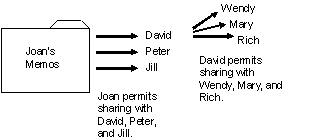
In this example, Joan is manager of the Accounts Payable (AP) department and writes CA Top Secret access rules that permit David, Peter, and Jill to read her memos. David copies a memo of Joan's and forwards it to Wendy, Mary, and Rich.
Result:
The intent of Joan's access rules has been circumvented. On the surface, this looks like a breach of trust: David had access to the information and misused it. Breach of trust is difficult for any security system to protect against. An untrustworthy employee who wants to release information can always use the telephone, write down what is on the terminal screen, or even memorize it to get around security controls. However, there are several ways that David can innocently disclose the memo by copying it. For example, he can:
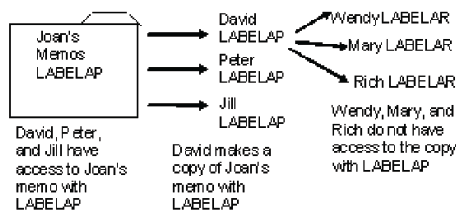
With multilevel security properly configured in an CA Top Secret system, a MAC layer of security which sits on top of DAC, can prevent Joan's memos from intentionally or unintentionally being accessed by Wendy, Mary and Rich.
In this example, security labels work to protect Joan's memos from being copied to unauthorized users.
Joan has access to security label, LABELAP, and so labels her memos data set. David is also in the AP department and has access to the security label, LABELAP, and can read the memos. If David makes a copy of Joan's memo, the copy will be labeled, LABELAP.
Result:
The simple security property restricts read accesses. The simple security property determines when to grant read access, that is, disclose data in an CA Top Secret MLS system. It states that the security label of the user must dominate the security label of the data or resource the user wants to access. This property is always enforced in an CA Top Secret MLS system.
The confinement property (also known as the *‑property or “write-down” protection) restricts write accesses. The confinement property states that a user can have write access to a file if the security label of the file dominates the security label of the user. This means that if you want to write to a file, the security label of the file must dominate your security label. However, a z/OS system does not support the ability to write to a data set without the ability to first read the data set. Therefore, your security label must equal the security label of the file for you to be able to write to it.
The confinement property is inactive by default in an CA Top Secret MLS system. To enforce the confinement property, a security administrator must set the MLWRITE(NO) control option. When MLWRITE(NO) is set, users cannot write from a higher security label to a lower security label. To write to a lower label, a user must log off and log on at that label. The user would no longer have access to the data at the higher label. In addition, when MLWRITE(NO) is activated, users cannot write up. To write to a higher label, you must logoff and log on at that label. You will no longer have write access to data at the lower label. However, a security administrator or other authorized user can reclassify the data or authorize you for “controlled write‑down”, which allows individual users to write down, if they have the proper authorization.
In CA Top Secret, a security label is a 1- to 8-character, alphanumeric name that represents a security level and zero or more categories.
The security level on data represents the sensitivity of the data to unauthorized disclosure. Security levels on users, called clearances, indicate their trustworthiness and need to know information. A security label needs only one security level, because levels form a hierarchy. A site can assign the level of trust based on a variety of criteria, such as rank, position, written agreements, or personal background checks. In CA Top Secret, a security level is a numerical rank between 1 and 254 that can also have an optional corresponding name or description, such as the familiar military designations, UNCLASSIFIED, CONFIDENTIAL, SECRET, and TOP SECRET. For example, before someone is cleared for access to SECRET information, the government must perform a background investigation. Before that person is cleared for access to TOP SECRET data, a more extensive background check is done. In other words, the more dangerous unauthorized disclosure of the data would be, the more the military wants to be sure it can trust that person to follow the rules of disclosure.
Categories represent the separation of data based on some use characteristic, such as department or project. In CA Top Secret, a category is a 1- to 32‑character, uppercase, alphanumeric name. Categories are independent of levels; they can exist at all levels of the system. Only the level of sensitivity of the data in the categories differs. A site can create categories based on projects, assignments, or group needs, however, categories are optional, and it is not necessary to create them, if there is no need to segregate data. For a user to access data in a particular category, the user in charge of that category must instruct the security administrator to reclassify the user to grant him the access. For example, a user is not normally granted access to personnel information unless the user is working in the personnel department.
The following are examples of security levels, categories, and security labels as defined in CA Top Secret.
|
Security Level |
Name |
|---|---|
|
150 |
CONFIDENTIAL |
|
100 |
INTERNAL USE ONLY |
|
50 |
PUBLIC |
|
25 |
*NONE* |
|
Category |
|
|---|---|
|
HUMAN RESOURCES |
|
|
FINANCE |
|
|
SALES |
|
|
Security Label Name |
Value |
|---|---|
|
HIGHEST |
SECLEVEL(150) |
|
LABEL1 |
SECLEVEL(100) |
|
LOWEST |
SECLEVEL(50) |
CA Top Secret uses the principle of MAC label dominance to determine how security labels compare in an MLS system, and, based on the comparison, whether MAC access is allowed or denied.
For example, if there are two security labels, X and Y:
In the first rule (X dominates Y), above, both conditions must be true for Label X to dominate Label Y. So, the “and” is important. If the Level of X is less than the Level of Y, then the dominance check has already failed and Label X will never dominate Label Y. However, if the Level of X is greater than or equal to the level of Label Y, then, the categories of Label X and Label Y must be compared to see if all the categories in Label Y are in Label X. If Label X's level is higher than Label Y's, dominance has not yet been established, until the categories are compared. In the second rule (X is disjoint from Y), above, if neither security label X nor Y includes all the categories of the other, the labels are said to be incomparable or disjoint; neither one dominates.
Note: The term “greater than” is used informally to mean dominates. Although labels cannot be compared in a numerical sense, the concept of “greater than” is a convenient way to think of label dominance.
Based on MAC dominance checking rules, here are some security label values and examples of label comparisons and their results:
|
Security Label |
Value |
|
|---|---|---|
|
LABELA |
SECLEVEL(5) |
CATEGORY(FIN) |
|
LABELB |
SECLEVEL(20) |
CATEGORY(DEV) |
|
LABELC |
SECLEVEL(20) |
CATEGORY(HR DEV FIN) |
|
LABELD |
SECLEVEL(10) |
CATEOGRY(SUPPORT) |
|
LABELE |
SECLEVEL(5) |
CATEGORY(SALES) |
|
LABELF |
SECLEVEL(5) |
CATEGORY(SALES) |
|
LABELG |
SECLEVEL(5) |
|
|
Label Comparison |
Comparison Result |
Explanation |
|---|---|---|
|
LABELA vs. LABELB |
LABELA does not dominate LABELB |
LABELA's level is lower than LABELB's level. The categories do not need to be checked. |
|
LABELB vs. LABELC |
LABELB does not dominate LABELC |
Both labels have the same level, but all of LABELC's categories (HR, DEV and FIN) are not in LABELB's categories (DEV) |
|
LABELD vs. LABELE |
LABELD does not dominate LABELE |
LABELD's level is higher than LABELE's level, but LABELE's category (SALES) is not also LABELD's category (SUPPORT). |
|
LABELE vs. LABELF |
LABELE dominates LABELF |
The levels are the same and LABELE's category (SALES) is also LABELF's category (SALES). These label values are the same (for example, they are equivalent). These labels can be said to dominate each other). |
|
LABELF vs. LABELG |
LABELF dominates LABELG |
LABELF's level is higher than LABELG's level and LABELG does not have any categories. |
|
LABELA vs. LABELF |
LABELA is disjoint from LABELF |
The levels are the same, but LABELA's category (FIN) is not LABELF's category (SALES) and LABELF's category (SALES) is not LABELA's category (FIN). |
In the table above, to give users who can access data labeled LABELA and LABELE the ability to share certain data, you can create a new label, LABELX, which would have the following value:
|
Security Label |
Value |
|---|---|
|
LABELX |
SECLEVEL(5) CATEGORY(SALESFIN) |
You could then authorize users to LABELX, which would allow them MAC access to the shared data labeled, LABELX, if DAC checks also allowed it.
There are three types of MAC label dominance checks in an CA Top Secret MLS system:
The type of label dominance check performed for each requested access to a classified resource depends on what the resource's class is and whether write‑down is restricted (preventing declassification of data in writing from a higher classification to a lower classification).
The MAC dominance check requires that because opening a data set for write access implicitly opens it for read access, to read-only or read/write to a data set, the user's label must dominate the data set's label. However, there are other resources that support true write-only access such as messages sent with the TSO SEND command and batch jobs submitted through the internal reader. To write-only when write-down is not restricted in an MLS system, the user's label and the resource's label must be comparable, for example, not disjoint. In other words, the user's label must dominate the resource's label or the resource's label must dominate the user's label.
The following table shows the MAC dominance check required for different types of access.
|
|
When Write-Down Is Allowed |
When Write-Down Is NOT Allowed |
|---|---|---|
|
READ ONLY |
Subject security label must dominate object security label |
Subject security label must dominate object security label |
|
WRITE ONLY |
Subject security label must dominate object security label [or] Object security label must dominate subject security label |
Object security label must dominate subject security label |
|
READ/WRITE |
Subject security label must dominate object security label |
Subject security label must be equivalent to object security label |
In the following example, LABELA dominates LABELB under MAC dominance checking rules in an MLS system where write-down is allowed.
|
Security Label |
Value |
|---|---|
|
LABELA |
SECLEVEL(5) CATEGORY(AA BB CC) |
|
LABELB |
SECLEVEL(5) CATEGORY(AA BB) |
USER07 has security label LABELA. Data set TEST.JCLLIB has security label LABELB. USER07 can read and write to TEST.JCLLIB because USER07's label, LABELA, dominates LABELB.
The reverse MAC dominance check is the opposite of the MAC dominance check. Reverse MAC dominance requires that the resource's security label dominates the user's security label for the requested access to be allowed. The following resource classes apply reverse MAC dominance checking rules: APPCPORT, CONSOLE, WRITER.
|
Access Type |
When Write-Down Is Allowed |
When Write-Down Is NOT Allowed |
|---|---|---|
|
READ ONLY |
Object security label must dominate subject security label |
Object security label must dominate subject security label |
|
WRITE ONLY |
Subject security label must dominate object security label [or] Object security label must dominate subject security label |
Subject security label must dominate object security label |
|
READ/WRITE |
Object security label must dominate subject security label |
Subject security label must be equivalent to object security label |
If two labels are equal, they dominate each other. Equal MAC dominance checking, which is used for any class that requires two-way communication, requires that the user and resource security labels are the same for the requested access to be allowed. The following resource classes apply equal MAC dominance checking rules: APPL, DSNR, JESINPUT, MQCONN, SERVAUTH, SERVER, TERMINAL
|
Access Type |
When Write-Down Is Allowed |
When Write-Down Is NOT Allowed |
|---|---|---|
|
READ ONLY |
Subject security label must be equivalent to object security label |
Subject security label must be equivalent to object security label |
|
WRITE ONLY |
Subject security label must be equivalent to object security label |
Subject security label must be equivalent to object security label |
|
READ/WRITE |
Subject security label must be equivalent to object security label |
Subject security label must be equivalent to object security label |
The following example shows two equivalent labels:
|
Security Label |
Value |
|---|---|
|
LABELA |
SECLEVEL(5) CATEGORY(AA BB) |
|
LABELB |
SECLEVEL(5) CATEGORY(AA BB) |
Note: LABELA and LABELB have different label names but the same values. They are considered equal.
|
Copyright © 2010 CA Technologies.
All rights reserved.
|
|