

In APPC/OS/390, side information and TP profile files contain routing and scheduling information that z/OS uses to find and initiate TPs in response to allocate requests from other TPs (do not confuse these profiles with the Profile ACID Type). The following figure illustrates how these components are used.
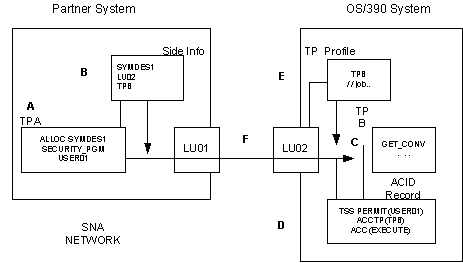
In the previous figure, the following occurs:
TPA allocates a conversation with TPB. SECURITY_PGM is indicated and the USER01 ACID is supplied. The symbolic destination name is SYMDES1.
APPC compares the SYMDES1 symbolic destination name with the information supplied in the side information file and learns that it refers to TPB and LU02.
TPB receives the allocation request.
Since SECURITY_PGM is specified on the request, CA Top Secret views the security record for USER01 and learns that USER01 has authorization to EXECUTE TPB.
TPB is located in the TP profile data set along with the corresponding JCL and scheduling information.
The entire conversation takes place across a VTAM session.
The administrator responsible for maintaining security for APPC resources creates and maintains TP profiles and side information files by using the APPC/OS/390 administration utility (ATBSDFMU) or the APPC/OS/390 administration dialog (an interactive front‑end to ATBSDFMU).
The TP profiles and side‑information files are stored in VSAM key sequenced data sets (KSDS). Since several TP profiles can be maintained in the same TP profile data set, by PERMITting an ACID the authority to administer one TP profile data set you are PERMITting that ACID the authority to administer all of the TP profiles (and consequently all of the TPs) contained in that data set.
If you want to authorize different ACIDs to administer each TP profile or subset of TP profiles individually, you need to use database tokens.
A database token is a one to eight‑character name that is used to identify an individual file within a data set. Each token can be used more than once. For example, within TPDSN01 TP profile data set you might have the following TP profiles:
Payroll.TPA        Research.TPD
Payroll.TPB        Research.TPE
Payroll.TPC        Pers.TPF
As you can see, TPA, TPB, and TPC have been grouped together with the Payroll token. TPD and TPE are given the Research token, while TPF is associated with the Pers token.
Although each administrator can be given access to the TP profile and side‑information file data sets, if database tokens are used, a second level of security checking is performed by z/OS. For example, John Smith, the administrator for the Payroll Department may be restricted to all TP profiles identified by the Payroll database token. Sue Jones, the administrator for the Personnel Department, may be PERMITed to EXECUTE TPs identified by the Pers token but may only READ TPs identified by the Payroll token.
It is recommended that a single administrator (either an SCA or LSCA) be responsible for creating TP profile and side‑information data sets and assigning database tokens, if necessary, to individual files within those data sets. In addition to having access to the data sets, this “super‑administrator” should also be restricted to accessing them only through the APPC/OS/390 administration utility. For example:
TSS PERMIT(acid) DSNAME(dsnnames)
                 PRIVPGM(ATBSDFMU)
To create and maintain database tokens, this administrator would use the APPC/OS/390 administration utility's DBMODIFY command. (For more information about the DBMODIFY utility, see the IBM Planning: APPC Management Guide.)
To control access to these tokens once they are created, you can use the existing IBMFAC resource. For example, if APPCADMN is to be responsible for maintaining database tokens, you would issue the following commands:
TSS ADDTO(owning‑acid) IBMFAC(APPCMVS.)

TSS PERMIT(APPCADMN) IBMFAC(APPCMVS.DBTOKEN)
                     ACCESS(UPDATE)
Security for individual TPs and TP profiles is administered through the APPCTP resource class. The APPCTP resource class name takes the following format:
dbtoken.level.tpname
The one to eight‑character database token associated with the TP profile.
Represents one of the following:
The administrator requires access to the APPC facility, READ access to view the TP profiles and UPDATE access to create, modify and delete TP profiles. APPC users also require access to the APPC facility and will need EXECUTE access to the TP profile to run the associated TP.
For example, if LSCA01 is to be responsible for maintaining TPB (which has a database token of PAYROLL and will be accessible to all users for LU02) the following command would be issued:
TSS PERMIT(LSCA01) APPCTP(PAYROLL.SYS1.TPB)
                   ACCESS(UPDATE)
                   FACILITY(APPC)
For users with the TECHPROF profile to run TPB, the following command would have to be issued:
TSS PERMIT(TECHPROF) APPCTP(PAYROLL.SYS1.TPB)
                     ACCESS(READ)
                     FACILITY(APPC)
The security administrator for APPC resources (LSCA01 in the examples) should create an APPCTP profile for each TP profile, using generic prefixing where appropriate. ACIDs requiring use of the TPs should then be given the appropriate access.
The authorization to access side information files is controlled by using the APPCSI resource class keyword. This keyword is composed of three levels in the following format:
dbtoken.SYS1.symbolic‑destination‑name
The one to eight‑character database token associated with the side‑information file.
Indicates that this file is available to all users.
The one to eight‑character symbolic destination name associated with the side‑information file.
To view the side information, the administrator requires READ access. To create, modify or delete these files, the administrator requires UPDATE access. In both cases, the administrator must have access to the APPC facility. Prefixing applies, but masking does not. Therefore, to allow LSCA01 to maintain all side information files assigned to the RESEARCH database token, issue the following command:
TSS PERMIT(LSCA01) APPCSI(RESEARCH.SYS1)
                   ACCESS(UPDATE)
Note: ACIDs who use symbolic destination names on an outbound allocate request do not require access to APPCSI profiles.
|
Copyright © 2013 CA Technologies.
All rights reserved.
|
|