

|
|
|
The default view for the Windows Client is Table View. The Table View displays objects in configurable tables. You can change display characteristics (such as the width and number of table columns, the number of rows displayed, and so on) and characteristics that apply to specific objects, such as sort and filter criteria. The display and object-specific characteristics determine the appearance of the table. When you save your user‑defined views, you automatically save the display and object characteristics with it.
Note: To immediately view certain changes, like filters and sorts, you must click the Refresh icon  .
.
The following is a sample of the Table View:
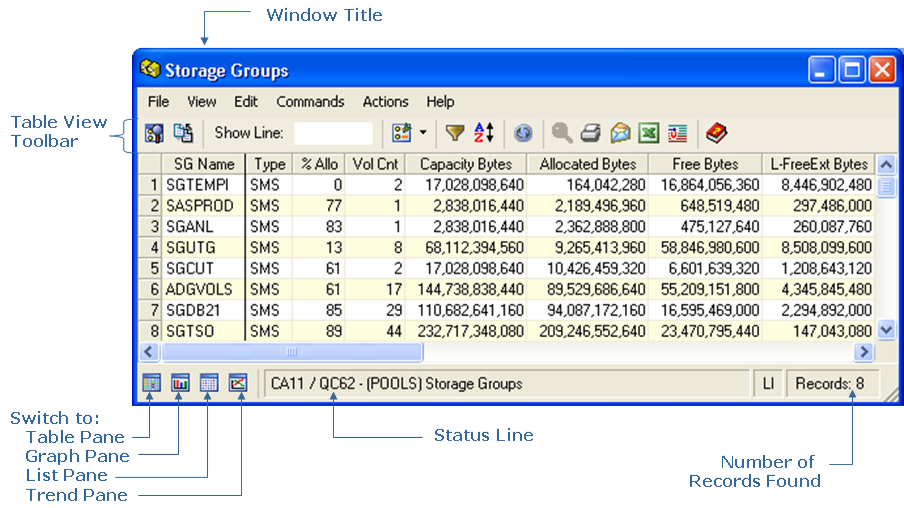
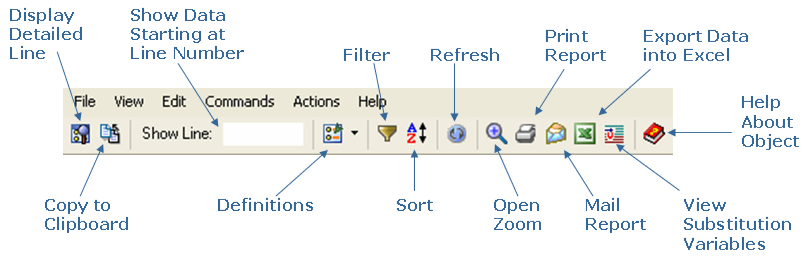
Table View Dialog Toolbar Options
The Table View dialog toolbar provides the following options:
| Copyright © 2010 CA. All rights reserved. | Tell Technical Publications how we can improve this information |