

Two variables, Z$DATE and Z$UDATE are available to display strings that indicate to users how the date is to be formatted. The strings displayed by these variables depend on the value of the European dates field.
When the variable Z$DATE appears on a panel, and European dates is set to N, it displays the following text string:
mm/dd/yy
If European dates is set to Y, it displays the following text string:
dd/mm/yy
When the variable Z$UDATE appears on a panel, it displays the following text string:
MM/DD/YY
If European dates is set to Y, it displays the following text string:
DD/MM/YY
The TEN0003 panel allows users at customer sites to sign on to the TPX product. The TEN0003 panel allows a site to verify that a valid userid and password combination has been entered. It also allows users the ability to change their passwords when signing on to TPX. TPX also supplies a TEN1003 panel that allows users to sign on with password phrases which can be between 9 and 100 characters long.
A TPX site administrator configures the signon panel by updating the Default LOGO: field on the User Signon panel on the TPX System Options Table Detail Panel (Panel TEN0108):
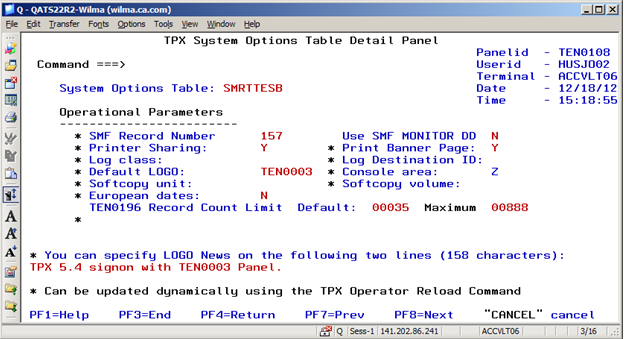
The sites can customize their TEN0003 Signon Panel. Perhaps a site wants to put their company name on their version of the TPX TEN0003 panel. There are many variables on the TEN0003 panel which will effects how the panel functions and what will be displayed.
The TEN0003 signon panel contains three very specific sign on related variables:
Sites must be careful when modifying fields on the TEN0003 panel. The SNPSWDV and SNNPSWDV variable fields can contain up to 50 characters. Any time either the SNPSWDV or SNNPSWDV fields are entered with more than eight characters will cause the user to have a password phrase sign on attempt.
Source for TEN0003 signon panel can be found in the ISPPENU panel library:
)ATTR
  _ TYPE(INPUT) MDT(ON) COLOR(WHITE)
  * TYPE(INPUT)  INTENSE(NON) MDT(ON)
  % TYPE(OUTPUT) INTENSE(LOW) SKIP(ON) COLOR(YELLOW)
  < TYPE(OUTPUT) INTENSE(HI) SKIP(ON) COLOR(RED)
  ^ TYPE(OUTPUT) INTENSE(HI) SKIP(ON) COLOR(TURQ)
  | TYPE(TEXT) SKIP(ON) INTENSE(HI) COLOR(green)
  ! TYPE(TEXT) SKIP(ON) INTENSE(HI) COLOR(red)
  + TYPE(TEXT) SKIP(ON) COLOR(yellow)
  ; TYPE(TEXT) SKIP(ON) INTENSE(low)
  / TYPE(TEXT) SKIP(ON) COLOR(BLUE) INTENSE(LOW)
  > TYPE(TEXT) SKIP(ON) COLOR(turq) INTENSE(LOW)
)BODY TYPE=BREAKIN ALARM=YES

                               !@@@@@@@@@@@;!@@@@@@@@@;!@@@@@!@@@@;
                              !@@;!@@@;!@@;  !@@@; !@@; !@@@;!@@;
        /ccccc|aaaaaa        !@; !@@@;!@;   !@@@; !@@@; !@@@ @@;
       /cc/  /cc   |aa          !@@@;      !@@@; !@@@;  !@@@@@;
      /cc/         |aa         !@@@;      !@@@; !@@@;   !@@@@;
      /cc/    |aaaaaaa        !@@@;      !@@@@@@@@;    !@@@@;
      /cc/   |aa   |aa       !@@@;      !@@@;         !@@@@@;
       /cc/  |aa  |aaa      !@@@;      !@@@;         !@@!@@@;>REL%ZPTFLVL  ;
        /ccccc|aaaa|aa>TM  !@@@;      !@@@;         !@@;!@@@;
                          !@@@;      !@@@;         !@@; !@@@;
                         !@@@@@;    !@@@@@;      !@@@@;!@@@@@;

     /       Copyright (C) 2010 CA.  All rights reserved.         ;
   +Userid:       _SNUSERV +  (or LOGOFF)                         %ZTIME      ;
   +Password:     *SNPSWDV +                                      %ZDATE      ;
   +New Password: *SNNPSWDV+                                      %ZTERMID    ;
   +Account:      _SNACCTV +                                      %ZMODEL     ;
   +Transfer:     _SNA +                                          %Z          ;
<ZINCOMP1
<ZINCOMP2
^ZNEWS1
^ZNEWS2
!                     ---- CA TPX Session Management ----
   /PF1=Help    PF3=Logoff;
)INIT
.ZVARS= ZSYSID
.HELP= HEN0003
)END
A sample display of the TEN0003 panel:
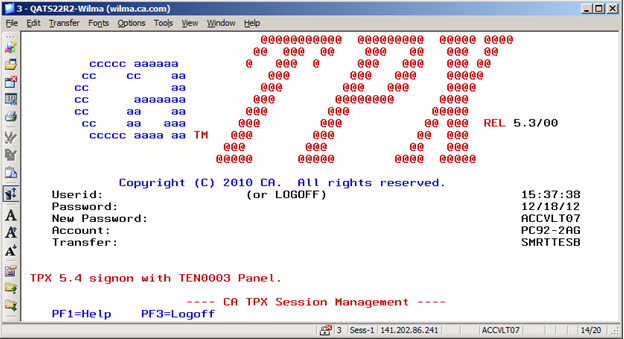
The TEN1003 panel allows users at customer sites to sign on to TPX. The TEN1003 panel requires sites to be use either ACF2, Top Secret or RACF security systems. The RACF sites must configure TPX to use the SAF security not RACF.
CA ACF2 R15 (Z/OS) and CA ACF2 R14 (Z/OS) sites must apply ACF2 APAR RO38461 before attempting to use the TPX Password Phrase interface.
The TEN1003 panel accepts either password phrases or passwords on the sign-on panel. The TEN1003 panel allows users at a site to verify:
TPX also supplies a TEN0003 panel that allows users to sign on with only a traditional one through eight character passwords.
A TPX site administrator configures the sign-on panel by updating the Default LOGO: field on the User Signon panel on the TPX System Options Table Detail Panel (Panel TEN0108):
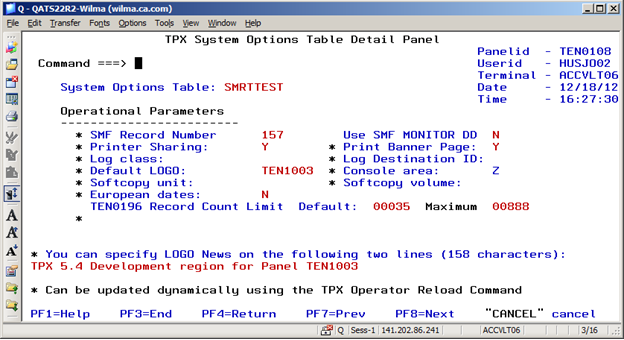
The sites can customize their TEN1003 Signon Panel. Perhaps a site wants to put their company name on their version of the TPX TEN1003 panel. Many variables on the TEN1003 panel affect how the panel functions and what is displayed.
The TEN1003 sign-on panel contains five specific signon related variables:
The sites must be careful when modifying fields on the TEN1003 panel. Variables having to do with password phrase fields can contain up to 50 characters. Any time either the SNPSWDV or SNNPSWDV fields are entered with less than nine characters causes the user to have a traditional password sign on the attempt.
A sample TEN1003 panel:
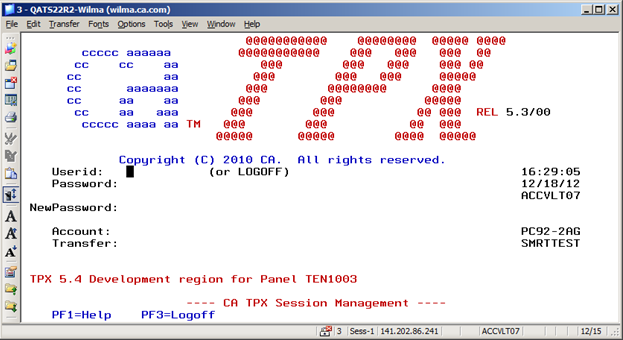
Source for the TEN1003 sign-on panel can be found in the ISPPENU panel library:
)ATTR
  _ TYPE(INPUT) MDT(ON) COLOR(WHITE)
  * TYPE(INPUT)  INTENSE(NON) MDT(ON)
  % TYPE(OUTPUT) INTENSE(LOW) SKIP(ON) COLOR(YELLOW)
  < TYPE(OUTPUT) INTENSE(HI) SKIP(ON) COLOR(RED)
  ^ TYPE(OUTPUT) INTENSE(HI) SKIP(ON) COLOR(TURQ)
  | TYPE(TEXT) SKIP(ON) INTENSE(HI) COLOR(green)
  ! TYPE(TEXT) SKIP(ON) INTENSE(HI) COLOR(red)
  + TYPE(TEXT) SKIP(ON) COLOR(yellow)
  ; TYPE(TEXT) SKIP(ON) INTENSE(low)
  / TYPE(TEXT) SKIP(ON) COLOR(BLUE) INTENSE(LOW)
  > TYPE(TEXT) SKIP(ON) COLOR(turq) INTENSE(LOW)
)BODY TYPE=BREAKIN ALARM=YES

                             !@@@@@@@@@@@;  !@@@@@@@@;!@@@@@!@@@@;
       /ccccc|aaaaaa        !@@@@@@@@@@@;  !@@@; !@@@; !@@@  @@;
      /cc/  /cc   |aa          !@@@;      !@@@; !@@@;  !@@@ @@;
     /cc/         |aa         !@@@;      !@@@; !@@@;   !@@@@@;
     /cc/    |aaaaaaa        !@@@;      !@@@@@@@@;    !@@@@;
     /cc/   |aa   |aa       !@@@;      !@@@;         !@@@@@;
      /cc/  |aa  |aaa      !@@@;      !@@@;         !@@!@@@;>REL%ZPTFLVL  ;
       /ccccc|aaaa|aa>TM  !@@@;      !@@@;         !@@;!@@@;
                         !@@@@@;    !@@@@@;      !@@@@;!@@@@@;

     /       Copyright (C) 2010 CA.  All rights reserved.         ;
   +Userid:  _SNUSERV +  (or LOGOFF)                              %ZTIME      ;
   +Password:*SNPSWDV                                           + %ZDATE      ;
   +         *SNPSWDV2                                          + %ZTERMID    ;
+NewPassword:*SNNPSWDV                                          +             ;
   +         *SNNPSWD2                                          +             ;
   +Account: _SNACCTV +                                           %ZMODEL     ;
   +Transfer:_SNA +                                               %Z          ;
<ZINCOMP1
<ZINCOMP2
^ZNEWS1
^ZNEWS2
!                     ---- CA TPX Session Management ----
   /PF1=Help    PF3=Logoff  ;
)INIT
.ZVARS= ZSYSID
.HELP= HEN1003
)END
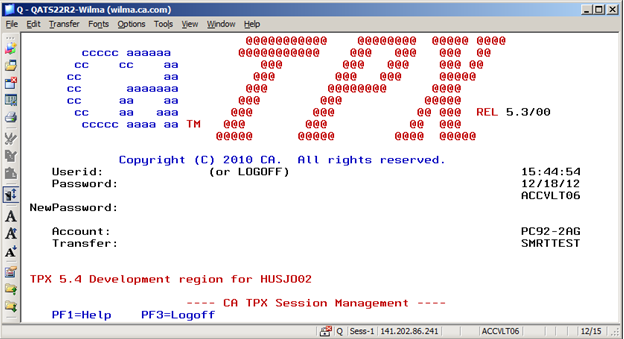
A sample display of the TEN1003 panel:
|
Copyright © 2013 CA.
All rights reserved.
|
|