

Introduction to Master Administration › Example of a Single Master Administrator Structure
Example of a Single Master Administrator Structure
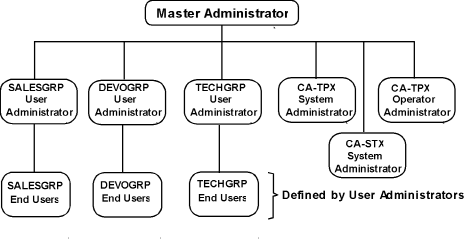
You have been appointed as the master administrator for a system and decide to distribute the administration responsibility. You want to assign one master administrator and a separate user administrator for each of the three major departments: Sales, Development, and Technical Support. Each of these user administrators will have authority for CA TPX. The following is an example of the procedure you would use:
- Sign on as TPXADMIN and define the user ID that you will use as the master administrator as described in the chapter "Defining Administrators."
- Sign off and then sign on with the master administrator ID you just defined.
- Define a system administrator as described in the chapter "Defining Administrators."
- Define an operator administrator as described in the chapter "Defining Administrators."
- Authorize yourself to administer the groups: SALESGRP, DEVOGRP, and TECHGRP as described in Authorizing a User to Administrate a Group in the chapter "Defining Administrators." Authorize yourself for CA TPX.
Note: You must be authorized to administer a group before you can authorize a user administrator to administer that group.
- Define a user ID for the user administrator of each group, and authorize them to administer the group as described in Authorizing a User to Administrate a Group in the chapter "Defining Administrators." Authorize each user ID for CA TPX.
At this point, the system and operator administrators can begin to perform their responsibilities. The user administrators can begin to add users and profiles to the groups that you have authorized them to administer.
The following diagram shows administration with a single master administrator and multiple user administrators:
Copyright © 2013 CA.
All rights reserved.
|
|