

Managing Network Storage Objects › Register NetWare Computers › Set the Properties for Standalone Computers › Manually Adding Computers
Manually Adding Computers
If there is a computer that you want to register, but it is not listed in this dialog, you can add it manually.
To add a computer manually
- Click Add Computers.
The Add Computer dialog opens.
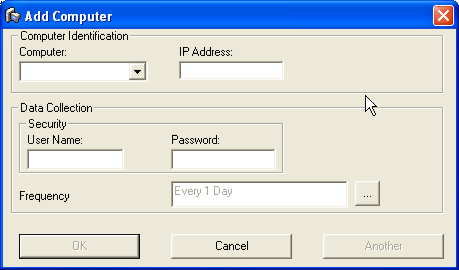
- Select the computer you want to register from the Computer drop-down list and enter the IP address.
- Enter the User Name and Password of a user with Administrator privileges on the target computer.
- (Optional) Set the frequency at which data you want to collect data on this computer. To do so, click the ellipsis button to open the Data Collection Frequency dialog, which lets you set any data collection frequency you want.
- Click Another to add another computer or click OK to finish.
Copyright © 2016 CA Technologies.
All rights reserved.
|
|