

Managing Network Storage Objects › Register NetWare Computers › Set the Data Collection Properties › Add a Non-published Computer
Add a Non-published Computer
The Discovery feature of the CA SRM Computer Registration Wizard detects only computers with physical IP addresses; therefore, some computers in the selected domain may not appear in the Candidates table.
To manually add a computer that was not detected by the CA SRM Computer Registration Wizard
- From the Setting Data Collection Properties dialog, click Add Computer. The Non-published Computer dialog opens:
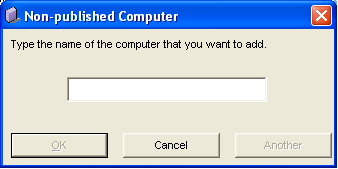
- Enter the name of the computer you want to add and click OK. CA SRM adds the computer to the To be Managed table.
To add more computers, click Another. CA SRM adds the computer to the To be Managed table, and the Non-published Computer dialog clears, letting you enter another computer name. When you finish, click OK.
- Select the To be Managed table in the Setting Data Collection Properties dialog and verify that CA SRM was able to determine the computer's IP address. If CA SRM did not add the IP address, or if the address is incorrect, double-click the cell in the IP Address column and manually enter the computer's IP address.
Copyright © 2016 CA Technologies.
All rights reserved.
|
|