

CA SRM lets you collect the following types of data:
CA SRM collects basic information by default. However, the basic collection does not show the following details:
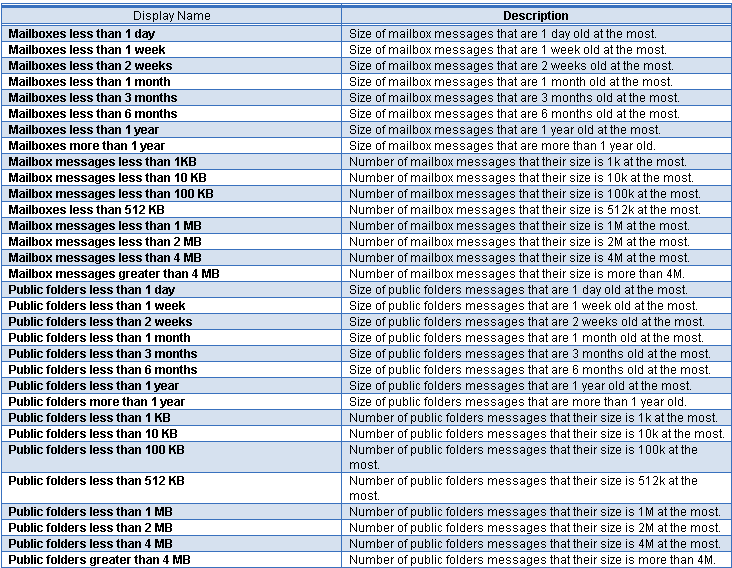
Collects information about all objects. Collecting this information increases the overall time required by the data collection service. However, the detailed collection collects all the details along with the above mentioned bucket details.
You can choose which method of data collection you want to use when you register the Microsoft Exchange server.
CA SRM collects data from Microsoft Exchange 2010 servers using the following protocols:
Allows remote access to Microsoft Exchange 2010 servers
Allows local access to Microsoft Exchange 2010 servers.
Note: The larger the configuration, the longer data collection takes. To improve data collection time, we recommend that you collect data locally.
Before invoking the exchange Data collection, if the exchange server email domain name is different from the default domain name, then we need to edit the BOS.ini file under \BrightStor SRM\Database and add the following section:
[EXCH]
EmailDomainName=<email_domain_name>
These changes need to be done on the proxy collector host.
|
Copyright © 2016 CA Technologies.
All rights reserved.
|
|