

CA SRM can schedule and execute operations automatically. When you start CA SRM, the Scheduler creates an execution schedule of all services and procedures defined in the CA SRM database. All services scheduled for execution appear on the CA SRM Monitor display. When you define a new service or procedure, CA SRM schedules it for execution immediately. CA SRM initiates the actual execution according to a user‑defined timing condition and depends on resources available at that particular moment.
The storage manager can request the execution of on-demand services. When certain jobs are running, an operator must be present to respond to attentions generated by the system.
Although you can launch services on demand, you typically schedule services to execute periodically at a specified time. When the service activates, CA SRM may use several computers to perform the selected task. You can perform any number of services concurrently if you have enough resources available.
Important! When you install the Application Server, the Open_System task is automatically popped in to the Schedule list, by default. You can delete the scheduled tasks that you do not want to run, from the list. However, do not delete the Open_System task, since the trend files maintenance is dependent on this task. If you delete this task, the corresponding entry gets deleted from the OASchedules_.MDB file, at \BrightStor SRM Data\Central. Contact CA Support to get the updated MDB file.
CA SRM uses an internal construct called a job to execute services. A job is the translation of a service request into a set of executable steps. Jobs are not visible to the user, but understanding how CA SRM uses jobs can help explain the principles on which CA SRM bases the scheduling of services.
A job is comprised of tasks. A task is a program that performs a portion of the job's work.
All jobs are input to the Scheduler, which checks their timing conditions and determines the time interval within which the next execution of the job must take place. The following example shows the sequence of events:
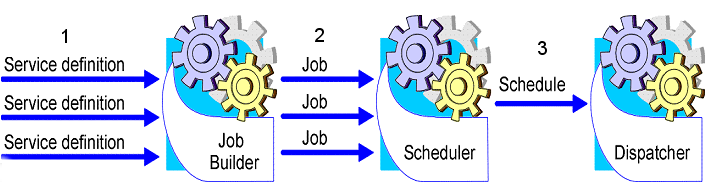
The Dispatcher verifies the actual availability of the required resources at the time of scheduled execution and executes the steps that make up each job.
When you submit a service or procedure for scheduling, the Scheduler checks the last time CA SRM executed the job and the current date and time, and determines the intervals within which the next execution of the job must take place. For example, if the timing of a service requires that the job run every Tuesday and Thursday after 17:00, and if the current day is Wednesday, the next execution of the job must take place on Thursday between 17:00 and 24:00.
Note: The scheduler does not check resource availability. Because resource availability changes from day-to-day and from hour-to-hour, the Scheduler cannot guarantee that the job will execute at the scheduled time, only that the Scheduler will submit the job for execution at that time. A job execution priority scheme ensures jobs that already started can complete before a new job starts.
When a job completes execution, it reschedules for the next execution according to its timing condition.
|
Copyright © 2016 CA Technologies.
All rights reserved.
|
|