

Managing Virtual Host VMware Servers › Defining a Query Service
Defining a Query Service
This section describes how to create a query using the Service Builder Wizard. The Service Builder Wizard contains predefined sets of sample services. After completing the configuration steps, the service is ready to use. If you want to tailor a service, use the Query Service Builder Wizard to customize it.
The following example shows you how to query the database immediately for all Virtual Host Servers.
To do this, follow these steps:
- Expand the CA SRM Object Tree, Open Systems, Services, Service Definitions, and then select Query, as shown in the following diagram:
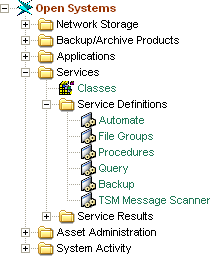
The Query table opens.
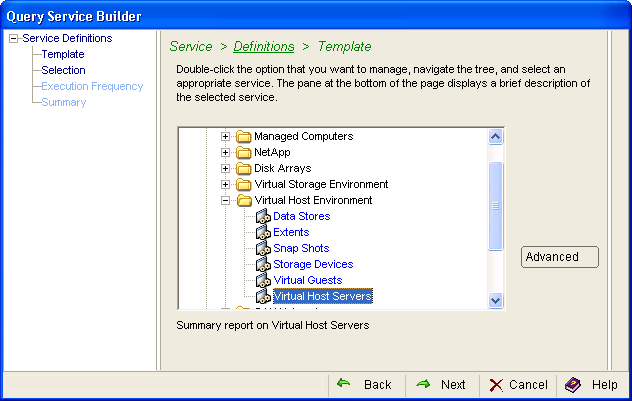
- Click the Configuration menu and then New in the Query table. The Query Service Wizard opens. From the Query table main menu, select Configuration, New. The Template dialog opens. Expand Network Storage, then Virtual Host Environment, and select Virtual Host Servers. Click Next.
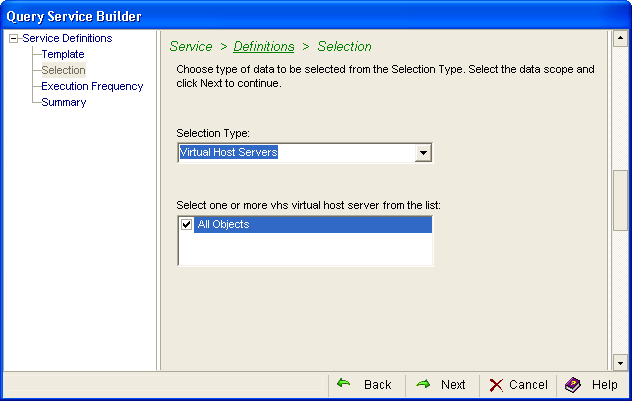
- Select Virtual Host Servers from the Selection Type drop-down list and select one or more check boxes from the Select one or more VHS from the list. Click Next.
- Select the execution frequency. The service can operate:
- Immediately—Collection occurs immediately but only once.
- Execute once—Collection occurs at a future date but only once. Click the drop-down list to enter the date in the calendar.
- Execute periodically—Collection occurs at regular intervals. Designate the interval in the Every box. Enter a number then select the frequency:
- Hours
- Days
- Weeks
- Months
- Business Days
If you select Weeks, you can choose a specific day in the On box. The On box is inactive for the other frequencies.
The Retain Historical Data (Trending) option is only available when you enable periodic execution.
- Specific Time—Collection occurs at, or as soon as possible after, a specific time of day. If a server is down and CA SRM cannot collect at the specified time, CA SRM collects as soon as it can that day (prior to midnight).
If you want to collect at a specific time check this box. This only works in conjunction with the Execute once and Execute periodically options. Use the spin box to designate the time of day you want the collection to occur.
- Hold—This option keeps the service available but the service does not run. It remains on hold until you change the option to one of the frequencies listed above. You can use the Hold option for situations where you want to kickoff this service from outside of CA SRM using the command line option. Hold is not available for every service.
- The Summary dialog displays the parameters for the service that you have defined. If you want to make changes, click the Back button. If there are no changes, click Launch to name and then execute the service. Click Save to save the service without executing it. CA SRM runs the service according to the configuration shown in this dialog.
Note: If you make changes in the Advanced dialog, you will have to use it for all of your future changes. After you use the Advanced dialog for a service, you can no longer edit the service in the Service Builder Wizard.
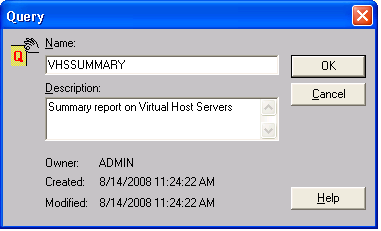
- Enter a name for the service in the dialog. You can also provide an optional description. When you finish, click OK. The service executes or saves depending on what you selected in the previous dialog:
You can use the CA SRM Activity Monitor to check the progress of any service that you create. From the Open Systems menu, select Activity Monitor.
Copyright © 2016 CA Technologies.
All rights reserved.
|
|