

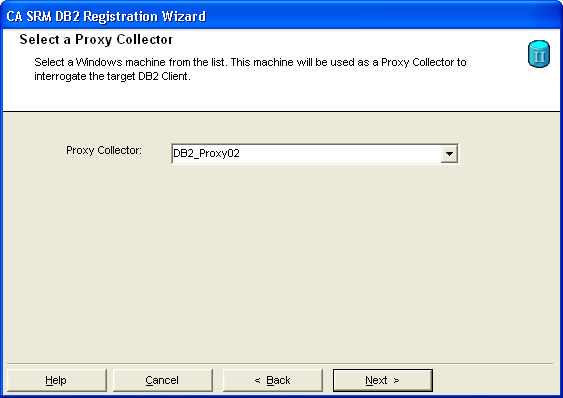
You can run the CA SRM DB2 Registration Wizard from any computer on which the CA SRM Windows Client is installed. You can collect data from any managed computer that has the IBM DB2 client software and the IBM DB2 ODBC driver installed, and on which the DB2 instance is cataloged.
To register a DB2 server using the DB2 Registration Wizard
The DB2 Registration Wizard opens.
Important! If you have just installed the DB2 server on the proxy collector, you must restart the computer before running the registration wizard. Otherwise, the wizard will fail to start.
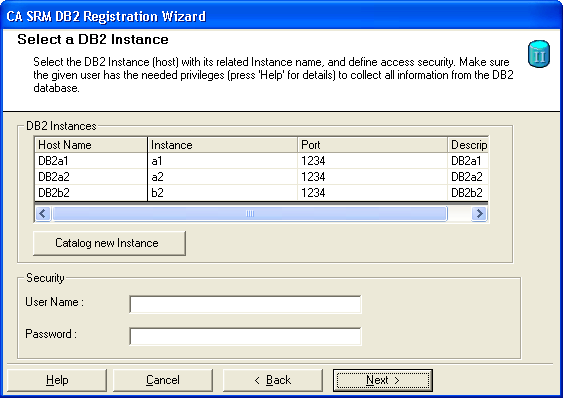
Note: If you do not see any instances, it is because the DB2 instance has not been cataloged on the proxy collector; the DB2 server has not been registered as a managed computer; or both. Make sure the proxy collector has the DB2 instance cataloged and that the DB2 server is a managed computer.
If you have not cataloged the instance, but the DB2 server has been registered as a managed computer, you can catalog the instance directly from the wizard by clicking Catalog new Instance. For more information about using this feature, click Help.
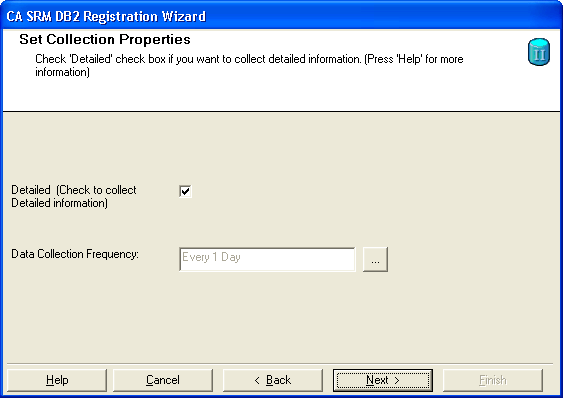
Note: Collecting detailed information increases the time required by the data collection service.
Note: You can also add new contacts by clicking New Contact in the Create New Location dialog or Create New Organization dialog.
Click Register.
CA SRM registers the DB2 server.
|
Copyright © 2016 CA Technologies.
All rights reserved.
|
|