

Apply switch credentials to register the switch in the fabric.
To apply switch credentials to register switch
The Switch Credentials dialog opens.
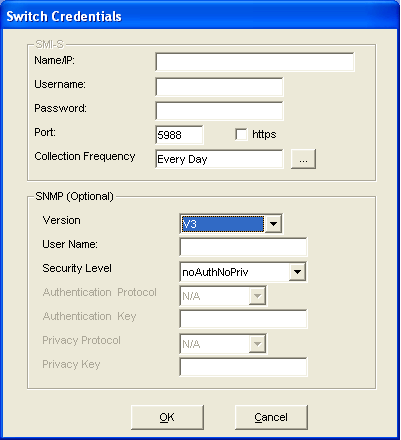
Type the computer name or the IP address.
Type the user name of the SMI-S provider.
Type the password associated with the user name.
Type the port of the switch.
Note: The default port of the switch is 5988, which is not secured.
Specifies how often you want CA SRM to perform data collection on the server. Click the Ellipsis button. The Data Collection Frequency dialog opens.
Note: If you select the Brocade / McData vendor in the Provider Credentials screen, the SMI-S provider section is dimmed.
Note: By default, the SNMP is optional. If you have selected QLogic vendor in the Provider Credentials dialog, you see V1 and V2c options only. For all other vendors, SNMP V3 option is enabled.
Specify the version of the SNMP.
If you select the SNMPV1 or V2c version, the community string field only is displayed.
If you select the SNMPV3 version, the Username, Security Level, Authentication Protocol, Authentication Key, Privacy Protocol, and Privacy Key fields are displayed.
This is applicable only if you select V1 and V2c versions. By default, the community string is public.
Type the user name of the SNMP.
Select the security level of the SNMP. The three options available for security level are:
This is the default option set. If you select this option, all the other following fields are dimmed.
If you select this option, the Authentication Protocol and Authentication Key are enabled.
If you select this option, all the options are enabled.
Select the authentication protocol of the SNMP.The available authentication algorithms are MD5 and SHA.
Type the authentication key of the SNMP. The authentication key is the password for the selected authentication protocol.
Select the privacy protocol of the SNMP. The available privacy algorithms are AES and DES.
Type the privacy key of the SNMP. The privacy key is the password for the selected privacy protocol.
The Discovered Switches dialog opens. The credentials for the selected switch are applied and displays Yes under the Credentials Set column.
|
Copyright © 2016 CA Technologies.
All rights reserved.
|
|