

The following issues might occur when dealing with large amounts of data. There are various JRE Settings for resolving the issues (Heap size, OutofMemory and Expanison Limit)
The problem occurs mainly with JRE versions less than 1.5, while issues 2-4 occur when reports have huge amounts of data to be obtained from the database or to be displayed.
Set the JRE argument -DentityExpansionLimit value to 1000000. By default the value is set to 64,000
a. Change the maximum heap size (-Xmx1024m). if the JVM fails, then that means the machine does not have enough memory. So reduce the value and try again. This has to be done at the Applet JRE arguments. And close all web browsers and redo the test.
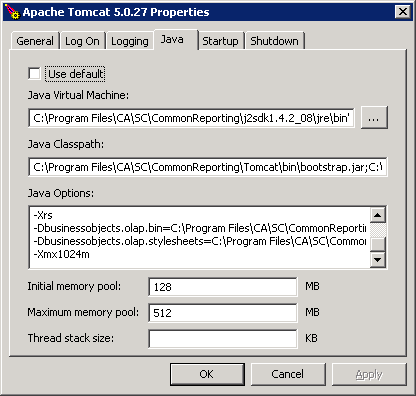
Tomcat configuration settings. Please set -Xmx1024m. Make sure to add this in a separate line and no spaces after that. If this is not done properly Tomcat server won't start. After this change restart tomcat server.
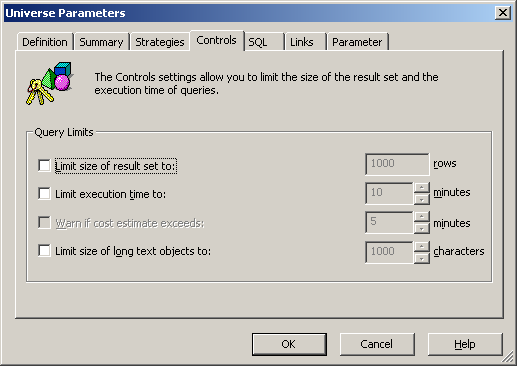
Check the control tab in the Universe parameters. "Limit execution time to", if the query is taking much time, and this option is checked then you would get "Partial Results" at report. To get complete results, unselect all the check boxes in this tab or set the values appropriate for your environment.
|
Copyright © 2013 CA.
All rights reserved.
|
|