

Use the Create Services option in the Open Systems menu to define storage system monitoring, data collecting, and reporting tasks, called Services. The following shows the Create Services menu:
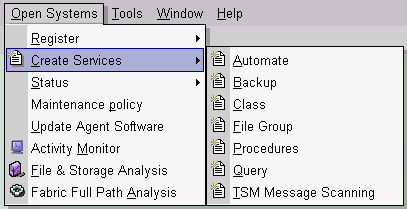
Once defined, a service can be activated in two ways:
Alternately, the Services folder in the Object Tree provides access to a different list of services. The following shows the Services folder:
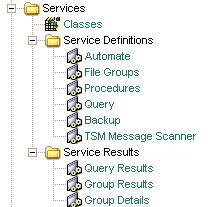
The following are the Services folder services:
CA SRM classes are user-defined, named constructs representing logical groups of storage management objects. You can use a class wherever you would use a CA SRM object or list of objects to provide the source of a service definition. Use classes to specify objects that conform to certain criteria. For example, you can define the class W2000_SERVERS as the collection of all computers running under the Windows 2000 operating system and the class ACCOUNTING as all the users who belong to the accounting group.
Use this service to test conditions in the system (for example, the amount of free space) and take predefined action when conditions are met. You can also use this service to execute applications remotely on available Windows computers and UNIX servers.
Use this service to periodically collect information on predefined groups of files. The File Groups service collects data about files and sorts it according to criteria defined in a class, for example, files larger than 1 MB. The File Groups service then summarizes this information in a report under Group Results and Group Details in the Object Tree. One service can collect information about several classes.
Use this as a group of services. Procedures help you to automate storage management functions because they let you execute a series of operations with a single command, as opposed to executing each operation separately. You can combine several services into one procedure and then invoke them in sequence or concurrently.
Use this service to direct queries to the network or to the CA SRM database. You can use aggregate functions to perform arithmetic operations on collected data. The Query Service returns the requested information formatted as a dynamic table. You can determine the format of the table and choose from a variety of preset formats (such as a delimited file, HTML, XML, and so on) that you can export to other applications for post-processing.
Use this service to backup objects or data to a CA ARCserve Backup server. If you register a CA ARCserve Backup server as a managed object in CA SRM and the machine on which CA ARCserve Backup is installed as a managed computer, you can backup files or volumes from managed computers within CA SRM. You can choose the backup policy to apply and whether to activate the service immediately or schedule it for a specific time.
Use this service to scan the TSM servers for client-related and server-related messages:
Scans the TSM Server Activity Log file for client messages. The service can accumulate the information in Result files, generate attentions to notify users about potential problems on TSM clients, and set severity indicators on the TSM client object.
Scans the TSM Server Activity Log file for server messages. The service can accumulate the information in Result files, generate attentions to notify users about potential problems on the TSM server, and set severity indicators on the TSM server object.
Contains a list of saved query results. Each entry represents a dynamic table created by a query or report service.
Contains information about a collection of files, including several counters. The File Group service creates the Group Result object.
Contains group result information by volume. By combining the Group Details object with other CA SRM objects, you can present group result data on different levels (organization-wide, by location, by volume, and so on).
|
Copyright © 2013 CA.
All rights reserved.
|
|