

User Views › Object Menu Bar › Options Menu › View and Output Definition Wizard › Trend - Periods › Absolute Period
Absolute Period
Use Absolute Periods to define a set starting and ending point for the trend report schedule.
To define an absolute period
- Click the Absolute Period radio button to enable Absolute Period parameters.
- In the Start date field, use the down arrow to open the calendar dialog.
The following is an example of the calendar dialog:
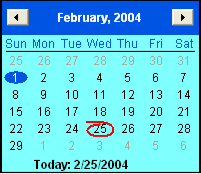
- Click a start date. Use the Month Locate arrow buttons to advance or back‑scroll to a different month.
- Click an end date. Use the Month Locate arrow buttons to advance or back‑scroll to a different month.
- Use the up and down arrow buttons in the Start time and End time fields to set the start and end times.
- Click OK to save the new configuration.
Copyright © 2013 CA.
All rights reserved.
|
|