

The Help menu is shown in the following example:
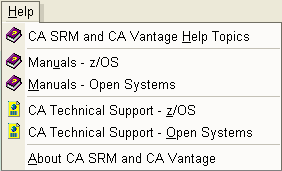
It includes the following functions:
Select this option to open the online Help System. The online Help System includes a list of help topics, an index, and a search tool.
Select this option to open the CA Vantage SRM Table of Contents which lists all the CA Vantage SRM manuals. In the CA Vantage SRM Table of Contents document, click the manual title to view a particular manual or click the Search all Guides button to search for a word or phrase (Acrobat reader will find all the CA Vantage SRM manuals that contain the word or phrase). You must have Acrobat Reader installed in order to view the manuals.
Select this option to open the CA SRM Table of Contents which lists all the CA SRM manuals. In the CA SRM Table of Contents document, click the manual title to view a particular manual or click the Search all Guides button to search for a word or phrase (Acrobat reader will find all the CA SRM manuals that contain the word or phrase). You must have Acrobat Reader installed in order to view the manuals.
Select this option to open the CA Vantage SRM support web site.
Select this option to open the CA SRM support web site.
Select this option to display information about the version of your Windows Client.
|
Copyright © 2013 CA.
All rights reserved.
|
|