

Use the Commands menu to send commands to one or several z/OS hosts. When you click the Commands option in the z/OS menu, a table opens listing all CA Vantage SRMrelated system commands
You can also open commands tables from the Commands option in the Options menu in the object menu bar. The Commands option in the Options menu provides two options:
Note: For a complete list of z/OS operator commands, see the topic “Operator Commands” in the CA Vantage SRM Reference Guide.
To execute a command from an object, perform these steps
Or,
Either choice opens a dialog similar to the following (the following shows the Exec on Sel Host dialog). If applicable, select the appropriate hosts, then click Accept or Accept All.
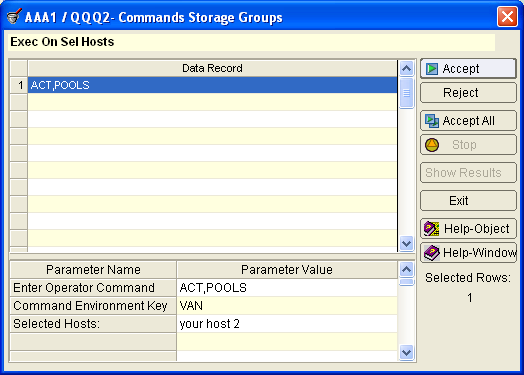
The Command Environment Key field is a non-modifiable parameter used in conjunction with the Exec on Sel Hosts to indicate what subsystem (HSM, VAN, CAS, HSC, PLS, and VSM) the command is issued for.
The Selected Hosts field shows what hosts this command will be issued on.
|
Copyright © 2013 CA.
All rights reserved.
|
|