

CA MSM is a program that runs in the address space of an application server environment hosted on a z/OS system. Typically, this system is where you use SMP/E to install and maintain your products. The system is known as the SMP/E driving system. The CA MSM web-based interface enables you to submit SMP/E batch jobs dynamically without having to code those jobs manually.
The following illustration shows the main components and data flows:
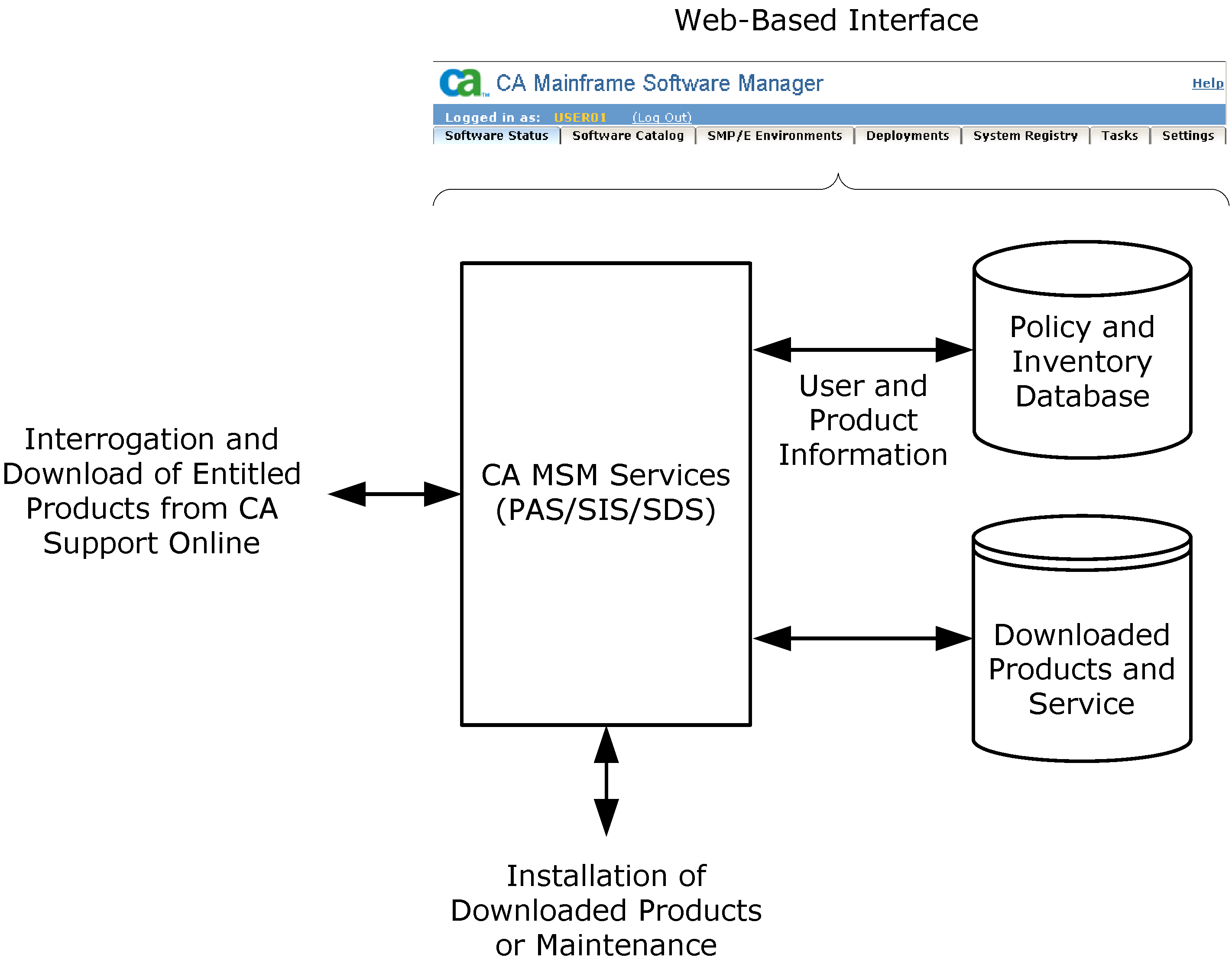
CA MSM has the following main components:
Provides the following services:
Facilitates the acquisition of CA mainframe products and the service for those products, such as program temporary fixes (PTFs). The service retrieves information about the products to which your site is entitled and records these entitlements in a software inventory maintained on your driving system. The service can also download the LMP keys (licenses) for those products. The web-based interface enables you to browse the software inventory for available software and fixes, and download them from the CA Support Online website to the driving system.
Facilitates the installation and maintenance of CA mainframe products in the software inventory of the driving system. The web-based interface enables you to browse and manage the software inventory, and automate installation tasks. You can browse downloaded software packages, and browse and manage SMP/E consolidated software inventories (CSIs) on the driving system.
Facilitates the deployment of CA Technologies mainframe products from the software inventory of the driving system. This service enables you to deploy installed products that are policy-driven with a set of appropriate transport mechanisms across a known topology. The enterprise system topology can include shared DASD environments, networked environments, and z/OS systems. Policies represent a combination of metadata input and user-supplied input. Metadata input identifies the component parts of a product. User-supplied input identifies the deployment criteria, such as where it goes and what it is named.
Stores information for use by CA MSM.
Stores site and user information for downloading and processing CA mainframe products.
Stores information about the CA mainframe products to which you are entitled.
Enables you to acquire, install, maintain, and deploy your CA mainframe products from the CA MSM catalog, and manage your SMP/E environments. The web-based interface includes online help that provides information about how to use CA MSM.
|
Copyright © 2011 CA.
All rights reserved.
|
|