

As a CA Spectrum administrator you are responsible for managing user accounts of different users. Users log in to OneClick console to access CA Spectrum. When you install CA Spectrum with your credentials, you become the installation owner and also the administrator with full privileges. Privileges are components and tools within CA Spectrum to which a user is granted access based on the license type. Administrator, Operator, and Service Manager are the three types of licenses which you can assign to a new user.
Each license can have Read and Write, or Read only access to CA Spectrum. These licenses determine which privileges you can assign to a user. The privileges available with a given license are enabled by default. You can keep the privileges enabled or you can customize them. As you create new user accounts in OneClick, you can add them within user groups or as stand-alone users. When you have multiple users with similar needs, consider creating user groups to manage their user accounts. When you have users with unique needs, create user accounts independent of user groups.
The following diagram shows how to manage user accounts of CA Spectrum users:
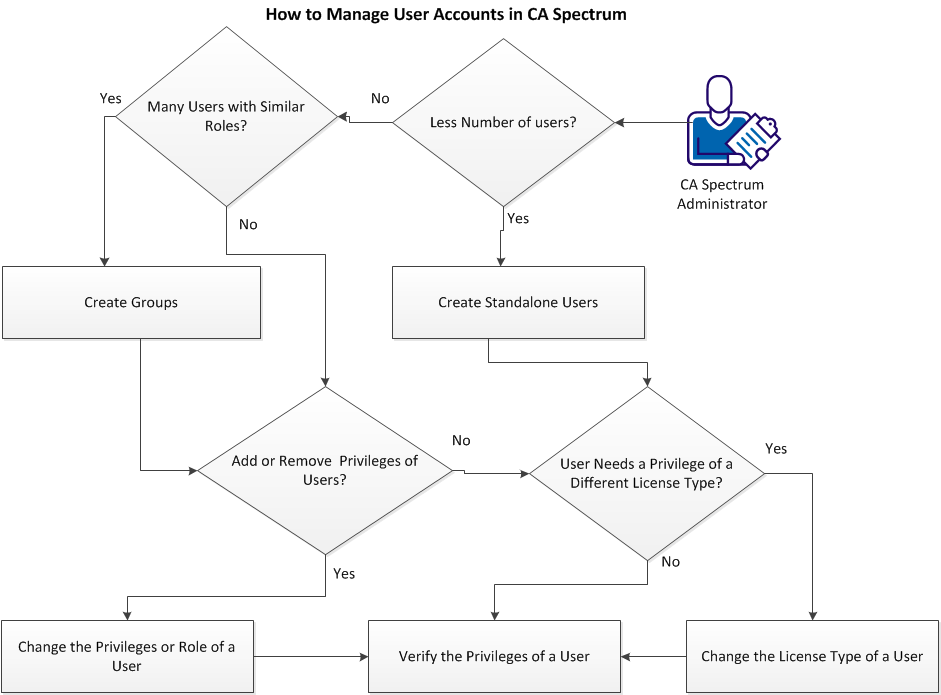
Managing the user accounts involves the following tasks:
|
Copyright © 2014 CA.
All rights reserved.
|
|