

As a CA Spectrum administrator, you are responsible for discovering all of the devices in a network. Your goal is to create a CA Spectrum landscape. A landscape is all the data that is specific to any one virtual network machine (VNM) in a single network. The term also identifies the network domain that is managed by a single SpectroSERVER. In OneClick console, a landscape is the network view of one SpectroSERVER. CA Spectrum gathers the MAC address, IP address, and other important information about the devices in your landscape when you discover them. Discovery helps you perform the following tasks:
After devices are discovered in a network, CA Spectrum models them in real time on the OneClick console, a web client application to view and manage network devices. The real-time modeling of devices gives you a full view of a network, and lets you track conditions within the computing infrastructure.
The following diagram shows how to discover devices in your network so that you can monitor and manage them:
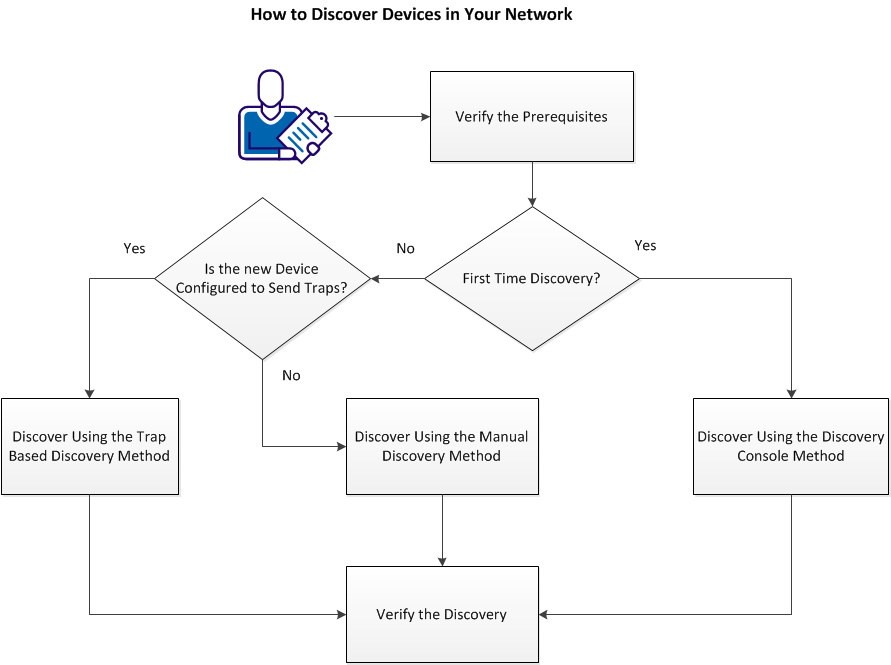
Running discovery the devices involves the following tasks:
|
Copyright © 2013 CA.
All rights reserved.
|
|