

|
|
|
Registration Services stores managed users in containers under organizations where they are created in the LDAP directory. For example, user profiles may be stored in the container, ou =People, under an organization, such as ou=Sample Organization. When a user is added, Registration Services creates this container under the specified organization automatically (if the container doesn’t already exist).
The default containers is ou=People.
You can modify these container names to reflect your directory structure.
You can specify None. to add user profiles directly under the organization. For example:
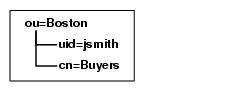
The user.properties file contains attribute/value pairs that identify where user profiles are stored.
Note: If you created an additional set(s) of properties files and mapped it to a Registration Space, modify the object properties files in the tables directory where you created the new set of properties files.
The following attribute/value pairs in the object properties files identify the containers:
ATTR_USER_CONTAINER_ID=ou
DEFAULT_NAME_USER_ID=People
OBJECTCLASS_OBJECTTYPE_CONTAINER_ID=objectclass,top,organizationalunit
To modify the name of the container for users, change the value that is paired with the variable. Do not change the variable. For example, to change the name of the Users container, modify "Users" as shown:
ATTR_USER_CONTAINER_ID=ou
DEFAULT_NAME_USER_ID=Employees
OBJECTCLASS_OBJECTTYPE_CONTAINER_ID=objectclass,top,organizationalunit
To specify None for users, change the value of the attribute identifier and the container name to None, as shown:
ATTR_USER_CONTAINER_ID=None
DEFAULT_NAME_USER_ID=None
OBJECTCLASS_OBJECTTYPE_CONTAINER_ID=objectclass,top,organizationalunit
| Copyright © 2011 CA. All rights reserved. | Email CA Technologies about this topic |