

|
|
|
In this example, there are two synchronized 6.x policy stores--A and B--containing the same objects with the same object IDs (OIDs) but different environments. The goal is to migrate 6.x policy data from A into B and keep the original B environment settings by doing the steps listed in the following figure using the .smdif and .cfg files. The .smdif files (A.smdif and B.smdif) back up the policy data. The configuration files (A.cfg and B.cfg) expedite incremental updates between the stores and preserve environment-specific properties such as Agent IP Addresses, redirection URLs, shared secrets, Agent names, logging settings, and .com extensions.
The following figure shows this environment.
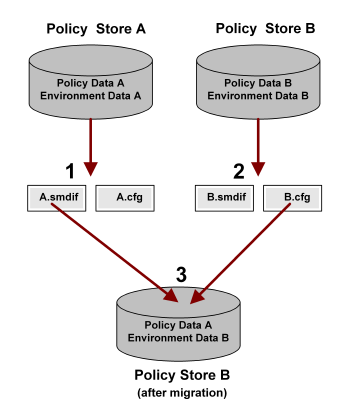
To migrate 6.x policy data from A into B and keep the original B environment settings:
smobjexport -oA.smdif -c -dSiteMinder -wpassword -v -t
Important! Before running a SiteMinder utility or executable on Windows Server 2008, open the command line window with Administrator permissions. Open the command line window this way, even if your account has Administrator privileges. For more information, see the release notes for your SiteMinder component.
smobjexport -oB.smdif -c -dSiteMinder -wpassword -v -t
smobjimport -iB.smdif -dSiteMinder -wpassword -v -f -t
To override existing data in policy store B with that of A, use the -f argument. You can override matching objects with this argument since you already backed up policy store B into B.smdif and B.cfg during the export.
Note: You can also migrate policy store data and the environment using the Scripting Interface for Perl. For more information, see the API Reference Guide for Perl.
smobjimport imports B.smdif and B.cfg into policy store B. The policy data in B.smdif, which contains policy data from A, overrides matching data in policy store B. The B environment settings stored in B.cfg overrides the settings stored in A.smdif. Thus, policy store B contains policy data from A, but the environment settings from B.
Note: If there are objects in A.smdif that do not have counterparts in B, then B.cfg will not override environment settings for non-matching objects.
| Copyright © 2011 CA. All rights reserved. | Email CA Technologies about this topic |