

|
|
|
In this example, there are two policy stores--one for test.com and another for production.com--containing different objects and environments. The goal is to migrate and override existing policy store data objects in production.com with those from test.com but keep production.com’s environment settings by following the steps listed in the following figure.
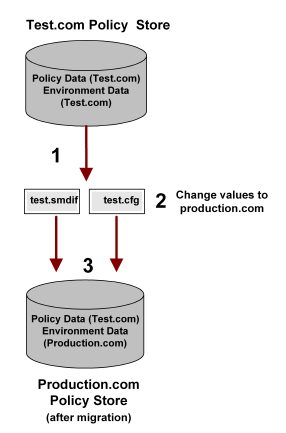
Note: The text in the .cfg file is separated by tabs and you can read it in any text editor or as a tab-delimited file in Microsoft Excel.
Note: These are just four sample values and you will need to edit other values based on your own environment.
Important! Make sure you only edit the Value entries and not the ones for Object OID, Object Class, Property Type.
|
Object OID |
Object Class |
Property Type |
Value |
|---|---|---|---|
|
Trusted Host OID |
TrustedHost |
IPAddr |
192.216.167.23 |
|
reg scheme OID |
SelfReg |
RegistrationURL |
http://test.url |
|
auth scheme OID |
Scheme |
Secret |
testpassword |
|
agent OID |
Agent |
Name |
testagent |
The Object OID column is represented only by the OID variable since OIDs such as the following are too long to fit in the above table:
Trusted Host OID = 0d-6dc75be0-1935-11d3-95cc-00c04f7468ef
|
Object OID |
Object Class |
Property Type |
Value |
|---|---|---|---|
|
Trusted Host OID |
TrustedHost |
IPAddr |
192.216.167.24 |
|
reg scheme OID |
SelfReg |
RegistrationURL |
http://production.url.com |
|
auth scheme OID |
Scheme |
Secret |
productionpassword |
|
agent OID |
Agent |
Name |
productionagent |
smobjimport -itest.smdif -dSiteMinder -wpassword -v -f -t
Important! Before running a SiteMinder utility or executable on Windows Server 2008, open the command line window with Administrator permissions. Open the command line window this way, even if your account has Administrator privileges. For more information, see the release notes for your SiteMinder component.
Note: To override existing data and matching objects in the Production.com policy store with that of Test.com, use the -f argument.
smobjexport and smobjimport let you export or import an entire policy store or an individual domain.
Note: For more information about exporting or importing individual objects on a smaller scale, see the API Reference Guide for Perl.
| Copyright © 2011 CA. All rights reserved. | Email CA Technologies about this topic |