

|
|
|
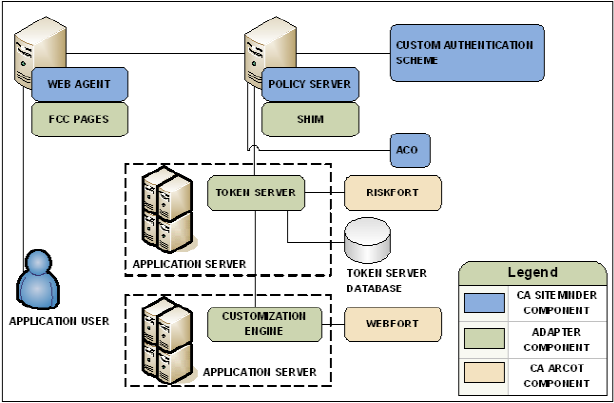
The simplest deployment includes integrating the Adapter and all related components with SiteMinder.
The Adapter guides users through the authentication (CA Arcot WebFort) and risk evaluation (CA Arcot RiskFort) processes to apply a risk score during authentication.
To deploy Arcot authentication and risk analysis
Note: For more information, see the respective CA Arcot installation and deployment guide.
Note: For more information about installing and configuring the Adapter and all related components, see the CA Arcot Adapter for CA SiteMinder Installation and Configuration Guide.
Note: For more information about the required custom authentication scheme and ACO settings, see the CA Arcot Adapter for CA SiteMinder Installation and Configuration Guide.
The following diagram illustrates this deployment scenario:
| Copyright © 2011 CA. All rights reserved. | Email CA Technologies about this topic |