

A Certificate Revocation List (CRL) is issued by a Certificate Authority to its subscribers. The list contains serial numbers of certificates that are invalid or have been revoked. When a request to access a server is received, the server allows or denies access based on the CRL.
CA SiteMinder® Federation Standalone can leverage CRLs for its certificate functions. For CA SiteMinder® Federation Standalone to use a CRL, the certificate data store must point to a current CRL. If CA SiteMinder® Federation Standalone tries using a revoked partner certificate, you see an error message. For legacy federation, the error message is in the SAML assertion. The message indicates that authentication failed.
CA SiteMinder® Federation Standalone supports the following CRL features:
CA SiteMinder® Federation Standalone stores CRLs in the certificate data store. File-based CRLs must be in Base64 or binary encoding. LDAP CRLs must be in binary encoding. Additionally, LDAP CRLs must include CRL data in one of the following attributes:
When a Certificate Authority publishes an LDAP CRL, it must return the CRL data in binary format, in accordance with RFC4522 and RFC4523. Otherwise, CA SiteMinder® Federation Standalone cannot use it.
CA SiteMinder® Federation Standalone does not validate an SSL server certificate against a CRL. The web server where CA SiteMinder® Federation Standalone is installed manages the SSL server certificate.
You are not required to have a CRL for each root CA in the system. If there is no CRL for the root CA, CA SiteMinder® Federation Standalone assumes that all certificates signed by that CA are trusted certificates.
The following figure shows the procedures for managing CRLs.
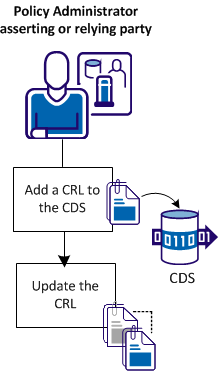
The CRL configuration steps are as follows:
|
Copyright © 2013 CA.
All rights reserved.
|
|