

Agent for Windows Authentication Guide › Introduction to the Federation Agent for Windows Authentication › Federation Agent for Windows Use Case
Federation Agent for Windows Use Case
A delegated authentication use case shows how the Federation Agent works. A department store wants to grant single sign-on access to employees of their supplier, ForwardInc Sporting Goods, to provide them with special discounts. The department store and ForwardInc Sporting Goods have an established federated partnership. Employees of ForwardInc Sporting Goods typically log in to their account at work with their domain user name and password. When an employee visits the department store web site, the employee is granted access through one of the IWA protocols without being challenged.
The following graphic shows the role of the Federation Agent in a federated partnership:
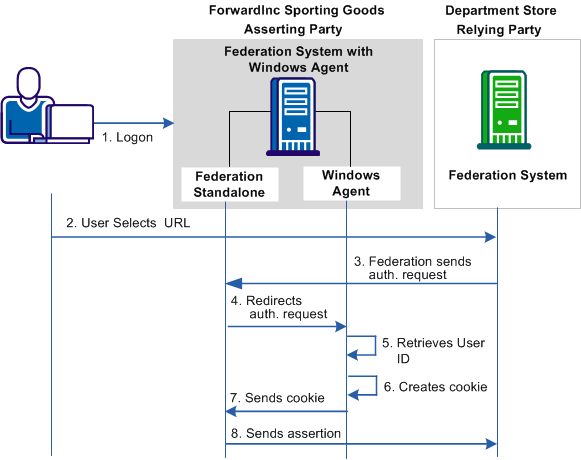
The transaction as shown in the diagram is as follows:
- The user logs in to the web access management (WAM) system at ForwardInc Sporting Goods.
- The user opens a browser and navigates to the URL for the department store at the relying party.
Note: The browser cannot be on the same system where CA SiteMinder® Federation Standalone and the Windows Agent are installed.
- The relying party sends an authentication request to the asserting party. The federation system at the asserting party determines that delegated authentication is configured for this partnership.
- The federation system sends a request to the Windows Agent to validate the security context for this user.
- The Windows Agent extracts the validated information from the request.
- The Windows Agent places the user information into an open format cookie.
- The Windows Agent sends the cookie to the federation system.
- The federation system at the asserting party extracts the user information, places it in an assertion, and sends the assertion to the relying party.
The user is granted access to the department store web site without having to log in.
Copyright © 2013 CA.
All rights reserved.
|
|