

An authentication context template defines the specific SAML 2.0 AuthnContext URIs that a partner supports. Each URI identifies a particular context class. You can select a template on a per-partnership basis; multiple partnerships can use a single template.
In addition to the common function, a template has the following distinct functions at each partner:
At the IdP
You only require a template at the IdP under the following conditions:
The template maps URIs to the protection levels associated with a user session. The protection levels indicate the strength of the authentication scheme at the policy server, from 1 through 1000, with 1000 being the strongest. An administrator assigns protection levels when configuring an authentication scheme that authenticates a user and establishes a user session.
Note: Protection levels are only available with the SiteMinder Connector.
At the SP
An authentication context template at the SP is required to generate an authentication context that is sent in the authentication request. After the SP generates the request, it sends it to the IdP. The template is also required for the SP to validate that the received assertion satisfies the authentication context requested.
Before proceeding with configuration, verify that you meet the following minimum knowledge requirements:
The following figure shows the configuration process for each partner. CA SiteMinder® Federation does not have to be installed at each site.
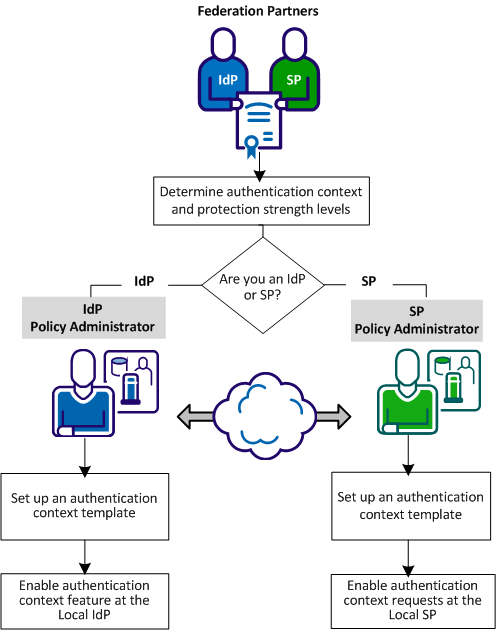
Complete the following steps to configure authentication context processing:
The SP can require specific authentication contexts and strength levels before it permits access to a requested resource. Based on the sensitivity of the resources at the SP, the SP has to have confidence in the assertion it receives from the IdP.
The administrators at the IdP and SP have to establish guidelines for supported authentication contexts and the relative strength of each authentication context URI. The order of the URIs at the IdP together with the associated strength levels affects how the IdP responds to the SP.
For example, an SP requests an authentication context for an X.509 certificate and a comparison value of exact. The IdP has to authenticate the requesting user at a suitable strength level and satisfy the comparison value during the evaluation of the authentication context.
Set up an authentication context template to implement authentication context processing. This procedure is the same for an Identity Provider or Service Provider.
Follow these steps:
The View Authentication Context Templates window opens.
The template wizard opens at the first step.
Consider the following information when assigning protection levels:
Read more about protection level assignments.
The template is complete.
A federation deployment that uses the SiteMinder Connector for delegated authentication requires that you associate protection levels with each authentication URI. The protection level indicates a level of assurance in the strength of the authentication. Each protection level is mapped to a URI strength level. Ensure that the protection level assignments reflect the protection levels of the CA SiteMinder® authentication scheme.
Note: In a deployment with the SiteMinder Connector, the protection level overrides the level specified in the connector authentication scheme.
When you assign protection levels in the Administrative UI, specify a range. Specify the maximum level for each URI in the list. The minimum protection level is automatically calculated based on the maximum level for the subsequent URI in the list. The range has to cover the configured CA SiteMinder® authentication schemes. For example, if CA SiteMinder® configures an X.509 authentication scheme at a protection level of 20, ensure that the range specified for CA SiteMinder® Federation Standalone includes 20.
Protection Level Example
|
SiteMinder Authentication Scheme |
Protection Level |
|---|---|
|
urn:oasis:names:tc:SAML:2.0:ac:classes:X509 |
20 |
|
urn:oasis:names:tc:SAML:2.0:ac:classes:MobileTwoFactorContract |
15 |
|
urn:oasis:names:tc:SAML:2.0:ac:classes:InternetProtocol |
10 |
|
urn:oasis:names:tc:SAML:2.0:ac:classes:Password |
5 |
Each protection level is mapped to a URI strength level. The table shows the original list of URIs:
|
URI |
Protection Level Max |
URI Strength |
|---|---|---|
|
urn:oasis:names:tc:SAML:2.0:ac:classes:X509 |
1000 |
4 |
|
urn:oasis:names:tc:SAML:2.0:ac:classes:MobileTwoFactorContract |
15 |
3 |
|
urn:oasis:names:tc:SAML:2.0:ac:classes:InternetProtocol |
10 |
2 |
|
urn:oasis:names:tc:SAML:2.0:ac:classes:Password |
5 |
1 |
The ranges cover the protection level of the CA SiteMinder® authentication scheme. For example:
If you group several of the URIs, the grouping enables URIs with different protection levels to have the same URI strength. The following modified table shows the groupings.
|
URI |
Protection Level Max |
URI Strength |
|
|---|---|---|---|
|
urn:oasis:names:tc:SAML:2.0:ac:classes:X509 |
1000 |
3 |
|
|
urn:oasis:names:tc:SAML:2.0:ac:classes:MobileTwoFactorContract |
800 |
3 |
|
|
urn:oasis:names:tc:SAML:2.0:ac:classes:InternetProtocol |
700 |
2 |
|
|
urn:oasis:names:tc:SAML:2.0:ac:classes:Password |
200 |
1 |
|
The range of strength levels reflects the total number of groups in the list. For example, if there are three groups, the strength level ranges from 1 to the total number groups, which is 3.
|
Copyright © 2014 CA.
All rights reserved.
|
|