

The Federation Agent for Windows Authentication lets users on systems implementing one of the Integrated Windows Authentication (IWA) protocols to federate with business partners.
When a user requests access to a protected resource, the federation system uses the log-on identity information from a third-party web access management (WAM) system. This process of using the third-party WAM is known as delegated authentication. The federation system redirects the request to the Federation Agent. The Agent verifies the user identity, creates an open format cookie, and passes the cookie to the federation system. The system then generates a SAML assertion and passes it to the relying party.
Note: See the Federation Standalone Guide for information about delegated authentication.
IWA supports the Windows NT LAN Manager (NTLM) and Kerberos encryption protocols. On a Windows system, the Federation Agent can use NTLM or Kerberos. On a UNIX system, the Federation Agent can only use Kerberos.
The Federation Agent is installed on the same Windows or UNIX system where CA SiteMinder® Federation Standalone is installed. The following restrictions apply:
The administrator must know about the Integrated Windows Authentication protocols—NTLM and Kerberos. In addition, the reader must be familiar with federation concepts and CA SiteMinder® Federation Standalone administration.
A delegated authentication use case shows how the Federation Agent works. A department store wants to grant single sign-on access to employees of their supplier, ForwardInc Sporting Goods, to provide them with special discounts.
The department store and ForwardInc Sporting Goods have an established federated partnership. Employees of ForwardInc Sporting Goods typically log in to their account at work with their domain user name and password. When an employee visits the department store web site, the employee is granted access through one of the IWA protocols without being challenged.
The following graphic shows the role of the Federation Agent in a federated partnership:
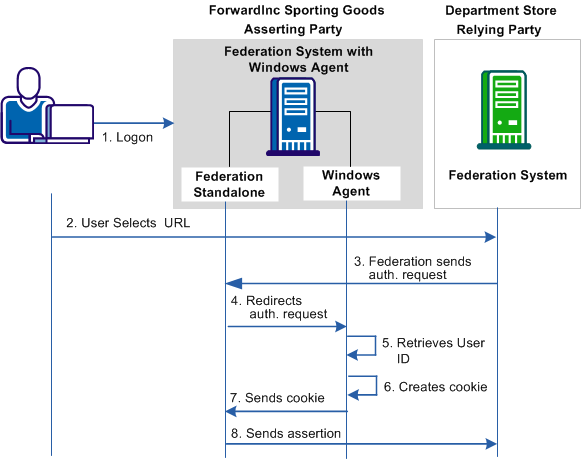
The transaction as shown in the diagram is as follows:
Note: The browser cannot be on the same system where the federation system with the Windows Agent is installed.
The user is granted access to the department store web site without having to log in.
This guide uses the following terms related to Windows authentication:
The authentication server is the part of the key distribution center (KDC) that replies to the initial authentication request from the client. After the user is authenticated, the authentication server issues a ticket granting ticket (TGT). Using the TGT the user can obtain other Kerberos service tickets without having to re-enter a password.
Integrated Windows Authentication provides Windows client application with authentication information from a user's log-on credentials. If the authentication exchange fails to identify the user, the browser prompts the user for a Windows ID and password. Integrated Windows Authentication is not a standard or an authentication protocol; it uses either the Kerberos or NTLM protocols.
The Kerberos authentication protocol lets users communicate safely over any network. Kerberos is also a suite of free software published by Massachusetts Institute of Technology (MIT) that implements this protocol. Kerberos uses tickets for verifying user identity. Kerberos protocol messages are protected against eavesdropping and replay attacks. Kerberos builds on symmetric key cryptography and requires a trusted third party, the key distribution center.
A key distribution center is part of a cryptographic system, which includes an authentication server and a ticket granting server. The purpose of a key distribution center is to reduce the risks inherent in exchanging keys. Key distribution centers often operate in systems where some users can have permission to use certain services at some times and not at others.
A keytab is a file containing pairs of Kerberos principals and encrypted keys derived from the Kerberos password. This file is used for logging into the key distribution center.
NTLM is an authentication protocol used in various Microsoft network implementations for single sign-on. NTLM employs a challenge-response mechanism for authentication, in which clients prove their identities without sending a password to the server. NTLM consists of three messages, commonly referred to as Type 1 (negotiation), Type 2 (challenge) and Type 3 (authentication). The responses in the Type 3 message are the most critical, because they prove to the server that the client user knows the account password.
The ticket granting ticket (TGT) is a small, encrypted identification file with a limited validity period. After authentication, this file is granted to a user for data traffic protection by the KDC authentication server. The ticket granting ticket file contains the session key, the expiration date of the ticket, and the user IP address.
The ticket granting server is the KDC component that distributes service tickets to clients with a valid ticket granting ticket (TGT). The ticket granting server is like an application server that issues tickets as a service.
NTLM includes various authentication and session security protocols. NTML is based on a challenge-response model, consisting of three types of messages that are exchanged in the following order:
The following graphic shows how the federation system with the Federation Agent use the NTLM protocol:
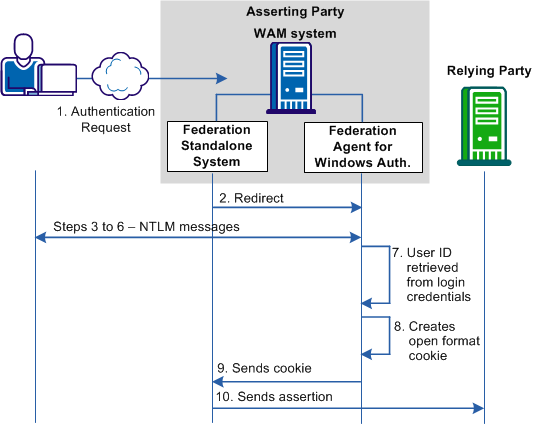
The following process references annotations in the preceding diagram:
The following illustration shows how the federation system with the Federation Agent use the Kerberos protocol:
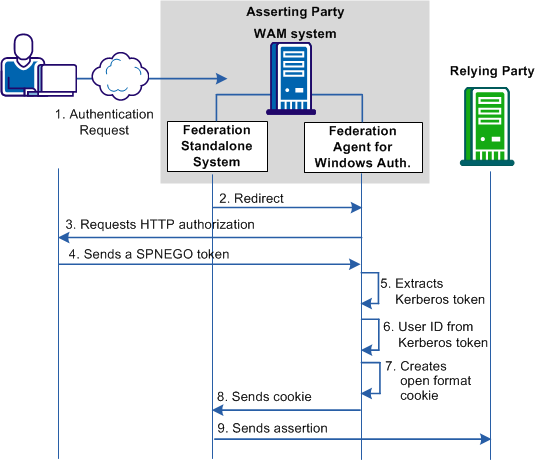
The following process references annotations in the preceding diagram:
The federation system recognizes that this request is a delegated authentication request.
|
Copyright © 2014 CA.
All rights reserved.
|
|