

In a federated network, it is not uncommon for the relying party to establish accounts for users federating from different asserting parties. Dynamic provisioning lets CA SiteMinder® Federation Standalone support the process of creating client accounts with the necessary account rights and access privileges for accessing data and applications.
CA SiteMinder® Federation Standalone offers two methods to support provisioning:
Each method is described in the following sections.
You can use local account linking to implement provisioning only for SAML 2.0 deployments. Provisioning occurs by linking a user account at the IdP to an account at the SP.
The local account linking process is as follows:
The persistent identifier is a randomly generated ID. The IdP uses this identifier as the value of the Name ID attribute and places it in the assertion. The IdP then returns the assertion to the SP.
Note: The Allow/Create feature must be configured at both sites. If the IdP is not configured to create an identifier, regardless of whether the Allow/Create attribute is in the AuthnRequest message, assertion generation fails.
Note: Local account linking requires the use of the Allow IdP to create User Identifier feature; however, the AllowCreate feature is not exclusively for local account linking. You can select this feature without wanting to implement local account linking.
Implementing the local account linking method of provisioning requires configuration at the Identity Provider and Service Provider.
To configure local account linking at the Identity Provider
In these fields is where you determine the attribute used for the NameID in the assertion.
Note: Click Help for a description of fields, controls, and their respective requirements.
Configuration at the Identity Provider is complete.
To configure local account linking at the Service Provider
The Search Specification value is the attribute CA SiteMinder® Federation Standalone uses to look up the user and to store the persistent identifier sent from the IdP. For example, if buyerID should store the value of the NameID, set the string to buyerID=%s.
Selecting this option automatically configures the User Not Found URL to the linkaccount.jsp page with a method of POST. This URL is where CA SiteMinder® Federation Standalone redirects the user after the first failed authentication attempt.
Remote provisioning employs a third-party provisioning application to create a new user account. The application then passes the necessary information back to the CA SiteMinder® Federation Standalone system. The federation system uses the data to create a user credential.
The following figure shows how a remote provisioning setup can be configured.
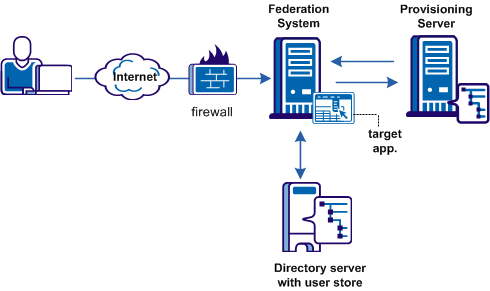
The high-level provisioning process is as follows:
The provisioning application can consume the open-format cookie using the CA SiteMinder® Federation Standalone Java or .NET SDK.
Note: The provisioning application must know the URI of the assertion consumer service at the relying party. For example, the SAML 2.0 URI for CA SiteMinder® as the relying party is https://sp_server:port/affwebservices/public/saml2assertionconsumer.
The redirect mode that you select for the target application determines the data delivery method to the target application.
To accomplish remote provisioning, the federation system redirects the browser with the assertion data to the provisioning application.
The federation system can pass the assertion data using one of the following methods:
Delivers SAML assertion information in a legacy cookie generated by the federation system. The cookie contains a login ID based on the assertion data. If a legacy cookie is used, then the CA SiteMinder® Federation Standalone Java SDK must be installed on the system with the provisioning application so that the provisioning application can read the legacy cookie.
Note: If you use the legacy cookie, the federation system and the remote provisioning system must be in the same domain.
Delivers SAML assertion information in an open format cookie. The cookie contains a login ID based on the assertion data.
Note: If you use the open-format cookie, the federation system and the remote provisioning system must be in the same domain.
The cookie can be created in one of two ways:
If you select one of the FIPS algorithms (AES algorithms), you are required to use a CA SiteMinder® Federation Standalone SDK to generate the cookie. If you are planning to use the .NET SDK, you are required to use the AES128/CBC/PKCS5Padding encryption algorithm. If the provisioning application uses .NET then the CA SiteMinder® Federation Standalone .NET SDK can be installed on the provisioning server and used to read the open format cookie.
The provisioning application must use the same language as the SDK that it is using to create a cookie. If you are using the CA SiteMinder® Federation Standalone Java SDK, the application must be in Java. If you are using the .NET SDK, the application must support .NET.
To create an open format cookie without using a CA SiteMinder® Federation Standalone SDK, use any programming language to create the cookie. Review the details about the contents of the open format cookie.
The language you use to write the cookie must support UTF-8 encoding and any of the PBE encryption algorithms that CA SiteMinder® Federation Standalone uses for password-based encryptions, which include:
The provisioning application cannot read the open-format cookie without an SDK if you select FIPS-compatible (AES) algorithm to encrypt the cookie.
You must also ensure that the open format cookie gets set in the user's browser.
Note: If you installed CA SiteMinder® Federation Standalone in FIPS-only mode, only the open format cookie is available.
The Open-format Cookie Post is similar to the open-format cookie, but it sends the data in the form of an HTTP-POST request. Use this option if you are concerned that data can be lost due to the cookie data limitations.
If proxy mode is used, this information can also be passed as HTTP headers. If you use HTTP headers, the CA SiteMinder® Federation Standalone system and the remote provisioning system can be in different domains.
The delivery option is configurable in the Application Integration step of the Partnership wizard.
After the user is redirected to the provisioning application, CA SiteMinder® Federation Standalone no longer has control over the process. If provisioning a user account is a time-consuming process, the provisioning application is responsible for handling this situation, for example, by sending a message to the user that provisioning is in process. This information lets the user know not to keep trying to log in before an user account is available.
Configuring remote provisioning requires that you determine a delivery option of the assertion data and supply the URL of the provisioning server.
In addition to configuring remote provisioning, you can select the Allow IdP to create User Identifier option. This option enables the IdP to create a persistent identifier if no identifier for the user exists. This Allow/Create feature is not exclusively for provisioning using local account linking, though it is required for the local method.
You can enable the Allow/Create feature together with remote provisioning, if you want the IdP to generate a user identifier that is sent with other attributes to the remote provisioning server. The application at the remote provisioning server determines how it uses the generated identifier. The application can perform local account linking; however, this is not CA SiteMinder® Federation Standalone local account linking.
To configure remote provisioning
Note: Click Help for a description of fields, controls, and their respective requirements.
These settings include the name of the cookie, the algorithm that encrypts the cookie and the encryption password. Optionally, you can enable an HMAC function to verify the integrity of the cookie.
You have completed remote provisioning configuration.
|
Copyright © 2014 CA.
All rights reserved.
|
|