

|
|
|
ForwardInc is a financial markets data provider. ForwardInc helps financial institutions to use its systems to gather live market and news data to make critical decisions. ForwardInc uses SharePoint 2010 as a web and document management system. ForwardInc requires users (employees, customers, and partners) to access its SharePoint applications.
ForwardInc's SharePoint Administrator created a site to enable customers and partners to access and download daily reports generated by ForwardInc Market Analysts. The SharePoint Administrator must configure alternate access mapping to control the URL address that displays in a web browser.
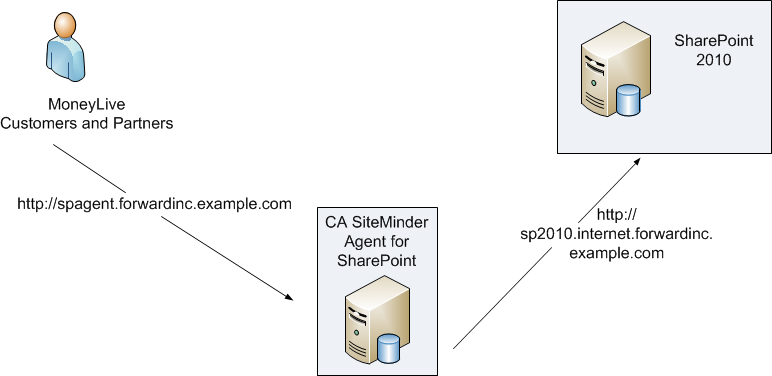
In the illustration, ForwardInc customers and partners enter a public URL (http://spagent.forwardinc.example.com) in their browsers to access the ForwardInc SharePoint site. The URL (http://spagent.forwardinc.example.com) is what appears in the links on the pages. The request first goes to the Agent for SharePoint, which redirects all authenticated requests to SharePoint, which then sends the user to the SharePoint site.
Follow these steps:
Note: This scenario assumes that the SharePoint Administrator has created a web application with the Default zone http://sp2010.default.forwardinc.example.com and the internet zone http://sp2010.internet.forwardinc.example.com.
| Copyright © 2012 CA. All rights reserved. |
|