Agent for SharePoint Guide › Advanced Options › How to Configure Multiple User Directories
How to Configure Multiple User Directories
If the users who access your protected SharePoint web applications are stored in more than one user directory, configure multiple user directories.
Important! Multiple directory connections are supported with Policy Server version 12.5 and above only.
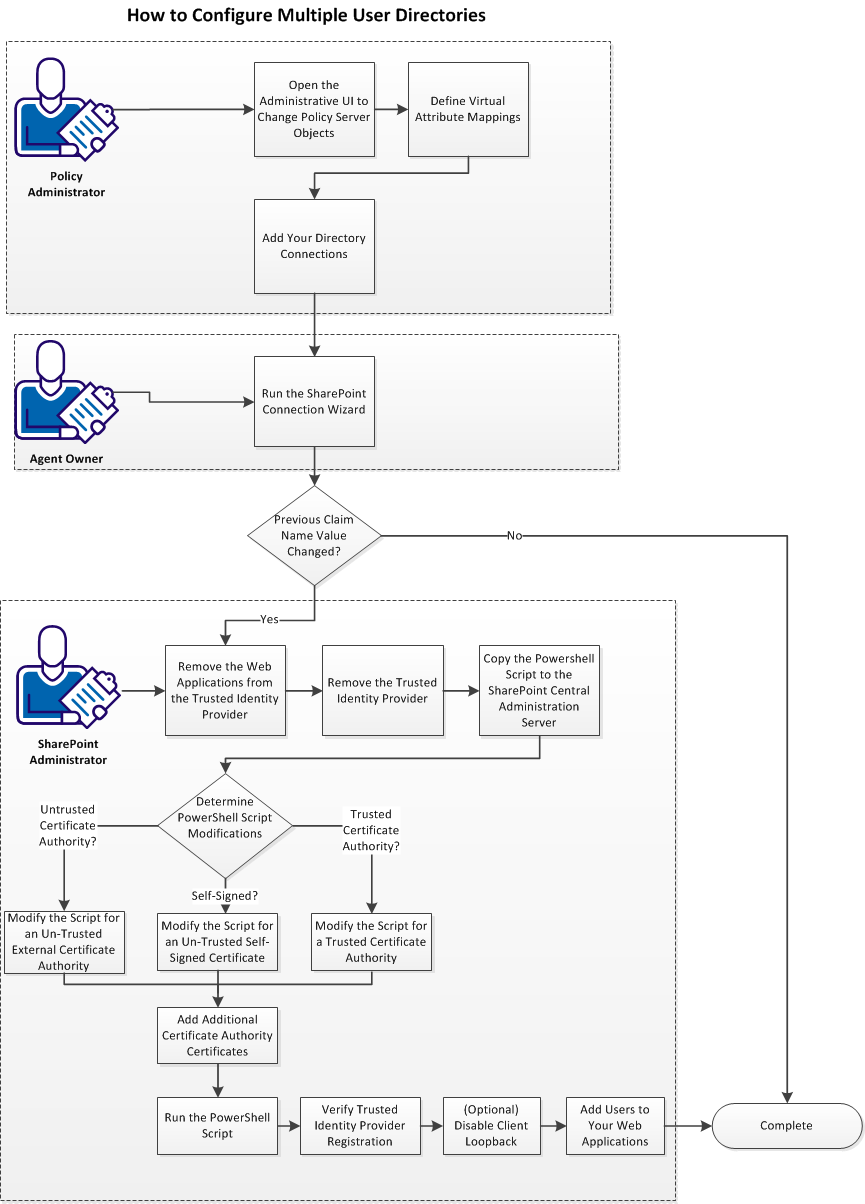
Follow these steps:
- Open the Administrative UI to change Policy Server objects.
- Define virtual attribute mappings.
- Add directory connections.
- Run the SharePoint connection wizard.
- If you changed the value of an existing Claim Name (attribute), do the following steps:
- Remove the web applications from the trusted identity provider.
- Remove the trusted identity provider.
- Copy the PowerShell script to the SharePoint central administration server.
- Determine the PowerShell script modifications (pick one of the following procedures):
- Add certificate authority certificates.
- Run the PowerShell script.
- Verify the trusted identity provider registration.
- (Optional) Disable client loopback.
- Add users to your web applications.
|
Copyright © 2012 CA.
All rights reserved.
|
|

