Agent for SharePoint Guide › Protect the SharePoint Shared Services Provider (SSP) and My Sites with FBA › How to Protect the SharePoint SSP with SiteMinder r12.0 SP2 and FBA › Add the SiteMinder ISAPI Filter to the IIS 6.0 Web Site for your Default SSP Site
Add the SiteMinder ISAPI Filter to the IIS 6.0 Web Site for your Default SSP Site
The following SharePoint resources need a SiteMinder ISAPI filter installed on the corresponding virtual web site on the IIS web server:
- SharePoint Central Administration site.
- Any SharePoint web sites protected by SiteMinder.
- The Default and Extended SSP sites (optional).
- My Site web sites (optional).
To add the SiteMinder ISAPI filter to your SharePoint resources on an IIS 6.0 web server
- Click Start, Programs, Administrative Tools, Internet Information Services (IIS) Manager.
The Internet Information Services (IIS) Manager window opens.
- In the left pane, expand your web server, and expand Web Sites folder.
A list of web sites appears.
- Right-click the SharePoint Central Administration v3 web site, and then select Properties.
The Properties dialog appears.
- Add the ISAPI filter by doing the following tasks:
- Click the Home Directory tab, and then click Configuration.
The Application Configuration dialog appears.
- Click Insert.
The Add/Edit Application Mapping dialog appears.
- Click Browse, and then locate the following file:
web_agent_home\bin\ISAPI6WebAgent.dll
- Click Open.
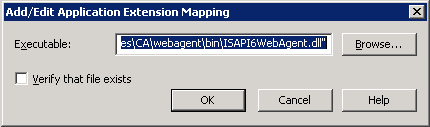
The ISAPI6WebAgent.dll file appears in the Executable field of the Add/Edit Application Mapping dialog.
- Clear the Verify that file exists check box as shown in the following illustration:
- Click OK.
The Add/Edit Application Mapping dialog closes and the ISAPI6WebAgent.dll file appears in the Wildcard application maps (order of implementation) list.
- Click Move Up until the ISAPI6WebAgent.dll file is at the top of the list.
- Click OK.
The Inheritance Overrides dialog appears with a list of child nodes.
- Click Select All, and then Click OK.
The Inheritance Overrides dialog and the Application Configuration dialogs close.
- Click OK.
The Properties dialog closes. The SiteMinder ISAPI filter is added to the corresponding SharePoint web site on your IIS 6.0 web server.
- Choose one of the following tasks:
- Right-click the web site folder of another SharePoint resource you want to protect, and then repeat Steps 4a through 4j, until all of the the following SharePoint sites you want to protect have the ISAPI filter installed.
- Default SSP web site.
- Extended SSP web site.
- My Site web site.
- Stop after you have added the ISAPI filter to all the previous types of SharePoint sites.
-
|
Copyright © 2010 CA.
All rights reserved.
|
|

