SiteMinder Agent for SAP Web AS Guide › Configure SAP Web Application Server 7.0 and the Agent for SAP Web AS to Work Together › How to Confirm your SiteMinder Protection › Configure the Enterprise Portal Authentication Scheme
Configure the Enterprise Portal Authentication Scheme
To integrate the SiteMinder Login module with the Enterprise Portal, a SiteMinder AuthScheme.
Follow these steps:
- Make sure the SiteMinder Agent for SAP Web AS solution is deployed on the Web AS J2EE Engine, as described in the following sections of this guide:
- Create a backup of the existing authschemes.xml file, as follows:
- In the Web AS J2EE Engine Visual Administrator console, select the Configuration Adapter service under the Server node.
- In the Display Configuration tab, scroll to the following:
cluster_data, server, persistent, com.sap.security.core.ume.service, authschemes.xml
- Double-click authschemes.xml, and click the Download button to keep a copy of the file.
- Edit the authschemes.xml file:
- Click the Edit button to switch to the edit mode. At the prompt, click Yes.
- Click the Write button (pencil icon) to open authschemes.xml.
- Create a new authscheme by copying the elements of the existing uidpwdlogon authscheme. Rename the new authscheme toSiteMinder.
See the following example:
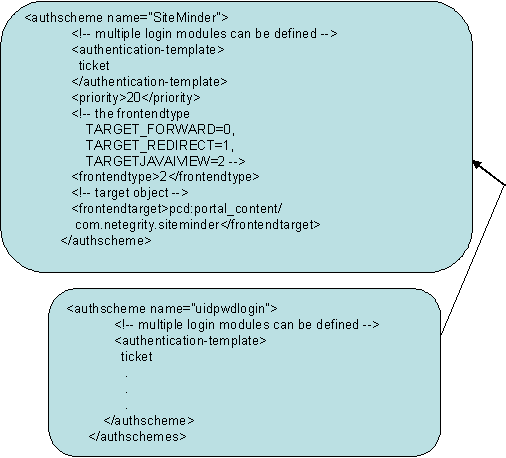
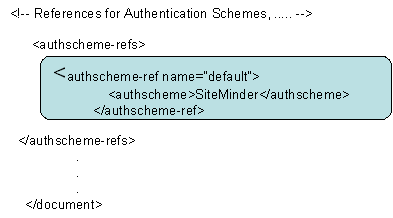
- Modify frontendtarget of the SiteMinder authscheme to point to a URL iView, which refers to an error page. This page is presented to the user if authentication is unsuccessful or if the authentication stack fails. For details on creating a URL iView, see the SAP documentation.
Note: The value of frontendtarget given here is just for reference. Change it for each user environment. Also if the frontendtarget value given here is an iView, the allow the Everyone group Read access to it.
- Modify the default authscheme-ref so that it points to the SiteMinder authscheme.
- Click OK to save changes to the authschemes.xml file.
- Navigate to Server, Services, and select Security Provider.
- Click the Runtime tab and the Select Policy Configurations tab.
- (Optional) Remove other Login Modules (BasicPasswordLoginModule, EvaluateTicketLoginModule) from the ticket authentication template stack.
- Add the following modules to the ticket authentication template stack, in the following order and after the EvaluateTicketLoginModule, if present:
- SiteMinderLoginModule
- CreateTicketLoginModule
- Do one of the following tasks:
- Restart the Web AS J2EE engine for the changes to take effect.
|
Copyright © 2012 CA.
All rights reserved.
|
|

