

Configuring and Using Diagnostic Tools › How to Clean Up Data with the CA SOI Toolbox
How to Clean Up Data with the CA SOI Toolbox
As an administrator, you maintain the CA SOI database. You ensure that your database runs efficiently and that the data it maintains is the data you need. Using the CA SOI Toolbox command utility, you can clean up the following data types:
- Imported data from a specific connector
- History and security data
- All the data that is maintained in a CA SOI instance
You may want to clean up data for the following reasons:
- You want to clean up data from a connector in your CA SOI instance that was not written correctly. Thus, the connector provides flawed data (for example, CIs using incorrect naming conventions) that does not correlate with data provided from other connectors.
- You want to maintain a more efficient CA SOI instance that does not maintain history that you do not need and consumes needed disk space. Thus, you clean up the history data that is no longer of use.
- Clear all security data for all users and user groups in a CA SOI instance.
- You want to restart a CA SOI instance from a clean state and clear all its data. This option is useful during the product implementation phase when incorrect connector configurations can cause database pollution.
Note: This scenario provides examples of commands for removing connector and history data. For detailed definitions of every parameter available, see the command help that comes with the toolbox.
Use this scenario to guide you through the process:
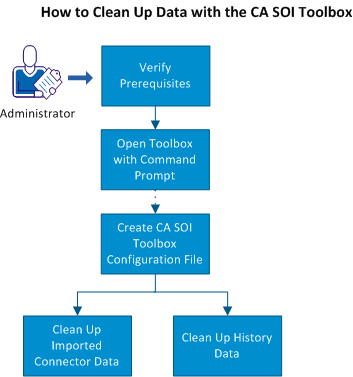
- Verify the prerequisites.
- Determine the database sizing.
- Open the toolbox with a command prompt.
- (Optional) Create a CA SOI Toolbox configuration file.
- Do any of the following:
Copyright © 2013 CA.
All rights reserved.
|
|