

You can view the revision information for the Service Discovery policy set, which informs you of the number of revisions to the policy set, who modified it, and when.
Follow these steps:
The Service Discovery Policy Editor opens.
The policy revision information appears in the Details tab.
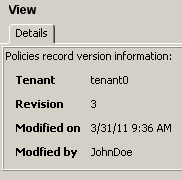
This field is for a future release of CA SOI.
Indicates the current revision number of the policy set. Performing a Redo using redo_rules.bat or a Save on the Service Discovery Policy Editor increases the revision number by one. Performing an Undo using undo_rules.bat decreases the revision number by one.
Indicates the last date and time when the policy set and revision number changed.
Indicates either a user ID or cmdLine if the last revision was performed using a command line operation.
|
Copyright © 2013 CA.
All rights reserved.
|
|