

CA SOI requires several ports open between its components. You can change the default CA SOI and CA Catalyst ports during installation. The default ports that are required for communication between CA SOI components are pictured in the following graphic and listed in the following tables:
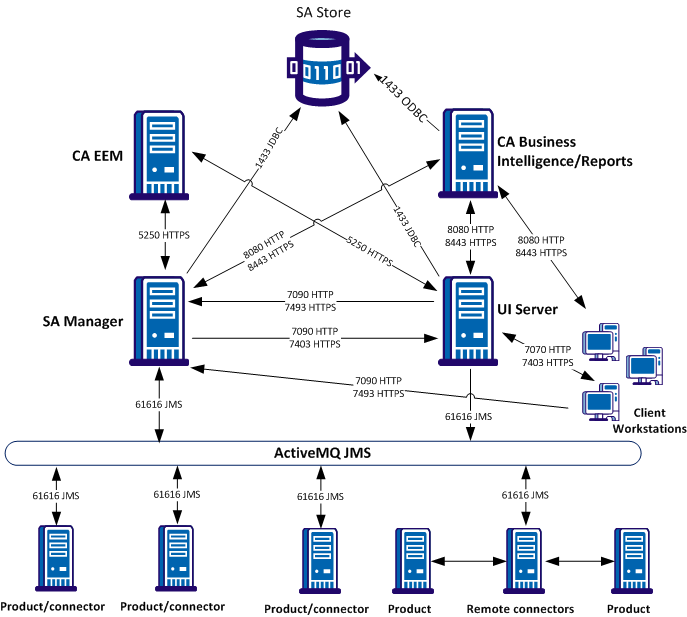
Ports Pictured:
Note: A value of RP (random port) in the first Port column designates a unidirectional connection. A unidirectional connection can use any port from the server of the source component to connect to the designated port on the destination component server.
|
Source |
Port |
Destination |
Port |
Protocol |
|---|---|---|---|---|
|
SA Manager |
RP |
UI Server |
7070 |
HTTP |
|
SA Manager |
RP |
UI Server |
7403 |
HTTPS |
|
UI Server |
RP |
SA Manager |
7090 |
HTTP |
|
UI Server |
RP |
SA Manager |
7493 |
HTTPS |
|
UI Server |
RP |
Connectors |
61616 |
JMS |
|
SA Manager/UI Server |
RP |
SA Store |
1433 |
JDBC |
|
BusinessObjects |
RP |
SA Store |
1433 |
ODBC |
|
Connectors |
RP |
UCF Broker (on SA Manager) |
8020 |
HTTP |
|
UCF Broker (on SA Manager) |
RP |
Connectors |
7878 |
HTTP |
|
Connectors |
61616 |
SA Manager/Active MQ Server |
61616 |
JMS |
|
SA Manager/UI Server |
RP |
CA EEM |
5250 |
HTTPS |
|
Client workstations |
RP |
UI Server |
7070 |
HTTP |
|
Client workstations |
RP |
UI Server |
7403 |
HTTPS |
|
Client workstations |
RP |
SA Manager |
7090 |
HTTP |
|
Client workstations |
RP |
SA Manager |
7493 |
HTTPS |
|
Client workstations |
RP |
BusinessObjects |
8080 |
HTTP |
|
Client workstations |
RP |
BusinessObjects |
8443 |
HTTPS |
Ports Not Pictured:
CA Business Intelligence
SA Manager
UI Server
Connectors
Client workstations
CA Event Integration (Event connector installations only)
Active Directory connections (optional)
CA EEM/BusinessObjects Active Directory LDAP port: 389
Note: For more information about configuring CA EEM to connect with an Active Directory, see the Administration Guide and the CA EEM documentation. For more information about configuring BusinessObjects to connect with an Active Directory, see the BusinessObjects documentation.
You can change some ports after installation if necessary. For more information about changing ports, see Communication Port Maintenance.
|
Copyright © 2013 CA.
All rights reserved.
|
|