

When you, as an administrator, require a functionality for an event policy that the Event Policy dialog does not support, you can manually refine event policy files. Examples of situations that require manual event policy customization are as follows:
Unless one of these or another unsupported use case occurs, always use the functionality provided in the Event Policy dialog to define and deploy event policies.
To manually refine event policy, you must edit or create the appropriate event policy files using the <Evaluate> policy operation and embedded Drools rules.
Use this scenario to guide you through the process:
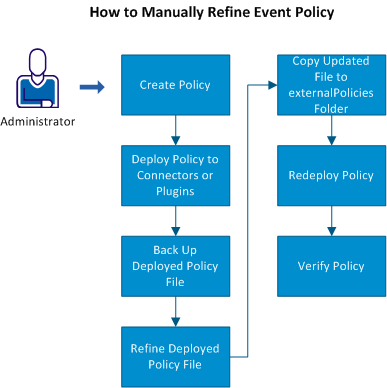
Note: You can create a custom event policy without first using the user interface, but the effort required and margin for error increases significantly.
The deployed policy file is named according to the policy file name of the deployed connector and the event policy name (for example, sampleconnector_policy.service crash.xml).
Rule evaluations and actions must adhere to the supported syntax for the Evaluate policy operation and the Drools language.
Note: Do not edit the similar file located at SOI_HOME\resources\EventManagement\Policies on the SA Manager. This file records the user interface policy selections. After you edit the deployed policy file, the SOI_HOME\resources\EventManagement\Policies file is out of date and obsolete.
Policies either created or refined manually must exist in this directory, so that the Event Policies dialog recognizes them as manually created or refined policies. The policy now appears under External Policies in the Events tab. Any time you edit a policy file and move the corresponding SA Manager record of that policy to the externalPolicies directory, it appears as an external policy in the user interface.
The updated policy redeploys.
|
Copyright © 2013 CA.
All rights reserved.
|
|