

Building a Custom Connector Using the Sample Connector › How to Build a Custom Connector › How to Set Up the Sample Connector in Eclipse IDE › Import Sample Connector Project
Import Sample Connector Project
You import the Sample connector project into Eclipse in a new workspace.
Follow these steps:
- Start Eclipse with a new workspace and Select File, Import.
The Import page opens.
- Expand General, select Existing Projects into Workspace, and click Next.
The Import Projects page opens.
- Choose Select root directory, click Browse, navigate to the SOI_HOME\SampleConnector directory, and click OK.
The SampleConnector project displays as selected in the Projects pane.
- Click Finish.
The Sample connector project is imported.
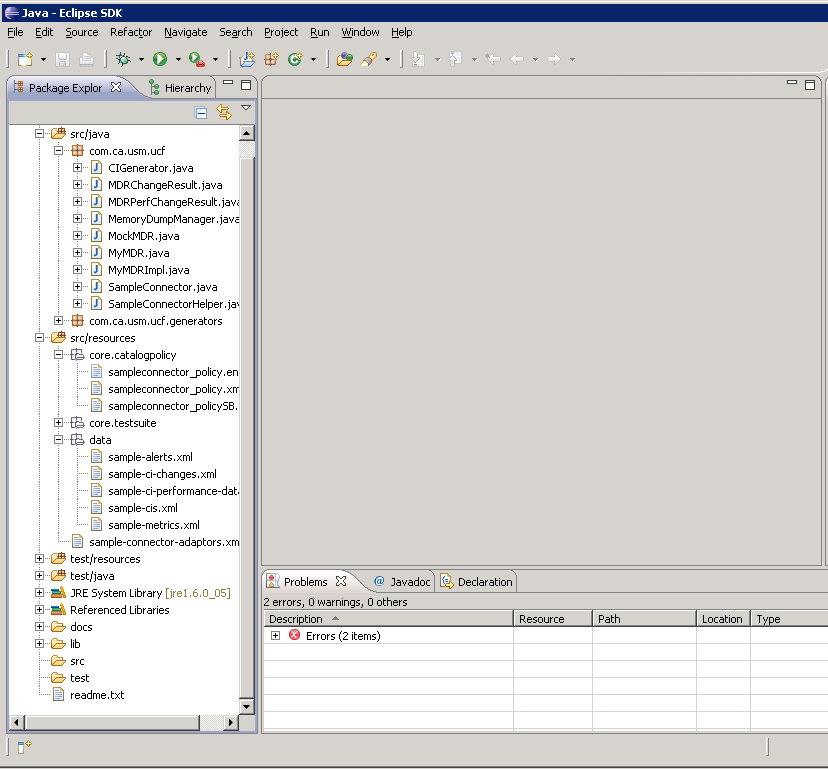
The following screen shows the imported SampleConnector project expanded to display the provided interfaces, policy, and sample data:
Copyright © 2013 CA.
All rights reserved.
|
|