

Searching and Browsing USM Data with USM Web View on a PC › Browse the USM Data with USM Web View › Results and USM Properties › Work with Results in USM Web View
Work with Results in USM Web View
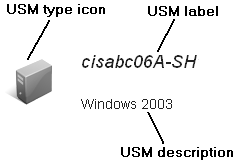
As an administrator or an operator, you can browse and search results in USM Web View. The results display as a list of object entries where each entry displays the USM type icon, label, and description as shown in the following graphic:
You can do the following on the results page:
- Click an object to display the USM properties for the selected object.
- Click More/Less Results per page to change the number of items displayed per page.
- Click More Options and do any of the following:
- Select a data source (domain manager) and a CI type from the Narrow Search drop-down list to filter the results.
- Click RSS feed
 to subscribe to the RSS feed for the current results.
- Click Add/Remove to favorite views to add/remove the current search to your favorites.
- Click the Navigation controls to page through the results. The following graphic shows typical navigation controls:
Copyright © 2013 CA.
All rights reserved.
|
|