Integrating with Other Products › Integrating CA Service Desk Manager with SAP Solution Manager › How to Configure SAP Solution Manager › Configure the SAP Solution Manager Connection
Configure the SAP Solution Manager Connection
After you configure the RFC Destination and test the connection, you generate and maintain the CA Service Desk Manager GUID to configure CA Service Desk Manager with the SAP Solution Manager system GUID.
To configure the SAP Solution Manager connection
- Execute transaction /n/casd/guid.
The Maintain CA Service Desk Manager GUID page appears.
- Enter the 32-character GUID and click the Execute icon
 to continue.
Note: The default GUID value for CA Service Desk Manager is CA000000000000000000000000000000.
A message appears stating that the GUID ID updated successfully.
- Execute transaction /nICTCONF.
The Configure SAP Solution Manager Service Desk Interface page appears.
- Click the Generate icon, and select Do Not Overwrite Old Values, as shown in the following example:
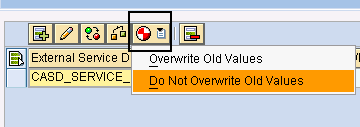
- Click Save.
The default mapping is generated and you can provide CA Service Desk Manager with the SAP Solution Manager system GUID.
- Execute transaction /n/CASD/SOLMAN_GUID.
The Get Solution Manager GUID page appears and displays your GUID as an example: DE2E02F6B5CAF1F1B94D005056B04977.
Important! The GUID is a unique required parameter for the CA Service Desk Manager configuration.
- Execute transaction /n/CASD/AUTH.
The Maintain the username and password for the CASD connector page appears.
- Enter the CA Service Desk Manager user name and password, click Execute.
The user name and password for CA Service Desk Manager are maintained.