Integrating with Other Products › Integrating CA Service Desk Manager with SAP Solution Manager › How to Configure SAP Solution Manager › Configure the RFC Destination
Configure the RFC Destination
After you create the logical port, SOAMANAGER generates an RFC Destination automatically. You test the connectivity of the RFC Destination before you configure the SAP Solution Manager connection.
To configure the RFC Destination
- Execute transaction /nSM59.
The Configuration of RFC Connections page appears.
- Select the RFC Connection from the list.
For example, the RFC Destination generated by SOAMANAGER is a 32-character HEX string DE4BE05CF5DA4BF1BDB6005056B04977.
- Click Connection Test.
The Connection Test page appears and displays an HTTP status of 200, as shown in the example:
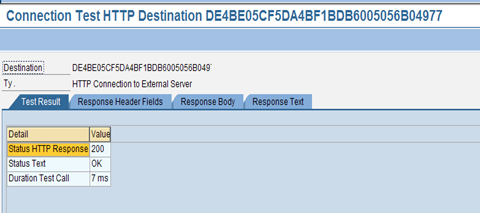
The RFC Connection is configured.