Integrating with Other Products › Integrating CA Service Desk Manager with SAP Solution Manager › How to Configure SAP Solution Manager › Activate the SOAMANAGER Services
Activate the SOAMANAGER Services
You activate the SOAMANAGER services after configuring the Business Configuration Sets. These services activate the HTTP site for SAP Solution Manager and generate the WSDL.
To activate the SOAMANAGER services
- Execute transaction /nSICF.
The services list appears.
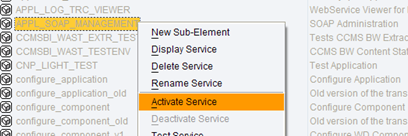
- Select the service, right-click the service, select Activate Service, as shown in the following example:
Click Yes at the prompt.
The service is activated.
- Verify that the following services are activated:
- APPL_SOAP_MANAGEMENT
Activates the HTTP site for SAP Solution Manager.
/sap/bc/webdynpro/sap/APPL_SOAP_MANAGEMENT
- WSDL
Activates the WSDL Generation of 7.10 SOAP Processor that generates the WSDL transaction SOAMANAGER.
/sap/bc/srt/wsdl
The services are activated.