

The REST sample mobile user interface provides two user interfaces: Analyst and Employee. This sample also supports the Administrator, Level 1 Analyst, and Employee roles. After you log in to CA SDM, the Administrator and Level 1 Analyst roles view the analyst interface. The Employee role only views the employee interface. For an invalid login, CA SDM rejects the login request and displays a message. If an administrator disabled Automatic Priority Calculation, the Priority field appears on create and edit pages.
Important! This functionality applies only to the sample program provided in CA SDM Release 12.9. It is not a design restricted in the REST Web Services application itself.
Fields that use autosuggest require a value selection from the auto suggestion list, such as the assignee and Incident Area. If you do not select a value, the user input for that field clears.
Note: We recommend that you navigate REST interfaces with the provided buttons, instead of using the browser back and forward options. For example, select Home or Cancel to return to a previous page.
You configure REST during the CA SDM configuration, but you enable the sample mobile interface manually.
Analysts can perform the following tasks:
Default: Sorted by Posted Date
Default: Sorted by Open Date.
Default: Sorted by Activity Date.
Employees can perform the following tasks:
Note: An asterisk indicates a required field.
This section contains the following topics:
Deploy the REST Mobile Sample User Interface
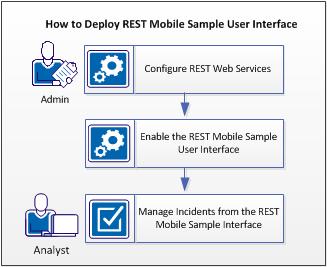
The REST mobile sample user interface lets the analyst to manage incidents on mobile devices. The administrator enables REST Web Services during product configuration and copies files on the CA SDM computer to enable the REST mobile sample user interface. The analyst uses the mobile interface to manage incidents that end users open in CA SDM.
The following diagram explains how an administrator enables REST Web Services so that the analyst can manage incidents in the queue:
Follow these steps:
The administrator enables REST Web Services during the CA SDM configuration. By default, the CA SDM configuration does not enable REST Web Services.
Follow these steps:
The configuration dialog opens.
The REST Web Services dialog opens.
Default: 8050
Default: 8055
The configuration completes.
CA SDM disables the REST Mobile Sample user interface by default to prevent undesired access to the MDB. The administrator enables this interface manually.
Follow these steps:
$NX_ROOT/samples/sdk/rest/mobiledemo
$NX_ROOT/bopcfg/www/CATALINA_BASE_REST/webapps
Note: You do not have to restart Tomcat.
The REST Mobile Sample user interface is enabled.
The analyst or an employee views the REST mobile sample interface on their mobile device to manage incidents in the queue. For example, the analyst opens Incident 30 to log an internal-only comment.
Follow these steps:
http://hostname:REST-Tomcat-port/mobiledemo/login.html
The sample REST mobile interface login page opens.
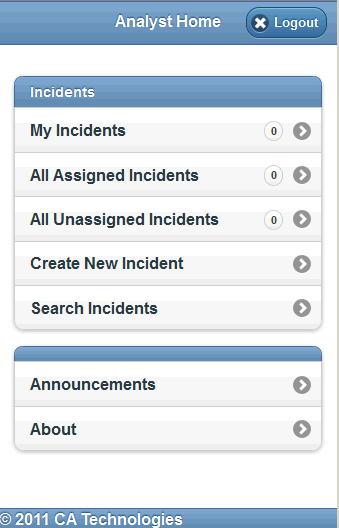
The REST mobile analyst home page opens.
The following image displays the REST sample analyst mobile home page:
The following image displays the REST sample employee mobile home page:
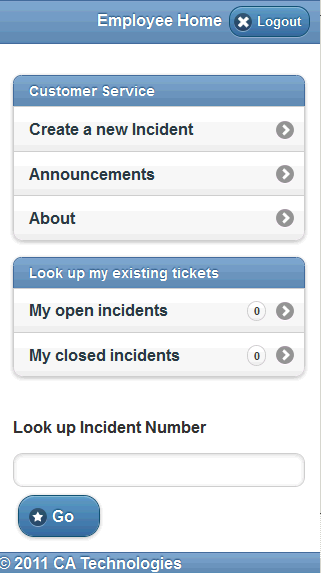
In this example, an employee logs in to the REST interface on the server to create an Incident for a network problem on their computer.
Follow these steps:
For example, the summary specifies that the employee cannot access the company network on a laptop.
For example, the description specifies the name of the end-user laptop on the network and hardware details.
The Incident is created and a message displays the Incident number.
|
Copyright © 2013 CA.
All rights reserved.
|
|